
Scimgateway
Using SCIM protocol as a gateway for user provisioning to other endpoints
Install / Use
/learn @jelhub/ScimgatewayREADME
SCIM Gateway





Author: Jarle Elshaug
Validated through IdPs:
- Symantec/Broadcom Identity Manager
- Microsoft Entra ID
- One Identity Manager
- Okta
- Omada
- SailPoint/IdentityNow
Latest news:
- Bun binary build is now supported, allowing SCIM Gateway to be compiled into a single executable binary for simplified deployment and execution. SCIM Gateway can now run as an ES module (TypeScript) in Node.js.
- Major release v6.0.0 introduces changes to API method responses (not SCIM-related) and a new method
publicApi()for handling public path/pub/apirequests with no authentication required. In addition, the configuration optionbearerJwtAzure.tenantIdGUIDhas been replaced bybearerJwt.azureTenantId. See the version history for details. - Support for Entra ID Federated Identity Credentials has been added through internal JWKS (JSON Web Key Set), allowing SCIM Gateway to access Microsoft Entra–protected resources without the need to manage secrets
- External JWKS (JSON Web Key Set) is now supported by JWT authentication, allowing external applications to access SCIM Gateway without the need to manage secrets
- Azure Relay is now supported for secure and hassle-free outbound-only communication — with just one minute of configuration
- ETag is now supported
- Bulk Operations is now supported
- Remote real-time log subscription for centralized logging and monitoring. Using browser
https://<host>/logger, curl or custom client API - see configuration notes - By configuring the chainingBaseUrl, it is now possible to chain multiple gateways in sequence, such as
gateway1->gateway2->gateway3->endpoint. In this setup, gateway behave like a reverse proxy, validating authorization at each step unless PassThrough mode is enabled. Chaining is also supported in stream subscriber mode - Email, onError and sendMail() supports more secure RESTful OAuth for Microsoft Exchange Online (ExO) and Google Workspace Gmail, alongside traditional SMTP Auth for all mail systems. HelperRest supports a wide range of common authentication methods, including basicAuth, bearerAuth, tokenAuth, oauth, oauthSamlBearer, oauthJwtBearer and Auth PassTrough
- Major release v5.0.0 marks a shift from JavaScript to native TypeScript and prioritizes Bun over Node.js. This upgrade requires some modifications to existing plugins.
- BREAKING: SCIM Stream is the modern way of user provisioning letting clients subscribe to messages instead of traditional IGA top-down provisioning. SCIM Gateway now offers enhanced functionality with support for message subscription and automated provisioning using SCIM Stream
- Authentication PassThrough letting plugin pass authentication directly to endpoint for avoid maintaining secrets at the gateway. E.g., using Entra ID application OAuth
- Supports OAuth Client Credentials authentication
- Major release v4.0.0 getUsers() and getGroups() replacing some deprecated methods. No limitations on filtering/sorting. Admin user access can be linked to specific baseEntities. New MongoDB plugin
- ipAllowList for restricting access to allowlisted IP addresses or subnets e.g. Azure IP-range
- General LDAP plugin configured for Active Directory
- PlugSSO using SCIM Gateway
- Each authentication configuration allowing more than one admin user including option for readOnly
- Codebase moved from callback of h... to the the promise(d) land of async/await
- Supports configuration by environments and external files
- Health monitoring through "/ping" URL, and option for error notifications by email
- Entra ID user provisioning including license management e.g. Office 365, installed and configured within minutes!
- Includes API Gateway for none SCIM/provisioning - becomes what you want it to become
- Running SCIM Gateway as a Docker container
Overview
SCIM Gateway facilitates user management using the standardized REST-based SCIM 1.1 or 2.0 protocol, offering easier, more powerful, and consistent provisioning while avoiding vendor lock-in. Acting as a translator for incoming SCIM requests, the gateway seamlessly enables CRUD functionality (create, read, update, and delete) for users and groups. By implementing endpoint-specific protocols, it ensures provisioning across diverse destinations. With the gateway, your destinations become SCIM-compatible interfaces, streamlining integration and simplifying user management.
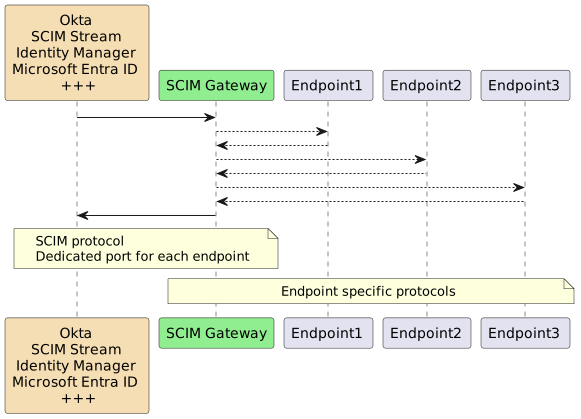
SCIM Gateway is built on the modern, asynchronous, event-driven framework Bun or Node.js using TypeScript/JavaScript. It is designed to be cloud and firewall friendly, runs on nearly all operating systems
The following fully functional plugins are included for demonstration and production use:
| Plugin | Endpoint Type | Description |
| :--- | :--- | :--- |
| Loki | NoSQL Database | Transforms the SCIM Gateway into a standalone SCIM endpoint utilizing the internal LokiJS database. Includes two test users and groups |
| MongoDB | NoSQL Database | Similar to the Loki plugin, but using an externally managed MongoDB database, showcasing multi-tenant and multi-endpoint capabilities via baseEntity |
| Entra ID | REST Webservices | Entra ID user provisioning via Microsoft Graph API |
| SCIM | REST Webservice | Using plugin Loki as a SCIM provisioning endpoint. May become a SCIM version-gateway (e.g., 1.1 => 2.0) |
| API | REST Webservices | A non-SCIM plugin demonstrating API Gateway functionality for custom REST specifications |
| Soap | SOAP Webservice | Demonstrates user provisioning to a SOAP-based endpoint with example WSDLs |
| MSSQL | Database | Demonstrates user provisioning to an MSSQL database |
| SAP HANA | Database | Demonstrates SAP HANA-specific user provisioning |
| LDAP | Directory | A fully functional LDAP plugin pre-configured for Microsoft Active Directory |
Installation
To get started with SCIM Gateway, follow the instructions below.
Install Bun
Bun is a prerequisite and must be installed
Note, Bun installs by default in the current user’s HOMEPATH\.bun. To install it elsewhere, set BUN_INSTALL=<install-path> as a global or system environment variable before installing. The installation will add Bun to the current user’s path, but consider adding it to the global or system path for easier access across all users.
SCIM Gateway Installation
Create a package directory and install the SCIM Gateway:
mkdir c:\my-scimgateway
cd c:\my-scimgateway
bun init -y
bun install scimgateway
bun pm trust scimgateway
index.ts, lib and config directories containing example plugins are copied to your package. The command bun pm trust scimgateway is required to allow the postinstall script to copy these files.
Startup and verify default Loki plugin
bun c:\my-scimgateway

Start a browser

http://localhost:8880/ping
=> Returns a health check with a "hello" response

http://localhost:8880/Users
http://localhost:8880/Groups
=> Logon using gwadmin/password and two users and groups should be listed

Start a new browser for remote log monitoring
using url: http://localhost:8880/logger

http://localhost:8880/Users/bjensen
http://localhost:8880/Groups/Admins
or
http://localhost:8880/Users?filter=userName eq "bjensen"
http://localhost:8880/Groups?filter=displayName eq "Admins"
=> Lists all attributes for specified user/group

http://localhost:8880/Groups?filter=displayName eq "Admins"&excludedAttributes=members
http://localhost:8880/Groups?filter=members.value eq "bjensen"&attributes=id,displayName,members.value
http://localhost:8880/Users?filter=userName eq "bjensen"&attributes=userName,id,name.givenName
http://localhost:8880/Users?filter=meta.created ge "2010-01-01T00:00:00Z"&attributes=userName,name.familyName,meta.created
http://localhost:8880/Users?filter=emails.value co "@example.com"&attributes=userName,name.familyName,emails&sortBy=name.familyName&sortOrder=descending
=> Filtering and attribute examples

"Ctrl + c" to stop the SCIM Gateway
For Node.js, the startup command is:
node --import=tsx ./index.ts
Upgrade Process
The recommended upgrade method is to rename the existing package folder, perform a fresh installation, and then copy your custom index.ts, config, and lib folders from the previous installation.
- Minor Upgrade:
bun install scimgateway - Major Upgrade:
bun install scimgateway@latest(Use with caution, as it may break compatibility with existing custom plugins)
Avoid (re-)adding the example plugins created during postinstall
For production we do not need example plugins to be incuded by the postinstall job
Bun will by default exlude any postinstall jobs unless we have trusted the scimgateway packa
