
PyHardLinkBackup
Hardlink/Deduplication Backups with Python
Install / Use
/learn @jedie/PyHardLinkBackupREADME
PyHardLinkBackup





PyHardLinkBackup is a cross-platform backup tool designed for efficient, reliable, and accessible backups.
Similar to rsync --link-dest, but with global deduplication across all backups and all paths, not just between two directories.
Some aspects:
- Creates deduplicated, versioned backups using hardlinks, minimizing storage usage by linking identical files across all backup snapshots.
- Employs a global deduplication database (by file size and SHA256 hash) per backup root, ensuring that duplicate files are detected and hardlinked even if they are moved or renamed between backups.
- Backups are stored as regular files and directories—no proprietary formats—so you can access your data directly without special tools.
- Deleting old snapshots does not affect the integrity of remaining backups.
- Linux and macOS are fully supported (Windows support is experimental)
Limitations:
- Requires a filesystem that supports hardlinks (e.g., btrfs, zfs, ext4, APFS, NTFS with limitations).
- Empty directories are not backed up.
installation
You can use pipx to install and use PyHardLinkBackup, e.g.:
sudo apt install pipx

pipx install PyHardLinkBackup
After this you can call the CLI via phlb command.
The main command is phlb backup <source> <destination> to create a backup.
e.g.:
phlb backup /path/to/source /path/to/destination
This will create a snapshot in /path/to/destination using hard links for deduplication. You can safely delete old snapshots without affecting others.
usage: phlb backup [-h] [BACKUP OPTIONS]

Backup the source directory to the destination directory using hard links for deduplication.

╭─ positional arguments ───────────────────────────────────────────────────────────────────────────────────────────────╮
│ source             Source directory to back up. (required)                                                           │
│ destination        Destination directory for the backup. (required)                                                  │
╰──────────────────────────────────────────────────────────────────────────────────────────────────────────────────────╯
╭─ options ────────────────────────────────────────────────────────────────────────────────────────────────────────────╮
│ -h, --help         show this help message and exit                                                                   │
│ --name {None}|STR  Optional name for the backup (used to create a subdirectory in the backup destination). If not    │
│                    provided, the name of the source directory is used. (default: None)                               │
│ --one-file-system, --no-one-file-system                                                                              │
│                    Do not cross filesystem boundaries. (default: True)                                               │
│ --excludes [STR [STR ...]]                                                                                           │
│                    List of directories to exclude from backup. (default: __pycache__ .cache .temp .tmp .tox .nox)    │
│ --verbosity {debug,info,warning,error}                                                                               │
│                    Log level for console logging. (default: warning)                                                 │
│ --log-file-level {debug,info,warning,error}                                                                          │
│                    Log level for the log file (default: info)                                                        │
╰──────────────────────────────────────────────────────────────────────────────────────────────────────────────────────╯
Screenshots
Screenshot - running a backup

Screenshot - backup finished
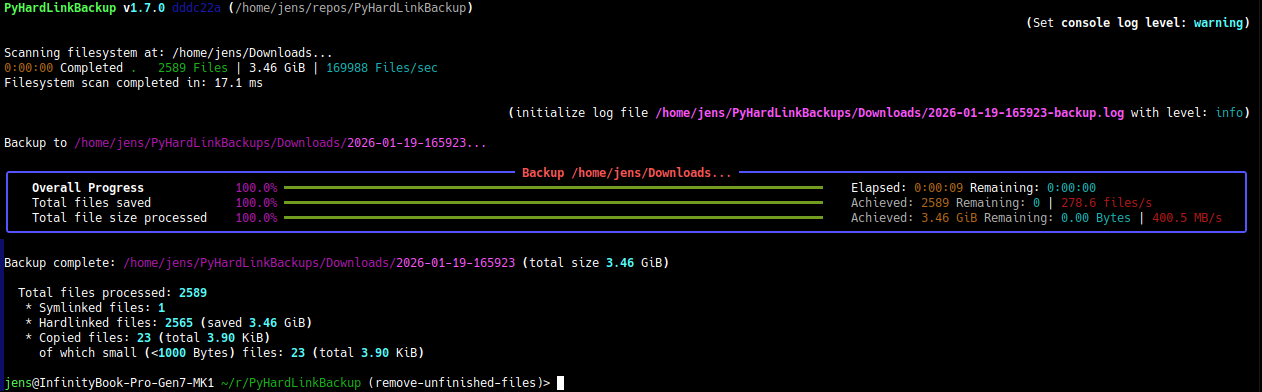
(more screenshots here: jedie.github.io/tree/main/screenshots/PyHardLinkBackup)
update
If you use pipx, just call:
pipx upgrade PyHardLinkBackup
see: https://pipx.pypa.io/stable/docs/#pipx-upgrade
Troubleshooting
- Permission Errors: Ensure you have read access to source and write access to destination.
- Hardlink Limits: Some filesystems (e.g., NTFS) have limits on the number of hardlinks per file.
- Symlink Handling: Broken symlinks are handled gracefully; see logs for details.
- Backup Deletion: Deleting a snapshot does not affect deduplication of other backups.
- Log Files: Check the log file in each backup directory for error details.
To lower the priority of the backup process (useful to reduce system impact during heavy backups), you can use nice and ionice on Linux systems:
nice -n 19 ionice -c3 phlb backup /path/to/source /path/to/destination
nice -n 19sets the lowest CPU priority.ionice -c3sets the lowest I/O priority (idle class).
Adjust priority of an already running backup:
renice 19 -p $(pgrep phlb) && ionice -c3 -p $(pgrep phlb)
complete help for main CLI app
usage: phlb [-h] {backup,compare,rebuild,version}


╭─ options ────────────────────────────────────────────────────────────────────────────────────────────────────────────╮
│ -h, --help   show this help message and exit                                                                         │
╰──────────────────────────────────────────────────────────────────────────────────────────────────────────────────────╯
╭─ subcommands ────────────────────────────────────────────────────────────────────────────────────────────────────────╮
│ (required)                                                                                                           │
│   • backup   Backup the source directory to the destination directory using hard links for deduplication.            │
│   • compare  Compares a source tree with the last backup and validates all known file hashes.                        │
│   • rebuild  Rebuild the file hash and size database by scanning all backup files. And also verify SHA256SUMS and/or │
│              store missing hashes in SHA256SUMS files.                                                               │
│   • version  Print version and exit                                                                                  │
╰──────────────────────────────────────────────────────────────────────────────────────────────────────────────────────╯
concept
Implementation boundaries
- pure Python using >=3.12
- pathlib for path handling
- iterate filesystem with
os.scandir()
overview
- Backups should be saved as normal files in the filesystem:
- non-proprietary format
- accessible without any extra software or extra meta files
- Create backups with versioning
- every backup run creates a complete filesystem snapshot tree
- every snapshot tree can be deleted, without affecting the other snapshots
- Deduplication with hardlinks:
- space-efficient incremental backups by linking unchanged files across snapshots instead of duplicating them
- find duplicate files everywhere (even if renamed or moved files)
used solutions
- Used
sha256hash algorithm to identify file content - Small file handling
- Always copy small files and never hardlink them
- Don't store size and hash of these files in the deduplication lookup tables
Deduplication lookup methods
To avoid unnecessary file copy operations, we need a fast method to find duplicate files. Our approach is based on two steps: file size and file content hash. Because the file size is very fast to compare.
size "database"
We store all existing file sizes as empty files in a special folder structure:
- 1st level: first 2 digits of the size in bytes
- 2nd level: next 2 digits of the size in bytes
- file: full size in bytes as filename
e.g.: file size 123456789 bytes stored in: {destination}/.phlb/size-lookup/89/67/123456789
We skip files lower than 1000 bytes, so no filling with leading zeros is needed ;)
hash "database"
We store the file hash <-> hardlink pointer mapping in a special folder structure:
- 1st level: first 2 chars of the hex encoded hash
- 2nd level: next 2 chars of the hex encoded hash
- file: full hex encoded hash as filename
e.g.: hash like abcdef123... stored in: {destination}/.phlb/hash-lookup/ab/cd/abcdef123...
The file contains only the relative path to the first hardlink of this file content.
start development
At least uv is needed. Install e.g.: via pipx:
a
