
Minishell
A 42 school project to create a simple shell interpreter in C. Recreates core bash functionalities like pipes, redirections, and built-in commands.
Install / Use
/learn @jdecorte-be/MinishellREADME
Introduction
Ever wondered how your terminal shell actually works? How does it parse commands, execute programs, handle pipes, and manage processes? Minishell is a 42 school project that challenges you to build your own mini version of Bash from scratch in C. It's an incredible journey into the depths of Unix systems programming.
This project implements a functional shell program that handles command parsing and execution, pipes and redirections, environment variable expansion, built-in commands (cd, echo, pwd, export, unset, env, exit), signal handling (Ctrl-C, Ctrl-D, Ctrl-), and process management with proper cleanup.
In this article, I'll walk through the key concepts and implementation challenges of building a shell, from understanding processes and pipes to handling signals and building command pipelines.
Project Overview
Minishell is a miniature shell program based on Bash that supports:
Core Features:
The shell provides an interactive prompt with command history (up and down arrows), executes both system executables from the environment (ls, cat, grep, etc.) and local executables (./minishell), and includes builtin commands with their essential options. It supports pipes (|) for chaining commands, redirections (>, >>, <, <<), environment variable expansion ($USER, $VAR), exit status tracking ($?), and signal handling for user interrupts.
Limitations:
The project intentionally doesn't support backslashes, semicolons, logical operators (&&, ||), or wildcards to keep the scope manageable while still covering the fundamental concepts.
Understanding Processes
Before diving into implementation, let's understand what processes are and how they work.
What is a Process?
A process is a program in execution. When you run a program, the system loads its instructions into RAM and executes them. The operating system manages all processes and allocates memory to each one independently—each has its own stack, heap, and instruction pointer.
You can view active processes with:
ps aux
Each process has a PID (Process Identifier), which is a unique non-negative integer, and a PPID (Parent Process Identifier) that references the parent process.
Processes are organized hierarchically. At startup, Unix has just one process called init (PID 1), which is the direct or indirect ancestor of all other processes.
Fork: Creating a Child Process
The fork() system call creates a new process by cloning the current one:
#include <unistd.h>

pid_t fork(void);
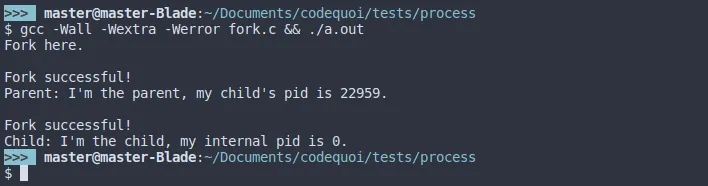
The return value is crucial: in the parent process, it returns the child's PID; in the child process, it returns 0; and on error, it returns -1.
Here's a basic example:
#include <unistd.h>
#include <stdio.h>

int main(void)
{
    pid_t pid;

    printf("Before fork\n");

    pid = fork();

    if (pid == -1)
    {
        perror("fork failed");
        return 1;
    }
    else if (pid == 0)
    {
        // Child process
        printf("I'm the child, PID: %d\n", getpid());
    }
    else
    {
        // Parent process
        printf("I'm the parent, child PID: %d\n", pid);
    }

    return 0;
}
Important: The child inherits the parent's instruction pointer, so it doesn't start from the beginning—it continues from where fork() was called!
Memory: Duplicated but Not Shared
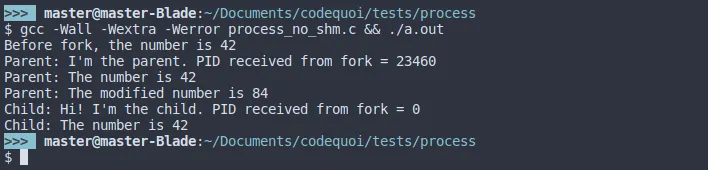
When you fork, the child gets a copy of the parent's memory, not a shared reference. Changes made in one process don't affect the other:
int main(void)
{
    int value = 42;
    pid_t pid;

    pid = fork();

    if (pid == 0)
    {
        value = 100;  // Child changes value
        printf("Child: value = %d\n", value);
    }
    else
    {
        sleep(1);  // Wait for child to finish
        printf("Parent: value = %d\n", value);  // Still 42!
    }

    return 0;
}
This isolation is why we need inter-process communication mechanisms like pipes.
Wait: Managing Child Processes
After creating a child process, the parent should wait for it to finish. Otherwise, you can get zombie processes—terminated children whose exit status hasn't been collected.
When a parent doesn't wait for its children, they become zombies:

Conversely, if a parent exits before waiting, children become orphans and are adopted by init:
The wait() and waitpid() Functions
#include <sys/wait.h>

pid_t wait(int *status);
pid_t waitpid(pid_t pid, int *status, int options);
wait() waits for any child process to terminate.
waitpid() offers more control with three parameters: pid (specific child to wait for, or -1 for any child), status (pointer to store the exit status), and options (flags like WNOHANG to return immediately if child hasn't exited).
Analyzing Exit Status
Use these macros to examine the status:
if (WIFEXITED(status))
{
    // Child exited normally
    int exit_code = WEXITSTATUS(status);
    printf("Exit code: %d\n", exit_code);
}

if (WIFSIGNALED(status))
{
    // Child was terminated by a signal
    int signal = WTERMSIG(status);
    printf("Terminated by signal: %d\n", signal);
}
Example: Proper Child Process Management
#include <unistd.h>
#include <sys/wait.h>
#include <stdio.h>
#include <stdlib.h>

int main(void)
{
    pid_t pid;
    int status;

    pid = fork();

    if (pid == 0)
    {
        // Child process
        printf("Child: Working...\n");
        sleep(2);
        exit(42);
    }
    else
    {
        // Parent process
        printf("Parent: Waiting for child...\n");
        waitpid(pid, &status, 0);

        if (WIFEXITED(status))
        {
            printf("Parent: Child exited with code %d\n",
                   WEXITSTATUS(status));
        }
    }

    return 0;
}
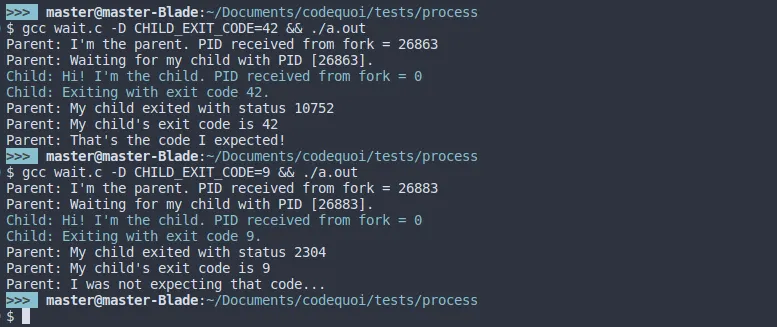
Here's what the output looks like when analyzing exit status:

And here's a comparison with different exit codes:
Pipes: Inter-Process Communication
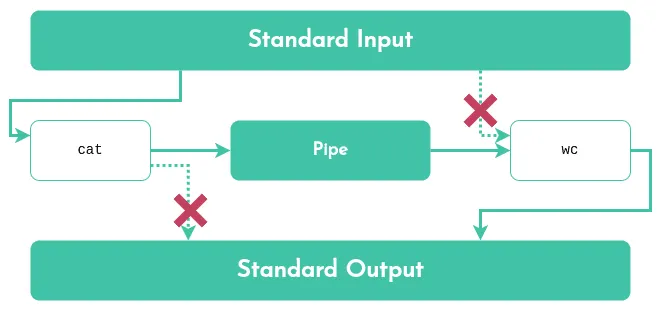
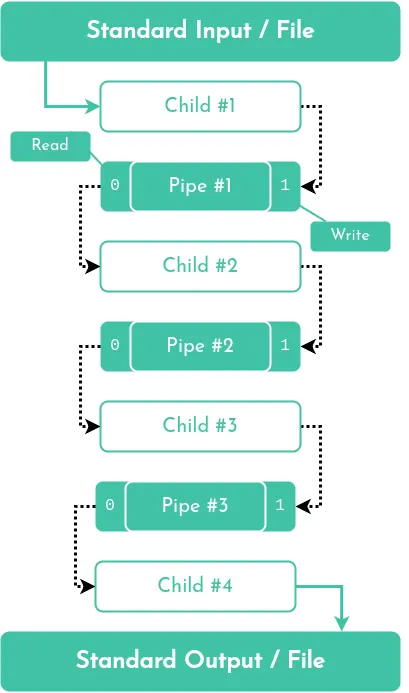
Pipes are the foundation of shell command chaining. They allow one process's output to become another's input.
What is a Pipe?
A pipe is a unidirectional communication channel with a read end (file descriptor) and a write end (file descriptor).
Data written to the write end is buffered until read from the read end.
