
Lips
Scheme based powerful lisp interpreter in JavaScript
Install / Use
/learn @jcubic/LipsREADME









 <a href="https://twitter.com/intent/tweet?text=Powerful%20Scheme%20based%20lisp%20language%20written%20in%20JavaScript.%20It%20makes%20life%20easier%20by%20better%20interaction%20with%20JS.%20Use%20full%20power%20of%20JS%2C%20lisp,%20and%20npm%20to%20create%20your%20applications%20via%20@lips_lang&url=https://github.com/jcubic/lips&hashtags=javascript,opensource,lisp,scheme,language,programming">
<img src="https://github.com/jcubic/lips/blob/devel/assets/tweet-shield.svg?raw=true" alt="Tweet" height="20"/>
</a>
<a href="https://twitter.com/intent/tweet?text=Powerful%20Scheme%20based%20lisp%20language%20written%20in%20JavaScript.%20It%20makes%20life%20easier%20by%20better%20interaction%20with%20JS.%20Use%20full%20power%20of%20JS%2C%20lisp,%20and%20npm%20to%20create%20your%20applications%20via%20@lips_lang&url=https://github.com/jcubic/lips&hashtags=javascript,opensource,lisp,scheme,language,programming">
<img src="https://github.com/jcubic/lips/blob/devel/assets/tweet-shield.svg?raw=true" alt="Tweet" height="20"/>
</a>
LIPS is a powerful Scheme-based, Lisp language written in JavaScript. It is based on the Scheme dialect of lisp and the R5RS/R7RS specifications. It has extensions to make it easier to interact with JavaScript and extend the language. It works both in the browser and with Node.js.
The aim of the project is to support full R7RS specification and be compatible with Scheme programming language.
The name is a recursive acronym which stands for LIPS Is Pretty Simple.
Demo
Features
- Literal regular expressions.
- Asynchronous execution (auto resolving of promises).
- Possibility to add new syntax (similar to vectors and object).
- Full numerical tower and Big Integer support.
- Powerful introspection.
- Great integration with JavaScript.
- Code formatting (pretty print).
- Lisp and hygienic Scheme macros and macroexpand.
- Builtin help system.
Installation
Node.js
To install you can use npm, which comes with Node.js or any other package manager (e.g.: yarn, bun, or pnpm)<br/>
The easiet way to install and use LIPS is via npx command (part of NPM):
npx lips@beta
Or you can install it:
npm install -g lips@beta
You can also install it as part of your Node project.
Browser
You need to include the javascript file in script tag inside your HTML.
You an grag the main file from jsDelivr:
<script src="https://cdn.jsdelivr.net/npm/lips@beta/dist/lips.min.js"></script>
Bookmarklet REPL
You can also run the REPL on any page while you learn Scheme using the bookmarklet:
https://github.com/jcubic/lips/blob/master/lib/js/bookmark.js
Create any link in your bookmarks, edit it and copy-paste the content of that file. After you click on the link it will create the REPL at the bottom of the page. (NOTE: It may not work on every page because of content security policy; e.g. google.com or gihub.com)
If you have trouble with creating the bookmarklet, you can open LISP Scheme home page where you can find a link that you can drag to your bookmarks.
Usage
Browser
The simplest way is to include the lips code in the script tag:
<script type="text/x-scheme" bootstrap>
(let ((what "world")
      (greet "hello"))
   (display (string-append greet " " what)))
</script>
or use the src attribute:
<script type="text/x-scheme" bootstrap src="example.scm"></script>
Node.js
You can use the REPL by typing:
lips
Or create a script using shebang:
#!/usr/bin/env -S lips

(print "Hello, world!")
If you save this into hello.scm and make it executable:
chmod a+x hello.scm
You can execute the script:
./hello.scm
it should print Hello, world!.
Bootstrapping Scheme system
Big part of LIPS is written in LIPS itself, but to use full power of LIPS you need
to load those additional Scheme files. The easiest way is to add bootstrap attribute
on first script tag with text/x-scheme type. By default, it will use CDN from
jsdelivr. To load each file using builtin load function
(that will fetch the file using AJAX and evaluate it).
<script src="https://cdn.jsdelivr.net/npm/lips@beta/dist/lips.min.js" bootstrap></script>
You can also specify the path where LIPS should search for standard library.
<script src="https://cdn.jsdelivr.net/npm/lips@beta/dist/lips.min.js"
        bootstrap="https://cdn.jsdelivr.net/npm/lips@beta/dist/std.xcb">
</script>
You can use bootstrap="./std.xcb" if there is std.xcb file in local directory.
You can also bootstrap with std.scm or std.min.scm but xcb file is the fastest,
because it's already parsed and compiled into binary format.
Running LIPS programmatically
var {exec} = require('lips'); // node
// or
var {exec} = lips; // browser

exec(string).then(function(results) {
     results.forEach(function(result) {
        console.log(result.toString());
     });
});
When running exec you will also need to bootstrap the language and loaded files from /lib/ directory.
Documentation about beta version can be found in Wiki.
Standalone executable
NOTE: Executable don't require bootstrapping lib files.
If you install lips globally with:
npm install -g lips@beta
you can run the interpreter from the terminal:
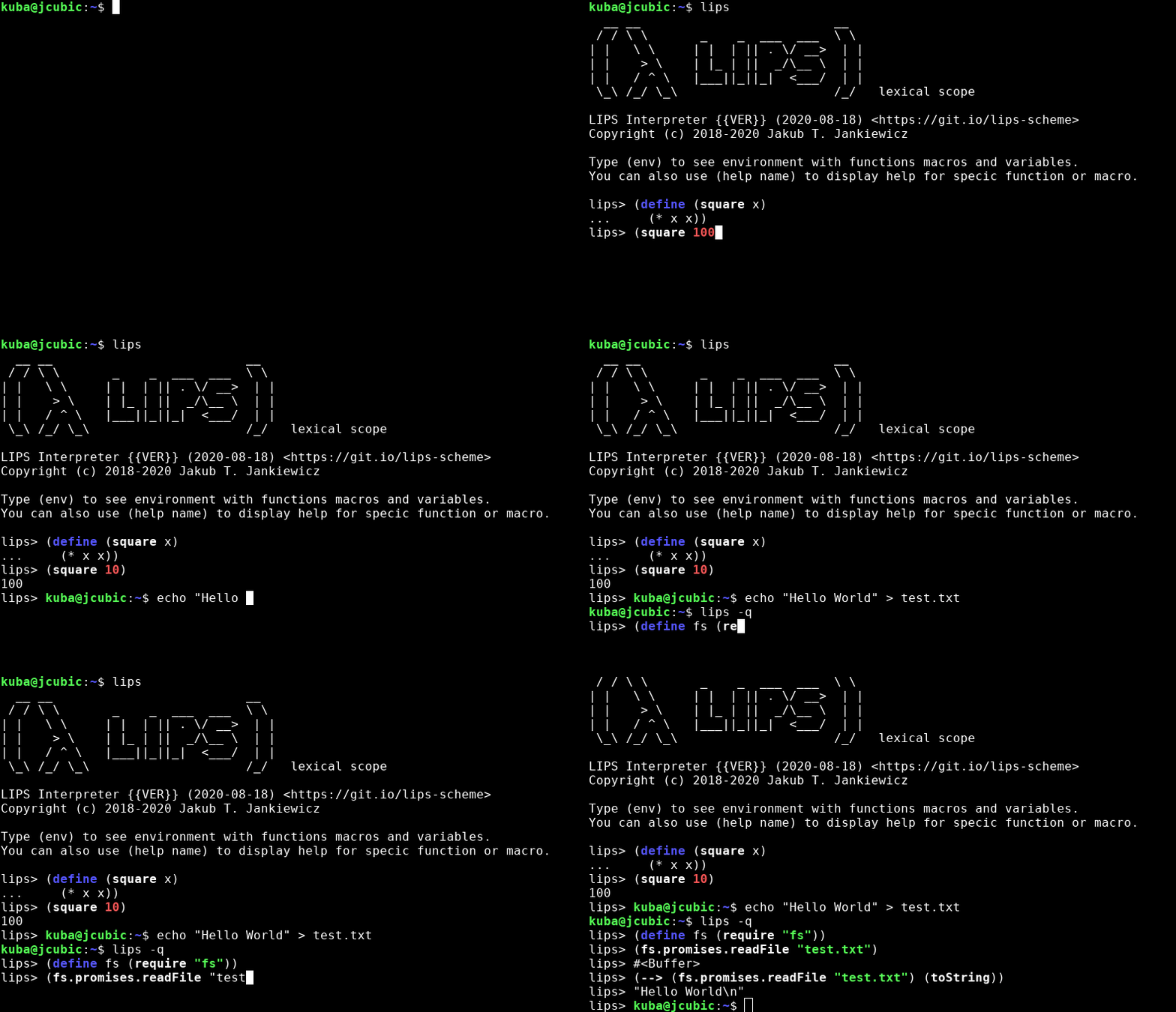
You can also run code in a string with:
lips -c '(let ((what "World")) (display (string-append "Hello " what)))'
and you can run a file using:
cat > foo.scm <<EOF
(let ((what "World"))
  (display (string-append "Hello " what))
  (newline))
EOF

lips foo.scm
You can also write executable files that use lips using shebang (SRFI-22)
cat foo.scm
#!/usr/bin/env lips

(let ((what "World"))
  (display (string-append "Hello " what))
  (newline))

chmod a+x foo.scm
./foo.scm
Executables also return a S-Expression according to SRFI-176 use lips --version or lips -V.
FOSDEM'23 Presentation [Video]
Limitations
Performance
Because LIPS is tree walking interpreter, sometimes it may be slow. Especially if you want to process long arrays and use callback function. If the array is quite large each piece of code inside the callback may slow down the processing. For example see:
script reference.scm
That generates reference documentation for all builtin functions and macros.
The slow part is (names.sort name-compare) (Array::sort) that take quite time to calculate,
because the array with functions and macros is quite large. If you came into performance issue,
you can write the part of the code in JavaScript. If you want to do this in LIPS Scheme you can use
something like this:
(let ((fn (self.eval "(function(a, b) {
                         /* any complex code in JS */
                         return a.localeCompare(b);
                      })")))
   (arr.sort fn))
Another example of slow performance is using LIPS with React, the more code you put into components the slower the app will become.
Examples:
- Preact app that update SVG - it requires using debounce.
- React with Hooks - on click the UI freezes for ~300ms, you can see warnings in dev tools.
The issue with performance is tracked in #197.
JavaScript callbacks
Another limitation is when using JavaScript libraries that require normal values but get a Promise instead.
This can happen with React/Preact and when the component returns a Promise. Some macros can be async
(return a Promise), which will break the React app when used in components. An example of a macro that is async is
do macro. So when using React/Preact and when you need to use a promise, use promise quotation and useEffect.
Supported SRFI
built-in
| description | spec | | :--- | ---: | | Feature-based conditional expansion construct | SRFI-0 | | Homogeneous numeric vector datatypes | SRFI-4 | | Basic String Ports | SRFI-6 | | Running Scheme Scripts on Unix | SRFI-22 | | Error reporting mechanism | SRFI-23 | | Basic Format Strings | SRFI-28 | | Basic Syntax-rules Extensions | [SRFI-46](https://srfi.schemers
