
CavalierContours
2D polyline library for offsetting, combining, etc.
Install / Use
/learn @jbuckmccready/CavalierContoursREADME
Summary
NOTE: This C++ library is not being actively developed. Development is continuing in Rust (with a C FFI), the repository is here. This repository will remain available but I do not plan to add new features or fix bugs due to lack of time and motivation! I recommend using the Rust library C API from C++, but if you'd like to help maintain the C++ then pull requests are welcome.
C++14 header only library (with a C API available) for processing 2D polylines containing both straight line and constant radius arc segments. Supports contour/parallel offsetting, boolean operations (OR, AND, NOT, XOR) between closed polylines, and other common functions (winding number, area, path length, distance to point, etc.). For interactive UI and development go to the development project CavalierContoursDev. For quick code examples look in the examples. Live web demo available here (note the page is quite large and may take a minute to download, it's created by building the CavalierContoursDev project to web assembly using Emscripten). For the C API header look here.
<img src="https://github.com/jbuckmccready/CavalierContoursDoc/blob/master/gifs/PolylineOffsets.gif" width="400"/> <img src="https://github.com/jbuckmccready/CavalierContoursDoc/blob/master/gifs/PolylineCombines.gif" width="400"/>
<img src="https://raw.githubusercontent.com/jbuckmccready/CavalierContoursDoc/master/images/pretty_examples/example1.png" width="400"/> <img src="https://raw.githubusercontent.com/jbuckmccready/CavalierContoursDoc/master/images/pretty_examples/islands_example1.png" width="400"/>
<img src="https://raw.githubusercontent.com/jbuckmccready/CavalierContoursDoc/master/images/pretty_examples/example6.png" width="800"/>Table of Contents
- Summary
- Table of Contents
- Quick Code Example
- Polyline Structure
- Other Programming Languages
- Offset Algorithm and Stepwise Example
- Original input polyline, pline in blue, vertexes in red
- Raw offset segments generated in purple (Step 1)
- Raw offset polyline created from raw offset segments, pline1 (in green) (Step 2)
- Raw offset polyline self intersects (dark cyan) (Step 4)
- Valid open polyline slices created from self intersects (in green, red, and blue) (Step 5 & 6)
- Open polyline slices stitched together (in red and blue) (Step 7)
- Interactively Exploring the Algorithm
- Performance
- Implementation Notes and Variations
- Development
- API Stability
- Project Motivation and Goal
- Algorithm Complexity and 2D Spatial Indexing
- References
Quick Code Example
#include "cavc/polylineoffset.hpp"

// input polyline
cavc::Polyline<double> input;
// add vertexes as (x, y, bulge)
input.addVertex(0, 25, 1);
input.addVertex(0, 0, 0);
input.addVertex(2, 0, 1);
input.addVertex(10, 0, -0.5);
input.addVertex(8, 9, 0.374794619217547);
input.addVertex(21, 0, 0);
input.addVertex(23, 0, 1);
input.addVertex(32, 0, -0.5);
input.addVertex(28, 0, 0.5);
input.addVertex(39, 21, 0);
input.addVertex(28, 12, 0);
input.isClosed() = true;

// compute the resulting offset polylines, offset = 3
std::vector<cavc::Polyline<double>> results = cavc::parallelOffset(input, 3.0);
NOTE: If the offset results are wrong in some way you may need to adjust the scale of the numbers, e.g. scale the inputs up by 1000 (by multiplying all the X and Y components of the vertexes by 1000), perform the offset (with the offset value also scaled up by 1000), and then scale the output result back down by 1000. This is due the fixed bit representation of floating point numbers and the absolute float comparing and thresholding used by the algorithm.
Polyline Structure
Polylines are defined by a sequence of vertexes and a bool indicating whether the polyline is closed or open. Each vertex has a 2D position (x and y) as well as a bulge value. Bulge is used to define arcs, where bulge = tan(theta/4). theta is the arc sweep angle from the starting vertex position to the next vertex position. If the polyline is closed then the last vertex connects to the first vertex, otherwise it does not (and the last vertex bulge value is unused). See [2] for more details regarding bulge calculations.
Other Programming Languages
CavalierContours is written in C++ and makes available a C API. Here are some wrappers in other languages:
Python (wraps the C API)
Offset Algorithm and Stepwise Example
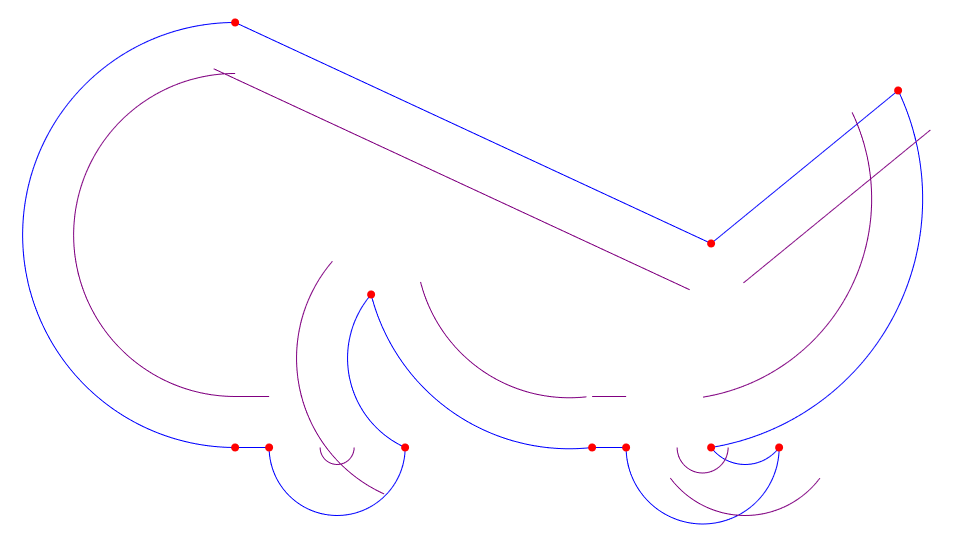
- Generate raw offset segments from the input polyline, pline.
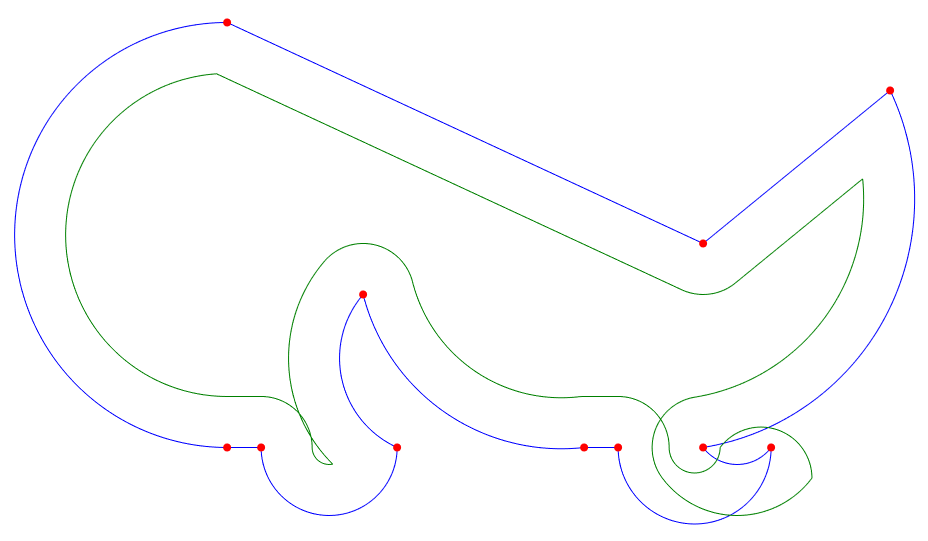
- Create the raw offset polyline, pline1, by trimming/joining raw offset segments acquired in step 1.
- If the input polyline, pline, has self intersections or is an open polyline then repeat steps 1 and 2 with the offset negated (e.g. if the offset was 0.5 then create raw offset polyline with offset of -0.5), this is known as pline2.
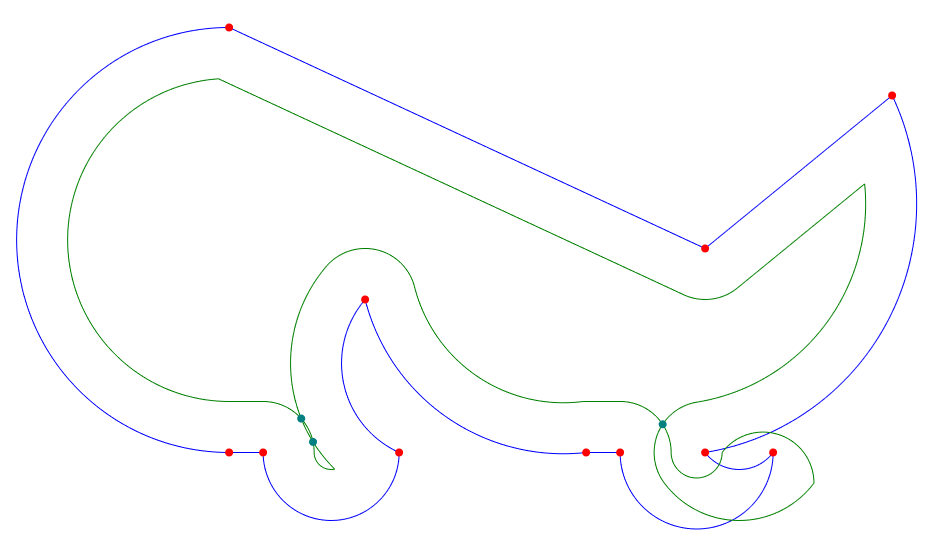
- Find all self-intersects of pline1. If step 3 was performed then also find all intersects between pline1 and pline2. If pline is an open polyline then also find intersects between pline1 and circles at the start and end vertex points of pline with radius equal to the offset.
- Create a set of open polylines by slicing pline1 at all of the intersect points found in step 4.
- Discard all open polyline slices whose minimum distance to pline is less than the offset.
- Stitch together the remaining open polyline slices found in step 6, closing the final stitched results if pline is closed.
The algorithm is mostly based on Liu et al. [1] with some differences since the algorithm they describe for GCPP (general closest point pair) clipping fails for certain inputs with large offsets (or at least I am unable to make their algorithm work).
The key clarifications/differences are:
- When raw offset segments are extended to form a raw offset polyline they are always joined by an arc to form a rounded constant distance from the input polyline.
- Dual offset clipping is only applied if input polyline is open or has self intersects, it is not required for a closed polyline with no self intersects.
- If the polyline is open then a circle is formed at each end point with radius equal to the offset, the intersects between those circles and the raw offset polyline are included when forming slices.
- GCPP (general closest point pair) clipping is never performed and instead slices are formed from intersects, then they are discarded if too close to the original polyline, and finally stitched back together.
- No special handling is done for adjacent segments that overlap (it is not required given the slice and stitch method).
- Collapsing arc segments (arcs whose radius is less than the offset value) are converted into a line and specially marked for joining purposes.
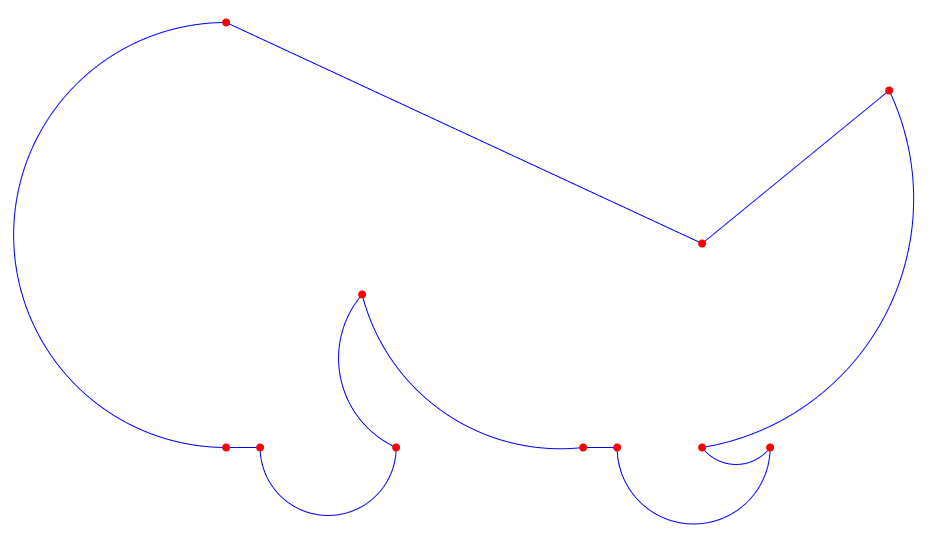
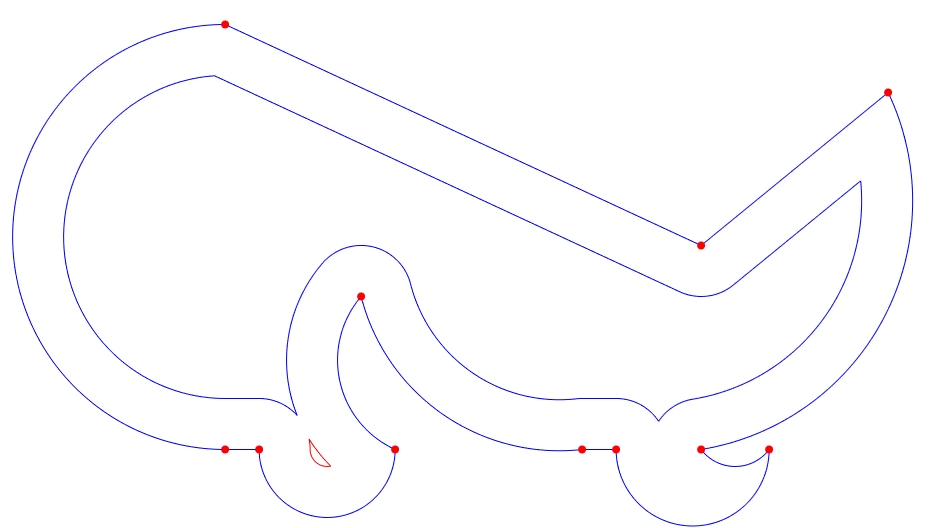
Here is example code and visualizations of the algorithm operating on a closed polyline with no self intersects as input.
Original input polyline, pline in blue, vertexes in red
Raw offset segments generated in purple (Step 1)
Raw offset polyline created from raw offset segments, pline1 (in green) (Step 2)
Raw offset polyline self intersects (dark cyan) (Step 4)
Valid open polyline slices created from self intersects (in green, red, and blue) (Step 5 & 6)
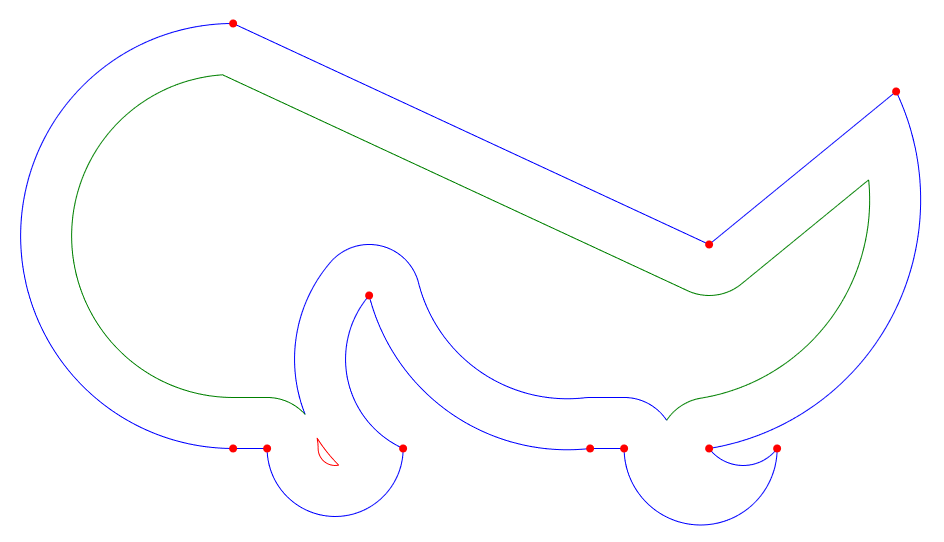
Open polyline slices stitched together (in red and blue) (Step 7)
Interactively Exploring the Algorithm
An interactive UI app (implemented using Qt and QML) is available (CavalierContoursDev) to visualize and explore in real time the offset algorithm. This app is also compiled to web assembly, for the live web version go
