
Gifstreaming
Live video streaming server using animated GIFs, Python and Node.js
Install / Use
/learn @jbochi/GifstreamingREADME
Live Video streaming using Animated GIFs
Preview

This sample video is just a fragment of a live video served by gifstreaming.
Warning
This is a toy project and it's not production ready. If you are seriously considering live video streaming using images, take a look at live_thumb. It uses much less bandwidth because the images are encoded as JPEG and it is more stable, since it uses nginx-push-stream to serve the images instead of this poorly tested node.js app.
Browser Support
All modern browsers since IE 5, that display the animation while download is in progress.
Usage
You need to have a stream of gif images (one per frame) at the input directory.
If you have ffmpeg and a input video, you can do it like this, to loop it continuously:
$ mkdir input
$ ffmpeg -i video.mp4 -loop 1 -pix_fmt pal8 -s 159x97 -r 10 input/in%d.gif
If you have a live RTMP stream handy:
$ ffmpeg -re -i rtmp://server/app/stream -pix_fmt pal8 -s 159x97 -r 10 input/in%d.gif
After that, run the Python script that will extract the gif frames and prepare then to be served:
$ mkdir parts
$ python transform.py
The server is a simple node.js script:
$ node server.js
With your browser, visit http://localhost:8080/
How it works
When a HTTP request is received, the node.js server delivers the Animated GIF Header, and frames for the first 10 seconds of video, but does not close the connection. After that, it watches the local directory for new frames and pushes then to all connected users. Since the GIF file format does not specify the number of frames and the Trailer is never delivered, the browser will keep the connection open (at least while it has enough memory :-).
The Python server creates the animated GIF header (Header, Logical Screen Descriptor, Application Extension) based on the first frame. For all the subsequent frames, it removes the Header, and transform the Global Color Table into a Local Color Table.
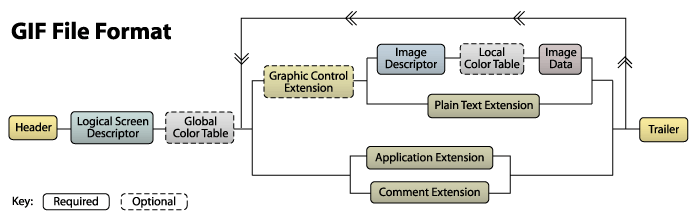
A good explanation of the GIF spec can be found here: http://www.matthewflickinger.com/lab/whatsinagif/bits_and_bytes.asp
Enjoy!
Related Skills
qqbot-channel
348.0kQQ 频道管理技能。查询频道列表、子频道、成员、发帖、公告、日程等操作。使用 qqbot_channel_api 工具代理 QQ 开放平台 HTTP 接口,自动处理 Token 鉴权。当用户需要查看频道、管理子频道、查询成员、发布帖子/公告/日程时使用。
docs-writer
100.2k`docs-writer` skill instructions As an expert technical writer and editor for the Gemini CLI project, you produce accurate, clear, and consistent documentation. When asked to write, edit, or revie
model-usage
348.0kUse CodexBar CLI local cost usage to summarize per-model usage for Codex or Claude, including the current (most recent) model or a full model breakdown. Trigger when asked for model-level usage/cost data from codexbar, or when you need a scriptable per-model summary from codexbar cost JSON.
Design
Campus Second-Hand Trading Platform \- General Design Document (v5.0 \- React Architecture \- Complete Final Version)1\. System Overall Design 1.1. Project Overview This project aims t
