
Stutter
RSVP for browsers
Install / Use
/learn @jamestomasino/StutterREADME
stutter 

<a href="https://addons.mozilla.org/en-US/firefox/addon/stutter/"><img src="./icons/stutter.svg" width="100"></a>
Table of contents
<!--ts--> <!--te-->About Stutter
stutter
Stutter is a Rapid Serial Visual Presentation (RSVP) extension for modern web browsers. RSVP is a way to read faster with less eye movement.
See a Stutter demonstration here.
Stutter supports full internationalization for basic usage. Long word hyphenization is supported in 40+ languages.
Installation



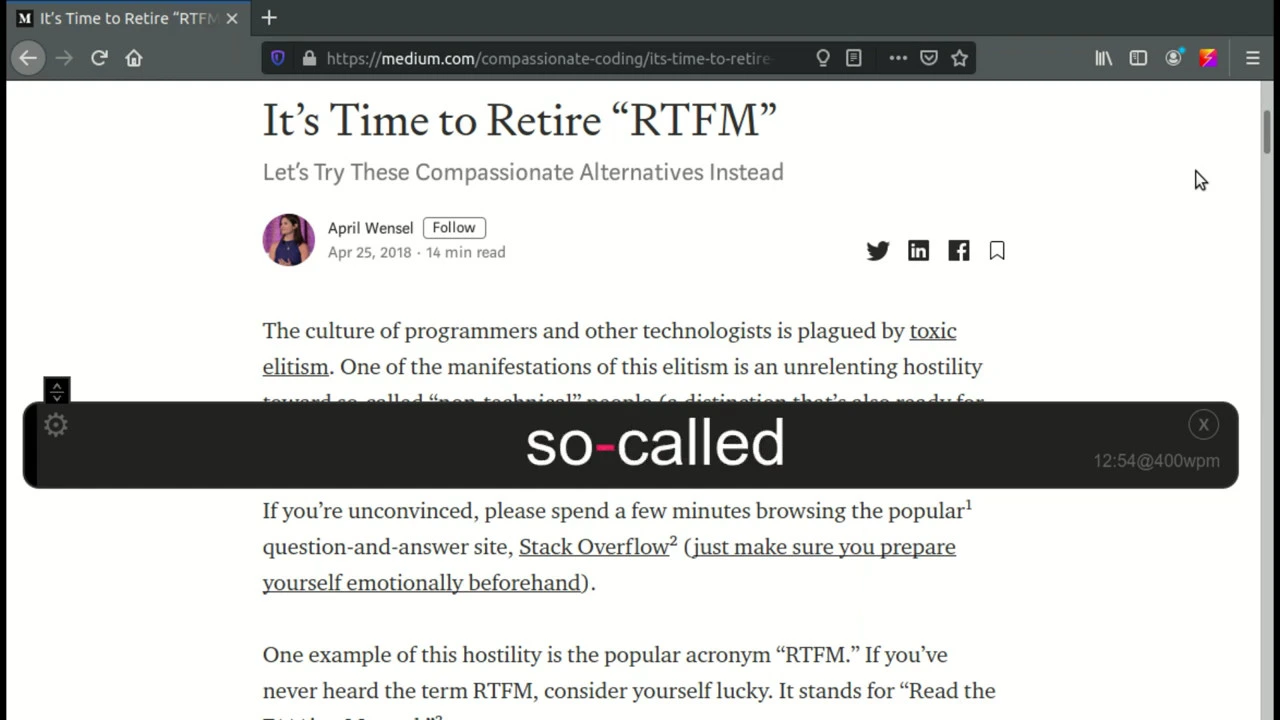
Usage
You can begin running Stutter in one of three ways:
- Click on the <img src="./icons/stutter.svg" width="16"> icon in the browser to start Stuttering. If you have text selected, it will use this as the content to Stutter, otherwise the entire page will be used.
- Press
Alt+Rto trigger Stutter by hotkey. - Select text you'd like to Stutter and then right-click and choose "Stutter Selection".
When Stutter is running, you can use the following hotkeys for control:
Alt+R- Restart StutterAlt+P- Pause/ResumeAlt+Left- Skip backwardsAlt+Right- Skip forwardsAlt+Up- Increase WPM by 50Alt+Down- Decrease WPM by 50Esc- Close Stutter
You can reposition the Stutter interface on the screen by dragging the handle on the left hand side. Stutter will remember its position in the future.
Many other timing options and theming are available inside the full settings panel. Click on the gear icon on the left while Stutter is running to change these settings. Note: You must have allowed the storage permission in order to change these default settings.
Getting Help
You can leave feedback using GitHub issues. If you would like to discuss problems or features with me directly, you can visit the #stutter IRC channel on Libera.Chat.
Contributing
This is an open source project and we welcome contributions. See the Wiki for ways to contribute:
Pull requests are welcome. For major changes, please open an issue first to discuss what you would like to change.
Development
Manifest generation is browser-aware:
manifest.base.jsoncontains shared MV3 fields.manifest.overrides/firefox.jsoncontains Firefox-only settings.manifest.jsonis generated for a target browser byscripts/build-manifest.cjs.- Manifest
versionis generated frompackage.json; ifHEADis exactly tagged asv*, that tag version is used.
Useful commands:
npm run build:chromenpm run build:firefoxnpm run build:edgenpm run package:chromenpm run package:firefoxnpm run package:edgenpm run package:all
Protected-branch release workflow:
- Create a release branch from latest
master:git checkout master && git pull --ff-onlygit checkout -b release/vNEXT
- Prepare the version bump and release commit on that branch:
npm run release:prepare:minor(or:patch/:major)
- Open PR and merge after required checks pass:
git push -u origin release/vNEXTgh pr create --base master --head release/vNEXT --fill
- After merge, tag from up-to-date
masterand push tag:git checkout master && git pull --ff-onlynpm run release:tag:push
- The tag push triggers GitHub Actions to publish browser ZIPs and source ZIP.
Research
Read some of the research that influences Stutter.
Privacy Policy
This browser extension collects no user data. Nothing about your usage is stored or transferred to any server. It can be used offline.
License
Mozilla's Readability library - http://www.apache.org/licenses/LICENSE-2.0
Related Skills
node-connect
343.3kDiagnose OpenClaw node connection and pairing failures for Android, iOS, and macOS companion apps
frontend-design
92.1kCreate distinctive, production-grade frontend interfaces with high design quality. Use this skill when the user asks to build web components, pages, or applications. Generates creative, polished code that avoids generic AI aesthetics.
openai-whisper-api
343.3kTranscribe audio via OpenAI Audio Transcriptions API (Whisper).
qqbot-media
343.3kQQBot 富媒体收发能力。使用 <qqmedia> 标签,系统根据文件扩展名自动识别类型(图片/语音/视频/文件)。
