
SkillAgentSearch skills...

LocationHelper

Android library project that helps you to track user location and manage the updates.

Install / Use

/learn @jaisonfdo/LocationHelper
About this skill

Quality Score

0/100

Supported Platforms

Universal

README

LocationHelper

This is a sample Android application to show how to <B> track user's location and manage the updates</B>
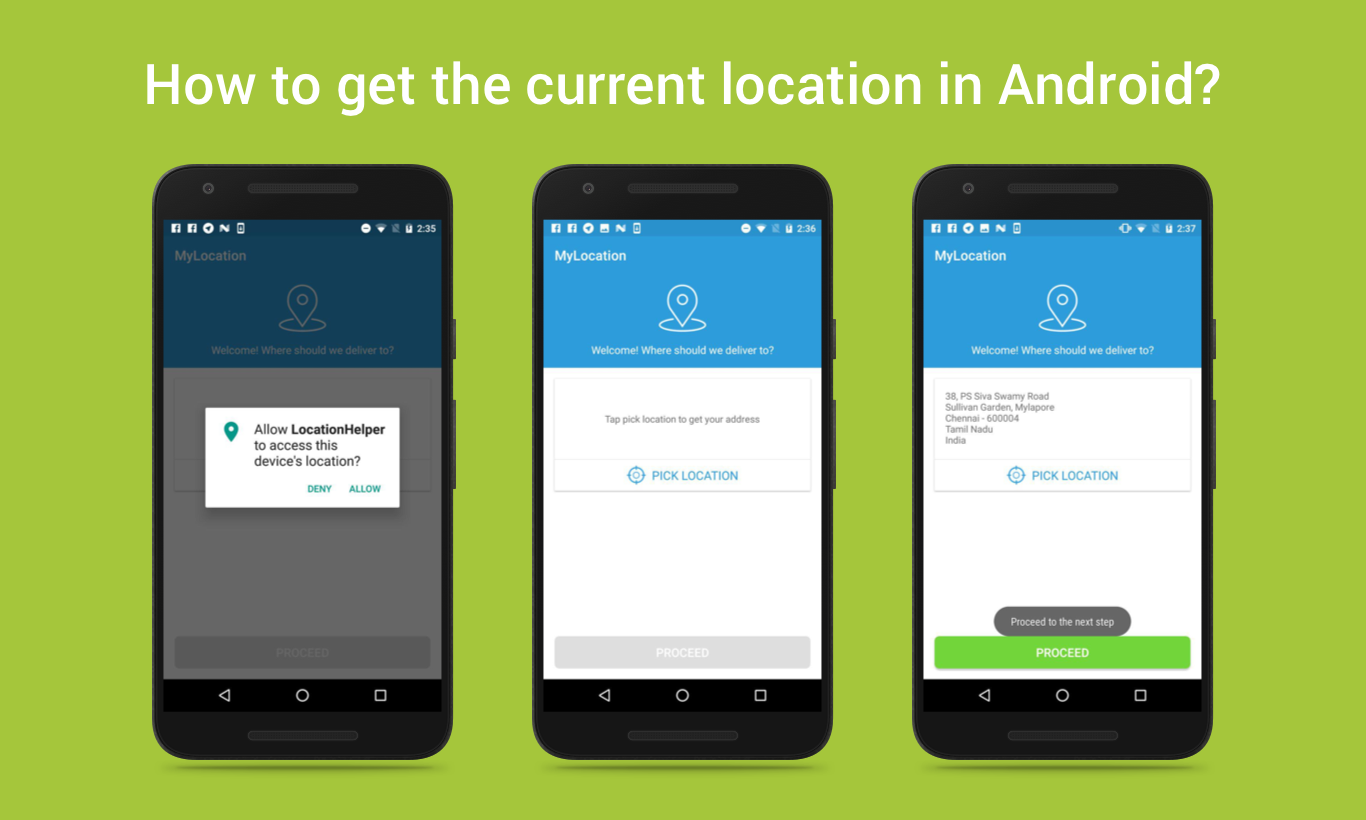
ScreenShot

Getting current location through <B>FusedLocationAPI</B> provided by Google is a bit tricky to implement, but the below step-by-step guidelines will explain the procedure.

  1. First, you need to add the needed dependency in your <B>build.gradle</B> file.
<pre> compile 'com.google.android.gms:play-services-location:10.+’ </pre>
  1. Then add the following permissions into the <B>AndroidManifest.xml</B> file.
     <uses-permission android:name="android.permission.ACCESS_FINE_LOCATION" />
     <uses-permission android:name="android.permission.ACCESS_COARSE_LOCATION" />
  1. Next is permission check, From Android 6.0 user can deny the permission request, so before try to get the location we need to check the status of the location access. For this use <a href="https://github.com/jaisonfdo/PermissionExample/blob/master/app/src/main/java/droidmentor/permissionexample/PermissionUtils.java">PermissionUtil</a> class.

  2. For making a connection with Location API, need to create an instance of <B>GoogleApiCLient</B>.

<pre> GoogleApiClient mGoogleApiClient; mGoogleApiClient = new GoogleApiClient.Builder(this) .addConnectionCallbacks(this) .addOnConnectionFailedListener(this) .addApi(LocationServices.API).build(); mGoogleApiClient.connect(); </pre>
  1. At next implement the <B>OnConnectionFailedListener</B> and <B>ConnectionCallbacks</B> for managing the GoogleApiclient connection.
<pre> public class MyLocationUsingLocationAPI extends AppCompatActivity implements ConnectionCallbacks, OnConnectionFailedListener,OnRequestPermissionsResultCallback, { @Override public void onConnectionFailed(ConnectionResult result) { Log.i(TAG, "Connection failed: ConnectionResult.getErrorCode() = "+ result.getErrorCode()); } @Override public void onConnected(Bundle arg0) { // Once connected with google api, get the location } @Override public void onConnectionSuspended(int arg0) { mGoogleApiClient.connect(); } } </pre>
  1. For refreshing the location of the device at regular intervals, use <B>LocationRequest</B> objects.
<pre> LocationRequest mLocationRequest = new LocationRequest(); mLocationRequest.setInterval(10000); mLocationRequest.setFastestInterval(5000); mLocationRequest.setPriority(LocationRequest.PRIORITY_HIGH_ACCURACY); LocationSettingsRequest.Builder builder = new LocationSettingsRequest.Builder() .addLocationRequest(mLocationRequest); </pre>
  1. Then check the google play service availability, if available get the last known location of the user's device from the Location service as follows.
<pre> mLastLocation = LocationServices.FusedLocationApi .getLastLocation(mGoogleApiClient); </pre>
  1. Using the <B>Geocoder</B> class you can get the address from the above location.
<pre> public Address getAddress(double latitude,double longitude) { Geocoder geocoder; List<Address> addresses; geocoder = new Geocoder(this, Locale.getDefault()); try { // Here 1 represent max location result to returned, by documents it recommended 1 to 5 addresses = geocoder.getFromLocation(latitude,longitude, 1); return addresses.get(0); } catch (IOException e) { e.printStackTrace(); } return null; } </pre>

For more information, check out my detailed guide here : http://droidmentor.com/get-the-current-location-in-android/

View on GitHub
GitHub Stars84
CategoryDevelopment
Updated6mo ago
Forks64

Languages

Java

Security Score

77/100

Audited on Sep 16, 2025

No findings