
ChatGPT.nvim
ChatGPT Neovim Plugin: Effortless Natural Language Generation with OpenAI's ChatGPT API
Install / Use
/learn @jackMort/ChatGPT.nvimREADME
ChatGPT.nvim


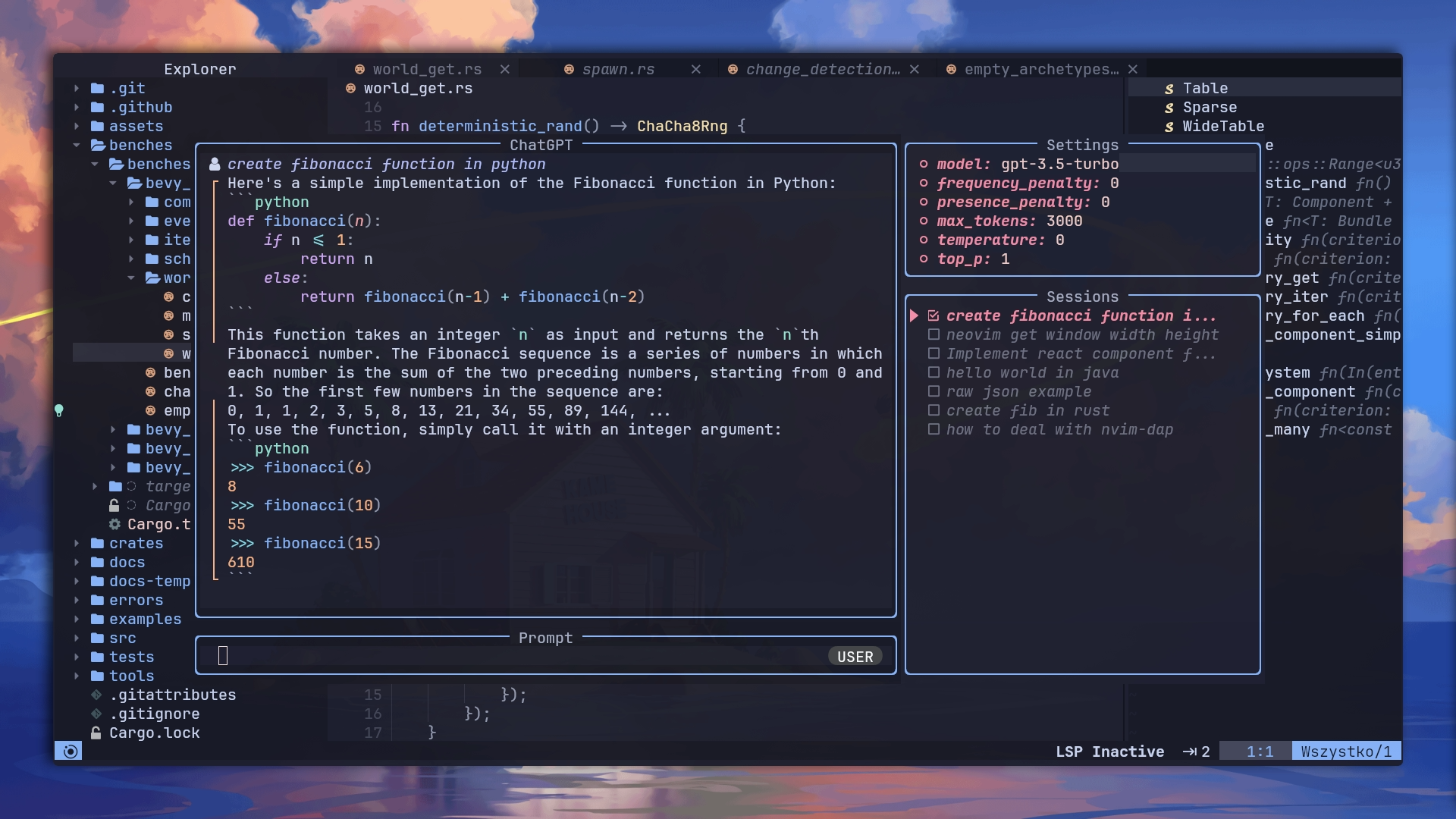
ChatGPT is a Neovim plugin that allows you to effortlessly utilize the OpenAI
ChatGPT API, empowering you to generate natural language responses from
OpenAI's ChatGPT directly within the editor in response to your inquiries.
Features
-
Interactive Q&A: Engage in interactive question-and-answer sessions with the powerful gpt model (ChatGPT) using an intuitive interface.
-
Persona-based Conversations: Explore various perspectives and have conversations with different personas by selecting prompts from Awesome ChatGPT Prompts.
-
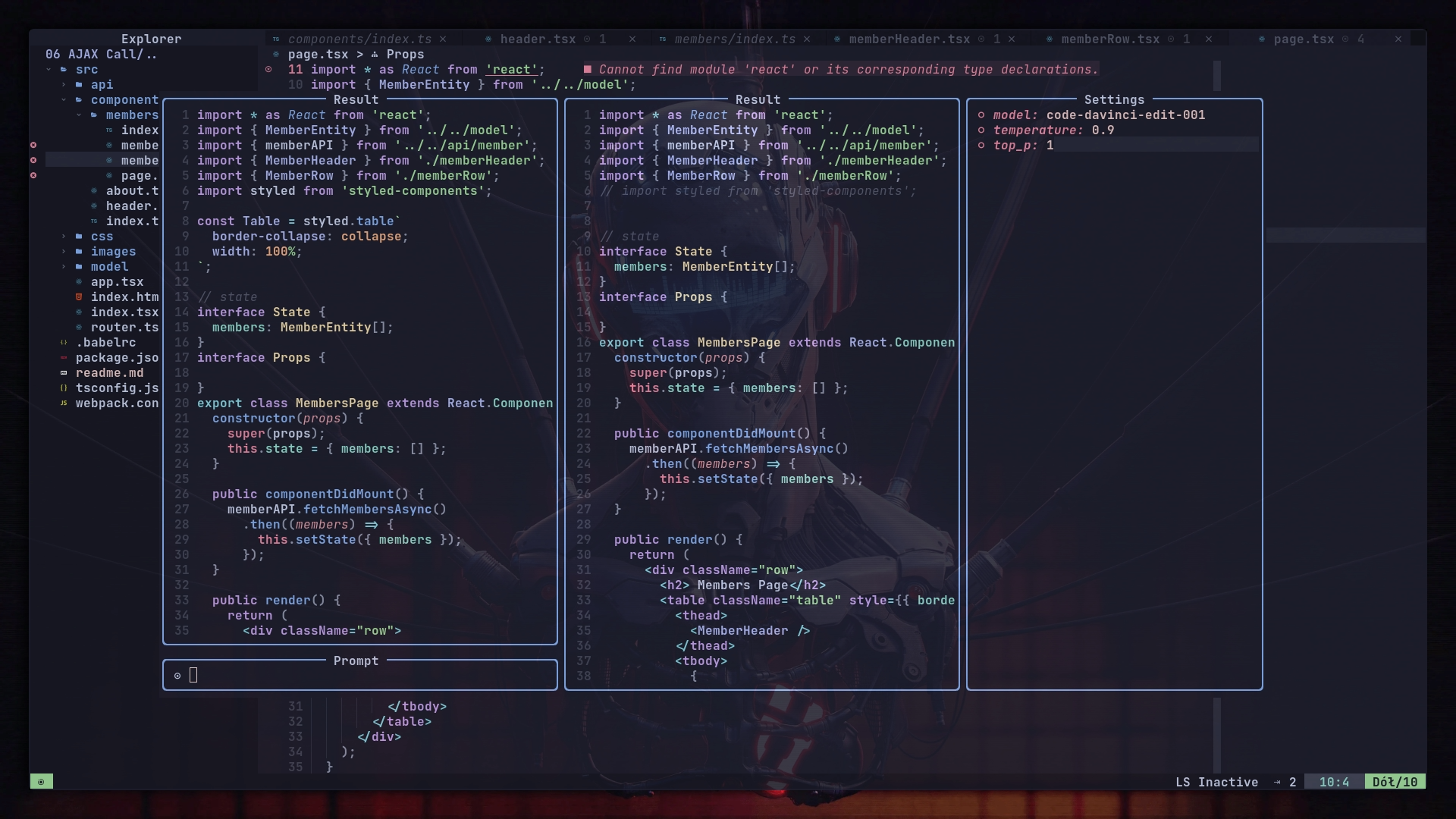
Code Editing Assistance: Enhance your coding experience with an interactive editing window powered by the gpt model, offering instructions tailored for coding tasks.
-
Code Completion: Enjoy the convenience of code completion similar to GitHub Copilot, leveraging the capabilities of the gpt model to suggest code snippets and completions based on context and programming patterns.
-
Customizable Actions: Execute a range of actions utilizing the gpt model, such as grammar correction, translation, keyword generation, docstring creation, test addition, code optimization, summarization, bug fixing, code explanation, Roxygen editing, and code readability analysis. Additionally, you can define your own custom actions using a JSON file.
-
Rich Message Rendering: Enhanced chat display with styled code blocks (language headers, copy indicators, foldable), markdown formatting (headers, bold, italic, lists, blockquotes, links), diff highlighting, and sender indicators.
-
Inline Context References: Use
@to add context from LSP definitions or project files directly in your prompts. References are displayed inline and expanded when sending to the API.
For a comprehensive understanding of the extension's functionality, you can watch a plugin showcase video
Installation
-
Make sure you have
curlinstalled. -
Get an API key from OpenAI, which you can obtain here. (NOTE: a ChatGPT Plus subscription doesn't currently include the required API credits. You'll have to buy API credits separately.)
The OpenAI API key can be provided in one of the following two ways:
-
In the configuration option
api_key_cmd, provide the path and arguments to an executable that returns the API key via stdout. -
Setting it via an environment variable called
$OPENAI_API_KEY.
Custom OpenAI API host with the configuration option api_host_cmd or
environment variable called $OPENAI_API_HOST. It's useful if you can't access
OpenAI directly
Custom cURL parameters can be passed using the configuration option extra_curl_params.
It can be useful if you need to include additional headers for requests:
{
  ...,
  extra_curl_params = {
    "-H",
    "Origin: https://example.com"
  }
}
For Azure deployments, you need to specify the URL base, the engine, and the API type. You can accomplish this in one of two ways:
- Use the configuration options
api_type_cmd,azure_api_base,azure_api_engine_cmd, andazure_api_version_cmd. Each of these should be an executable command that returns the corresponding value.
For example:
  local config = {
    api_host_cmd = 'echo -n ""',
    api_key_cmd = 'pass azure-openai-key',
    api_type_cmd = 'echo azure',
    azure_api_base_cmd = 'echo https://{your-resource-name}.openai.azure.com',
    azure_api_engine_cmd = 'echo chat',
    azure_api_version_cmd = 'echo 2023-05-15'
  }

  require("chatgpt").setup(config)
- Set the values via the environment variables
$OPENAI_API_TYPE,$OPENAI_API_BASE,$OPENAI_API_AZURE_ENGINE, and$OPENAI_API_AZURE_VERSION.
For example:
export OPENAI_API_TYPE="azure"
export OPENAI_API_BASE="https://{your-resource-name}.openai.azure.com"
export OPENAI_API_AZURE_ENGINE="chat"
export OPENAI_API_AZURE_VERSION="2023-05-15"
Please note that edit models have been deprecated and may not function as expected.
If you are using packer.nvim as plugin manager:
-- Packer
use({
  "jackMort/ChatGPT.nvim",
    config = function()
      require("chatgpt").setup()
    end,
    requires = {
      "MunifTanjim/nui.nvim",
      "nvim-lua/plenary.nvim",
      "folke/trouble.nvim",
      "nvim-telescope/telescope.nvim"
    }
})
or if you are using lazy.nvim:
-- Lazy
{
  "jackMort/ChatGPT.nvim",
    event = "VeryLazy",
    config = function()
      require("chatgpt").setup()
    end,
    dependencies = {
      "MunifTanjim/nui.nvim",
      "nvim-lua/plenary.nvim",
      "folke/trouble.nvim", -- optional
      "nvim-telescope/telescope.nvim"
    }
}
Configuration
ChatGPT.nvim comes with the following defaults, you can override them by passing config as setup param
https://github.com/jackMort/ChatGPT.nvim/blob/main/lua/chatgpt/config.lua
Example Configuration
A simple configuration of the chat model could look something like this:
{
  "jackMort/ChatGPT.nvim",
  event = "VeryLazy",
  config = function()
    require("chatgpt").setup({
      -- this config assumes you have OPENAI_API_KEY environment variable set
      openai_params = {
        -- NOTE: model can be a function returning the model name
        -- this is useful if you want to change the model on the fly
        -- using commands
        -- Example:
        -- model = function()
        --     if some_condition() then
        --         return "gpt-5"
        --     else
        --         return "gpt-5-mini"
        --     end
        -- end,
        model = "gpt-5-mini",
        frequency_penalty = 0,
        presence_penalty = 0,
        max_tokens = 4095,
        temperature = 0.2,
        top_p = 0.1,
        n = 1,
      }
    })
  end,
  dependencies = {
    "MunifTanjim/nui.nvim",
    "nvim-lua/plenary.nvim",
      "folke/trouble.nvim", -- optional
    "nvim-telescope/telescope.nvim"
  }
}
Secrets Management
Providing the OpenAI API key via an environment variable is dangerous, as it leaves the API key easily readable by any process that can access the environment variables of other processes. In addition, it encourages the user to store the credential in clear-text in a configuration file.
As an alternative to providing the API key via the OPENAI_API_KEY environment
variable, the user is encouraged to use the api_key_cmd configuration option.
The api_key_cmd configuration option takes a string, which is executed at
startup, and whose output is used as the API key.
The following configuration would use 1Passwords CLI, op, to fetch the API key
from the credential field of the OpenAI entry.
require("chatgpt").setup({
    api_key_cmd = "op read op://private/OpenAI/credential --no-newline"
})
The following configuration would use GPG to decrypt a local file containing the API key
local home = vim.fn.expand("$HOME")
require("chatgpt").setup({
    api_key_cmd = "gpg --decrypt " .. home .. "/secret.txt.gpg"
})
Note that the api_key_cmd arguments are split by whitespace. If you need
whitespace inside an argument (for example to reference a path with spaces),
you can wrap it in a separate script.
Usage
Plugin exposes following commands:
ChatGPT
ChatGPT command which opens interactive window using the gpt-5-mini
model.
(also known as ChatGPT)
ChatGPTActAs
ChatGPTActAs command which opens a prompt selection from
Awesome ChatGPT Prompts
to be used with the gpt-5-mini model.

ChatGPTEditWithInstructions
ChatGPTEditWithInstructions command which opens interactive window to edit
selected text or whole window using the gpt-5-mini model (configurable).
You can map it using the Lua API, e.g. using which-key.nvim:
local chatgpt = require("chatgpt")
wk.register({
    p = {
        name = "ChatGPT",
        e = {
            function()
                chatgpt.edit_with_instructions()
            end,
            "Edit with instructions",
        },
    },
}, {
    prefix = "<leader>",
    mode = "v",
})
ChatGPTRun
ChatGPTRun [action] command which runs specific actions -- See
actions.json file for a detailed
list. Available actions are:
grammar_correctiontranslatekeywordsdocstringadd_testsoptimize_codesummarizefix_bugsexplain_coderoxygen_editcode_readability_analysis-- see demofix_diagnostic-- fix error under cursorexplain_diagnostic-- explain error under cursorfix_diagnostics-- fix all errors in selection
All the above actions are using gpt-5-mini model.
It is possible to define custom actions with a JSON file. See actions.json for an example. The path of custom actions can be set in the config (see actions_paths field in the config example above).
An example of custom action may look like this: (# marks comments)
{
  "action_name": {
    "type": "chat", # or "completion" or "edit"
    "opts": {
      "template": "A template using possible varia
