
Ttkbootstrap
A modern theming library for Tkinter that adds sleek, responsive styles inspired by Bootstrap. Includes ready-to-use widgets, 20+ themes, and tools for building beautiful, cross-platform desktop apps with ease.
Install / Use
/learn @israel-dryer/TtkbootstrapREADME





ttkbootstrap
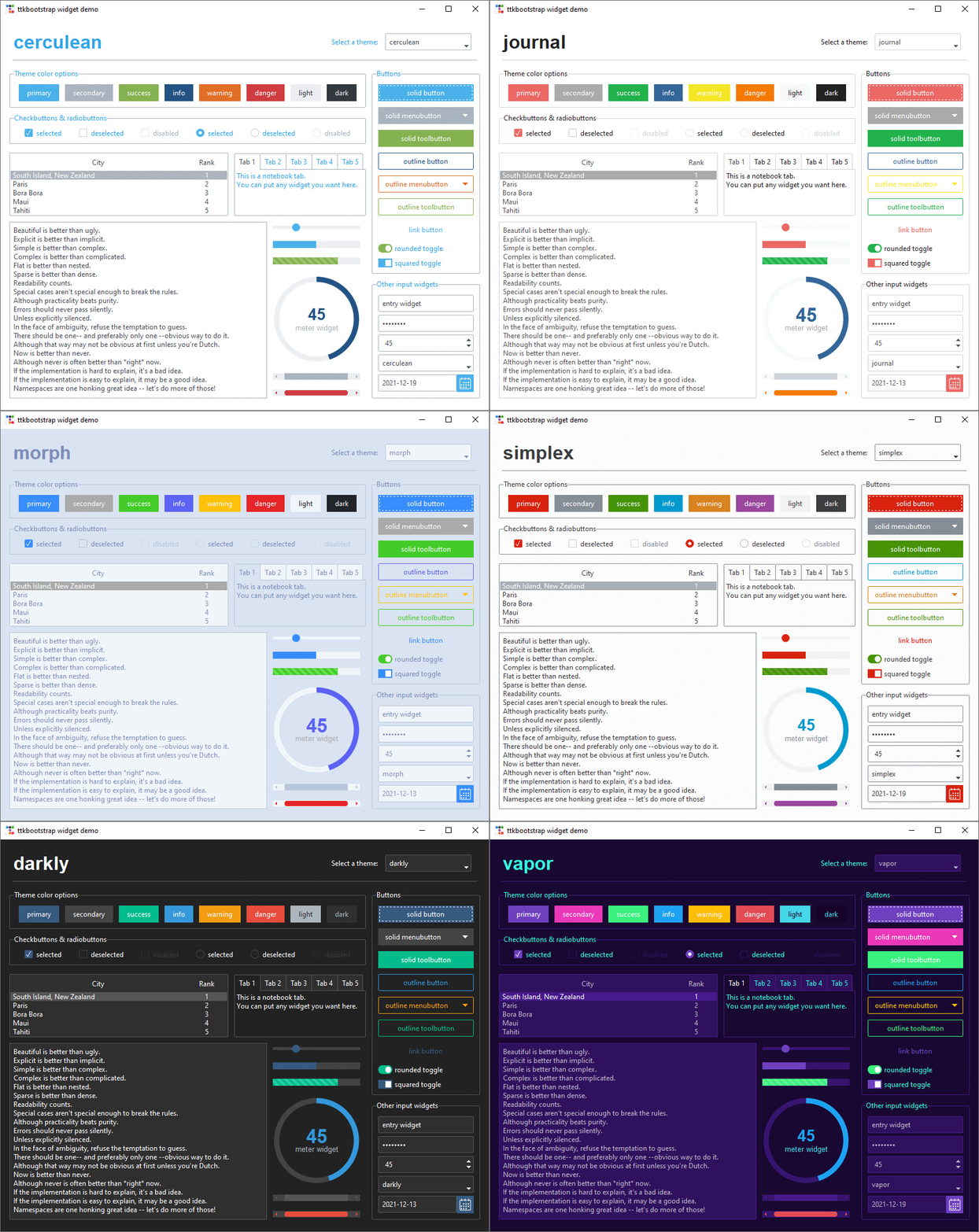
ttkbootstrap is a Python library that enhances tkinter by providing modern, flat-style themes inspired by Bootstrap. Easily create stylish GUI applications with built-in themes, pre-defined widget styles, and more.
Documentation
👀 Check out the documentation.
Features
✔️ Built-in Themes
Over a dozen curated dark and light themes.
✔️ Pre-defined Styles:
Loads of beautiful pre-defined widget styles such as outline and round toggle buttons.
✔️ Simple keyword API:
Apply colors and types using simple keywords such as primary and striped instead of the legacy approach of primary.Striped.Horizontal.TProgressbar. If you've used Bootstrap for web development, you are already familiar with this approach using css classes.
✔️ Lots of new Widgets:
ttkbootstrap comes with several new beautifully designed widgets such as Meter, DateEntry, and Floodgauge. Additionally, dialogs are now themed and fully customizable.
✔️ Built-in Theme Creator:
Want to create your own theme? Easy! ttkboostrap includes a built-in theme creator that enables you to easily build, load, expore, and apply your own custom themes.
Installation
Install ttkbootstrap using pip in the terminal/command prompt!
python -m pip install ttkbootstrap
Simple Usage
Instead of using long, complicated ttk style classes, you can use simple keywords with the "bootstyle" parameter.
To get started, add the import statement at the top of your file in your preferred IDE:
import ttkbootstrap as ttk
Then create a window using the ttk.Window(...) and .mainloop() commands. And add a couple buttons (b1 and b2) to create your first window!
root = ttk.Window(themename="superhero")

b1 = ttk.Button(root, text="Submit", bootstyle="success")
b1.pack(side=LEFT, padx=5, pady=10)

b2 = ttk.Button(root, text="Submit", bootstyle="info-outline")
b2.pack(side=LEFT, padx=5, pady=10)

root.mainloop()
Here is the desired result:

For more detailed usage, please refer to the Getting Started page This page includes creating buttons, adding widgets, different styles and more.
The new keyword API is very flexible. The following examples all produce the same result:
bootstyle="info-outline"bootstyle="info outline"bootstyle=("info", "outline")bootstyle=(INFO, OUTLINE)
Icons
Add icons to your app buttons and labels using the ttkbootstrap-icons library.
Contributing
We welcome contributions! If you'd like to contribute to ttkbootstrap, please check out our contributing guidelines.
Links
- Documentation: https://ttkbootstrap.readthedocs.io/en/latest/
- GitHub: https://github.com/israel-dryer/ttkbootstrap
Support
This project is proudly developed with the support of the <a href="https://www.jetbrains.com/pycharm/" target="_blank" rel="noopener">PyCharm IDE</a>, generously provided by JetBrains.
<a href="https://www.jetbrains.com/" target="_blank" rel="noopener"> <picture> <source media="(prefers-color-scheme: light)" srcset="https://github.com/user-attachments/assets/f6d4e79d-97f4-4368-a944-affd423aa922"> <img width="250" alt="JetBrains logo" src="https://github.com/user-attachments/assets/1e42e5db-ffb5-4c8d-b238-3f5633fb7e6d"> </picture> </a>
<sub> © 2025 JetBrains s.r.o. JetBrains and the JetBrains logo are registered trademarks of JetBrains s.r.o. </sub>
Related Skills
node-connect
344.1kDiagnose OpenClaw node connection and pairing failures for Android, iOS, and macOS companion apps
claude-opus-4-5-migration
96.8kMigrate prompts and code from Claude Sonnet 4.0, Sonnet 4.5, or Opus 4.1 to Opus 4.5
frontend-design
96.8kCreate distinctive, production-grade frontend interfaces with high design quality. Use this skill when the user asks to build web components, pages, or applications. Generates creative, polished code that avoids generic AI aesthetics.
model-usage
344.1kUse CodexBar CLI local cost usage to summarize per-model usage for Codex or Claude, including the current (most recent) model or a full model breakdown. Trigger when asked for model-level usage/cost data from codexbar, or when you need a scriptable per-model summary from codexbar cost JSON.
