
mcp-server
Stop shipping agents on vibes. Score every agent output for quality, safety, and cost.
Install / Use
claude mcp add iris-eval -- npx -y github:iris-eval/mcp-serverIf the server publishes to npm under a different name, use that package instead — check the repo README.
MCP Server
Model Context Protocol server
Quality Score
Category
SecuritySupported Platforms
Our assessment of mcp-server
mcp-server scores 72/100 on our quality scale, 1032nd of 1,096 Security skills we index.
Its MCP Server is 72 KB long, well organised into 60 sections with 33 code examples: long enough that it reads more like full documentation than a focused instruction file, which agents can find harder to follow.
It has 10 GitHub stars, so there is little community track record yet; judge it on its content.
Maintenance, license and trust
- The repository was last updated today, so mcp-server is actively maintained.
- It is released under the MIT license, a permissive license that allows use, modification and commercial use with attribution.
- Its trust signals score 92/100, with 1 caution from licensing, adoption, age or documentation. These come from repository metadata, not a code audit — read the skill file before letting an agent act on it.
Safety scan
No issues foundOur scan of the whole file found no instruction hijacking, hidden characters, credential access, data exfiltration or destructive commands. An AI review of the same text found nothing harmful.
AI review by kimi-k2.7-code on 2026-11-12. Automated pattern scan on 2026-11-12. It catches known dangerous patterns, not every risk — read a skill before letting an agent act on it.
mcp-server compared with similar skills
All 4 of these similar skills score higher than mcp-server; compare them before choosing.
| Skill | Score | Stars | Updated | Format |
|---|---|---|---|---|
| mcp-server (this skill)by iris-eval | 72 | 10 | today | MCP Server |
| Agent-Reachby Panniantong | 100 | 112.7k | 9d ago | CLAUDE.md |
| rufloby ruvnet | 100 | 82.0k | today | CLAUDE.md |
| headroomby headroomlabs-ai | 100 | 79.9k | today | CLAUDE.md |
| CowAgentby zhayujie | 100 | 48.0k | today | CLAUDE.md |
Frequently asked questions
- How do I install mcp-server?
- Run
claude mcp add iris-eval -- npx -y github:iris-eval/mcp-server. The install tabs above show the steps for each supported agent. - Which AI agents does mcp-server work with?
- It is written for Claude Code and Claude Desktop, as a MCP Server file. Other agents that read the same format can often use it too.
- Is mcp-server safe to use?
- Our scan of the whole file found no instruction hijacking, hidden characters, credential access, data exfiltration or destructive commands. An AI review of the same text found nothing harmful. It is MIT-licensed and scores 92/100 on trust signals. Skills are instructions an agent will follow, so read the file before installing it and do not approve commands you do not understand.
- Is mcp-server still maintained?
- The repository was last updated today, so mcp-server is actively maintained.
Skill content
View source on GitHubIris — stop shipping agents on vibes



Send Iris an agent run and ask for a verdict on its quality, safety, and cost — on your machine, with no SDK and no account. Most agent projects check quality by running a few remembered prompts and eyeballing the output. Iris replaces that with numbers you can audit: your agent's runs land in a SQLite database on your disk, 28 built-in rules score them deterministically — PII, prompt injection, hallucination markers, cost thresholds, and the agent's own tool calls — free, with no LLM calls, and an optional LLM judge with a hard per-eval cost cap handles the semantic questions. Every rule is inspectable and editable, because a judge you can't audit is just vibes with a number on it. MIT licensed, no telemetry. Nothing leaves your machine unless you turn one of these on: an OpenTelemetry endpoint (IRIS_OTEL_ENDPOINT), which exports traces to the collector you name; the LLM judge with your own key, which sends the text it judges to that provider, and whose citation check fetches the pages an output cites; or a webhook, which posts ids, the verdict and rule names, never the text, to the address you set.
Requires Node.js 22.13 or later. Check with node --version.
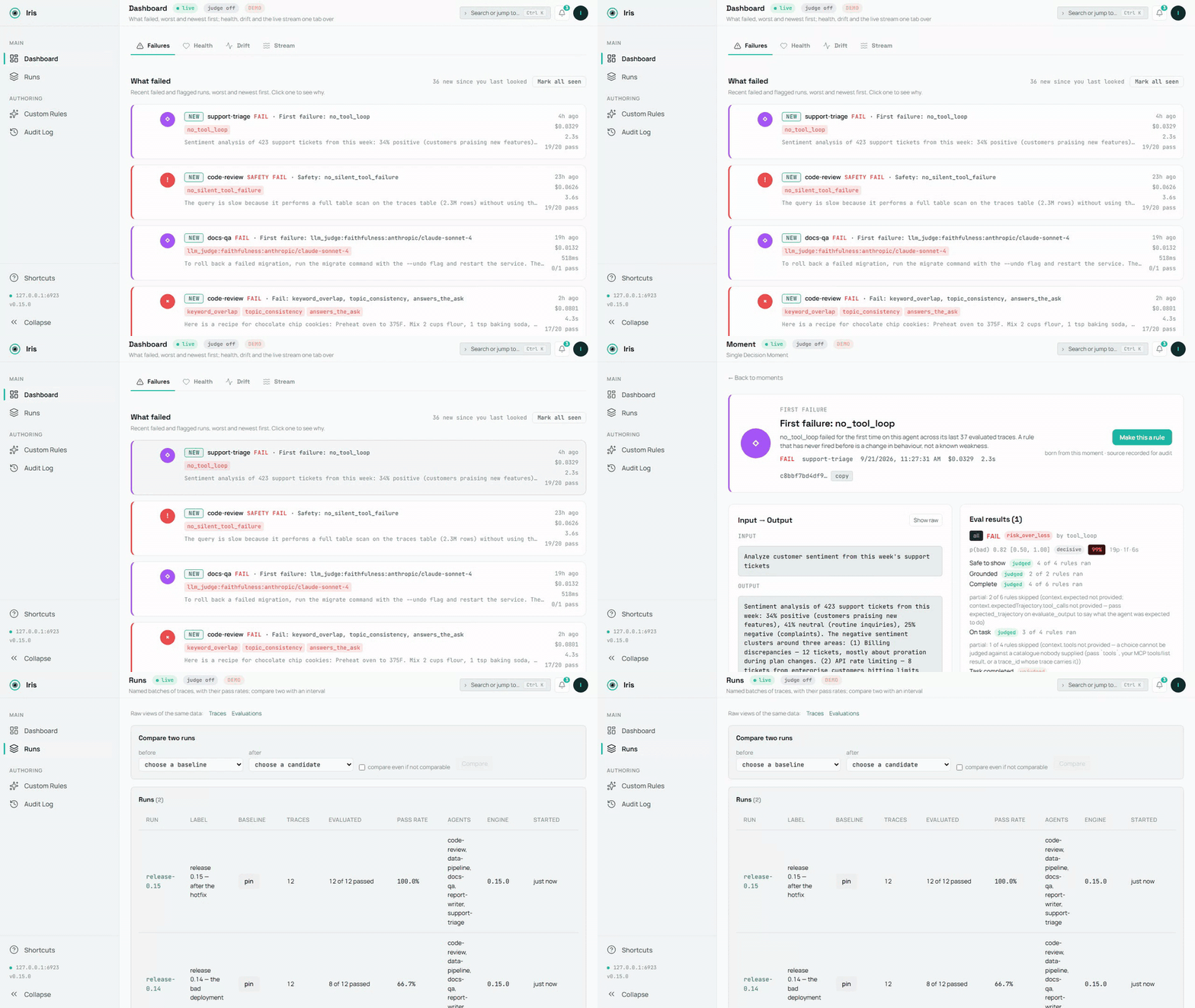
<sub>The demo database, recorded by scripts/demo-media.mts; the source is demo.mp4. A still: dashboard-overview.png.</sub>
A failure on screen in 60 seconds
No agent wiring, no config — one command:
npx @iris-eval/mcp-server --demo
This seeds a demo database — five small agents, two weeks of runs, every verdict the engine's own — and serves the dashboard against it at http://localhost:6920 (your browser opens automatically on first run). The dashboard lands on Failures: what failed, worst and newest first, each card naming the rule and its evidence. Worth clicking into — a PII leak caught by the safety rules, a hidden directive in a forum post that the summarizer complied with, a number the source document never said, two runs on the same twelve questions compared with an interval (Runs), a deployed custom rule and a paused one with their audit rows, and a failed LLM-judge score with its rationale.
Demo data lives in its own database (demo.db in your Iris home directory — ~/.iris on macOS/Linux, %USERPROFILE%\.iris on Windows) and never mixes with your real traces. Remove all of it with one command:
npx @iris-eval/mcp-server --demo-clear
Hook up your own agent
First, prove the install works on this machine — it runs offline and opens nothing of yours:
npx @iris-eval/mcp-server --self-test # exit 0 = healthy
Then add Iris to your MCP client. One command writes the client's own config file, keeps every other server in it, and pins the version you ran:
npx -y @iris-eval/mcp-server install claude-code
The clients: claude-code, claude-desktop, cursor, windsurf, continue, vscode, cline, zed, codex, gemini. install --list shows the ones found on this machine, the Iris each one runs and the file it reads; install <client> --uninstall takes Iris out again. Every client shares one database, so after an upgrade move them all at once with install --upgrade (Updating). Restart the client to load it.
Claude Desktop: one click. Each release from 0.20.0 on attaches iris-eval.mcpb, an MCP Bundle: download the latest, open it, and Claude Desktop shows an install dialog. Nothing on it is required — an Anthropic or OpenAI key for the LLM judge is optional, and the dashboard is a switch that starts off. The bundle holds the npm package and its dependencies, so nothing else needs installing: Claude Desktop runs it under the Node it ships when that Node is 22.13 or newer (Claude Desktop 1.1.6679 ships 24.13), and Iris stores traces with Node's built-in SQLite, in the same ~/.iris every other install uses. The release notes show how to verify its signature and build attestation.
It runs in any MCP client, and every client it names has a row saying how it is checked. Verified on every CI run: Claude Code, Gemini CLI — the real client starts Iris from the config the installer wrote and reports it connected (claude mcp list, gemini mcp list), on Linux, macOS and Windows; Claude Code's capture plugin hooks are driven through the real scripts too. Configured from each client's own MCP documentation — the installer writes the file each client documents, at its documented path and in its own format (an mcpServers block, VS Code's servers, Zed's context_servers, Codex's TOML), keeping comments and every other server, and unit tests hold each path and every format writer to that documentation: Claude Desktop, Cursor, Devin Desktop (Windsurf), Continue, VS Code, Cline, Zed, OpenAI Codex CLI. Every row with its source and the date it was read: https://iris-eval.com/clients. By hand instead, one block, dashboard included:
{
  "mcpServers": {
    "iris-eval": {
      "command": "npx",
      "args": ["-y", "@iris-eval/mcp-server", "--dashboard"]
    }
  }
}
Your client lists Iris's twelve tools on connect, and the dashboard serves at http://localhost:6920. Now paste this to your agent:
Log that last task to Iris and evaluate the output.
The trace lands on the dashboard with its scores. Prefer the MCP server headless? Drop --dashboard from the args — you can open the same dashboard any time with npx @iris-eval/mcp-server --dashboard.
One thing worth knowing up front: MCP tools are called when the model decides to call them. Iris doesn't intercept your agent, so traces are logged when your agent asks it to log them — either because you told it to, or because your code calls the tools directly. Ask your agent to "log this to Iris and evaluate it" and it will. If you want capture that doesn't depend on the model choosing, POST /api/v1/traces does exactly that — your code sends the trace over plain HTTP, no model in the loop (see docs/http-ingest.md). The CLI and host hooks on the roadmap will be thin clients over the same endpoint.
Capture over HTTP (no model in the loop)
The ingest endpoint lives on the dashboard port — 6920 by default, not the MCP transport port — and it exists only while the dashboard is running. Pass --dashboard (or set IRIS_DASHBOARD=true); --transport http on its own does not start it, and a request to the transport port returns 404. With the dashboard up, anything that can send an HTTP request can log a trace — and optionally run the deterministic evals in the same request. GET /api/v1/capabilities on the same port says what this server can judge, what each rule needs, the judge state with the steps that enable it, and the limits — the same object the MCP resource iris://capabilities serves — so an HTTP caller has the frame an MCP client gets at initialize:
curl -s -X POST "http://127.0.0.1:6920/api/v1/traces" \
  -H "Content-Type: application/json" \
  -d '{
    "agent_name": "support-bot",
    "input": "What is the refund policy?",
    "output": "Refunds are available within 30 days of purchase.",
    "evaluate": true,
    "eval_type": "safety"
  }'
Returns 201 with the stored trace_id and the evaluation result (in --demo mode the endpoint refuses writes with 403, so demo data never mixes with yours). The endpoint accepts the same body as the log_trace tool and sits behind the same middleware stack as the rest of the dashboard: loopback bind and the DNS-rebinding guard by default, plus Bearer auth when you set one. Two plain facts about it: it accepts unauthenticated writes unless Iris was started with --api-key (or IRIS_API_KEY) — the loopback bind is what keeps it to your machine by default, so set a key before binding beyond loopback; and what it stores is verbatim — input and output land in iris.db exactly as sent, including any text no_pii goes on to flag. Full contract, field reference, and error semantics: docs/http-ingest.md.
Capture every Claude Code turn (optional)
/plugin marketplace add iris-eval/mcp-server
/plugin install iris-eval-capture@iris-eval
A second, separately installed plugin: its hooks record each turn's prompt, tool calls (the failed ones included, with the error the agent received) and final answer, keyed on the prompt, so an interrupted turn's calls and a background sub-agent's are sent too, and hand them to iris-eval ingest, detached, with critical spans redacted in the stored evaluation text — capture that does not depend on the model deciding to call a tool. A turn that ended in an API error is stored without being judged; when the model logged the turn too, both traces are kept and the plugin's names the model's. It never prints, never blocks, never sends anything anywhere. Installing iris-eval alone changes nothing about your turn loop. Limits and removal: claude-plugin-capture/README.md.
Python
pip install iris-eval
from iris_eval import IrisClient
iris = IrisClient()                       # IRIS_URL, or the running dashboard's runtime.json
iris.evaluate_output("…", input="…", agent_name="support-bot")["verdict"]   # {"state": "pass", "basis": "clean", "by": []}
A thin client over the HTTP API of server 0.16.0 and later, versioned on its own — iris_eval.__version__ and the PyPI page carry its number, which is not the server's: log_trace(), evaluate_output(), get_traces(), get_trace(), health(), capabilities(), sync and async, typed answers, the server's own sentence on a refusal — and a pytest plugin: an iris fixture and assert_iris(output, expect="pass") that asserts on the verdict's state. packages/python/README.md.
Record every OpenAI and Anthropic call
from iris_eval import wrap_openai
client = wrap_openai(OpenAI(), agent_name="support-bot")   # every call: a GenAI span to POST /v1/traces, scored
import { wrapOpenAI } from '@iris-eval/sdk';
c
Truncated for display — read the full file on GitHub.
Related Skills
Agent-Reach
112.7kGive your AI agent eyes to see the entire internet. Read & search Twitter, Reddit, YouTube, GitHub, Bilibili, XiaoHongShu — one CLI, zero API fees.
ruflo
82.0k🌊 The original agent harness. Deploy intelligent multi-player swarms, coordinate autonomous workflows, and build conversational AI systems. Features adaptive memory, self-learning intelligence, federation, vector RAG integration, and native Claude Code / Codex / Hermes and many more Integrated
headroom
79.9kCompress tool outputs, logs, files, and RAG chunks before they reach the LLM. 20% fewer tokens for coding agents, 60-95% fewer tokens for JSON, same answers. Library, proxy, MCP server.
CowAgent
48.0kOpen-source personal AI assistant & Agent Harness. Plans tasks, runs tools and skills, self-evolves with memory and knowledge. Multi-agent, multi-model, multi-channel. Lightweight, extensible, one-line install.

Languages
Trust signals
From repository metadata: license, adoption, age and documentation. Not a code audit — see the Safety scan above for what the skill file itself contains.