
Wasabi
Wasabi A/B Testing service is an open source project that is no longer under active development or being supported
Install / Use
/learn @intuit/WasabiREADME
Wasabi A/B Testing service is an open source project that is no longer under active development or being supported
Wasabi - A/B Testing Platform
Support:  <br/>
Documentation: User Guide, JavaDocs
<br/>
A/B Testing Overview:
<br/>
Documentation: User Guide, JavaDocs
<br/>
A/B Testing Overview: 

 <br/>
Continuous Integration:
<br/>
Continuous Integration: 

 <br/>
License:
<br/>
License:  <br/>
<br/>
Project
Wasabi A/B Testing Service is a real-time, enterprise-grade, 100% API driven project. Users are empowered to own their own data, and run experiments across web, mobile, and desktop. It’s fast, easy to use, it’s chock full of features, and instrumentation is minimal.
Learn more about how Wasabi can empower your team to move from hunches to actionable, data-driven user insights with our simple, flexible, and scalable experimentation platform.
Features
- Own your own data - Wasabi runs on your servers, in the cloud or on-premise, where you have complete control over your data.
- Proven - Wasabi is battle-tested in production at Intuit, Inc., a financial technology company. Wasabi is the experimentation platform for TurboTax, QuickBooks, Mint.com, and other Intuit offerings.
- High Performance - Consistent server-side response times for user assignments within 30ms.
- 100% API-Driven - The Wasabi REST API is compatible with any language and environment.
- Platform Agnostic - Uniform, consistent testing across Web, mobile, desktop. Also supports front-end, back-end integrations.
- Real-time user assignments - Assign users into experiments in real time, to preserve traffic for other parallel A/B tests.
- Cloud and on-premise - Designed to live in the cloud or in your own data center.
- Analytics - Core experiment analytics and metrics visualization out of the box, as well as the ability to send data to your existing analytics infrastructure.
- Pluggable - Well-defined interfaces for plugging in your own access control, sending data to data pipelines, and providing fully custom bucket allocations.
- Experiment Management UI - Setup and manage experiments via a modern Web interface. Management via REST API is also possible.
- Dockerized - Spin up a Wasabi Docker instance in 5 minutes and be in production with the platform, instrumentation, and experiments within a day.
User Interface
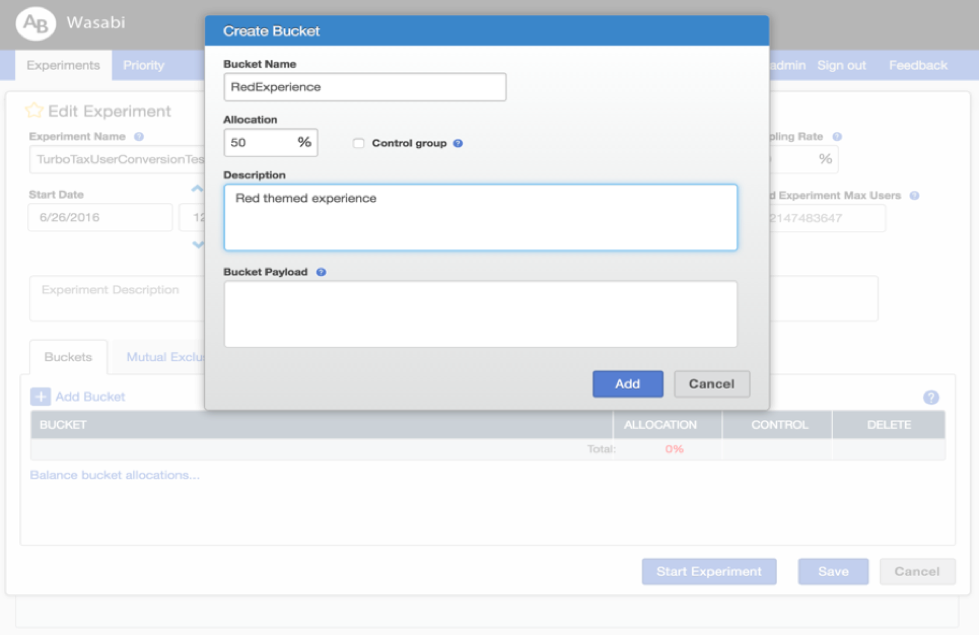
- Create an experiment and its buckets:
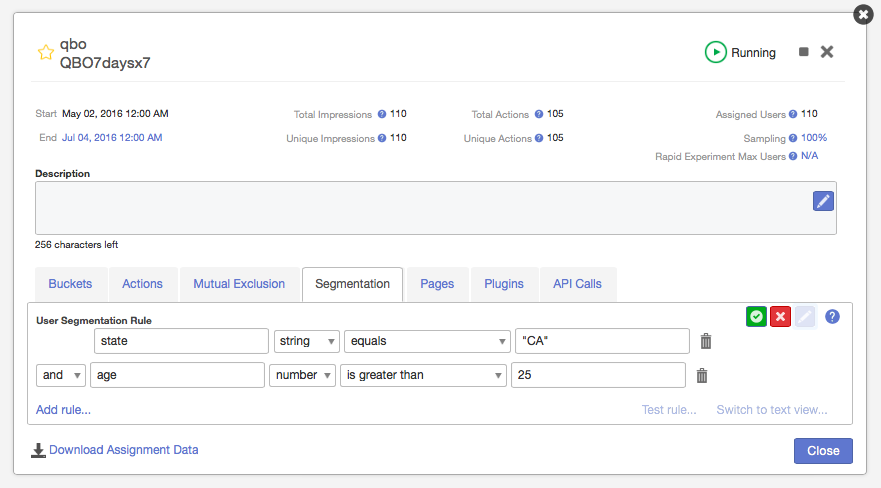
- Filter which customers are considered for your experiment:
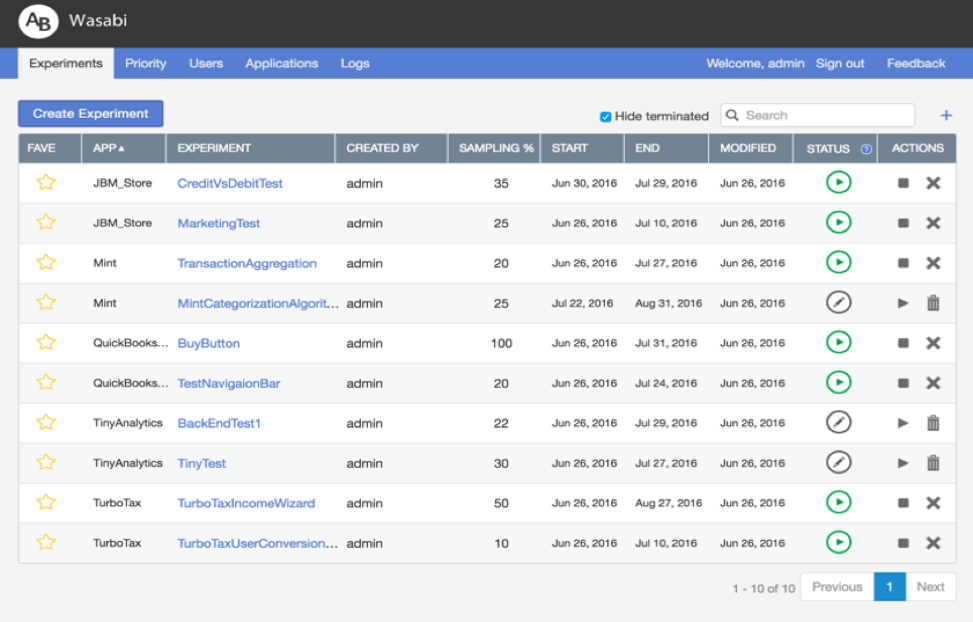
- Follow your currently running experiments:
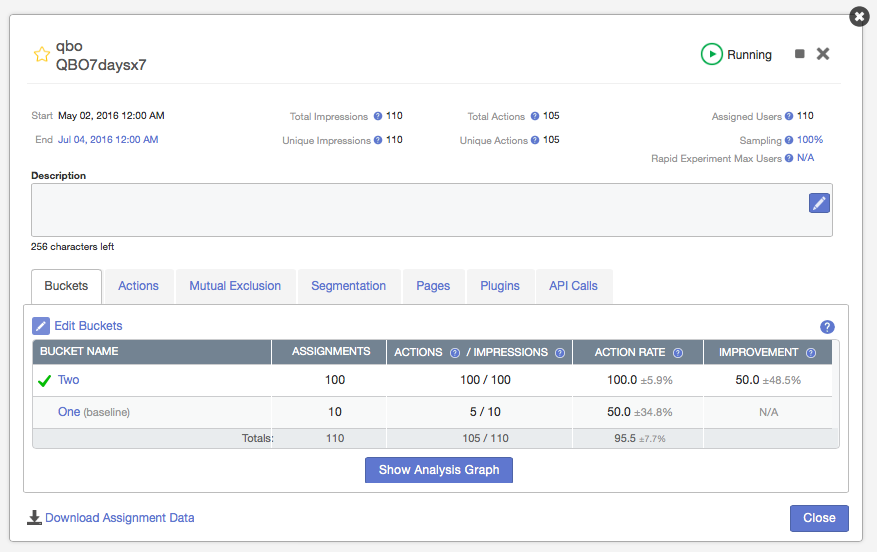
- Track your experiment results in real-time:
Get Started
The following steps will help you install the needed tools, then build and run a complete Wasabi stack.
Bootstrap Your Environment
Mac OS
% /usr/bin/ruby \
  -e "$(curl -fsSL https://raw.githubusercontent.com/Homebrew/install/master/install)"
% brew install git
% git clone https://github.com/intuit/wasabi.git
% cd wasabi
% ./bin/wasabi.sh bootstrap
Installed tools include: homebrew 0.9, git 2, maven 3, java 1.8, docker 1.12, node 6 and python 2.7.
Ubuntu
Bootstrapping on Ubuntu requires sudo privileges to install all the required dependencies. You will be prompted to enter your password. Currently only 16.04 (x64) is supported.
% sudo apt-get install git
% git clone https://github.com/intuit/wasabi.git
% cd wasabi
% ./bin/wasabi.sh bootstrap
% sudo reboot
NOTE: A reboot is required after running the bootstrap command on Ubuntu.
For all other processes (build, start etc.) the commands are same for Ubuntu and Mac OS.
Installed tools include: git 2, maven 3, OpenJdk 8, docker 1.12, node 6 and python 2.7
Similar tooling will work for Windows. Contribute a patch :)
Start Wasabi
Now that we have the necessary tools in place, let's move on to build and start Wasabi, followed by issuing a ping command to verify the build:
% ./bin/wasabi.sh build start
...
wasabi is operational:

  ui: % open http://localhost:8080     note: sign in as admin/admin
  ping: % curl -i http://localhost:8080/api/v1/ping
  debug: attach to localhost:8180

% curl -i http://localhost:8080/api/v1/ping
HTTP/1.1 200 OK
Date: Wed, 25 May 2016 00:25:47 GMT
...
X-Application-Id: wasabi-api-20151215171929-SNAPSHOT-development
Content-Type: application/json
Transfer-Encoding: chunked
Server: Jetty(9.3.z-SNAPSHOT)

{
  "componentHealths":[
    {
      "componentName":"Experiments Cassandra",
      "healthy":true
    },
    {
      "componentName":"MySql","healthy":true
    }
  ],
  "wasabiVersion":"wasabi-api-20151215171929-SNAPSHOT-development"
}
Congratulations! You are the proud owner of a newly minted Wasabi instance. :)
Running Wasabi with remote storage
Set Mysql and Cassandra credentials
- Modify /pom.xml to set the values that apply to your environment
Download Cassandra migration tool https://oss.sonatype.org/content/repositories/public/com/builtamont/cassandra-migration/0.9/cassandra-migration-0.9-jar-with-dependencies.jar
Set up your environment variables
- Set location of the migration tool
export CASSANDRA_MIGRATION=/location/of/cassandra-migration-0.9-jar-with-dependencies.jar
- Set location of migration scripts within your project
export MIGRATION_SCRIPT=/location/of/modules/repository-datastax/src/main/resources/com/intuit/wasabi/repository/impl/cassandra/migration
Set up Cassandra tables
CQLSH_VERSION=<version> CQLSH_USERNAME=<username> CQLSH_PASSWORD=<pwd> CQLSH_HOST=<host> bin/docker/migration.sh
Run Wasabi with env variables for remote storage hosts
MYSQL_HOST=<mysql_host> NODE_HOST=<cassandra_host> ./bin/wasabi.sh start:wasabi
Run Wasabi outside of docker with WASABI_CONFIGURATION for remote storage hosts
WASABI_CONFIGURATION="
  -Ddatabase.url.host=$MYSQL_HOST\
  -Ddatabase.url.port=$MYSQL_PORT\
  -Ddatabase.url.dbname=$MYSQL_DATABASE\
  -Ddatabase.user=$MYSQL_USER\
  -Ddatabase.password=$MYSQL_PASSWORD\
  -Ddatabase.pool.connections.min=$MYSQL_MIN_CONNECTIONS\
  -Ddatabase.pool.connections.max=$MYSQL_MAX_CONNECTIONS\
  -Dusername=$CASSANDRA_USER\
  -Dpassword=$CASSANDRA_PASSWORD\
  -DnodeHosts=$CASSANDRA_HOST\
  -DtokenAwareLoadBalancingLocalDC=$CASSANDRA_DATACENTER\
  -Dapplication.http.port=$PORT" bash usr/local/wasabi-main-*/bin/run
Troubleshooting
-
While starting Wasabi, if you see an error when the docker containers are starting up, you could do the following:
- Look at the current docker containers that have been successfully started.
% ./bin/wasabi.sh status

CONTAINER ID        IMAGE                    COMMAND                  CREATED             STATUS              PORTS                                                                     NAMES
8c12458057ef        wasabi-main              "entrypoint.sh wasabi"   25 minutes ago      Up 25 minutes       0.0.0.0:8080->8080/tcp, 0.0.0.0:8090->8090/tcp, 0.0.0.0:8180->8180/tcp    wasabi-main
979ecc885239        mysql:5.6                "docker-entrypoint.sh"   26 minutes ago      Up 26 minutes       0.0.0.0:3306->3306/tcp                                                    wasabi-mysql
2d33a96abdcb        cassandra:2.1            "/docker-entrypoint.s"   27 minutes ago      Up 27 minutes       7000-7001/tcp, 0.0.0.0:9042->9042/tcp, 7199/tcp, 0.0.0.0:9160->9160/tcp   wasabi-cassandra
- The above shell output shows a successful start of 3 docker containers needed by Wasabi: wasabi-main (the Wasabi server), wasabi-mysql, and wasabi-cassandra. If any of these are not running, try starting them individually. For example, if the MySQL container is running, but Cassandra and Wasabi containers failed to start (perhaps due to a network timeout docker could not download the Cassandra image), do the following:
% ./bin/wasabi.sh start:cassandra

% ./bin/wasabi.sh start:wasabi
Call Wasabi
These ar
Related Skills
node-connect
334.9kDiagnose OpenClaw node connection and pairing failures for Android, iOS, and macOS companion apps
frontend-design
82.3kCreate distinctive, production-grade frontend interfaces with high design quality. Use this skill when the user asks to build web components, pages, or applications. Generates creative, polished code that avoids generic AI aesthetics.
openai-whisper-api
334.9kTranscribe audio via OpenAI Audio Transcriptions API (Whisper).
commit-push-pr
82.3kCommit, push, and open a PR
