IndexedDBShim
A polyfill for IndexedDB using WebSql
Install / Use
/learn @indexeddbshim/IndexedDBShimREADME
IndexedDB Polyfill








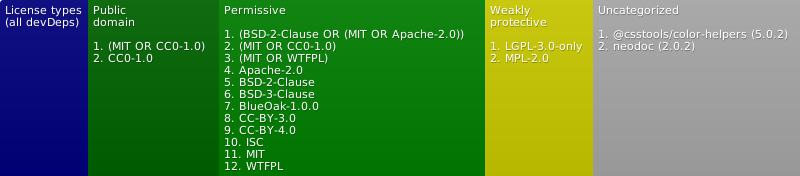
(see also licenses for dev. deps.)
<!--[](https://issuehunt.io/r/indexeddbshim/indexeddbshim)-->|Live Demo (stable)! | Live Demo (master)! | | -------------- | ----------------- |
Use a single, indexable, offline storage API across all desktop and mobile browsers and Node.js.
Even if a browser natively supports IndexedDB, you may still want to use this shim. Some native IndexedDB implementations are very buggy. Others are missing certain features. There are also many minor inconsistencies between different browser implementations of IndexedDB, such as how errors are handled, how transaction timing works, how records are sorted, how cursors behave, etc. Using this shim will ensure consistent behavior across all browsers.
Features
- Optionally adds full IndexedDB support to any web browser that supports WebSQL
- Does nothing if the browser already natively supports IndexedDB
- Can optionally replace native IndexedDB on browsers with buggy implementations
- Works on desktop and mobile devices as well as Node.js (courtesy of websql which sits on top of SQLite3)
- Works on Cordova and PhoneGap via the IndexedDB plug-in (Not recently tested)
- This shim is basically an IndexedDB-to-WebSQL adapter.
- More (though most likely now outdated) details about the project at http://nparashuram.com/IndexedDBShim
Installation
You can download the development or production (minified) script, or install it using NPM.
For Mac, you may need to have CMake installed
for the SQLite3 install to work (See
Tools->How to Install For Command Line Use) as well as build SQLite3 from
source via npm install --build-from-source in the node-sqlite3 directory.
Also make sure Python (2.7) is installed.
npm
npm install indexeddbshim
or
yarn add indexeddbshim
Browser set-up
Add the following scripts to your page:
<script src="./node_modules/core-js-bundle/minified.js"></script>
<script src="./node_modules/indexeddbshim/dist/indexeddbshim.min.js"></script>
If you need full Unicode compliance (handling special non-alphanumeric identifiers in store and index names), use the following instead:
<script src="./node_modules/core-js-bundle/minified.js"></script>
<script src="./node_modules/indexeddbshim/dist/indexeddbshim-UnicodeIdentifiers.min.js"></script>
Node set-up
const setGlobalVars = require('indexeddbshim');

global.window = global; // We'll allow ourselves to use `window.indexedDB` or `indexedDB` as a global
setGlobalVars(); // See signature below
ES6 Modules
Bundler for Browser
import setGlobalVars from 'indexeddbshim';
Bundler for Node
import setGlobalVars from 'indexeddbshim/src/node-UnicodeIdentifiers';

// Or without Unicode support
// import setGlobalVars from 'indexeddbshim/src/node';
Usage/API
For the browser scripts, if the browser already natively supports IndexedDB and is not known to be buggy, then the script won't do anything.
Otherwise, assuming WebSQL is available, the script will add the
IndexedDB API
to the browser (unless you use one of the non-invasive files, in which case
setGlobalVars can be used to optionally add the API to an object of your
choosing; if you also wish Unicode support, you will need to add it yourself).
Either way, you can use IndexedDB just like normal. Here's an example.
setGlobalVars(<winObj or null>, initialConfig)
In the non-invasive builds (and Node.js), globals are not automatically set. You have the choice to set globals when you wish as well as to set the API on an object of your choosing in place of setting globals.
This is done through setGlobalVars() (which is otherwise called in the
browser builds automatically with no arguments).
This function defines shimIndexedDB, indexedDB, IDBFactory, etc. on
one of the following objects in order of precedence:
- The passed in
winObjobject if defined window(for Node, defineglobal.window = global;)self(for web workers)global(for Node)- A new empty object
The initialConfig argument, if present, should be an object whose keys
are the config properties to set and its values are the config values (see
shimIndexedDB.__setConfig below).
If you are adding your own window.openDatabase implementation, supplying
it within initialConfig (keyed as openDatabase) will ensure that
shimIndexedDB.__useShim() is auto-invoked for you if poor IndexedDB
support is detected.
shimIndexedDB.__useShim();
To force IndexedDBShim to shim the browser's native IndexedDB (if our code is not already auto-shimming your browser when detecting poor browser support), add this method call to your script.
On browsers that support WebSQL, this line will completely replace the native IndexedDB implementation with the IndexedDBShim-to-WebSQL implementation.
On browsers that don't support WebSQL, but do support IndexedDB, this line will patch many known problems and add missing features. For example, on Internet Explorer, this will add support for compound keys.
If CFG.addNonIDBGlobals has been set (e.g., on the initialConfig argument
of setGlobalVars), the other non-IndexedDB shims necessitated by this
library will be polyfilled as possible on the chosen "global" (i.e.,
ShimEvent, ShimCustomEvent, ShimEventTarget, ShimDOMException,
and ShimDOMStringList). Mostly useful for testing.
If CFG.replaceNonIDBGlobals is used, it will instead attempt to add,
or if already present, overwrite these globals.
If CFG.fullIDLSupport has been set, the slow-performing
Object.setPrototypeOf calls required for full WebIDL compliance will
be used. Probably only needed for testing or environments where full
introspection on class relationships is required.
See this SO topic
shimIndexedDB.__forceClose([dbName], [connIdx], [msg])
The spec anticipates the closing of a database connection with a forced flag.
The spec also mentions some circumstances where this may occur:
A connection may be closed by a user agent in exceptional circumstances, for example due to loss of access to the file system, a permission change, or clearing of the origin’s storage.
Since the latter examples are under the browser's control, this method may be more useful on the server or for unit-testing.
If the first argument, dbName is missing (or null or undefined),
all connections to all databases will be force-closed.
If the second argument, connIdx is missing (or null or undefined),
all connections with the given name will be force-closed. It can
alternatively be an integer representing a 0-based index to indicate a
Related Skills
feishu-drive
326.5k|
things-mac
326.5kManage Things 3 via the `things` CLI on macOS (add/update projects+todos via URL scheme; read/search/list from the local Things database)
clawhub
326.5kUse the ClawHub CLI to search, install, update, and publish agent skills from clawhub.com
codebase-memory-mcp
766High-performance code intelligence MCP server. Indexes codebases into a persistent knowledge graph — average repo in milliseconds. 64 languages, sub-ms queries, 99% fewer tokens. Single static binary, zero dependencies.