
Resizer
The official repository for ImageResizer
Install / Use
/learn @imazen/ResizerREADME
<a name="top"></a>
ImageResizer 5 - Better images, faster sites



If you can use .NET 5, 6, or 7, use Imageflow.Server in place of ImageResizer. This readme is for ImageResizer 5.x for .NET Framework 4.x. Click for the ImageResizer 4.x, 3.x, or 2.x readme.
We've made some major changes in V5 to greatly improve image quality, file sizes, concurrency, maintainability, and response times. Read the changelog and follow suggestions in /resizer.debug when migrating from V4.
Quick Start: Install the ImageResizer.WebConfig NuGet package, run your app, then visit /resizer.debug
What can it do?
- Enables fast on-demand image compression, resizing, and manipulation via the querystring.
- Easy: https://example.com/image.jpg?width=100&height=200&mode=crop
- Use
<picture>andsrcsetwithout leaving your IDE (bye, Photoshop). - Makes implementing product and image galleries trivially easy.
- Can process images from S3, Azure Blobs, and more (very extensible).
- Cutting-edge low-latency disk caching to keep response times blazing fast.
- Designed and hardened for server-side use.
- Easy to use with a CDN, or behind a reverse proxy.
- Extensive collection of plugins, including more than a dozen from the wider community.
- Integrates with most CMSes, and is included by many.
- Great for use with both public and private (secured) images; supports custom authorization rules.
Packages
ImageResizerincludes an HttpModule for .NET Framework 4.7.2/4.8.ImageResizer.WebConfiginstalls the HttpModule in Web.config.ImageResizer.Plugins.Imageflowinstalls the Imageflow backend. Imageflow is what provides excellent image quality and file sizes, and is required for most image manipulation commands. If you're not using ASP.NET, you can use it directly via theImageflow.Netpackage.Imageflow.NativeRuntime.win-x86 (enable pre-release)installs the 32-bit imageflow.dllImageflow.NativeRuntime.win-x86_64 (enable pre-release)installs the 64-bit imageflow.dll. Keep this pacakge updated!ImageResizer.Plugins.AzureReader2allows processing images located in Azure Blob storage.ImageResizer.Plugins.S3Reader2allows processing images located in Amazon S3.ImageResizer.Plugins.HybridCacheis essential for scaling your website to high traffic. It offers an insanely well optimized, low latency disk cache with accurate space limiting. It replaces DiskCache and does everything better.ImageResizer.Storageis useful for integrating ImageResizer with alternate image storage locations.
How do you apply commands?
ImageResizer has a very simple (and powerful) URL API.
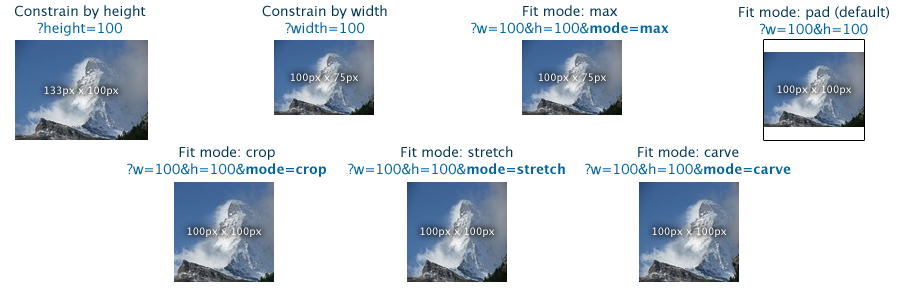
For more information, check out the website.
License
- ImageResizer and ImageResizer.WebConfig are licensed under the Apache 2.0 license.
- ImageResizer.Plugins.Imageflow, .HybridCache, .AzureReader2, and .S3Reader2 require a commercial license or compliance with the AGPL 3.0.
TODO - Content below this point has not been updated for V5
Table of Contents
- Getting Started
- Basic Installation Guide
- Installing a Plugin Manually
- Reference
- List of Plugins
- Full Command Reference
- Managed API Examples
- Configuration Reference
- Nifty Tricks
- Watermark Images Based on Folder Name or Display Size
- Generate Thumbnails and Multiple Sizes to Disk
- Convert and Resize Images as They Are Uploaded
- Troubleshooting
- Accessing Self-Diagnostics
- Getting Detailed Error Messages
- What Might be Wrong
- Everything Else
- Licensing and Support Information
- Contact Us
<a name="getting_started"></a>
Getting Started
Below is a basic installation guide, although a more comprehensive one can be found on our website.
Starting with ImageResizer v5, you'll want to avoid nuget.packages and use the ProjectReference format instead in your projects.
PM> Install-Package Imageflow.NativeRuntime.win-x86 -pre
PM> Install-Package Imageflow.NativeRuntime.win-x86_64 -pre
<a name="installation"></a>
Basic Installation Guide
Install from NuGet
In V5, ImageResizer rolled the vast majority of plugin features into ImageResizer.Plugins.Imageflow. That's why so many plugins are deprecated; they're duplicating Imageflow functionality.
Nearly all ImageResizer plugins are on NuGet. You can enable source symbols from symbolsource.org for an enhanced debugging experience.
Get the basics:
PM> Install-Package ImageResizer.WebConfig
PM> Install-Package ImageResizer.Plugins.Imageflow
PM> Install-Package Imageflow.NativeRuntime.win-x86 -pre
PM> Install-Package Imageflow.NativeRuntime.win-x86_64 -pre
PM> Install-Package ImageResizer.Plugins.HybridCache
<a name="install_plugin"></a>
Manual Plugin Installation
- In your project, add a reference to the plugin DLL (or project, if you're using the source).
- Configure the plugin to be installed at startup via (i) or (ii).
- In the <plugins /> section of Web.config, insert
<add name="PluginName" /> - In
Application_Start, create an instance of the plugin and install it.
new PluginName().Install(ImageResizer.Configuration.Config.Current);
You will need to add the appropriate namespace reference to access the plugin.
Most configuration and plugin installation issues can be resolved by checking ImageResizer’s self-diagnostics page. If your local website is running at http://localhost:5000/, then you should browse to http://localhost:5000/resizer.debug.ashx to access it. See [the Troubleshooting](#troubleshooting section) for more details.
<a name="reference"></a>
Reference
<a name="plugins_list"></a>
List of Plugins
The following is a list of all plugins currently available on ImageResizer, and links to their more detailed documentation on our website. They are grouped according to the license necessary to access them. Higher level licenses include all plugins from lower level licenses. Their order, from lowest to highest, is Essential, Performance, Creative, Elite. If you have any further questions about ImageResizer licenses, we encourage you to look at our licenses page.
Elite License Plugins
- CropAround plugin - Automatic cropping based on a set of areas to preserve specified areas.
- BatchZipper plugin - Asynchronously generated .zip archives of files and resized images. Great for providing customized downloads to customers.
- Faces plugin - Provides face detection.
- FFmpeg plugin - Extract frames from videos by time or percentage. Includes basic blank frame avoidance. Based on ffmpeg.
- MongoReader plugin - Allows GridFS files to be resized and served.
- PsdComposer - Dynamically edit and render PSD files - turn layers on and off, edit text layer contents, and apply certain effects.
- RedEye plugin - Provides sophisticated eye detection and red eye correction.
- WebP plugins - Decode and encode .webp images.
Creative License Plugins
- AdvancedFilters plugin - Blur, sharpen, remove noise, and perform automatic histogram adjustment, plus several other cool effects.
- CopyMetadata plugin - Preserve metadata during image processing.
- WIC plugins (V3.1+)- 3 plugins: WicDecoder supports decoding images through WIC, and supports any image codecs installed on the computer. WicEncoder encodes jpeg, gif, and png images through WIC for better performance and more control. Adjust jpeg quality, subsampling, gif dithering, and palette size. WicBuilder provides a completely alternate pipeline, which supports most basic resize/crop/pad operations. 2-4x faster than the default pipeline. Enable on a per-request bass.
- FreeImage plugins - Includes 4 plugins: FreeImageDecoder adds support for RAW & HDR source images - over 20 formats supported. FreeImageEcoder provides 2-4x Faster jpeg encoding. FreeImageResizer adds support for Lanczos3 and CatmullRom scaling. FreeImageBuilder provides an altern
Related Skills
node-connect
341.0kDiagnose OpenClaw node connection and pairing failures for Android, iOS, and macOS companion apps
frontend-design
84.4kCreate distinctive, production-grade frontend interfaces with high design quality. Use this skill when the user asks to build web components, pages, or applications. Generates creative, polished code that avoids generic AI aesthetics.
openai-whisper-api
341.0kTranscribe audio via OpenAI Audio Transcriptions API (Whisper).
commit-push-pr
84.4kCommit, push, and open a PR
