
briar
Local-first CLI that mines your tools (GitHub, Jira, AWS, …) into agent-ready context and runs autonomous LLM agents against it. https://usebriar.com
Install / Use
claude mcp add iklobato -- npx -y github:iklobato/briarIf the server publishes to npm under a different name, use that package instead — check the repo README.
MCP Server
Model Context Protocol server
Quality Score
Category
AI & Machine LearningSupported Platforms
Our assessment of briar
briar scores 83/100 on our quality scale, 663rd of 947 AI & Machine Learning skills we index.
Its MCP Server is 24 KB long, well organised into 22 sections with 10 code examples: a thorough specification that gives an agent plenty to work with.
It has 3 GitHub stars, so there is little community track record yet; judge it on its content.
Maintenance, license and trust
- The repository was last updated yesterday, so briar is actively maintained.
- It is released under the MIT license, a permissive license that allows use, modification and commercial use with attribution.
- Its trust signals score 92/100, with 1 caution from licensing, adoption, age or documentation. These come from repository metadata, not a code audit — read the skill file before letting an agent act on it.
Safety scan
No issues foundOur scan of the whole file found no instruction hijacking, hidden characters, credential access, data exfiltration or destructive commands. An AI review of the same text found nothing harmful.
AI review by kimi-k2.7-code on 2026-10-31. Automated pattern scan on 2026-10-31. It catches known dangerous patterns, not every risk — read a skill before letting an agent act on it.
briar compared with similar skills
All 4 of these similar skills score higher than briar; compare them before choosing.
| Skill | Score | Stars | Updated | Format |
|---|---|---|---|---|
| briar (this skill)by iklobato | 83 | 3 | 1d ago | MCP Server |
| Agent-Reachby Panniantong | 100 | 107.1k | 6d ago | CLAUDE.md |
| claude-memby thedotmack | 100 | 107.0k | today | CLAUDE.md |
| Understand-Anythingby Egonex-AI | 100 | 89.3k | 5d ago | CLAUDE.md |
| headroomby headroomlabs-ai | 100 | 78.4k | today | CLAUDE.md |
Frequently asked questions
- How do I install briar?
- Run
claude mcp add iklobato -- npx -y github:iklobato/briar. The install tabs above show the steps for each supported agent. - Which AI agents does briar work with?
- It is written for Claude Code and Claude Desktop, as a MCP Server file. Other agents that read the same format can often use it too.
- Is briar safe to use?
- Our scan of the whole file found no instruction hijacking, hidden characters, credential access, data exfiltration or destructive commands. An AI review of the same text found nothing harmful. It is MIT-licensed and scores 92/100 on trust signals. Skills are instructions an agent will follow, so read the file before installing it and do not approve commands you do not understand.
- Is briar still maintained?
- The repository was last updated yesterday, so briar is actively maintained.
Skill content
View source on GitHubbriar
The local CLI that turns your team's tools into knowledge, then runs coding agents that open draft PRs with it.






Install · Quickstart · Docs · Website · Changelog
<img src="https://raw.githubusercontent.com/iklobato/briar/main/docs/demo/01-setup-and-extract.gif" alt="briar init, briar doctor, then briar extract collects facts about the repo and briar context get prints them" width="800">New to briar? Learn it in 3 examples, from install to AI agents.
</div>briar is a command-line tool (you run it in your terminal) that helps AI coding assistants do better work on your team's code.
The problem: an AI assistant like Claude can write code, but it does not know your team. It does not know which tests you run, who reviews what, how your PRs usually look, or what the ticket really asks. So it guesses, and you fix its guesses.
What briar does about it, in two parts:
- It collects facts. It reads your team's tools (GitHub or Bitbucket, Jira or Linear, AWS, Fireflies meeting notes) and writes what it learns into plain text files on your computer. briar calls these facts "knowledge".
- It gives those facts to AI agents. An agent is an AI that works on its own, step by step. One briar agent takes a ticket and opens a draft PR (a PR marked "not ready to merge yet"). Another one fixes the review comments on a PR. You always review and merge yourself.
There is no briar server and no account. briar only talks to the services you set up: your code host, your tracker, your cloud and your AI provider. Your tokens stay in a file on your computer.
What you get
- Facts from your tools. briar has 23 extractors. An extractor is a small reader for one kind of fact, for example "how long PRs take to merge" or "which files change the most". They read GitHub, Bitbucket, Jira, Linear, AWS, GCP, Azure and Fireflies, and write plain markdown text to a folder (or to a Postgres database), once or on a schedule.
- AI agents that read the facts first.
briar agent implementtakes a ticket, reads the facts it needs, writes the code in a fresh copy of your repo, runs your tests and opens a draft PR.briar agent prfixanswers each review comment with its own small commit. Agents never force-push, amend or rebase, so they never rewrite history that is already there. - A whole board, one card at a time.
briar planreads a Jira board or a GitHub Project (the list of tickets your team works on), puts the cards in order and works on them one by one. When a card needs another card's code, it starts from that card's branch, so the PRs build on each other. - You stay in charge. Agents only open draft PRs. briar has no command that merges.
- Works with your other AI tools.
--merge-claude-mdadds the facts toCLAUDE.md, the file Claude Code reads when it starts.briar mcp serveshares the facts with any app that speaks MCP (a standard way for AI apps to call tools); it offers 10 tools. - Runs on your computer. No account. Keys stay in a file on your machine, or in AWS Secrets Manager, SSM or Vault.
Where the knowledge comes from, and where the work goes
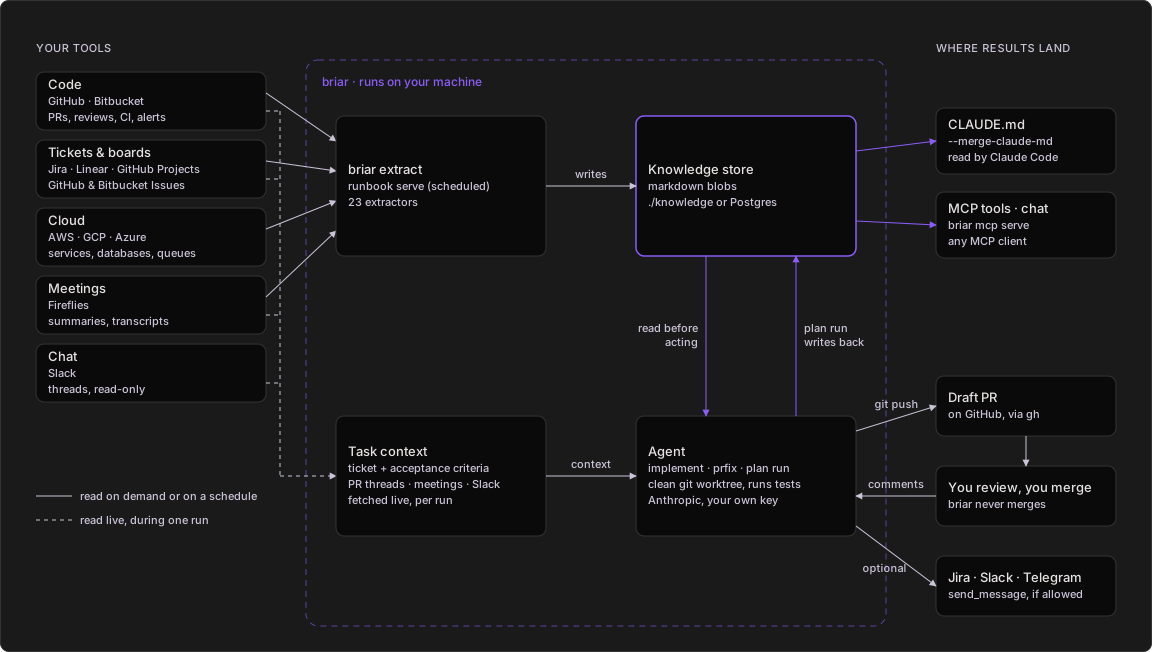
Everything in the dashed box runs on your machine and reads from your
tools. Agents push branches, open draft PRs and reply on reviews; their
send_message tool only reaches the channels you list in the runbook.
- Extractors read your tools, on demand or on a schedule, and write markdown knowledge to a local folder or to Postgres.
- You point an agent at a ticket or a PR. It fetches the ticket, the PR's review threads, and matching meeting notes and Slack messages live.
- In a clean git worktree it first reads the knowledge sections that fit its job (conventions, hotspots, reviewers, PR history), writes the code on a new branch and runs your tests. Coding agents run on Anthropic with your own key.
- It pushes and opens a draft PR. If you allow those channels in the runbook, it can also comment on the ticket or post in Slack or Telegram.
- You review.
briar agent prfixanswers the comments with one commit per thread. You merge; briar never does. - A plan run writes what each card taught into the plan's knowledge, which
its selector reads before the next pick. All knowledge also feeds Claude
Code (
CLAUDE.md) and any MCP client.
More diagrams are in See it run.
Install
pip install briar-cli
briar version
briar needs Python 3.10 or later. To run briar agent or briar plan run
you also need git and the GitHub CLI gh, because the agent runs them.
The base install covers GitHub, Bitbucket, AWS, Jira, Linear, Fireflies, Anthropic (Claude) and AWS Bedrock, with a file or Postgres store, and runs the coding agents. Extras add more:
pip install 'briar-cli[mcp]'      # briar mcp serve, briar chat, MCP tools for agents
pip install 'briar-cli[all]'      # openai, gemini, mcp, gcp, azure, vault
Or skip the install and use the Docker image, which also has git and
gh:
docker run --rm iklob1/briar version
Mounts, keys and running agents in Docker: usebriar.com/docs/install#docker. What each extra adds: usebriar.com/docs/install#extras.
Quickstart
The short version, for a GitHub repo with Jira tickets. New to briar? Learn it in 3 examples instead.
# 1. Save a GitHub token and Jira login. They go to ~/.config/briar/secrets.env
briar auth login github-pat --company acme
briar auth login jira-token --company acme

# 2. Give briar a Claude key. It reads it from your shell.
export ANTHROPIC_API_KEY=sk-ant-your-key

# 3. Read the repo's recent PRs and its tools into the blob knowledge:acme
briar extract --company acme --repo acme-co/acme-app \
    --include pr-archaeology --include codebase-conventions --max 50

# 4. Read what was saved
briar context get knowledge:acme

# 5. Print the agent's prompt for ticket ACME-42. No cost, nothing pushed.
briar agent implement --company acme --repo acme-co/acme-app \
    --ticket-key ACME-42 --tracker jira --dry-run

# 6. Run it for real: clone, branch, code, test, open a draft PR
briar agent implement --company acme --repo acme-co/acme-app \
    --ticket-key ACME-42 --tracker jira
After step 3 you have ./knowledge/knowledge/acme.md. After step 6 you
have a branch chore/acme-42 and a draft PR on acme-co/acme-app.
Learn briar in 3 examples
Written for someone who has never used briar. Each example says the problem it solves, what each command does, what happens behind the scenes, and what you get. Every GIF is a real run in a clone of this repo on briar 1.1.99: the commands really ran; only the typing is paced, and a long output is shown one screen at a time so you can read it.
Before you start (once, about 2 minutes):
pip install briar-cli                  # installs the briar command (needs Python 3.10 or later)
cd path/to/your-repo                   # go into any GitHub repo you can read
export GITHUB_TOKEN=$(gh auth token)   # gives briar your GitHub login, so it can read the repo
If you do not use the GitHub CLI gh, run
briar auth login github-pat --company myteam and paste a GitHub token
instead. That token is all examples 1 and 2 need. Nothing is sent to an
AI, so they cost nothing. Example 3 also uses --dry-run, so it costs
nothing either; you only need an AI key (export ANTHROPIC_API_KEY=...)
when you drop --dry-run and let the agent really work.
Words you will see:
| Word | What it means |
|---|---|
| extractor | A reader for one kind of fact, like "merged PRs" or "CI runs". |
| knowledge, blob | The facts briar saved. One markdown file, named like knowledge:myteam. |
| agent | An AI that works on its own, step by step: it reads files, runs commands and writes code. |
| prompt | The instructions text that briar gives the AI. |
| --dry-run | "Show me what you would do, but do not do it." No AI call, nothing changes. |
| draft PR | A PR marked "not ready", so nobody merges it by accident. |
| runbook | A YAML file that lists which extractors to run, for which team, and how often. |
Example 1: Set up briar and collect facts
The problem: an AI that writes code for you does not know your repo or how your team works: how fast PRs get merged, who writes them, how often you release, how often CI passes.
briar init --company myteam    # creates .briar.toml, a small settings file in your repo
briar doctor                   # checks that briar has everything it needs
briar extract --include pr-archaeology --include release-cadence --include ci-health --merge-claude-md
                               # collects three kinds of facts and tells Claude Code where they are
briar context get knowledge:myteam   # prints the facts briar saved

What happens:
initrunsgit remote get-url originto find the GitHub owner and repo name, and writes them into.briar.tomlwith the team name you chose (myteamis just a label). After this, no command needs--companyor--repo. To see each setting and where it came from, runbriar config show.doctorchecks Python, the settings file, the git remote, your GitHub token and your AI key.okmeans ready;warntells you what is missing and what needs it.extractruns the extractors you name with--include. They ask the GitHub API for your merged PRs (pr-archaeology), your releases (release-cadence) and your last 100 CI runs (ci-health), and sum them up. The result is saved as one markdown file under./knowledge/, calledknowledge:myteam.--merge-claude-mdalso writes the facts to.briar/knowledge/myteam.mdand adds a short block toCLAUDE.mdthat points to it. Claude Code (an AI coding assistant) readsCLAUDE.mdwhen it starts, so every session begins with your facts. Your own text inCLAUDE.mdstays as it is.context getprints the saved file. It only reads your disk; nothing goes online.
You get: your repo's facts in one text file, ready for any AI.
briar extract -h lists all 23 extractors. Good ones to add later:
code-hotspots (the files that change the most),
codebase-conventions (your test runner, linter and formatter) and
stale-prs (open PRs nobody touched for a while). Running extract again
only replaces the sections of the extractors that ran, so the facts you
already h
Truncated for display — read the full file on GitHub.
Related Skills
Agent-Reach
107.1kGive your AI agent eyes to see the entire internet. Read & search Twitter, Reddit, YouTube, GitHub, Bilibili, XiaoHongShu — one CLI, zero API fees.
claude-mem
107.0kPersistent Context Across Sessions for Every Agent – Captures everything your agent does during sessions, compresses it with AI, and injects relevant context back into future sessions. Works with Claude Code, OpenClaw, Codex, Gemini, Hermes, Copilot, OpenCode + More
Understand-Anything
89.3kGraphs that teach > graphs that impress. Turn any code into an interactive knowledge graph you can explore, search, and ask questions about. Works with Claude Code, Codex, Cursor, Copilot, Gemini CLI, and more.
headroom
78.4kCompress tool outputs, logs, files, and RAG chunks before they reach the LLM. 20% fewer tokens for coding agents, 60-95% fewer tokens for JSON, same answers. Library, proxy, MCP server.

Languages
Trust signals
From repository metadata: license, adoption, age and documentation. Not a code audit — see the Safety scan above for what the skill file itself contains.