
Icomet
A C1000K comet/push server built with C++, for web and mobile app
Install / Use
/learn @ideawu/IcometREADME
icomet
A C1000K comet/push server built with libevent.
iComet is powerfull, can be used as the messaging server of many applications, such as web chat, mobile application, desktop application etc.
iComet provides a easy-to-use JavaScript library, with iComet js lib, you can build a web app that needs server-push feature very fast.
Documentation
https://github.com/ideawu/icomet/wiki
iComet's role in web system and mobile system

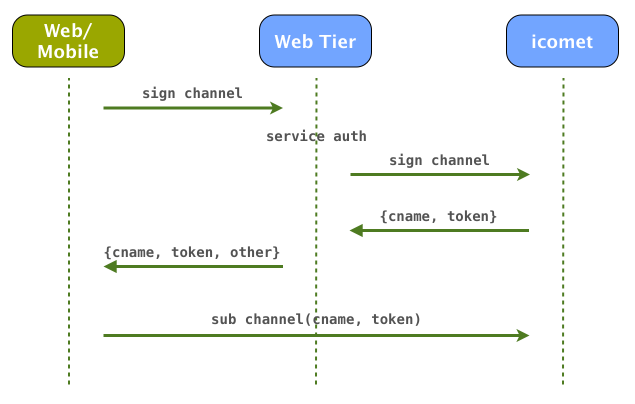
The work process of iComet in your system
Compile and Run
Compile:
wget --no-check-certificate https://github.com/ideawu/icomet/archive/master.zip
unzip master.zip
cd icomet-master/
make
Start icomet server
./icomet-server icomet.conf
# or run as daemon
./icomet-server -d icomet.conf
# stop
./icomet-server icomet.conf -s stop
Make a test via curl:
curl -v "http://127.0.0.1:8100/sub?cname=12&seq=1"
# open another terminal
curl -v "http://127.0.0.1:8000/push?cname=12&content=hi"
JavaScript Library Usage
var comet = new iComet({
    channel: 'abc',
    signUrl: 'http://127.0.0.1:8000/sign',
    subUrl: 'http://127.0.0.1:8100/sub',
    callback: function(content){
        // on server push
        alert(content);
    }
});
Supported Platforms and Browsers
| Browser | Platform | | --------| -------- | | Safari | iOS(iPhone, iPod, iPad), Mac | | Firefox | Windows, Mac | | Chrome | Windows, Mac | | IE6, IE8 | Windows |
Java/Android API
Run the chat demo
- Compile and start icomet server
- Drag and drop the file demo/web/chat.html into one web browser
- Drag and drop the file demo/web/chat.html into another different web browser
- Start chatting!
Live demo
This live demo is based on https://github.com/ideawu/icomet-demos, which has buddy list, chat history, and other features.
Live Demo: http://www.ideawu.com/icomet/chat.html
Nginx + icomet
You can integrate icomet with nginx. If you are running you website on port 80 with domain www.test.com. That is you visit your website home page with this url:
http://www.test.com/
Then you want to run icomet on the same server with port 80, for the concern of firewall issue. You can config nginx to pass request to icomet:
location ~ ^/icomet/.* {
	rewrite ^/icomet/(.*) /$1 break;

	proxy_read_timeout 60;
	proxy_connect_timeout 60;
	proxy_buffering off;
	proxy_pass   http://127.0.0.1:8100;
}
Then, this url is used to subscribe to icomet channel xxx:
http://www.test.com/icomet/sub?cname=xxx
Misc
Users
- xiaozhu.com
- testin.cn
QQ group
- 389083972
Related Skills
node-connect
334.9kDiagnose OpenClaw node connection and pairing failures for Android, iOS, and macOS companion apps
frontend-design
82.3kCreate distinctive, production-grade frontend interfaces with high design quality. Use this skill when the user asks to build web components, pages, or applications. Generates creative, polished code that avoids generic AI aesthetics.
openai-whisper-api
334.9kTranscribe audio via OpenAI Audio Transcriptions API (Whisper).
commit-push-pr
82.3kCommit, push, and open a PR
