Id Analyzer Php SDK
PHP SDK for ID Analyzer Core API, DocuPass and Vault
Install / Use
npx skills add idanalyzer/id-analyzer-php-sdkInstalls into whichever agent you are using.
README
⚠️ DEPRECATED — use the v2 SDK
This is the legacy API v1 PHP SDK (Composer package
idanalyzer/id-analyzer-php-sdk). It targets the olderapi.idanalyzer.comendpoint and is no longer actively maintained.New projects should use the API v2 SDK: Composer
idanalyzer/id-analyzer-v2-php-sdk· repo idanalyzer/id-analyzer-v2-php (composer require idanalyzer/id-analyzer-v2-php-sdk).
ID Analyzer PHP SDK
This is a PHP SDK for ID Analyzer Identity Verification APIs, though all the APIs can be called with without the SDK using simple HTTP requests as outlined in the documentation, you can use this SDK to accelerate server-side development.
We strongly discourage users to connect to ID Analyzer API endpoint directly from client-side applications that will be distributed to end user, such as mobile app, or in-browser JavaScript. Your API key could be easily compromised, and if you are storing your customer's information inside Vault they could use your API key to fetch all your user details. Therefore, the best practice is always to implement a client side connection to your server, and call our APIs from the server-side.
Installation
Install through composer
composer require idanalyzer/id-analyzer-php-sdk
Alternatively, download this package and manually require the PHP files under src folder.
Core API
ID Analyzer Core API allows you to perform OCR data extraction, facial biometric verification, identity verification, age verification, document cropping, document authentication (fake ID check), AML/PEP compliance check, and paperwork automation using an ID image (JPG, PNG, PDF accepted) and user selfie photo or video. Core API has great global coverage, supporting over 98% of the passports, driver licenses and identification cards currently being circulated around the world.
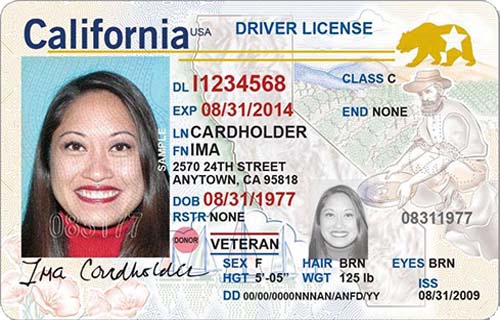
The sample code below will extract data from this sample Driver License issued in California, compare it with a photo of Lena, and check whether the ID is real or fake.
// use composer autoload
require("vendor/autoload.php");

// or manually load CoreAPI class
//require("../src/CoreAPI.php");

use IDAnalyzer\CoreAPI;

// Initialize Core API US Region with your credentials
$coreapi = new CoreAPI("Your API Key", "US");

// Enable authentication and use 'quick' module to check if ID is authentic
$coreapi->enableAuthentication(true, 'quick');

// Analyze ID image by passing URL of the ID image and a face photo (you may also use a local file)
$result = $coreapi->scan("https://www.idanalyzer.com/img/sampleid1.jpg","","https://upload.wikimedia.org/wikipedia/en/7/7d/Lenna_%28test_image%29.png");

// All information about this ID will be returned in an associative array
$data_result = $result['result'];
$authentication_result = $result['authentication'];
$face_result = $result['face'];

// Print result
echo("Hello your name is {$data_result['firstName']} {$data_result['lastName']}<br>");

// Parse document authentication results
if($authentication_result){
    if($authentication_result['score'] > 0.5) {
        echo("The document uploaded is authentic<br>");
    }else if($authentication_result['score'] > 0.3){
        echo("The document uploaded looks little bit suspicious<br>");
    }else{
        echo("The document uploaded is fake<br>");
    }
}
// Parse face verification results
if($face_result){
    if($face_result['error']){
        // View complete error codes under API reference: https://developer.idanalyzer.com/coreapi.html
        echo("Face verification failed! Code: {$face_result['error']}, Reason: {$face_result['error_message']}<br>");
    }else{
        if($face_result['isIdentical'] === true){
            echo("Great! Your photo looks identical to the photo on document<br>");
        }else{
            echo("Oh no! Your photo looks different to the photo on document<br>");
        }
        echo("Similarity score: {$face_result['confidence']}<br>");
    }
}
You could also set additional parameters before performing ID scan:
$coreapi->enableVault(true,false,false,false);  // enable vault cloud storage to store document information and image
$coreapi->setBiometricThreshold(0.6); // make face verification more strict
$coreapi->enableAuthentication(true, 'quick'); // check if document is real using 'quick' module
$coreapi->enableBarcodeMode(false); // disable OCR and scan for AAMVA barcodes only
$coreapi->enableImageOutput(true,true,"url"); // output cropped document and face region in URL format
$coreapi->enableDualsideCheck(true); // check if data on front and back of ID matches
$coreapi->setVaultData("user@example.com",12345,"AABBCC"); // store custom data into vault
$coreapi->restrictCountry("US,CA,AU"); // accept documents from United States, Canada and Australia
$coreapi->restrictState("CA,TX,WA"); // accept documents from california, texas and washington
$coreapi->restrictType("DI"); // accept only driver license and identification card
$coreapi->setOCRImageResize(0); // disable OCR resizing
$coreapi->verifyExpiry(true); // check document expiry
$coreapi->verifyAge("18-120"); // check if person is above 18
$coreapi->verifyDOB("1990/01/01"); // check if person's birthday is 1990/01/01
$coreapi->verifyDocumentNumber("X1234567"); // check if the person's ID number is X1234567
$coreapi->verifyName("Elon Musk"); // check if the person is named Elon Musk
$coreapi->verifyAddress("123 Sunny Rd, California"); // Check if address on ID matches with provided address
$coreapi->verifyPostcode("90001"); // check if postcode on ID matches with provided postcode
$coreapi->enableAMLCheck(true); // enable AML/PEP compliance check
$coreapi->setAMLDatabase("global_politicians,eu_meps,eu_cors"); // limit AML check to only PEPs
$coreapi->enableAMLStrictMatch(true); // make AML matching more strict to prevent false positives
$coreapi->generateContract("Template ID", "PDF", array("email"=>"user@example.com")); // generate a PDF document autofilled with data from user ID
To scan both front and back of ID:
$result = $coreapi->scan("path/to/id_front.jpg", "path/to/id_back.jpg");
To perform biometric photo verification:
$result = $coreapi->scan("path/to/id.jpg", "", "path/to/face.jpg");
To perform biometric video verification:
$result = $coreapi->scan("path/to/id.jpg", "", "", "path/to/video.mp4", "1234");
Check out sample response array fields visit Core API reference.
DocuPass Identity Verification API
DocuPass allows you to verify your users without designing your own web page or mobile UI. A unique DocuPass URL can be generated for each of your users and your users can verify their own identity by simply opening the URL in their browser. DocuPass URLs can be directly opened using any browser, you can also embed the URL inside an iframe on your website, or within a WebView inside your iOS/Android/Cordova mobile app.
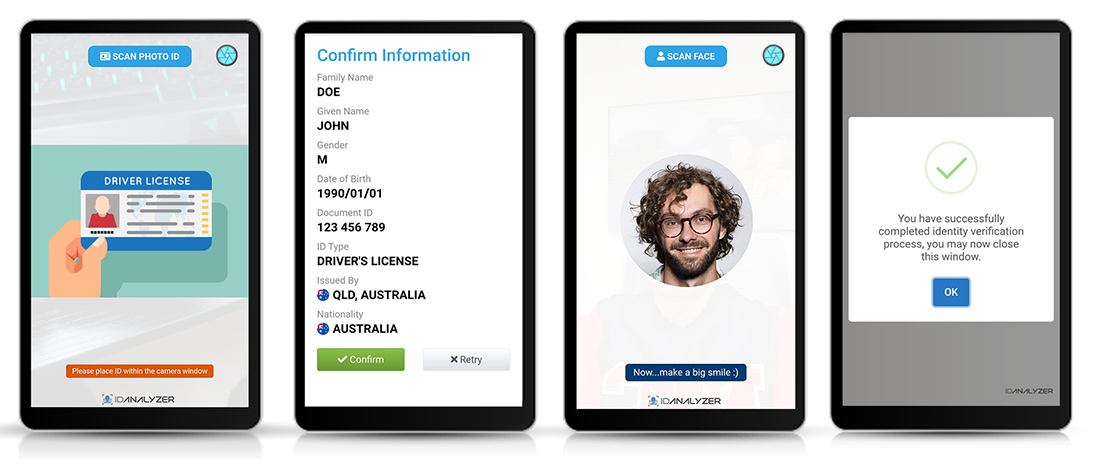
DocuPass comes with 4 modules and you need to choose an appropriate DocuPass module for integration.
To start, we will assume you are trying to verify one of your user that has an ID of "5678" in your own database, we need to generate a DocuPass verification request for this user. A unique DocuPass reference code and URL will be generated.
// use composer autoload
require("vendor/autoload.php");

// or manually load DocuPass class
//require("../src/DocuPass.php");

use IDAnalyzer\DocuPass;

// Initialize DocuPass with your credential, company name and API region
$docupass = new DocuPass("API Key", "My Company Inc.", "US");

// We need to set an identifier so that we know internally who we are verifying, this string will be returned in the callback. You can use your own user/customer id.
$docupass->setCustomID("5678");

// Enable vault cloud storage to store verification results, so we can look up the results
$docupass->enableVault(true);

// Set a callback URL where verification results will be sent, you can use docupass_callback.php in demo folder as a template
$docupass->setCallbackURL("https://www.your-website.com/docupass_callback.php");

// We want DocuPass to return document image and user face image in URL format so we can store them on our own server later.
$docupass->setCallbackImage(true, true, 1);

// We will do a quick check on whether user have uploaded a fake ID
$docupass->enableAuthentication(true, "quick", 0.3);

// Enable photo facial biometric verification with threshold of 0.5
$docupass->enableFaceVerification(true, 1, 0.5);

// Users will have only 1 attempt at verification
$docupass->setMaxAttempt(1);

// We want to redirect user back to your website when they are done with verification
$docupass->setRedirectionURL("https://www.your-website.com/verification_succeeded.php", "https://www.your-website.com/verification_failed.php");

// Get user to review and sign legal document (such as rental contract) prefilled with ID data
$docupass->signContract("Template ID", "PDF");

// Create a session using DocuPass Standard Mobile module
$result = $docupass->createMobile();

if($result['error']){
    // Something went wrong
    echo("Error Code: {$result['error']['code']}<br/>Error Message: {$result['error']['message']}");
}else{
    echo("Scan the QR Code below to verify your identity: <br/>");
    echo("<img sr
Related Skills
node-connect
385.5kDiagnose OpenClaw Android, iOS, or macOS node pairing, QR/setup code, route, auth, and connection failures.
blender-python-addon
40.5kBlender Python add-on rules for operators, panels, properties, registration, testing, and API-safe scripting
flutter-development-guidelines-cursorrules-prompt-file
40.5kCursor rules for Flutter development with MVVM architecture, Riverpod state management, Material widgets, and Dart style guidelines.
commit-push-pr
140.7kCommit, push, and open a PR