
YYModel
High performance model framework for iOS/OSX.
Install / Use
/learn @ibireme/YYModelREADME
YYModel






High performance model framework for iOS/OSX.<br/> (It's a component of YYKit)
Performance
Time cost (process GithubUser 10000 times on iPhone 6):
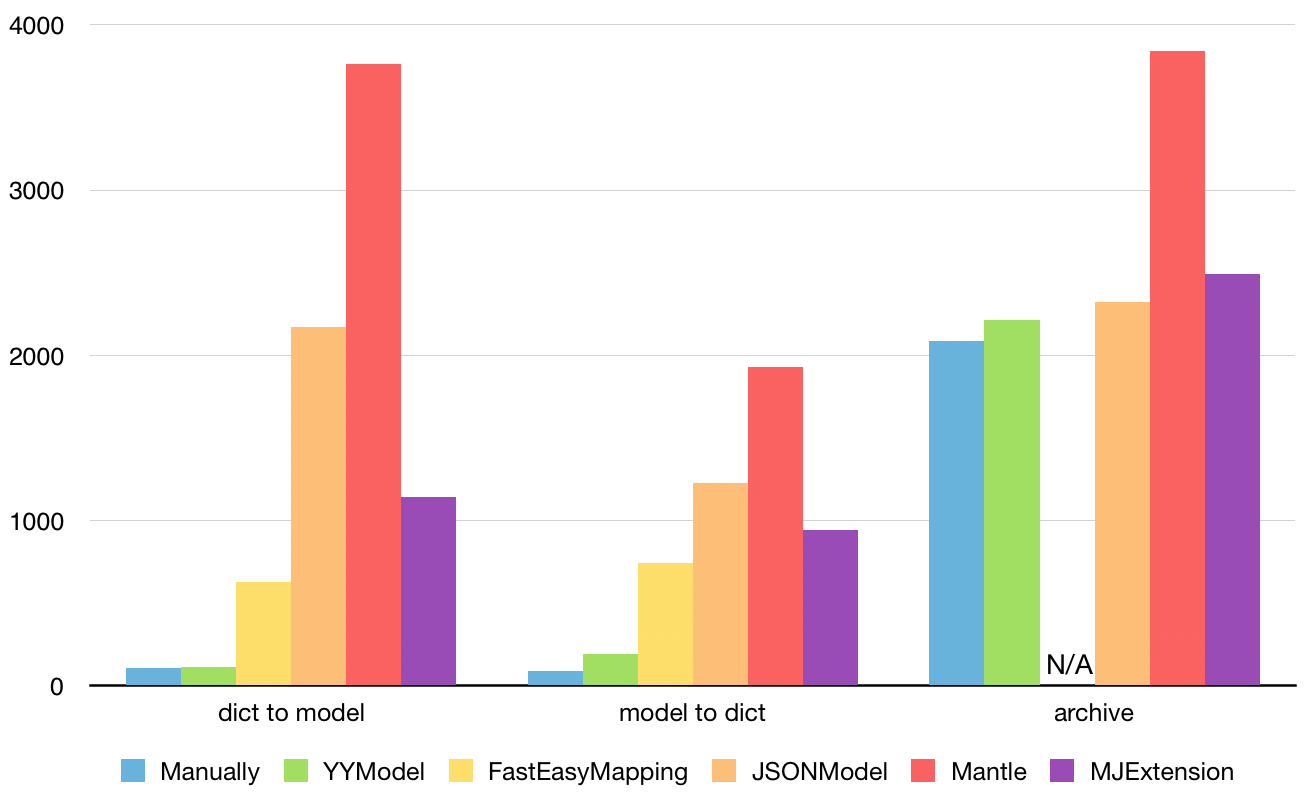
See Benchmark/ModelBenchmark.xcodeproj for more benchmark case.
Features
- High performance: The conversion performance is close to handwriting code.
- Automatic type conversion: The object types can be automatically converted.
- Type Safe: All data types will be verified to ensure type-safe during the conversion process.
- Non-intrusive: There is no need to make the model class inherit from other base class.
- Lightwight: This library contains only 5 files.
- Docs and unit testing: 100% docs coverage, 99.6% code coverage.
Usage
Simple model json convert
// JSON:
{
    "uid":123456,
    "name":"Harry",
    "created":"1965-07-31T00:00:00+0000"
}

// Model:
@interface User : NSObject
@property UInt64 uid;
@property NSString *name;
@property NSDate *created;
@end
@implementation User
@end


// Convert json to model:
User *user = [User yy_modelWithJSON:json];

// Convert model to json:
NSDictionary *json = [user yy_modelToJSONObject];
If the type of an object in JSON/Dictionary cannot be matched to the property of the model, the following automatic conversion is performed. If the automatic conversion failed, the value will be ignored.
<table> <thead> <tr> <th>JSON/Dictionary</th> <th>Model</th> </tr> </thead> <tbody> <tr> <td>NSString</td> <td>NSNumber,NSURL,SEL,Class</td> </tr> <tr> <td>NSNumber</td> <td>NSString</td> </tr> <tr> <td>NSString/NSNumber</td> <td>C number (BOOL,int,float,NSUInteger,UInt64,...)<br/> NaN and Inf will be ignored</td> </tr> <tr> <td>NSString</td> <td>NSDate parsed with these formats:<br/> yyyy-MM-dd<br/> yyyy-MM-dd HH:mm:ss<br/> yyyy-MM-dd'T'HH:mm:ss<br/> yyyy-MM-dd'T'HH:mm:ssZ<br/> EEE MMM dd HH:mm:ss Z yyyy </td> </tr> <tr> <td>NSDate</td> <td>NSString formatted with ISO8601:<br/> "YYYY-MM-dd'T'HH:mm:ssZ"</td> </tr> <tr> <td>NSValue</td> <td>struct (CGRect,CGSize,...)</td> </tr> <tr> <td>NSNull</td> <td>nil,0</td> </tr> <tr> <td>"no","false",...</td> <td>@(NO),0</td> </tr> <tr> <td>"yes","true",...</td> <td>@(YES),1</td> </tr> </tbody> </table>Match model property to different JSON key
// JSON:
{
    "n":"Harry Pottery",
    "p": 256,
    "ext" : {
        "desc" : "A book written by J.K.Rowing."
    },
    "ID" : 100010
}

// Model:
@interface Book : NSObject
@property NSString *name;
@property NSInteger page;
@property NSString *desc;
@property NSString *bookID;
@end
@implementation Book
+ (NSDictionary *)modelCustomPropertyMapper {
    return @{@"name" : @"n",
             @"page" : @"p",
             @"desc" : @"ext.desc",
             @"bookID" : @[@"id",@"ID",@"book_id"]};
}
@end
You can map a json key (key path) or an array of json key (key path) to one or multiple property name. If there's no mapper for a property, it will use the property's name as default.
Nested model
// JSON
{
    "author":{
        "name":"J.K.Rowling",
        "birthday":"1965-07-31T00:00:00+0000"
    },
    "name":"Harry Potter",
    "pages":256
}

// Model: (no need to do anything)
@interface Author : NSObject
@property NSString *name;
@property NSDate *birthday;
@end
@implementation Author
@end

@interface Book : NSObject
@property NSString *name;
@property NSUInteger pages;
@property Author *author;
@end
@implementation Book
@end
Container property
@class Shadow, Border, Attachment;

@interface Attributes
@property NSString *name;
@property NSArray *shadows; //Array<Shadow>
@property NSSet *borders; //Set<Border>
@property NSMutableDictionary *attachments; //Dict<NSString,Attachment>
@end

@implementation Attributes
+ (NSDictionary *)modelContainerPropertyGenericClass {
	// value should be Class or Class name.
    return @{@"shadows" : [Shadow class],
             @"borders" : Border.class,
             @"attachments" : @"Attachment" };
}
@end
Whitelist and blacklist
@interface User
@property NSString *name;
@property NSUInteger age;
@end

@implementation Attributes
+ (NSArray *)modelPropertyBlacklist {
    return @[@"test1", @"test2"];
}
+ (NSArray *)modelPropertyWhitelist {
    return @[@"name"];
}
@end
Data validate and custom transform
// JSON:
{
	"name":"Harry",
	"timestamp" : 1445534567
}

// Model:
@interface User
@property NSString *name;
@property NSDate *createdAt;
@end

@implementation User
- (BOOL)modelCustomTransformFromDictionary:(NSDictionary *)dic {
    NSNumber *timestamp = dic[@"timestamp"];
    if (![timestamp isKindOfClass:[NSNumber class]]) return NO;
    _createdAt = [NSDate dateWithTimeIntervalSince1970:timestamp.floatValue];
    return YES;
}
- (BOOL)modelCustomTransformToDictionary:(NSMutableDictionary *)dic {
    if (!_createdAt) return NO;
    dic[@"timestamp"] = @(n.timeIntervalSince1970);
    return YES;
}
@end
Coding/Copying/hash/equal/description
@interface YYShadow :NSObject <NSCoding, NSCopying>
@property (nonatomic, copy) NSString *name;
@property (nonatomic, assign) CGSize size;
@end

@implementation YYShadow
- (void)encodeWithCoder:(NSCoder *)aCoder { [self yy_modelEncodeWithCoder:aCoder]; }
- (id)initWithCoder:(NSCoder *)aDecoder { self = [super init]; return [self yy_modelInitWithCoder:aDecoder]; }
- (id)copyWithZone:(NSZone *)zone { return [self yy_modelCopy]; }
- (NSUInteger)hash { return [self yy_modelHash]; }
- (BOOL)isEqual:(id)object { return [self yy_modelIsEqual:object]; }
- (NSString *)description { return [self yy_modelDescription]; }
@end
Installation
CocoaPods
- Add
pod 'YYModel'to your Podfile. - Run
pod installorpod update. - Import <YYModel/YYModel.h>.
Carthage
- Add
github "ibireme/YYModel"to your Cartfile. - Run
carthage update --platform iosand add the framework to your project. - Import <YYModel/YYModel.h>.
Manually
- Download all the files in the YYModel subdirectory.
- Add the source files to your Xcode project.
- Import
YYModel.h.
Documentation
Full API documentation is available on CocoaDocs.<br/> You can also install documentation locally using appledoc.
Requirements
This library requires iOS 6.0+ and Xcode 8.0+.
License
YYModel is provided under the MIT license. See LICENSE file for details.
<br/><br/>
中文介绍
高性能 iOS/OSX 模型转换框架。<br/> (该项目是 YYKit 组件之一)
性能
处理 GithubUser 数据 10000 次耗时统计 (iPhone 6):
更多测试代码和用例见 Benchmark/ModelBenchmark.xcodeproj。
特性
- 高性能: 模型转换性能接近手写解析代码。
- 自动类型转换: 对象类型可以自动转换,详情见下方表格。
- 类型安全: 转换过程中,所有的数据类型都会被检测一遍,以保证类型安全,避免崩溃问题。
- 无侵入性: 模型无需继承自其他基类。
- 轻量: 该框架只有 5 个文件 (包括.h文件)。
- 文档和单元测试: 文档覆盖率100%, 代码覆盖率99.6%。
使用方法
简单的 Model 与 JSON 相互转换
// JSON:
{
    "uid":123456,
    "name":"Harry",
    "created":"1965-07-31T00:00:00+0000"
}

// Model:
@interface User : NSObject
@property UInt64 uid;
@property NSString *name;
@property NSDate *created;
@end
@implementation User
@end


// 将 JSON (NSData,NSString,NSDictionary) 转换为 Model:
User *user = [User yy_modelWithJSON:json];

// 将 Model 转换为 JSON 对象:
NSDictionary *json = [user yy_modelToJSONObject];
当 JSON/Dictionary 中的对象类型与 Model 属性不一致时,YYModel 将会进行如下自动转换。自动转换不支持的值将会被忽略,以避免各种潜在的崩溃问题。
<table> <thead> <tr> <th>JSON/Dictionary</th> <th>Model</th> </tr> </thead> <tbody> <tr> <td>NSString</td> <td>NSNumber,NSURL,SEL,Class</td> </tr> <tr> <td>NSNumber</td> <td>NSString</td> </tr> <tr> <td>NSString/NSNumber</td> <td>基础类型 (BOOL,int,float,NSUInteger,UInt64,...)<br/> NaN 和 Inf 会被忽略</td> </tr> <tr> <td>NSString</td> <td>NSDate 以下列格式解析:<br/> yyyy-MM-dd<br/> yyyy-MM-dd HH:mm:ss<br/> yyyy-MM-dd'T'HH:mm:ss<br/> yyyy-MM-dd'T'HH:mm:ssZ<br/> EEE MMM dd HH:mm:ss Z yyyy </td> </tr> <tr> <td>NSDate</td> <td>NSString 格式化为 ISO8601:<br/> "YYYY-MM-dd'T'HH:mm:ssZ"</td> </tr> <tr> <td>NSValue</td> <td>struct (CGRect,CGSize,...)</td> </tr> <tr> <td>NSNull</td> <td>nil,0</td> </tr> <tr> <td>"no","false",...</td> <td>@(NO),0</td> </tr> <tr> <td>"yes","true",...</td> <td>@(YES),1</td> </tr> </tbody> </table>Model 属性名和 JSON 中的 Key 不相同
// JSON:
{
    "n":"Harry Pottery",
    "p": 256,
    "ext" : {
        "desc" : "A book written by J.K.Rowing."
    },
Related Skills
node-connect
350.1kDiagnose OpenClaw node connection and pairing failures for Android, iOS, and macOS companion apps
frontend-design
109.9kCreate distinctive, production-grade frontend interfaces with high design quality. Use this skill when the user asks to build web components, pages, or applications. Generates creative, polished code that avoids generic AI aesthetics.
openai-whisper-api
350.1kTranscribe audio via OpenAI Audio Transcriptions API (Whisper).
qqbot-media
350.1kQQBot 富媒体收发能力。使用 <qqmedia> 标签,系统根据文件扩展名自动识别类型(图片/语音/视频/文件)。
