
Coc Spell Checker
A basic spell checker that works well with camelCase code for (Neo)vim
Install / Use
npx skills add iamcco/coc-spell-checkerInstalls into whichever agent you are using.
README
Spelling Checker for (Neo)vim
fork from vscode-spell-checker v1.7.24 and commit
A basic spell checker that works well with camelCase code.
The goal of this spell checker is to help catch common spelling errors while keeping the number of false positives low.
Functionality
Load a TypeScript, JavaScript, Text, etc. file. Words not in the dictionary files will have a squiggly underline.

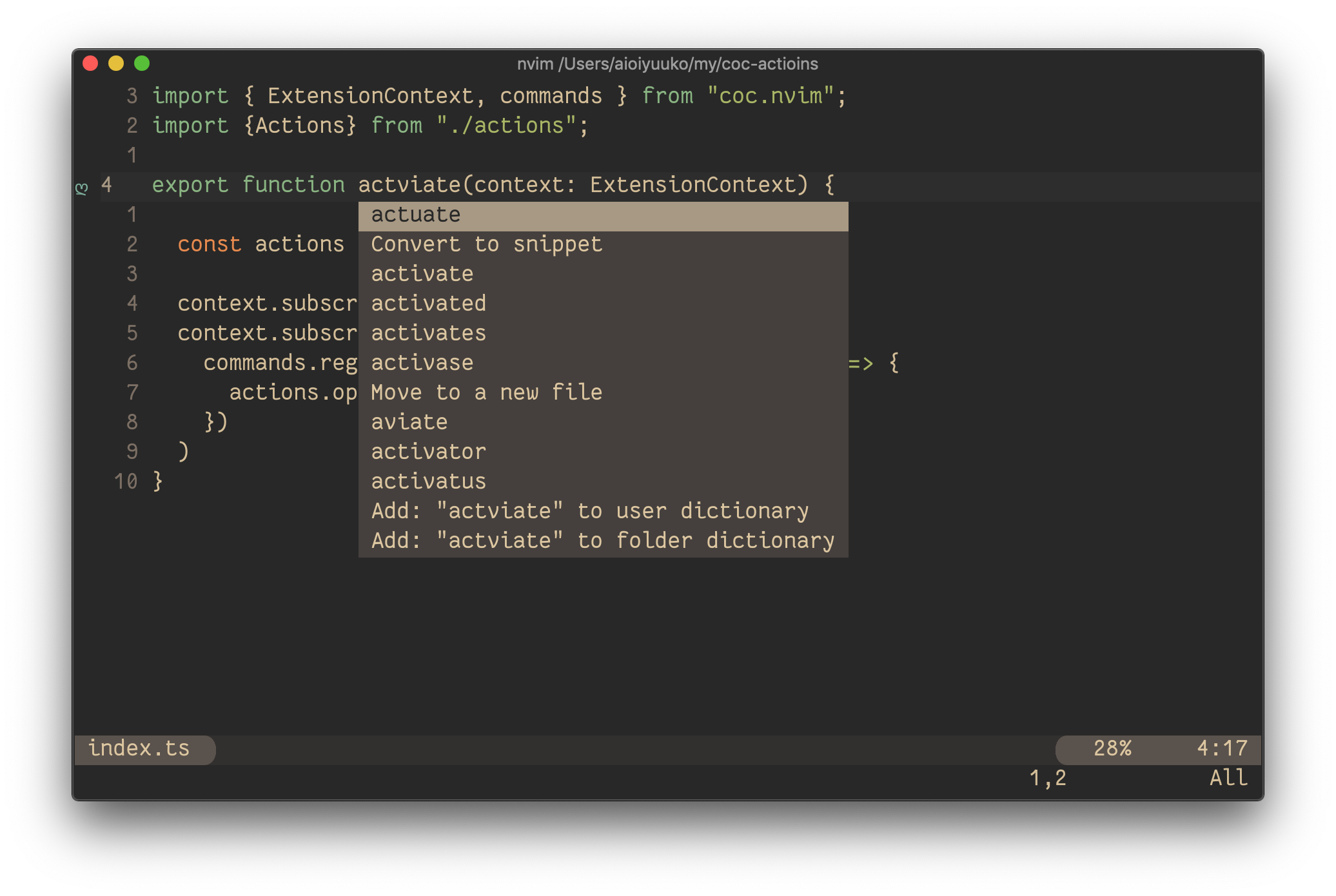
To see the list of suggestions:

Paste below configurations to your init.vim or .vimrc
-
Remap for do codeAction of selected region
vmap <leader>a <Plug>(coc-codeaction-selected)
nmap <leader>a <Plug>(coc-codeaction-selected)
Then positioning the cursor in the word, any of the following should display the list of suggestions:
<leader>aapfor current paragraph<leader>awfor current word
Or use the coc-actions
Install
:CocInstall coc-spell-checker
Commands and Configurations
Supported Languages
- English (US)
- English (GB) - turn on by changing
"cSpell.language": "en"to"cSpell.language": "en-GB"
Add-On Dictionaries
- catalan
- czech
- danish
- dutch
- french
- french-reforme
- german
- greek
- italian
- persian
- polish
- portuguese
- portuguese-brazilian
- russian
- spanish
- swedish
- turkish
- ukrainian
- medical-terms
Enabled File Types
- vim
- AsciiDoc
- C, C++
- C#
- css, less, scss
- Elixir
- Go
- Html
- Java
- JavaScript
- JSON / JSONC
- LaTex
- Markdown
- PHP
- PowerShell
- Pug / Jade
- Python
- reStructuredText
- Rust
- Scala
- Text
- TypeScript
- YAML
How it works with camelCase
The concept is simple, split camelCase words before checking them against a list of known English words.
- camelCase -> camel case
- HTMLInput -> html input -- Notice that the
Iis associated withInputand notHTML - snake_case_words -> snake case words
- camel2snake -> camel snake -- (the 2 is ignored)
Special case will ALL CAPS words
There are a few special cases to help will common spelling practices for ALL CAPS words.
Trailing s, ing, ies, es, ed are kept with the previous word.
- CURLs -> curls -- trailing
s - CURLedRequest -> curled request -- trailing
ed
Things to note
- This spellchecker is case insensitive. It will not catch errors like english which should be English.
- The spellchecker uses a local word dictionary. It does not send anything outside your machine.
- The words in the dictionary can and do contain errors.
- There are missing words.
- Only words longer than 3 characters are checked. "jsj" is ok, while "jsja" is not.
- All symbols and punctuation are ignored.
In Document Settings
It is possible to add spell check settings into your source code. This is to help with file specific issues that may not be applicable to the entire project.
All settings are prefixed with cSpell: or spell-checker:.
disable-- turn off the spell checker for a section of code.enable-- turn the spell checker back on after it has been turned off.ignore-- specify a list of words to be ignored.words-- specify a list of words to be considered correct and will appear in the suggestions list.ignoreRegExp-- Any text matching the regular expression will NOT be checked for spelling.includeRegExp-- Only text matching the collection of includeRegExp will be checked.enableCompoundWords/disableCompoundWords-- Allow / disallow words like: "stringlength".
Enable / Disable checking sections of code
It is possible to disable / enable the spell checker by adding comments to your code.
Disable Checking
/* cSpell:disable *//* spell-checker: disable *//* spellchecker: disable *//* cspell: disable-line *//* cspell: disable-next-line */
Enable Checking
/* cSpell:enable *//* spell-checker: enable *//* spellchecker: enable */
Example
// cSpell:disable
const wackyWord = ['zaallano', 'wooorrdd', 'zzooommmmmmmm'];
/* cSpell:enable */

// Nest disable / enable is not Supported

// spell-checker:disable
// It is now disabled.

var liep = 1;

/* cspell:disable */
// It is still disabled

// cSpell:enable
// It is now enabled

const str = "goededag";  // <- will be flagged as an error.

// spell-checker:enable <- doesn't do anything

// cSPELL:DISABLE <-- also works.

// if there isn't an enable, spelling is disabled till the end of the file.
const str = "goedemorgen";  // <- will NOT be flagged as an error.
Ignore
Ignore allows you the specify a list of words you want to ignore within the document.
// cSpell:ignore zaallano, wooorrdd
// cSpell:ignore zzooommmmmmmm
const wackyWord = ['zaallano', 'wooorrdd', 'zzooommmmmmmm'];
Note: words defined with ignore will be ignored for the entire file.
Words
The words list allows you to add words that will be considered correct and will be used as suggestions.
// cSpell:words woorxs sweeetbeat
const companyName = 'woorxs sweeetbeat';
Note: words defined with words will be used for the entire file.
Enable / Disable compound words
In some programing language it is common to glue words together.
// cSpell:enableCompoundWords
char * errormessage;  // Is ok with cSpell:enableCompoundWords
int    errornumber;   // Is also ok.
Note: Compound word checking cannot be turned on / off in the same file. The last setting in the file determines the value for the entire file.
Excluding and Including Text to be checked.
By default, the entire document is checked for spelling.
cSpell:disable/cSpell:enable above allows you to block off sections of the document.
ignoreRegExp and includeRegExp give you the ability to ignore or include patterns of text.
By default the flags gim are added if no flags are given.
The spell checker works in the following way:
- Find all text matching
includeRegExp - Remove any text matching
excludeRegExp - Check the remaining text.
Exclude Example
// cSpell:ignoreRegExp 0x[0-9a-f]+     -- will ignore c style hex numbers
// cSpell:ignoreRegExp /0x[0-9A-F]+/g  -- will ignore upper case c style hex numbers.
// cSpell:ignoreRegExp g{5} h{5}       -- will only match ggggg, but not hhhhh or 'ggggg hhhhh'
// cSpell:ignoreRegExp g{5}|h{5}       -- will match both ggggg and hhhhh
// cSpell:ignoreRegExp /g{5} h{5}/     -- will match 'ggggg hhhhh'
/* cSpell:ignoreRegExp /n{5}/          -- will NOT work as expected because of the ending comment -> */
/*
   cSpell:ignoreRegExp /q{5}/          -- will match qqqqq just fine but NOT QQQQQ
*/
// cSpell:ignoreRegExp /[^\s]{40,}/    -- will ignore long strings with no spaces.
// cSpell:ignoreRegExp Email           -- this will ignore email like patterns -- see Predefined RegExp expressions
var encodedImage = 'HR+cPzr7XGAOJNurPL0G8I2kU0UhKcqFssoKvFTR7z0T3VJfK37vS025uKroHfJ9nA6WWbHZ/ASn...';
var email1 = 'emailaddress@myfancynewcompany.com';
var email2 = '<emailaddress@myfancynewcompany.com>';
Note: ignoreRegExp and includeRegExp are applied to the entire file. They do not start and stop.
Include Example
In general you should not need to use includeRegExp. But if you are mixing languages then it could come in helpful.
# cSpell:includeRegExp #.*
# cSpell:includeRegExp ("""|''')[^\1]*\1
# only comments and block strings will be checked for spelling.
def sum_it(self, seq):
    """This is checked for spelling"""
    variabele = 0
    alinea = 'this is not checked'
    for num in seq:
        # The local state of 'value' will be retained between iterations
        variabele += num
        yield variabele
Predefined RegExp expressions
Exclude patterns
Urls<sup>1</sup> -- Matches urlsHexDigits-- Matches hex digits:/^x?[0-1a-f]+$/iHexValues-- Matches common hex format like #aaa, 0xfeef, \u0134EscapeCharacters<sup>1</sup> -- matches special characters: '\n', '\t' etc.Base64<sup>1</sup> -- matches base64 blocks of text longer than 40 characters.Email-- matches most email addresses.
Include Patterns
Everything<sup>1</sup> -- By default we match an entire document and remove the excludes.string-- This matches common string formats like '...', "...", and `...`CStyleComment-- These are C Style comments /* */ and //
Related Skills
node-connect
385.5kDiagnose OpenClaw Android, iOS, or macOS node pairing, QR/setup code, route, auth, and connection failures.
blender-python-addon
40.5kBlender Python add-on rules for operators, panels, properties, registration, testing, and API-safe scripting
flutter-development-guidelines-cursorrules-prompt-file
40.5kCursor rules for Flutter development with MVVM architecture, Riverpod state management, Material widgets, and Dart style guidelines.
commit-push-pr
140.7kCommit, push, and open a PR
