
UI.WinForms.Styler
A Windows Forms library that provides native controls with many of the advanced features.
Install / Use
/learn @iNKORE-NET/UI.WinForms.StylerREADME
📸 Screenshots
-
SampleApp
| Control | Windows 11 | Windows 7 | | ------------ | ------------ | ------------ | | Basic Controls<br><br>AdvProgressBar<br>AdvButton<br>AdvComboBox<br>AdvTextBox<br>SplitButton<br>CommandLink |
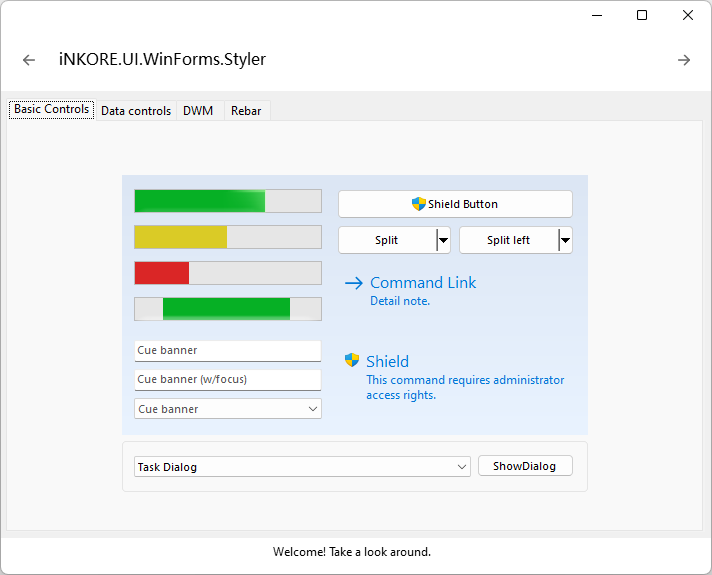 |
|  |
| Data Controls<br><br>AdvListView<br>AdvTreeView |
|
| Data Controls<br><br>AdvListView<br>AdvTreeView | 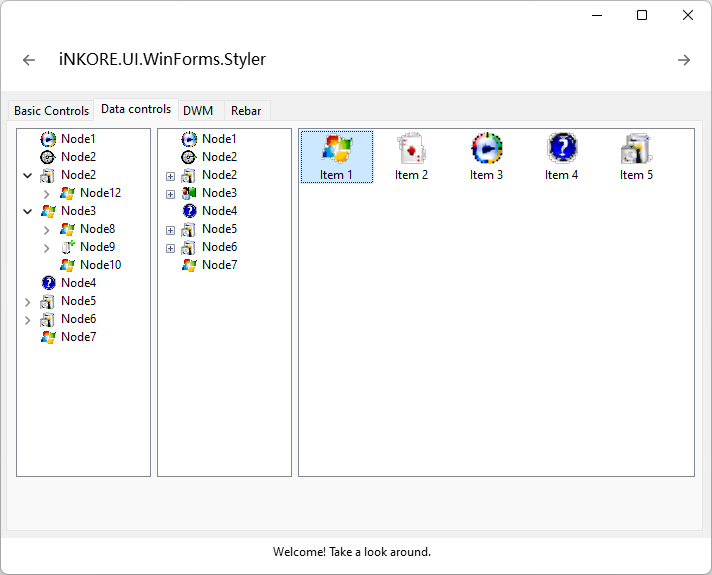 |
|  |
| Rebar |
|
| Rebar |  |
|  |
| TaskDialog |
|
| TaskDialog |  |
| 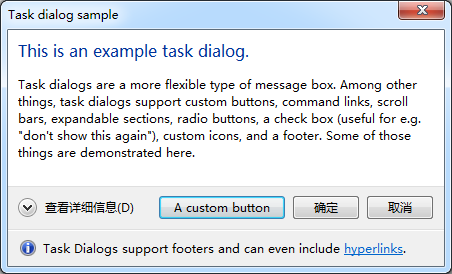 |
| TaskDialog<br>(with command links) |
|
| TaskDialog<br>(with command links) | 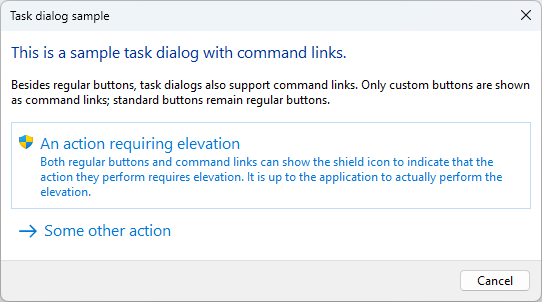 |
|  |
| ProgressDialog |
|
| ProgressDialog |  |
|  |
| CredentialDialog |
|
| CredentialDialog |  |
| 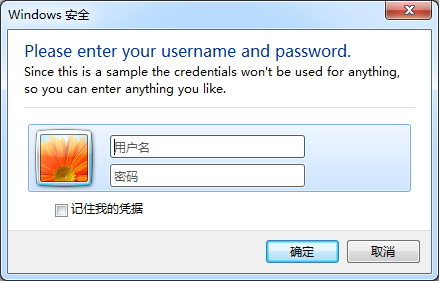 |
|FolderBrowser<br>Dialog |
|
|FolderBrowser<br>Dialog |  |
| 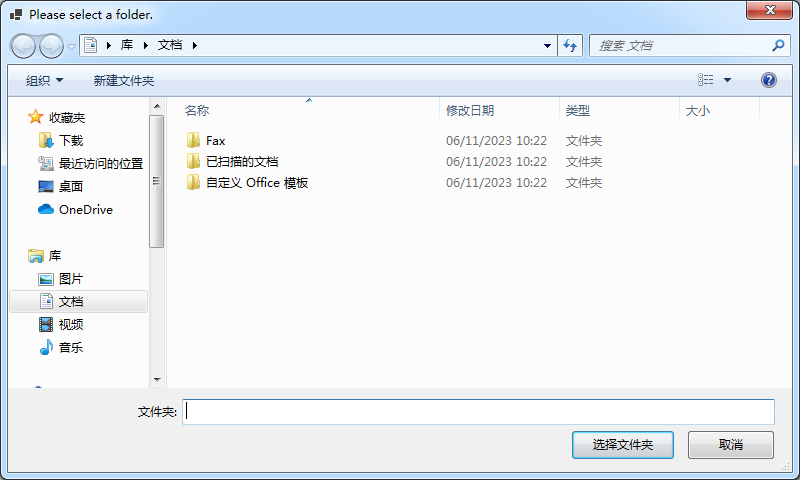 |
|ShellAbout<br>Dialog |
|
|ShellAbout<br>Dialog |  |
| 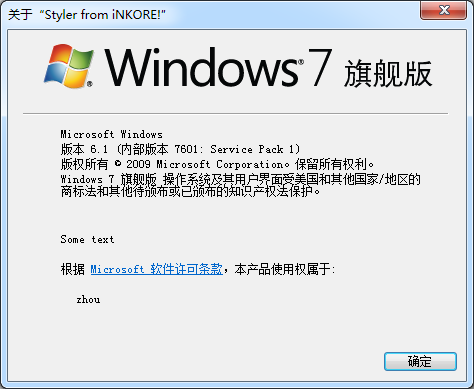 |
|
📃 Overview
-
Controls
- [x] AeroForm: Base form class that automatically sets its font according to the Windows UX guidelines and supports some Aero properties.
- [x] AdvButton: Advanced Button class, supports icons and admin shields
- [x] AdvComboBox: Advanced ComboBox class, supports cue banner
- [x] AdvListView: Advanced ListView class, supports explorer-like style and grouping
- [x] AdvProgressBar: Advanced ProgressBar class, supports 3 color states and marquee mode
- [x] AdvTabControl: Advanced TabControl class, supports rendering correctly when using bottom alignment with a visual
- [x] AdvTextBox: Advanced TextBox class, supports cue banner
- [x] AdvTreeView: Advanced TreeView class, supports explorer-like styles, customizing HScrollBar
- [x] CommandLink: Native CommandLink class, with a clean, lightweight appearance that allows for descriptive labels, and are displayed with either a standard arrow or custom icon, and an optional supplemental explanation.
- [x] DragDropSign: A simple control with the visual style of DragDropSign
- [x] HorizontalPanel: A horizontal panel which resembles what is used for information and navigation in the Control Panel of Windows 7 and Vista.
- [x] LabeledDivider: The labeled divider provides a Aero styled divider with an optional caption, similiar to what is seen in the Control Panel dialogs of Windows 7 and Vista.
- [x] NavigationButton: A simple Back/Forward Button drawn by Windows via Visual Styles if available.
- [x] RadioButtonGroup: A list of radio buttons based on a collection of objects for easy creation of radio button groups.
- [x] SearchTextBox: A standard WinForms text box presenting the common Vista "search" interface.
- [x] Separator: The line is drawn with Visual Styles (TaskDialog > FootnoteSeperator). If running on XP or another OS, the line is drawn manually.
- [x] SplitButton: A button with a split dropdown menu
- [x] StylePanel: An enhanced panel which provides customizable visual style background
- [x] TabStrip: A strip bar with TabCOntrol header-like items
- [x] VerticalPanel: A vertical panel which resembles what is used for information and navigation in the Control Panel of Windows 7 and Vista.
- [x] VisibleSplitContainer: A SplitContainer with a visible grip in the separator
- [x] RebarWrapper: Container for native Rebar Control
- [x] ThemeLabel: A Label containing some text that will be drawn with glowing border on top of the Glass Sheet effect.
-
Dialogs
- [x] ProgressDialog: Represents a dialog that can be used to report progress to the user.
- [x] TaskDialog: The task dialog contains an application-defined message text and title, icons, and any combination of predefined push buttons.
- [x] AdvOpenFileDialog: Prompts the user to open a file.
- [x] AdvSaveFileDialog: Prompts the user to select a location for saving a file.
- [x] CredentialDialog: Represents a dialog box that allows the user to enter generic credentials.
- [x] ShellAboutDialog: Shows a dialog with windows system detials
- [x] VistaFolderBrowserDialog: Prompts the user to select a folder.
References
- https://github.com/LorenzCK/WindowsFormsAero
- https://github.com/dahall/AeroWizard
- https://github.com/ookii-dialogs/ookii-dialogs-winforms
Related Skills
node-connect
342.5kDiagnose OpenClaw node connection and pairing failures for Android, iOS, and macOS companion apps
frontend-design
85.3kCreate distinctive, production-grade frontend interfaces with high design quality. Use this skill when the user asks to build web components, pages, or applications. Generates creative, polished code that avoids generic AI aesthetics.
openai-whisper-api
342.5kTranscribe audio via OpenAI Audio Transcriptions API (Whisper).
qqbot-media
342.5kQQBot 富媒体收发能力。使用 <qqmedia> 标签,系统根据文件扩展名自动识别类型(图片/语音/视频/文件)。
