
Ratus
Ratus is a RESTful asynchronous task queue server. It translated concepts of distributed task queues into a set of resources that conform to REST principles and provides a consistent HTTP API for various backends.
Install / Use
/learn @hyperonym/RatusREADME
Ratus




Ratus is a RESTful asynchronous task queue server. It translated concepts of distributed task queues into a set of resources that conform to REST principles and provides a consistent HTTP API for various backends.
The key features of Ratus are:
- Self-contained binary with a fast in-memory storage.
- Support multiple embedded or external storage engines.
- Guaranteed at-least-once execution of tasks.
- Unified model for prioritized and time-based scheduling.
- Task-level timeout control with automatic recovery.
- Language agnostic RESTful API with built-in Swagger UI.
- Load balancing across a dynamic number of consumers.
- Horizontal scaling through replication and partitioning.
- Native support for Prometheus and Kubernetes.
Quick Start
Installation
Ratus offers a variety of installation options:
- Docker images are available on Docker Hub and GitHub Packages.
- Kubernetes and Docker Compose examples can be found in the deployments directory.
- Pre-built binaries for all major platforms are available on the GitHub releases page.
- Build from source with
go install github.com/hyperonym/ratus/cmd/ratus@latest.
Running Ratus from the command line is as simple as typing:
$ ratus
The above command will start an ephemeral Ratus instance using the default in-memory storage engine memdb and listen on the default HTTP port of 80.
To use another port and enable on-disk snapshot for persistence, start Ratus with:
$ ratus --port 8000 --engine memdb --memdb-snapshot-path ratus.db
Depending on the storage engine you choose, you may also need to deploy the corresponding database or broker. Using the mongodb engine as an example, assuming the database is already running locally, then start Ratus with:
$ ratus --port 8000 --engine mongodb --mongodb-uri mongodb://127.0.0.1:27017
Basic Usage
Concepts introduced by Ratus will be bolded below, see Concepts (a.k.a cheat sheet) to learn more.
cURL
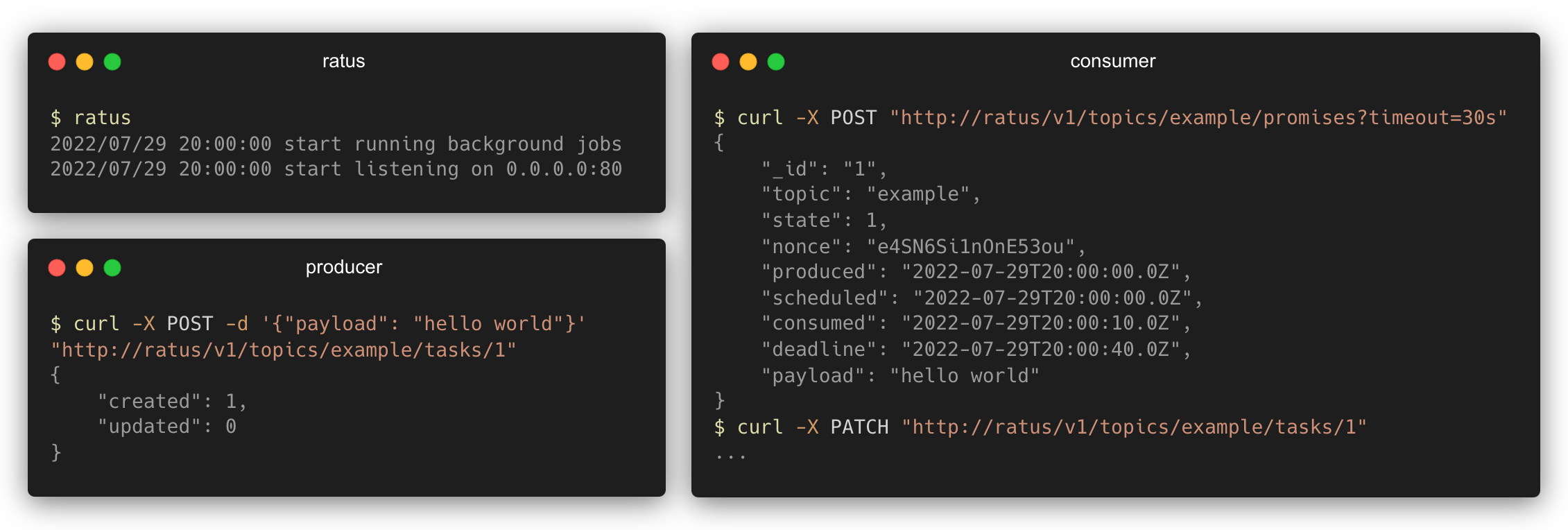
A producer creates a new task and pushes it to the example topic:
$ curl -X POST -d '{"payload": "hello world"}' "http://127.0.0.1:8000/v1/topics/example/tasks/1"
{
	"created": 1,
	"updated": 0
}
A consumer can then make a promise to claim and execute the next task in the example topic:
$ curl -X POST "http://127.0.0.1:8000/v1/topics/example/promises?timeout=30s"
{
	"_id": "1",
	"topic": "example",
	"state": 1,
	"nonce": "e4SN6Si1nOnE53ou",
	"produced": "2022-07-29T20:00:00.0Z",
	"scheduled": "2022-07-29T20:00:00.0Z",
	"consumed": "2022-07-29T20:00:10.0Z",
	"deadline": "2022-07-29T20:00:40.0Z",
	"payload": "hello world"
}
After executing the task, remember to acknowledge Ratus that the task is completed using a commit:
$ curl -X PATCH "http://127.0.0.1:8000/v1/topics/example/tasks/1"
{
	"_id": "1",
	"topic": "example",
	"state": 2,
	"nonce": "",
	"produced": "2022-07-29T20:00:00.0Z",
	"scheduled": "2022-07-29T20:00:00.0Z",
	"consumed": "2022-07-29T20:00:10.0Z",
	"deadline": "2022-07-29T20:00:40.0Z",
	"payload": "hello world"
}
If a commit is not received before the promised deadline, the state of the task will be set back to pending, which in turn allows consumers to try to execute it again.
Go Client
Ratus comes with a Go client library that not only encapsulates all API calls, but also provides idiomatic poll-execute-commit workflows like Client.Poll and Client.Subscribe. The examples directory contains ready-to-run examples for using the library:
- The hello world example demonstrated the basic usage of the client library.
- The crawl frontier example implemented a simple URL frontier for distributed web crawlers. It utilized advanced features like concurrent subscribers and time-based task scheduling.
Concepts
Data Model
- Task references an idempotent unit of work that should be executed asynchronously.
- Topic refers to an ordered subset of tasks with the same topic name property.
- Promise represents a claim on the ownership of an active task.
- Commit contains a set of updates to be applied to a task.
Workflow
- Producer client pushes tasks with their desired date-of-execution (scheduled times) to a topic.
- Consumer client makes a promise to execute a task polled from a topic and acknowledges with a commit upon completion.
Topology
- Both producer and consumer clients can have multiple instances running simultaneously.
- Consumer instances can be added dynamically to increase throughput, and tasks will be naturally load balanced among consumers.
- Consumer instances can be removed (or crash) at any time without risking to lose the task being executing: a task that has not received a commit after the promised deadline will be picked up and executed again by other consumers.
Task States
- pending (0): The task is ready to be executed or is waiting to be executed in the future.
- active (1): The task is being processed by a consumer. Active tasks that have timed out will be automatically reset to the
pendingstate. Consumer code should handle failure and set the state topendingto retry later if necessary. - completed (2): The task has completed its execution. If the storage engine implementation supports TTL, completed tasks will be automatically deleted after the retention period has expired.
- archived (3): The task is stored as an archive. Archived tasks will never be deleted due to expiration.
Behavior
- Task IDs across all topics share the same namespace (ADR). Topics are simply subsets generated based on the
topicproperties of the tasks, so topics do not need to be created explicitly. - Ratus is a task scheduler when consumers can keep up with the task generation speed, or a priority queue when consumers cannot keep up with the task generation speed.
- Tasks will not be executed until the scheduled time arrives. After the scheduled time, excessive tasks will be executed in the order of the scheduled time.
Engines
Ratus provides a consistent API for various backends, allowing users to choose a specific engine based on their needs without having to modify client-side code.
To use a specific engine, set the --engine flag or ENGINE environment variable to one of the following names:
| Name | Persistence | Replication | Partitioning | Expiration |
| --- | :---: | :---: | :---: | :---: |
| memdb | ○/● | ○ | ○ | ● |
| mongodb | ● | ● | ● | ● |
MemDB

MemDB is the default storage engine for Ratus. It is implemented on top of go-memdb, which is built on immutable radix trees. MemDB is suitable for development and production environments where durability is not critical.
Persistence
The MemDB storage engine is ephemeral by default, but it also provides snapshot-based persistence options. By setting the --memdb-snapshot-path flag or MEMDB_SNAPSHOT_PATH environment variable to a non-empty file path, Ratus will write on-disk snapshots at an interval specified by MEMDB_SNAPSHOT_INTERVAL.
MemDB does not write Append-Only Files (AOF), which means in case of Ratus stopping working without a graceful shutdown for any reason you should be prepared to lose the latest minutes of data. If durability is critical to your workflow, switch to an external stor
Related Skills
node-connect
349.0kDiagnose OpenClaw node connection and pairing failures for Android, iOS, and macOS companion apps
xurl
349.0kA CLI tool for making authenticated requests to the X (Twitter) API. Use this skill when you need to post tweets, reply, quote, search, read posts, manage followers, send DMs, upload media, or interact with any X API v2 endpoint.
frontend-design
109.4kCreate distinctive, production-grade frontend interfaces with high design quality. Use this skill when the user asks to build web components, pages, or applications. Generates creative, polished code that avoids generic AI aesthetics.
openai-whisper-api
349.0kTranscribe audio via OpenAI Audio Transcriptions API (Whisper).
