
Hydratool
HydraBus host tool with GUI (Qt)
Install / Use
/learn @hydrabus/HydratoolREADME
HydraTool
This repository contains host software (Linux/Windows) for HydraBus with HydraFW firmware, a project to produce a low cost, open source multi-tool hardware for anyone interested in Learning/Developping/Debugging/Hacking/Penetration Testing for basic or advanced embedded hardware.
HydraBus: https://www.hydrabus.com & https://github.com/hydrabus
HydraFW: https://github.com/hydrabus/hydrafw
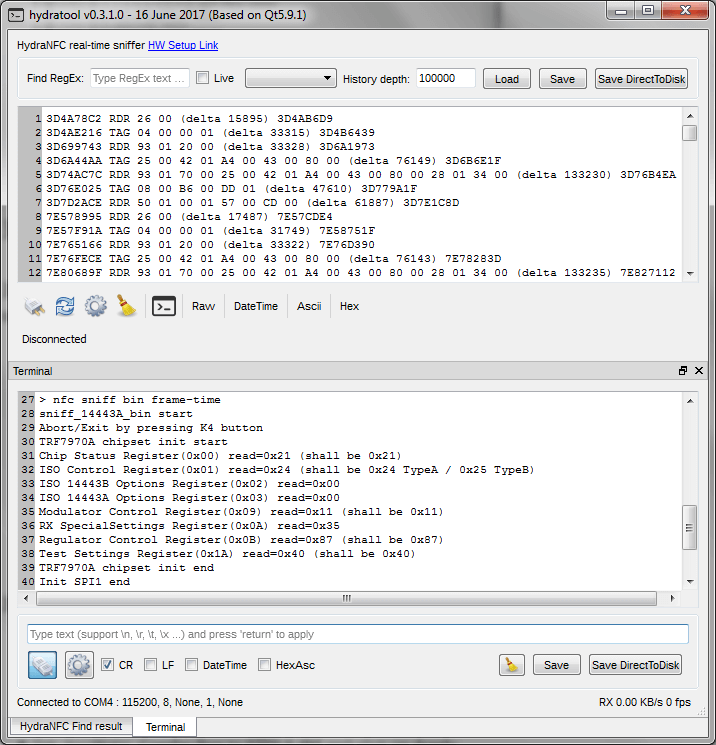
For more details on HydraTool see the HydraTool Wiki
How to build host software on Windows, GNU/LINUX:
Prerequisites Windows, GNU/Linux:
- Qt5.6.x or more (with QtCreator)
- See Qt5.x Online Installer http://download.qt.io/official_releases/online_installers/qt-unified-windows-x86-online.exe
- See also http://download.qt.io/official_releases/qt/
- Tested with success on Qt5.6/5.7/5.9.1 (using Qt Static Build) on Ubuntu 16.x LTS & Windows7 SP1(MSVC2013)
Build the project with QtCreator on Windows, GNU/Linux:
- Import hydratool.pro project in Qt Creator
- Configure the Project for GCC/MinGW/MSVC2013 ...
- Build the project
How to build Qt5.x as static build on Windows, GNU/LINUX:
http://wohlsoft.ru/pgewiki/Building_static_Qt_5
How to build Qt5.9.1 as static build on Windows MSCV2013:
Download and extract qt-everywhere-opensource-src-5.9.1 from http://download.qt.io/official_releases/qt/5.9/5.9.1/single/qt-everywhere-opensource-src-5.9.1.zip
In this example extract it to D:\Qt\Qt5_9_1-msvc2013_static_build\qt-everywhere-opensource-src-5.9.1

Download and extract jom from https://download.qt.io/official_releases/jom/
copy jom.exe to D:\Qt\Qt5_9_1-msvc2013_static_build\qt-everywhere-opensource-src-5.9.1

Go to D:\Qt\Qt5_9_1-msvc2013_static_build\qt-everywhere-opensource-src-5.9.1\qtbase\mkspecs\common
and change msvc-desktop.conf like this (change all MD to MT to remove dependency on msvc dlls)
	initial values:

	QMAKE_CFLAGS_RELEASE = $$QMAKE_CFLAGS_OPTIMIZE -MD
	QMAKE_CFLAGS_RELEASE_WITH_DEBUGINFO += $$QMAKE_CFLAGS_OPTIMIZE -MD -Zi
	QMAKE_CFLAGS_DEBUG = -Zi -MDd
	should be changed to:

	QMAKE_CFLAGS_RELEASE = $$QMAKE_CFLAGS_OPTIMIZE -MT
	QMAKE_CFLAGS_RELEASE_WITH_DEBUGINFO += $$QMAKE_CFLAGS_OPTIMIZE -MT -Zi
	QMAKE_CFLAGS_DEBUG = -Zi -MTd

cd D:
d:

REM Set up \Microsoft Visual Studio 2013, where <arch> is \c amd64, \c x86, etc.
CALL "D:\Microsoft Visual Studio 12.0\VC\vcvarsall.bat" x86
SET _ROOT=D:\Qt\Qt5_9_1-msvc2013_static_build\qt-everywhere-opensource-src-5.9.1
SET PATH=%_ROOT%\qtbase\bin;%_ROOT%\gnuwin32\bin;%PATH%
REM Uncomment the below line when using a git checkout of the source repository
REM SET PATH=%_ROOT%\qtrepotools\bin;%PATH%
SET _ROOT=

cd D:\Qt\Qt5_9_1-msvc2013_static_build\qt-everywhere-opensource-src-5.9.1

configure.bat -static -release -prefix "D:\Qt\Qt5.9.1_msvc2013_static" -platform win32-msvc2013 -opensource -confirm-license -qt-zlib -qt-pcre -qt-libpng -qt-libjpeg -qt-freetype -opengl desktop -no-openssl -make libs -nomake tools -nomake examples -nomake tests -skip wayland -skip purchasing -skip serialbus -skip script -skip scxml -skip speech -skip qtwebengine

jom

jom install
How to build Qt5.9.1 as static build on GNU/LINUX:
cd ~
wget http://download.qt.io/official_releases/qt/5.9/5.9.1/single/qt-everywhere-opensource-src-5.9.1.tar.xz
tar --xz -xvf qt-everywhere-opensource-src-5.9.1.tar.xz
cd qt-everywhere-opensource-src-5.9.1
sudo ./configure -static -release -prefix ~/Qt591static -opensource -confirm-license -qt-zlib -qt-pcre -qt-libpng -qt-libjpeg -qt-freetype -qt-xcb -opengl desktop -make libs -nomake tools -nomake examples -nomake tests -skip wayland -skip purchasing -skip serialbus -skip script -skip scxml -skip speech -skip qtwebengine
sudo make -r -j 4
sudo make install
Related Skills
node-connect
349.0kDiagnose OpenClaw node connection and pairing failures for Android, iOS, and macOS companion apps
frontend-design
109.4kCreate distinctive, production-grade frontend interfaces with high design quality. Use this skill when the user asks to build web components, pages, or applications. Generates creative, polished code that avoids generic AI aesthetics.
openai-whisper-api
349.0kTranscribe audio via OpenAI Audio Transcriptions API (Whisper).
qqbot-media
349.0kQQBot 富媒体收发能力。使用 <qqmedia> 标签,系统根据文件扩展名自动识别类型(图片/语音/视频/文件)。
