
seo-audit
Free SEO Audit MCP server for Claude - captures and stores all the raw data you need for a complete technical SEO audit. Google Search Console + a first-party crawl + DataForSEO + Majestic SEO merged into one prioritised audit.
Install / Use
claude mcp add houtini-ai -- npx -y github:houtini-ai/seo-auditIf the server publishes to npm under a different name, use that package instead — check the repo README.
MCP Server
Model Context Protocol server
Quality Score
Category
MarketingSupported Platforms
Tags
Our assessment of seo-audit
seo-audit scores 85/100 on our quality scale, 398th of 592 Marketing skills we index.
Its MCP Server is 33 KB long, well organised into 19 sections with 3 code examples: a thorough specification that gives an agent plenty to work with.
It has 44 GitHub stars, so there is little community track record yet; judge it on its content.
Maintenance, license and trust
- The repository was last updated yesterday, so seo-audit is actively maintained.
- Our last check on 2026-08-23 found the source still online.
- It is released under the Apache-2.0 license, a permissive license that allows use, modification and commercial use with attribution.
- Its trust signals score 97/100, with no cautions. These come from repository metadata, not a code audit — read the skill file before letting an agent act on it.
seo-audit compared with similar skills
All 4 of these similar skills score higher than seo-audit; compare them before choosing.
| Skill | Score | Stars | Updated | Format |
|---|---|---|---|---|
| seo-audit (this skill)by houtini-ai | 85 | 44 | 1d ago | MCP Server |
| Agent-Reachby Panniantong | 100 | 93.0k | 22d ago | CLAUDE.md |
| headroomby headroomlabs-ai | 100 | 74.6k | today | CLAUDE.md |
| CowAgentby zhayujie | 100 | 47.3k | today | CLAUDE.md |
| Scraplingby D4Vinci | 100 | 86.1k | today | MCP Server |
Frequently asked questions
- How do I install seo-audit?
- Run
claude mcp add houtini-ai -- npx -y github:houtini-ai/seo-audit. The install tabs above show the steps for each supported agent. - Which AI agents does seo-audit work with?
- It is written for Claude Code and Claude Desktop, as a MCP Server file. Other agents that read the same format can often use it too.
- Is seo-audit safe to use?
- It is Apache-2.0-licensed and scores 97/100 on trust signals. Skills are instructions an agent will follow, so read the file before installing it and do not approve commands you do not understand.
- Is seo-audit still maintained?
- The repository was last updated yesterday, so seo-audit is actively maintained.
Skill content
View source on GitHubSEO Audit Console - the technical SEO audit MCP server for Claude
A technical SEO audit you can hold a conversation with - built from your own Search Console data and a live crawl of your site, run inside Claude.




Almost every technical SEO audit I've been handed in twenty years is a crawler's opinion, and a crawler only ever sees half the picture. It tells you what your site says. It has nothing to say about what Google did about it: which queries you rank for, which pages earn the impressions, where the clicks land.
This one brings the other half. SEO Audit Console runs inside Claude, pulls your Google Search Console history, crawls your site properly, and joins the two so every finding carries the traffic at stake. Ninety-nine checks, ranked by the clicks the fix could recover rather than how alarming the check sounds, and it writes the fix for you: the 301 rule, the JSON-LD, the internal links. The core audit needs nothing but your own Search Console; DataForSEO and Majestic slot in later, when your questions grow into competitors and link building. Your data stays on your machine.
Built by Houtini. We build automation for the grunt work of digital marketing - the data collection, the crawling, the merging, the checking - so your team's time goes on the thinking, the strategy and the client work that needs a human. This plugin is that idea applied to the technical SEO audit.
New to MCPs, or not sure where to start? The Getting started guide takes you from a completely fresh machine (no Node, no Git, never heard of a service account) to your first audit - every step screenshotted, including the one everyone misses. Ten minutes, honestly.
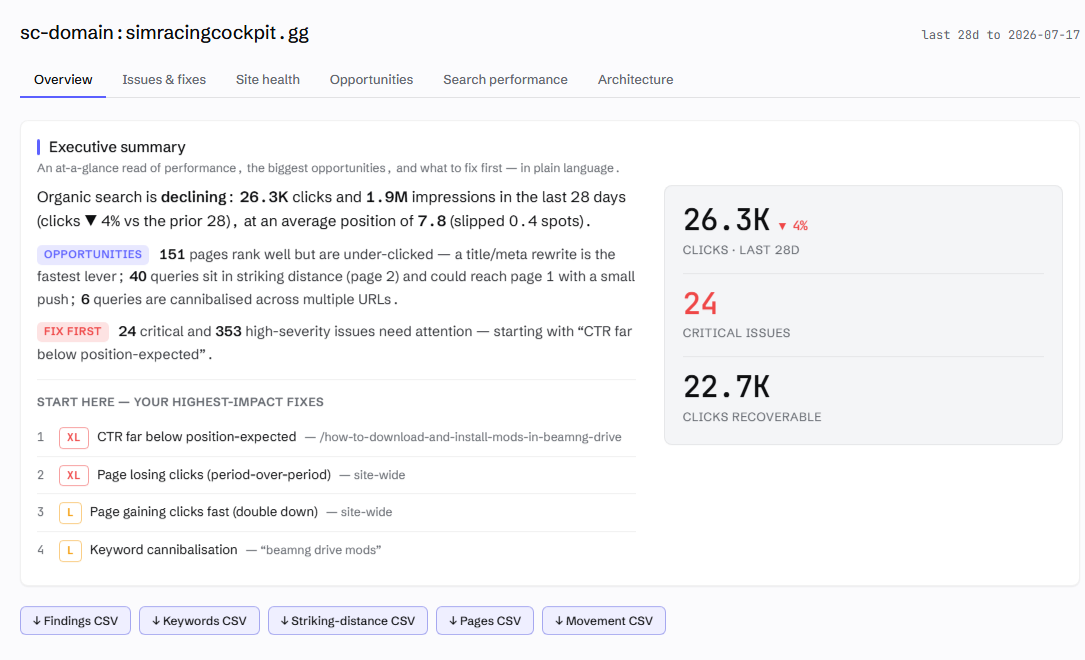
you  › run an SEO audit on mysite.com

     ⣾ search console  1.8M rows synced (19s - incremental)
     ⣾ crawl           868 pages · HTTP/2 · robots-polite · 8 parallel
     ⣾ link graph      internal PageRank · click depth · in-degree
     ✓ 99 checks · 220 findings · ranked by expected clicks per dev-hour

     #1  CTR far below position-expected     /pricing                   XL
     #2  Page losing clicks (trend)          site-wide                  XL
     #3  Keyword cannibalisation             "project management app"   L
     #4  Robots-blocked page earning traffic /category/guides           L

you  › generate the fix for #1 ▍
The manual
This README is the story and the quick start. The detail lives in the manual:
| Page | What's in it |
|---|---|
| Getting started | Install, the GSC service-account setup (and the step everyone misses), Claude Desktop and Claude Code config, your first audit, troubleshooting |
| Tool reference | Every tool: what it does, inputs, joins, an example prompt |
| The check registry | All 99 checks with what each catches, its D/N label, and the fix |
| Composition | The join keys, the grains, and thirteen worked recipes for asking your own questions across the data |
| Competitive analysis | The Semrush-replacement workflows, DataForSEO setup, link intersect with the Majestic Trust Flow tier, and the real costs |
| SEO Recon | Why a page is losing: the live SERP + AI-Overview citation verdict, the competitor diff, and the trackable to-do ledger |
| DataForSEO functions | Every DataForSEO-backed tool grouped by API module - Keywords, SERP, Labs, Backlinks, OnPage - each with its endpoint and cost |
| Majestic functions | The optional Trust Flow tier - what it adds and how link_intersect uses it |
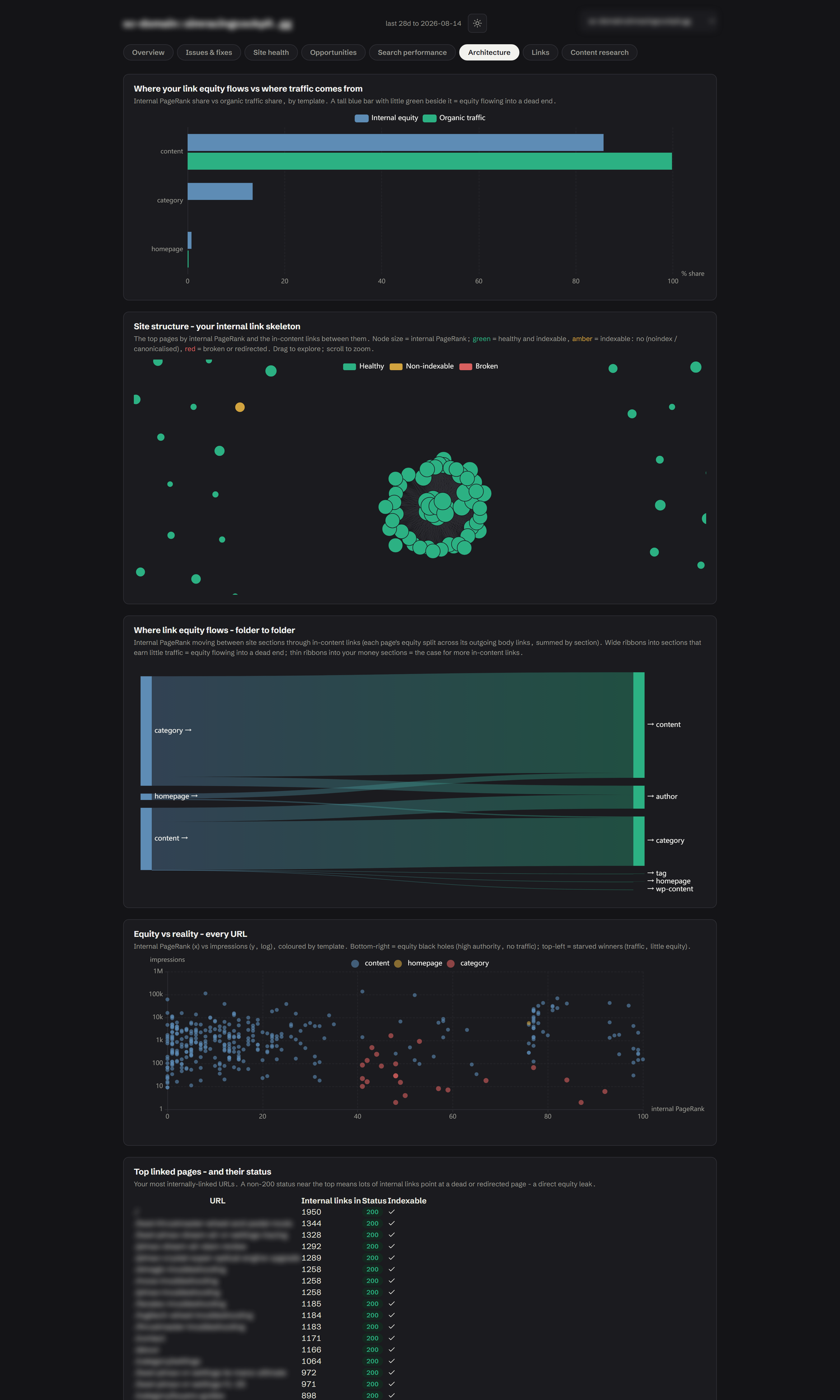
| Dashboard & reports | The eight tabs, the report hub, what each chart shows, and the shareable export |
Surprisingly little has changed in twenty years
The technical audit I was writing for clients in 2006 is, structurally, the audit most agencies still sell today. A crawler runs, a template fills, a 60-page PDF lands. Everything a crawler could find, in severity order, with no idea which findings are worth money and which are cosmetic.
What has changed is what's possible. Google gives every site owner a complete record of its search reality - which queries, which pages, how many impressions, where you ranked. Your crawl tells you what your site says. Search Console tells you what Google did about it. And in my experience, the gap between those two datasets is where nearly all of the recoverable traffic hides.
So that's what I built. SEO Audit Console is a Model Context Protocol server that merges your Search Console history with a first-party crawl of your site (and, when you want it, DataForSEO) into one thing: a prioritised, evidence-backed audit you can interrogate inside Claude Desktop. It hands you paste-ready fixes. Every finding traces back to a real datapoint.
One idea underneath all of it:
Your crawl is intent. Search Console is reality. The money is where they diverge.
A flat crawler tells you a page 404s. Useful, but only just. This tells you the 404 is draining 15% of your homepage's internal PageRank, that the page used to earn 10,000 clicks a month, and it writes the 301 rule to fix it. It finds the page at position #3 on 150,000 impressions with a 0.2% click-through rate - a title rewrite probably worth thousands of clicks - and ranks that above the cosmetic findings. Severity is what crawlers sell you. Yield is what moves the numbers.
Who is this for?
The SEO consultant who wants the collection and checking automated so the thinking time survives. The in-house marketer who's been quoted four figures for a commodity audit. And anyone newer to this who wants to learn what a good audit looks at - because every finding shows its evidence, the tool doubles as a teacher.
A note on where to run it. Claude Desktop is the easy start, but in my view Claude Code is the best home for this tool - because it closes the loop. In a chat client the audit hands you a 301 rule to paste somewhere. In Claude Code, the same session has your site's repo, a terminal and git: the audit finds the issue, writes the fix, applies it to the codebase, commits it, and re-crawls to verify. Finding to deployed fix, one conversation.
You don't need to learn an interface. You type "run an SEO audit on mysite.com" into Claude and it happens. Forget what's possible? Ask "run seo_audit_help" and you get the full menu with example prompts.
Does the approach work?
Yes. The crawl-plus-GSC merge is not a novelty; it's the method. On one property, seeding the crawl from Search Console URLs took coverage of GSC-known pages from 29% to 70% - every one of those extra pages is a page a conventional crawl silently missed, and several were earning traffic with no internal links pointing at them at all. On the same property the incremental sync turned a 33-minute data refresh into 19 seconds, which is the difference between "audit quarterly" and "audit whenever you're curious".
What the audit checks
run_audit executes 99 checks over the joined data and returns a ranked list - not a wall of everything, a priority order with the traffic at stake attached to each finding. The families, briefly:
| Family | What it catches | |---|---| | Crawlability & indexation | Broken links, redirect chains, orphans, index bloat, spider-traps, robots-blocked pages still earning traffic, and the reason every URL isn't indexable | | On-page & structured data | Titles, metas, H1s, alt text - plus a local validator covering ~30 rich-result types, required fields only, so it never nags about properties Google ignores | | Trends (GSC over time) | Pages losing clicks, rankings slipping, vanished queries, rising pages worth doubling down on, stale content decaying year-on-year | | The merged questions | Cannibalisation, striking distance, ghost pages, traffic to dead URLs, internal authority wasted on no-click pages, titles missing the query you already rank for | | AI-search readiness | Phrases you rank for but never say, queries your copy never answers in one passage, content that doesn't chunk cleanly for retrieval |
Every check is labelled D (deterministic - here are the bytes) or N (judgement - off by default, ask for "the judgement findings" to see them). In my view a wrong finding is worse than no finding at all, so the heuristic checks have to ask permission. The full registry, check by check, is in the manual.
And if you grew up on Screaming Frog or Sitebulb, the dashboard's Site health tab will feel like home - response codes, indexability reasons, crawl depth, the heaviest images, server errors and slow pages, all as clean stat bars. Same diagnostics, except each one is sitting next to the Search Console numbers for the same URL. The tab-by-tab tour is in dashboard.md.
The crawl, properly explained
The crawl is where audits usually go wrong, so it's worth understanding what this one does differently. I've spent enough of my career cleaning up after crawlers that fooled themselves. This one is a proper SEO crawler - it just happens to have your Search Console history sitting next to it.
It discovers pages three ways. Following links, reading your XML sitemaps, and - the important one - starting from every URL Google is already sending traffic to, straight out of your GSC data. Coverage stops depending on your sitemap being honest. It's also exactly how ghost pages get caught: if Google ranks a URL your own site structure can't reach, that URL still gets crawled, and the mismatch becomes a finding.
It records why, not just what. For every URL that isn't indexable it stores the reason - 404, noindex, X-Robots header, canonicalised elsewhere, robots-blocked, non-HTML. "This page won't rank" is a fact; "this page won't rank because a plugin set an X-Robots header nobody remembers" is a fix.
It refuses to be fooled. A redirect that leaves your site (Shopify OAuth flows, I'm looking at you) is recorded as a redirect-out, never stored as a page. It always uses GET rather than HEAD, because a HEAD request can return a different status than the real request would - but it abandons the body for images, PDFs and assets, so it records status and size without downloading the bytes.
It's quick without being rude. HTTP/2 where your origin supports it, gzip and brotli negotiated, keep-alive connections reused. The speed comes from efficiency, not from hammering your server. It respects robots.txt properly (a bot-specific group replaces
Truncated for display — read the full file on GitHub.
Related Skills
Agent-Reach
93.0kGive your AI agent eyes to see the entire internet. Read & search Twitter, Reddit, YouTube, GitHub, Bilibili, XiaoHongShu — one CLI, zero API fees.
headroom
74.6kCompress tool outputs, logs, files, and RAG chunks before they reach the LLM. 20% fewer tokens for coding agents, 60-95% fewer tokens for JSON, same answers. Library, proxy, MCP server.
CowAgent
47.3kOpen-source personal AI assistant & Agent Harness. Plans tasks, runs tools and skills, self-evolves with memory and knowledge. Multi-agent, multi-model, multi-channel. Lightweight, extensible, one-line install.
Scrapling
86.1k🕷️ An adaptive Web Scraping framework that handles everything from a single request to a full-scale crawl! Don't be shy, join here: https://discord.gg/EMgGbDceNQ and follow here for daily tips and tricks: https://x.com/Scrapling_dev

Languages
Trust signals
From repository metadata: license, adoption, age and documentation. Not a code audit — see the Safety scan above for what the skill file itself contains.