
Mountmate
A simple macOS menu bar app to manage external drives
Install / Use
/learn @homielab/MountmateREADME
🚀 MountMate
A simple macOS menu bar app to manage your external drives.
<p align="center"> <img src="https://raw.githubusercontent.com/homielab/mountmate/main/docs/assets/icon.png" alt="MountMate Icon" width="100" height="100" style="border-radius: 22%; border: 0.5px solid rgba(0,0,0,0.1);" /> </p> <p align="center"> <a href="https://github.com/homielab/mountmate/releases"> <img src="https://img.shields.io/github/v/release/homielab/mountmate?label=release&style=flat-square" /> </a> <a href="https://github.com/homielab/mountmate"> <img src="https://img.shields.io/github/downloads/homielab/mountmate/total?style=flat-square" /> </a> <a href="https://brew.sh"> <img src="https://img.shields.io/badge/homebrew-supported-blue?style=flat-square" /> </a> </p>⚡️ Quick Start
Install via Homebrew:
brew install mountmate
Or download the latest .dmg and drag MountMate.app into your Applications folder.
🧩 What is MountMate?
MountMate is a lightweight macOS menu bar utility that lets you mount and unmount external drives with a single click – no Terminal, no Disk Utility, no hassle.
Whether you're dealing with a noisy spinning HDD or want finer control over when your drives are active, MountMate gives you a clean, no-nonsense solution right from your menu bar.
🧠 Why I Built It
I have a 4TB external HDD plugged into my Mac mini 24/7. Since it's a spinning drive, macOS constantly spins it up – just for trivial things like opening Finder or running Spotlight. That meant:
- Unwanted noise
- System slowdowns
- Wasted energy
I tried:
- Disk Utility – too slow and clunky
- Custom shell scripts – too technical
- Existing third-party apps – too bloated or didn’t work right
So I built MountMate.
✅ Features
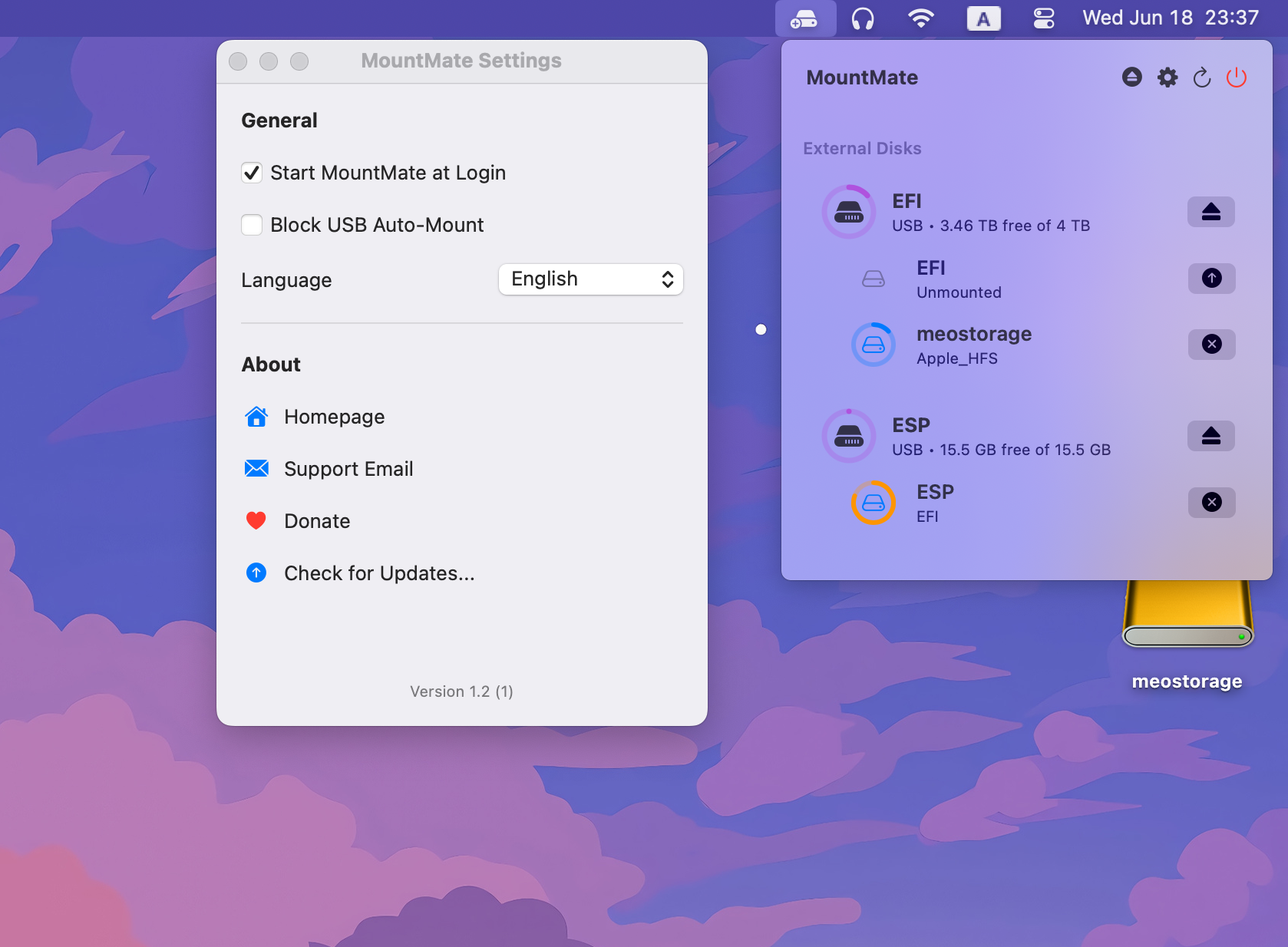
- View all connected external drives
- See which ones are mounted
- Mount/unmount any drive with a click
- Check available free space
- Keyboard Shortcuts: Quick mount/unmount with
⌘⇧Mand⌘⇧U - Network Shares: Auto-mount SMB shares at login
- Force Eject: Safely force eject drives that are in use
- Runs quietly in the menu bar
- Fully native – no Electron, no dependencies
✨ Why Use MountMate?
macOS automatically mounts drives when they’re plugged in – but gives you no easy way to remount them later unless you use Terminal or Disk Utility. MountMate is perfect for:
- External HDDs you don’t always need
- Drives used only for backup
- Reducing wear and tear or noise
- Improving system responsiveness
🔐 Private, Fast, and Safe
MountMate runs entirely offline, using native macOS APIs and command-line tools. It:
- Does not track anything
- Does not require connect to the internet
- Does not access your files
- Does not require root permissions
Just a clean utility that does one job well.
🖼️ Screenshots
<img src="https://raw.githubusercontent.com/homielab/mountmate/main/docs/screenshots/light.png" width="300" /><img src="https://raw.githubusercontent.com/homielab/mountmate/main/docs/screenshots/dark.png" width="300" />
🛠️ Installation
Manual Installation
- Download the latest
.dmgrelease - Open the
.dmgfile - Drag
MountMate.appinto the Applications folder - Eject the installer disk image
- Launch MountMate from Applications
Install via Homebrew
If you have Homebrew installed, you can install MountMate directly from this repository:
brew install mountmate
📫 Feedback & Contributions
MountMate was built to solve my personal workflow issue, but I’d love to improve it for others too. Feel free to open an issue or suggest improvements!
🤝 Support
If you found MountMate helpful, please consider supporting its development:

Related Skills
node-connect
347.0kDiagnose OpenClaw node connection and pairing failures for Android, iOS, and macOS companion apps
frontend-design
107.8kCreate distinctive, production-grade frontend interfaces with high design quality. Use this skill when the user asks to build web components, pages, or applications. Generates creative, polished code that avoids generic AI aesthetics.
openai-whisper-api
347.0kTranscribe audio via OpenAI Audio Transcriptions API (Whisper).
qqbot-media
347.0kQQBot 富媒体收发能力。使用 <qqmedia> 标签,系统根据文件扩展名自动识别类型(图片/语音/视频/文件)。
