
Queue
Tiny async queue with concurrency control. Like p-limit or fastq, but smaller and faster.
Install / Use
/learn @henrygd/QueueREADME
@henrygd/queue


Tiny async queue with concurrency control. Like p-limit or fastq, but smaller and faster. Optional time-based rate limiting also available. See comparisons and benchmarks below.
Works with: <img alt="browsers" title="This package works with browsers." height="16px" src="https://jsr.io/logos/browsers.svg" /> <img alt="Deno" title="This package works with Deno." height="16px" src="https://jsr.io/logos/deno.svg" /> <img alt="Node.js" title="This package works with Node.js" height="16px" src="https://jsr.io/logos/node.svg" /> <img alt="Cloudflare Workers" title="This package works with Cloudflare Workers." height="16px" src="https://jsr.io/logos/cloudflare-workers.svg" /> <img alt="Bun" title="This package works with Bun." height="16px" src="https://jsr.io/logos/bun.svg" />
Usage
Create a queue with the newQueue function. Then add async functions - or promise returning functions - to your queue with the add method.
You can use queue.done() to wait for the queue to be empty.
import { newQueue } from '@henrygd/queue'

// create a new queue with a concurrency of 2
const queue = newQueue(2)

const pokemon = ['ditto', 'hitmonlee', 'pidgeot', 'poliwhirl', 'golem', 'charizard']

for (const name of pokemon) {
    queue.add(async () => {
        const res = await fetch(`https://pokeapi.co/api/v2/pokemon/${name}`)
        const json = await res.json()
        console.log(`${json.name}: ${json.height * 10}cm | ${json.weight / 10}kg`)
    })
}

console.log('running')
await queue.done()
console.log('done')
The return value of queue.add is the same as the return value of the supplied function.
const response = await queue.add(() =>
  fetch("https://pokeapi.co/api/v2/pokemon")
);
console.log(response.ok, response.status, response.headers);
queue.all is like Promise.all with concurrency control:
import { newQueue } from "@henrygd/queue";

const queue = newQueue(2);

const tasks = ["ditto", "hitmonlee", "pidgeot", "poliwhirl"].map(
  (name) => async () => {
    const res = await fetch(`https://pokeapi.co/api/v2/pokemon/${name}`);
    return await res.json();
  }
);

// Process all tasks concurrently (limited by queue concurrency) and wait for all to complete
const results = await queue.all(tasks);
console.log(results); // [{ name: 'ditto', ... }, { name: 'hitmonlee', ... }, ...]
You can also mix existing promises and function wrappers.
const existingPromise = fetch("https://pokeapi.co/api/v2/pokemon/ditto").then(
  (r) => r.json()
);
const results = await queue.all([
  existingPromise,
  () =>
    fetch("https://pokeapi.co/api/v2/pokemon/pidgeot").then((r) => r.json()),
]);
Note that only the wrapper functions are queued, since existing promises start running as soon as you create them.
Time-based rate limiting
If you need to limit not just concurrency (how many tasks run simultaneously) but also rate (how many tasks can start within a time window), use @henrygd/queue/rl.
This is useful when working with APIs that have rate limits.
import { newQueue } from '@henrygd/queue/rl'

// max 10 concurrent requests, but only 3 can start per second
const queue = newQueue(10, 3, 1000)

const start = Date.now()

for (let i = 1; i <= 10; i++) {
   queue.add(async () => console.log(`Task ${i} started at ${Date.now() - start}ms`))
}

await queue.done()
The signature is: newQueue(concurrency, rate?, interval?).
concurrency- Maximum number of tasks running simultaneouslyrate- Maximum number of tasks that can start within theinterval(optional)interval- Time window in milliseconds for rate limiting (optional)
If you omit rate and interval, it works exactly like the main package (just concurrency limiting).
[!TIP] If you need support for Node's AsyncLocalStorage, import
@henrygd/queue/async-storageinstead.
Queue interface
/** Add an async function / promise wrapper to the queue */
queue.add<T>(promiseFunction: () => PromiseLike<T>): Promise<T>
/** Adds promises (or wrappers) to the queue and resolves like Promise.all */
queue.all<T>(promiseFunctions: Array<PromiseLike<T> | (() => PromiseLike<T>)>): Promise<T[]>
/** Returns a promise that resolves when the queue is empty */
queue.done(): Promise<void>
/** Empties the queue - pending promises are rejected, active promises continue */
queue.clear(): void
/** Returns the number of promises currently running */
queue.active(): number
/** Returns the total number of promises in the queue */
queue.size(): number
Comparisons and benchmarks
| Library | Version | Bundle size (B) | Weekly downloads | | :-------------------------------------------------------------- | :------ | :-------------- | :--------------- | | @henrygd/queue | 1.2.0 | 472 | hundreds :) | | @henrygd/queue/rl | 1.2.0 | 685 | - | | p-limit | 5.0.0 | 1,763 | 118,953,973 | | async.queue | 3.2.5 | 6,873 | 53,645,627 | | fastq | 1.17.1 | 3,050 | 39,257,355 | | queue | 7.0.0 | 2,840 | 4,259,101 | | promise-queue | 2.2.5 | 2,200 | 1,092,431 |
Note on benchmarks
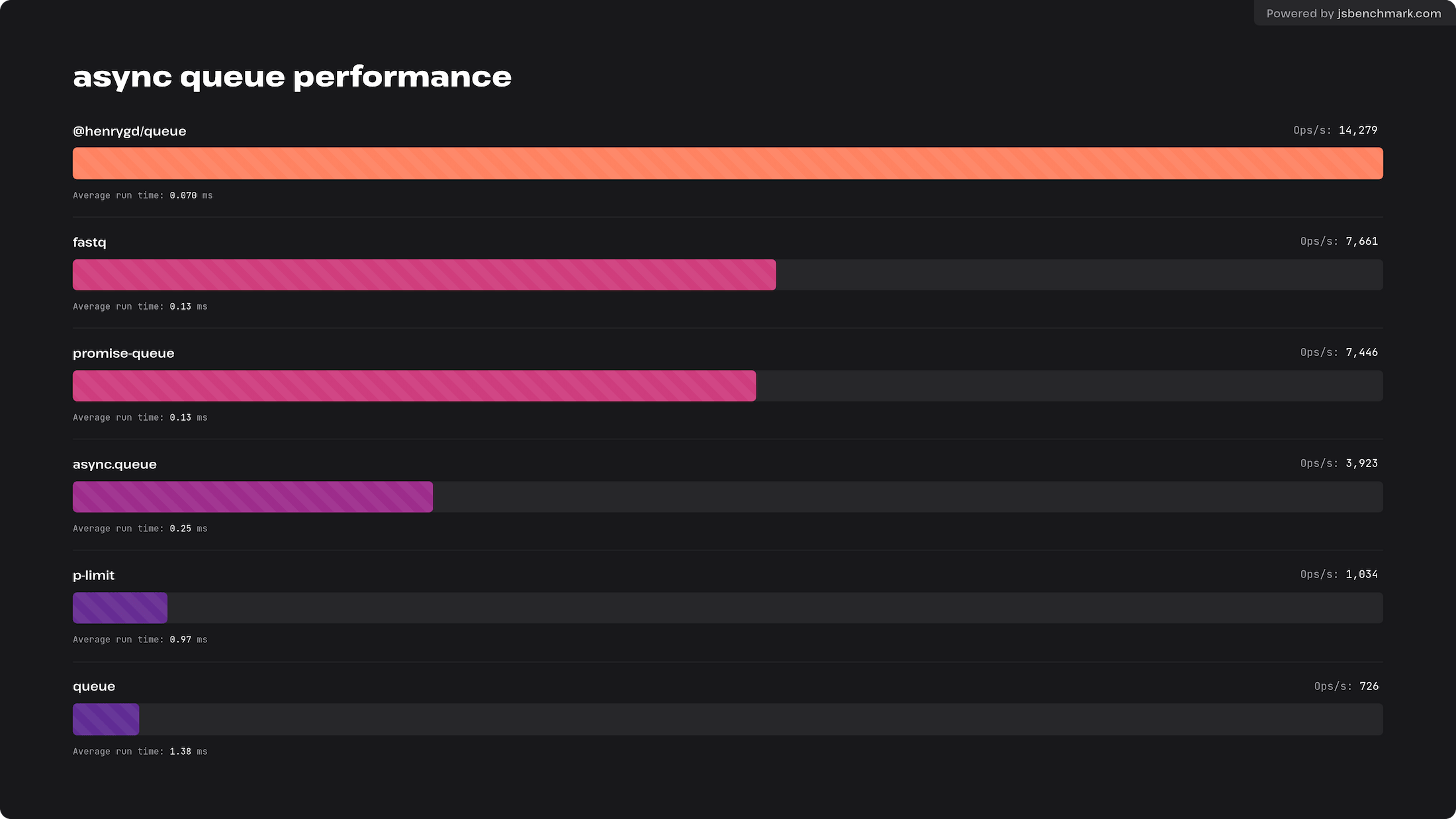
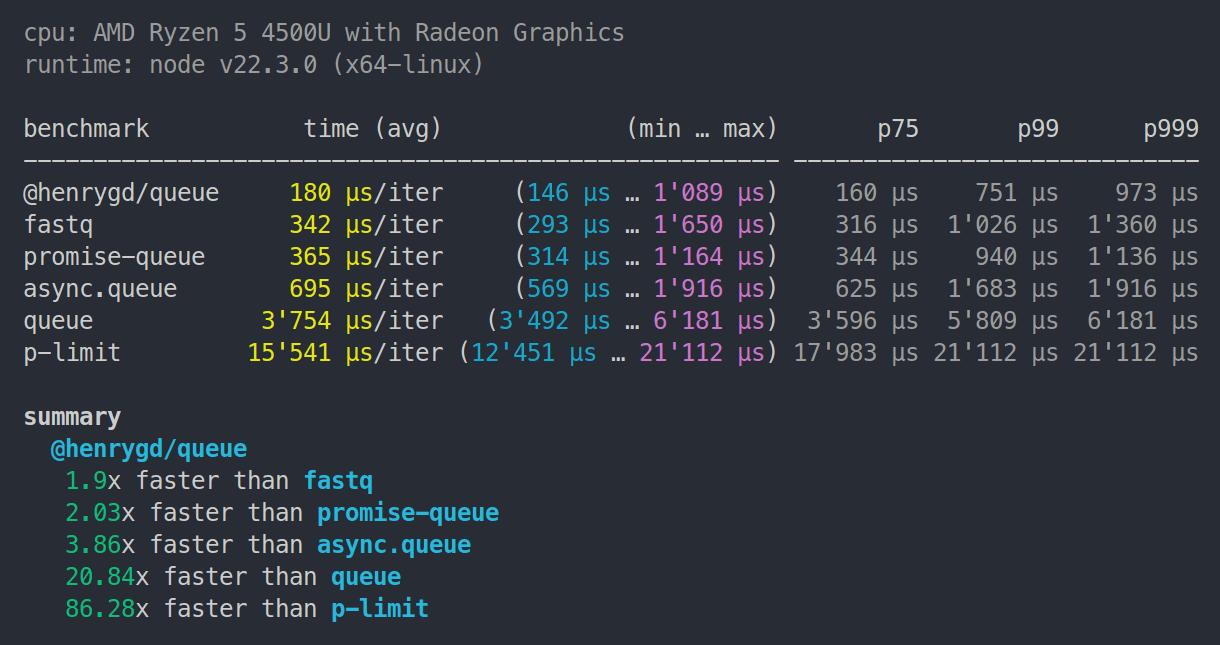
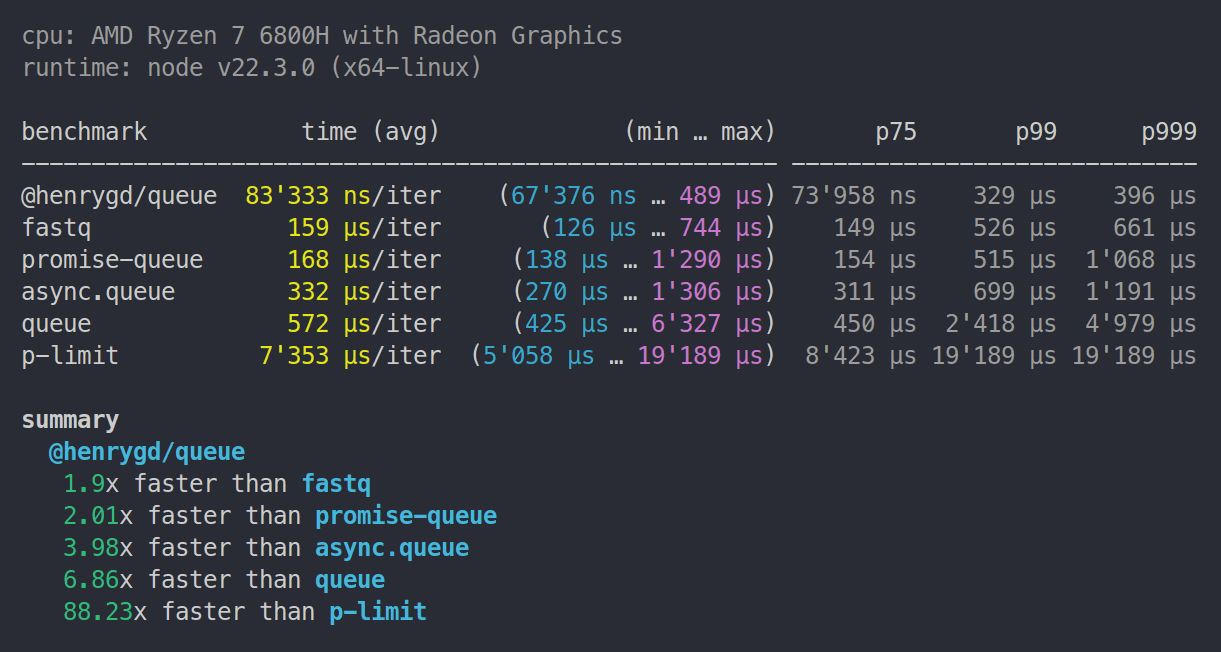
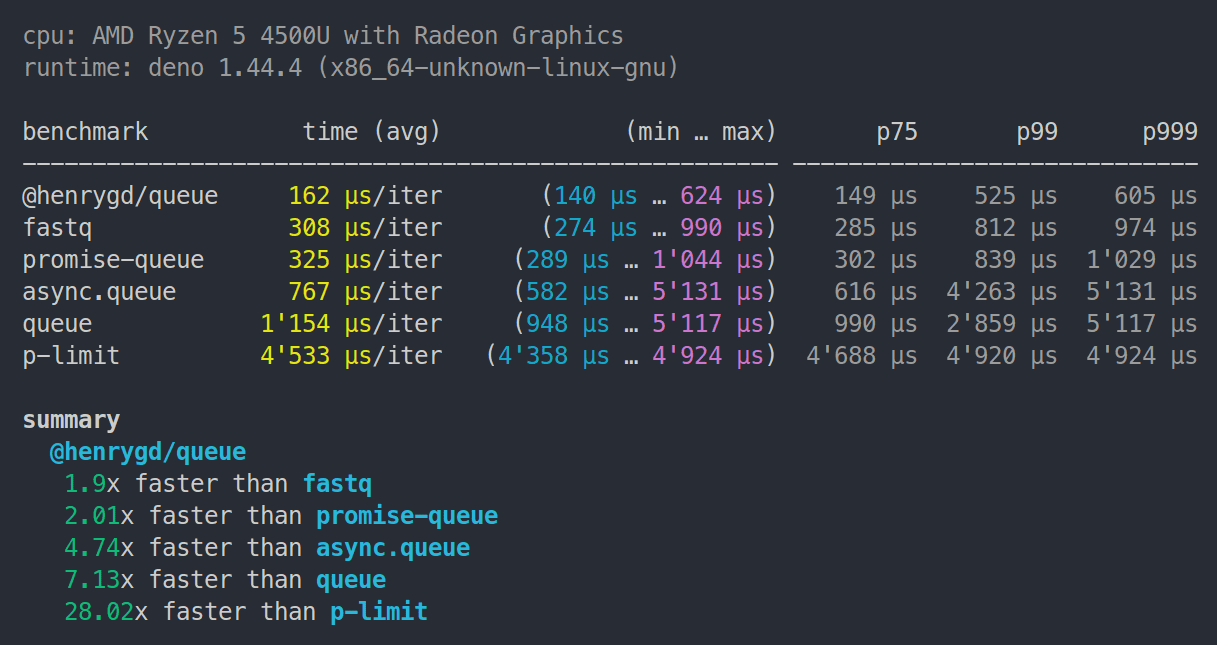
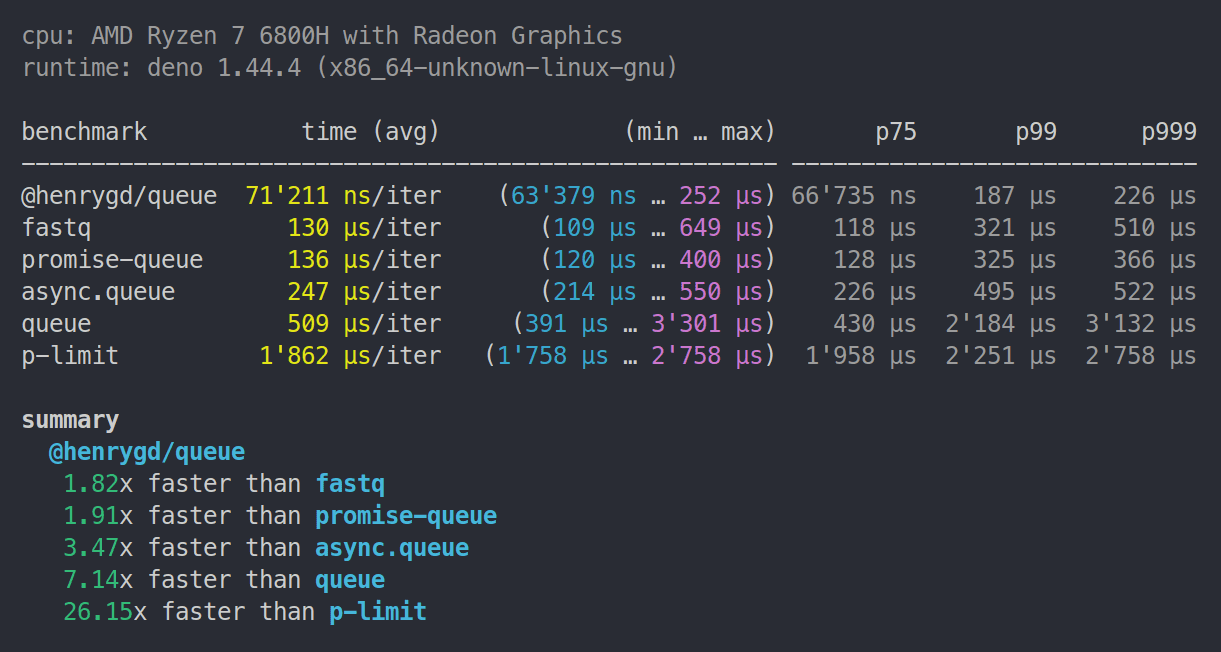
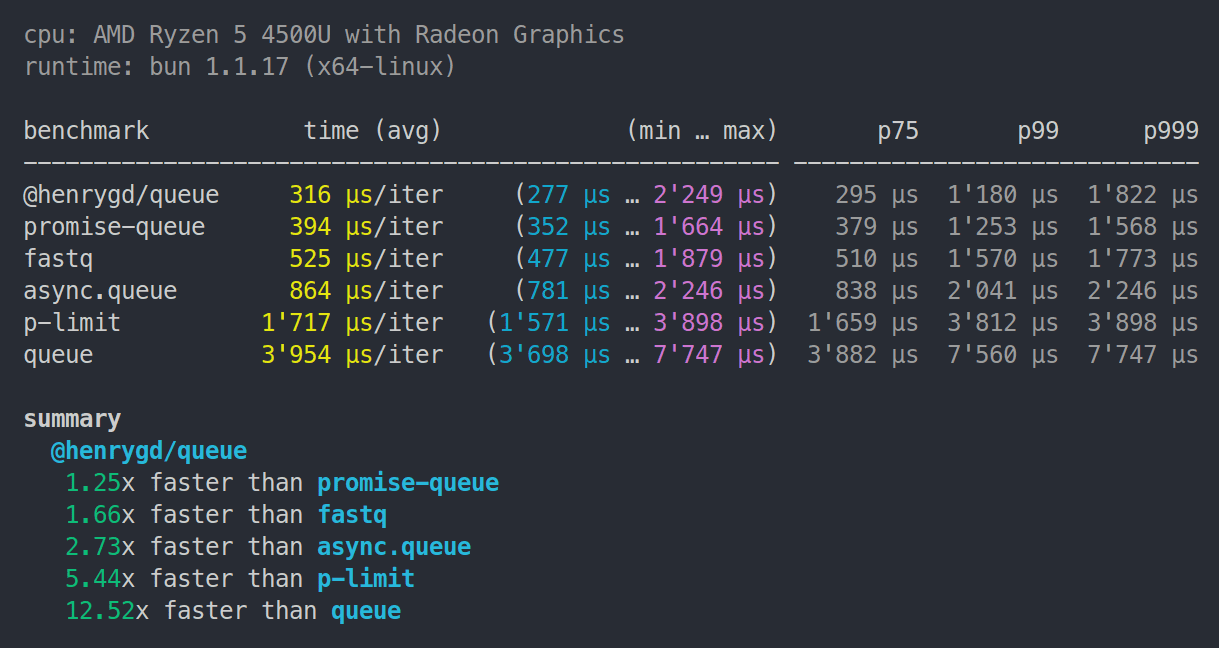
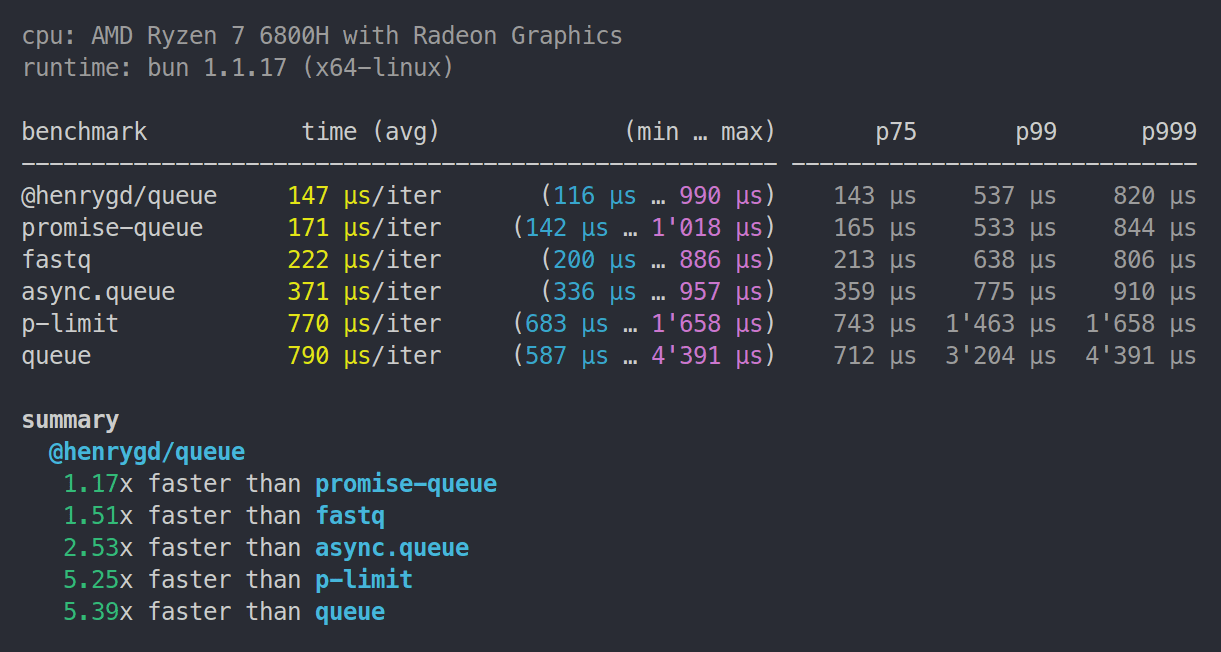
All libraries run the exact same test. Each operation measures how quickly the queue can resolve 1,000 async functions. The function just increments a counter and checks if it has reached 1,000.[^benchmark]
We check for completion inside the function so that promise-queue and p-limit are not penalized by having to use Promise.all (they don't provide a promise that resolves when the queue is empty).
Browser benchmark
This test was run in Chromium. Chrome and Edge are the same. Firefox and Safari are slower and closer, with @henrygd/queue just edging out promise-queue. I think both are hitting the upper limit of what those browsers will allow.
You can run or tweak for yourself here: https://jsbm.dev/TKyOdie0sbpOh
Node.js benchmarks
Note:
p-limit6.1.0 now places betweenasync.queueandqueuein Node and Deno.
Ryzen 5 4500U | 8GB RAM | Node 22.3.0
Ryzen 7 6800H | 32GB RAM | Node 22.3.0
Deno benchmarks
Note:
p-limit6.1.0 now places betweenasync.queueandqueuein Node and Deno.
Ryzen 5 4500U | 8GB RAM | Deno 1.44.4
Ryzen 7 6800H | 32GB RAM | Deno 1.44.4
Bun benchmarks
Ryzen 5 4500U | 8GB RAM | Bun 1.1.17
Ryzen 7 6800H | 32GB RAM | Bun 1.1.17
Cloudflare Workers benchmark
Uses oha to make 1,000 requests to each worker. Each request creates a queue and resolves 5,000 functions.
This was run locally using Wrangler on a Ryzen 7 6800H laptop. Wrangler uses the same workerd runtime as workers deployed to Cloudflare, so the relative difference should be accurate. Here's the repository for this benchmark.
| Library | Requests/sec | Total (sec) | Average | Slowest | | :------------- | :----------- | :---------- | :------ | :------ | | @henrygd/queue | 816.1074 | 1.2253 | 0.0602 | 0.0864 | | promise-queue | 647.2809 | 1.5449 | 0.0759 | 0.1149 | | fastq | 336.7031 | 3.0877 | 0.1459 | 0.2080 | | async.queue | 198.9986 | 5.0252 | 0.2468 | 0.3544 | | queue | 85.6483 | 11.6757 | 0.5732 | 0.7629 | | p-limit | 77.7434 | 12.8628 | 0.6316 | 0.9585 |
Related
@henrygd/semaphore - Fastest javascript inline semaphores and mutexes using async / await.
License
[^benchmark]
Related Skills
node-connect
340.2kDiagnose OpenClaw node connection and pairing failures for Android, iOS, and macOS companion apps
frontend-design
84.1kCreate distinctive, production-grade frontend interfaces with high design quality. Use this skill when the user asks to build web components, pages, or applications. Generates creative, polished code that avoids generic AI aesthetics.
openai-whisper-api
340.2kTranscribe audio via OpenAI Audio Transcriptions API (Whisper).
commit-push-pr
84.1kCommit, push, and open a PR
