
skgate
Any MCP server. Anywhere. An OAuth-protected MCP gateway that can also run the servers, plus SI provider proxying with model aliases, and your Grok subscription as an OpenAI-compatible API with no API key.
Install / Use
claude mcp add helv-io -- npx -y github:helv-io/skgateIf the server publishes to npm under a different name, use that package instead — check the repo README.
MCP Server
Model Context Protocol server
Quality Score
Category
OperationsSupported Platforms
Our assessment of skgate
skgate scores 84/100 on our quality scale, 560th of 753 Operations skills we index.
Its MCP Server is 19 KB long, well organised into 18 sections with 18 code examples: a thorough specification that gives an agent plenty to work with.
It has 10 GitHub stars, so there is little community track record yet; judge it on its content.
Maintenance, license and trust
- The repository was last updated 3 days ago, so skgate is actively maintained.
- It is released under the MIT license, a permissive license that allows use, modification and commercial use with attribution.
- Its trust signals score 97/100, with no cautions. These come from repository metadata, not a code audit — read the skill file before letting an agent act on it.
skgate compared with similar skills
All 4 of these similar skills score higher than skgate; compare them before choosing.
| Skill | Score | Stars | Updated | Format |
|---|---|---|---|---|
| skgate (this skill)by helv-io | 84 | 10 | 3d ago | MCP Server |
| Agent-Reachby Panniantong | 100 | 96.2k | 3d ago | CLAUDE.md |
| headroomby headroomlabs-ai | 100 | 75.1k | 1d ago | CLAUDE.md |
| CowAgentby zhayujie | 100 | 47.4k | today | CLAUDE.md |
| Scraplingby D4Vinci | 100 | 86.9k | today | MCP Server |
Frequently asked questions
- How do I install skgate?
- Run
claude mcp add helv-io -- npx -y github:helv-io/skgate. The install tabs above show the steps for each supported agent. - Which AI agents does skgate work with?
- It is written for Claude Code and Claude Desktop, as a MCP Server file. Other agents that read the same format can often use it too.
- Is skgate safe to use?
- It is MIT-licensed and scores 97/100 on trust signals. Skills are instructions an agent will follow, so read the file before installing it and do not approve commands you do not understand.
- Is skgate still maintained?
- The repository was last updated 3 days ago, so skgate is actively maintained.
Skill content
View source on GitHub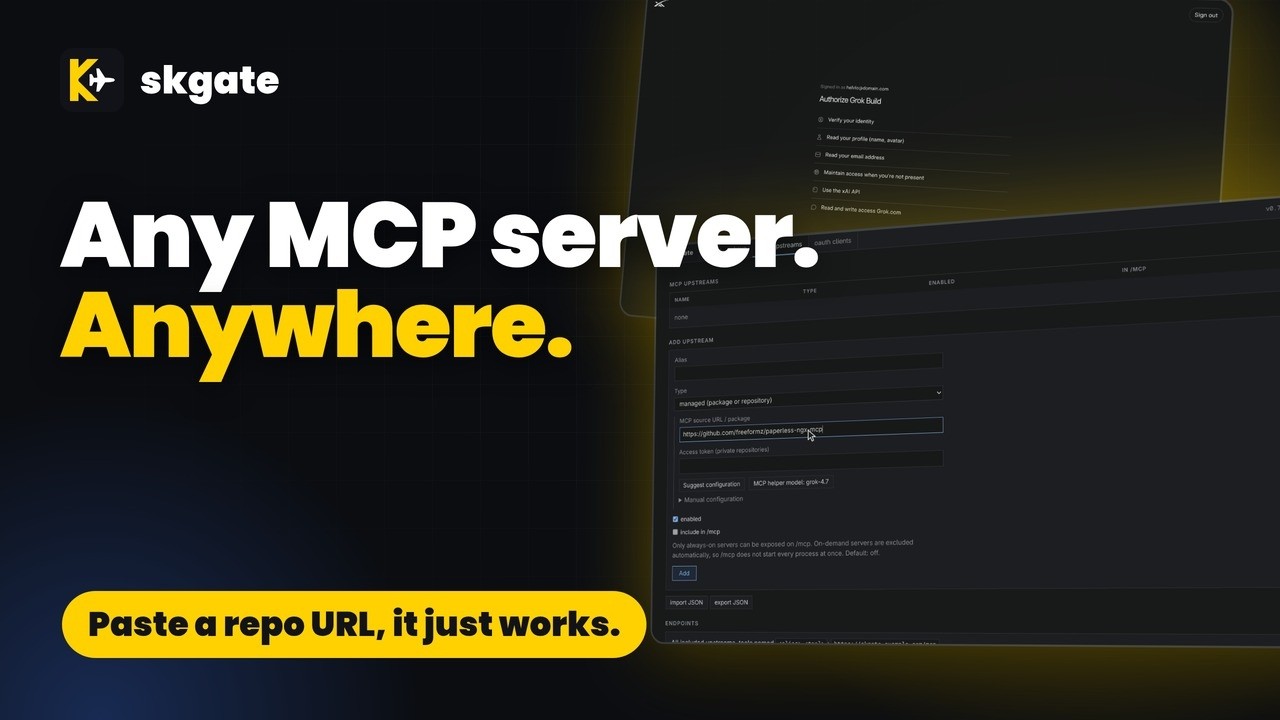
Name Origin
skgate /ɛsˈkɑːɡeɪt/ (ess-KAH-gate)
"sk" is how a lot of SI API keys start, and "gate" is for gateway. Not a great name, but it's ours.
The plane in the logo is an inside joke. The public wouldn't understand it, and I'm not about to explain it. Sorry.
Quality
<details> <summary>Is it good?</summary>Yes
</details>Quick start
You need an OIDC provider with a confidential client for skgate. Admin login is OIDC only. Trying it on one machine? docs/quickstart.md runs skgate with a bundled provider and no accounts.
# docker-compose.yml
services:
  skgate:
    container_name: skgate
    image: ghcr.io/helv-io/skgate:latest
    restart: always
    ports:
      - 8080:8080
    environment:
      - PUBLIC_URL=https://skgate.example.com
      - OIDC_ISSUER=https://auth.example.com
      - OIDC_CLIENT_ID=skgate
      - OIDC_CLIENT_SECRET=change-me
    volumes:
      - ./data:/data
    healthcheck:
      test: ["CMD", "/skgate", "healthcheck"]
      interval: 30s
      timeout: 5s
      retries: 3
docker compose up -d- Open
https://skgate.example.com/adminand sign in through your OIDC provider. - mcp upstreams > Add upstream: a remote MCP server, or a GitHub repository, npm package, or PyPI package that skgate runs for you (see Add an MCP server with Suggest configuration).
- Point your MCP client at
https://skgate.example.com/mcpor the site root for every included upstream, or athttps://skgate.example.com/mcp/<alias>for one upstream. Sign in when it asks.
Image tags:
latest: proxy + managed MCP servers. Bundles Node.js (npx), pnpm, Bun (bunx), Deno, Python (uv,uvx), Go, .NET and git.slim: proxy only
To upgrade, back up ./data, then docker compose pull && docker compose up -d.
Proxy your SI providers
skgate is also an OpenAI-compatible API in front of your SI providers. Point your apps at one address; switch the provider behind them without changing the apps. User-defined model aliases give your apps a stable model name of your choosing.
Grok can use subscription sign-in with no API key. Other providers use that provider's API key (OpenAI, Anthropic, Gemini, Mistral, DeepSeek, Groq, OpenRouter, Ollama, LM Studio, and any OpenAI-compatible endpoint).
- status > Grok > Sign in: open the shown address, enter the code, approve. skgate keeps the sign-in fresh.
- keys > enter a name > Create key. Copy the
sk-...key; it is shown once. - Use it: base URL
https://skgate.example.com/v1, API keysk-...(see Examples).- These base URLs all reach the same API:
/v1,/api,/api/v1, and the bare host. Use whichever form your client expects.
- These base URLs all reach the same API:
- Other providers: status > Add provider, pick one and enter its API key. Type the provider's address in any form; skgate finds the one that works.
Examples
<details><summary>curl: models and a chat completion</summary>export SKGATE=https://skgate.example.com KEY=sk-...
curl -s $SKGATE/v1/models -H "Authorization: Bearer $KEY"
curl -s $SKGATE/v1/chat/completions -H "Authorization: Bearer $KEY" \
-H 'Content-Type: application/json' \
-d '{"model":"<id from /v1/models>","messages":[{"role":"user","content":"Say hi"}]}'
export OPENAI_BASE_URL=https://skgate.example.com/v1 OPENAI_API_KEY=sk-...
from openai import OpenAI

client = OpenAI()  # reads the two variables above
r = client.chat.completions.create(model="<id from /v1/models>", messages=[{"role": "user", "content": "Say hi"}])
print(r.choices[0].message.content)
Aliases are user-defined: skgate ships with none. Pick any name and point it at a model. This example uses grok-latest, but the name is up to you.
Change the target in this one place and every app using that name switches at once, with no client config changes.
Grok > Aliases: New alias grok-latest, Target model grok-4.7, Add alias.
client sends   {"model": "grok-latest", ...}
skgate sends   {"model": "grok-4.7", ...}
Aliases are listed first in /v1/models.
Needs the latest image and an MCP helper model from any ready provider. The first time, Pick MCP helper model next to the button opens the model picker right on the page.
mcp upstreams > Add upstream > Type managed process:
-
MCP source URL / package, one of:
| Source | Runs as | | --- | --- | |
@modelcontextprotocol/server-everything| npm package,npx| |pypi:mcp-server-time| PyPI package,uvx| |https://github.com/example-org/notes-mcp| git repo: clone, install, run (private: Access token) | -
Suggest configuration. skgate fetches the README and manifests (
package.json,pyproject.toml,server.json).The MCP helper model proposes the command, args, install step, and env names (secret or not, required or optional). The Manual configuration fields fill in, with a confidence and any warnings.
Nothing is saved yet. Set the variables the server needs.
-
Set an alias, fill in the variables you need (empty ones are not passed to the server), Save. The server is at
https://skgate.example.com/mcp/<alias>.
If the button is greyed out, hover it. Use Pick MCP helper model beside it, or add a provider on status first.
</details> <details><summary>MCP client: one upstream or all of them</summary>| URL | Serves |
| --- | --- |
| https://skgate.example.com/mcp/<alias> | One upstream |
| https://skgate.example.com/mcp | Every upstream marked In /mcp |
| https://skgate.example.com/ (MCP clients) | Same aggregate as /mcp when Accept/Content-Type look like MCP; browsers still go to /admin |
Hosted connectors use OAuth (leave client ID and secret empty). Scripts and CLIs send a key:
{"mcpServers": {"skgate": {"type": "http", "url": "https://skgate.example.com/mcp/<alias>",
  "headers": {"Authorization": "Bearer sk-..."}}}}
On a RAM-constrained homelab, idle MCP servers should cost nothing.
Managed servers (npx, pnpm dlx, bunx, deno, uvx, git) are child processes of skgate.
By default (Lifecycle on-demand) one starts on its first request and stops after 10 minutes without requests; the next request starts it again.
before   3 MCP servers = 3 containers, always running
after    1 skgate container; 0 server processes while idle, 1 per server in use
stopped --request--> starting --> running --10 min idle--> stopped
- Default is on-demand; Lifecycle
always-onstarts the server at boot instead. - The first request after a stop waits until the server is up.
- A server with a request in flight is never stopped.
- Idle time is
idleTimeoutSecondsin import JSON (default 600; not in the form):
{"mcpServers": {"time": {"command": "uvx", "args": ["mcp-server-time"], "skgate": {"idleTimeoutSeconds": 120}}}}
- The aggregated
/mcpincludes remote, OpenAPI and always-on upstreams marked In /mcp. On-demand servers are left out, so/mcpnever starts them. Point a client at/mcp/<alias>to use one. - Remote and OpenAPI upstreams have no process; there is nothing to idle.
- An admin Stop keeps a server stopped until Start or Restart.
mcp upstreams > import JSON > paste > Import. Needs the latest image.
{"mcpServers": {"everything": {"command": "npx", "args": ["-y", "@modelcontextprotocol/server-everything"]}}}
Served at https://skgate.example.com/mcp/everything. The same package runs with any bundled runner:
| Runner | command | args |
| --- | --- | --- |
| npm | npx | ["-y", "<package>"] |
| pnpm | pnpm | ["dlx", "<package>"] |
| Bun | bunx | ["<package>"] |
| Deno | deno | ["run", "-A", "npm:<package>"] |
| Python | uvx | ["<package>"] |
mcp upstreams > import JSON > paste > Import. skgate clones the repo, runs install, then the command.
{"mcpServers": {"notes": {"command": "node", "args": ["server.js"],
  "skgate": {"gitUrl": "https://github.com/example-org/notes-mcp.git", "gitRef": "main", "install": "npm ci"}}}}
mcp upstreams > Add upstream > Type remote server, or import:
{"mcpServers": {"docs": {"type": "http", "url": "https://mcp.example.com/mcp",
  "headers": {"Authorization": "Bearer ..."}}}}
Features
| Feature | What it does |
| --- | --- |
| Grok sign-in | Device code or browser paste-back; tokens refresh |
| Other providers | OpenAI, Anthropic, Gemini and more by API key (docs) |
| Model aliases | User-defined model names; change the target once |
| API | /v1, /api/v1, /api, no prefix; SSE (docs) |
| Virtual keys | Hashed; tokens in/out per key (docs) |
| MCP | Remote, stdio and git servers behind OAuth 2.1 (docs) |
| REST APIs as tools | Give an OpenAPI description, pick the operations (or let Suggest names and selection name them and pick a core set), and MCP clients get them as tools (docs) |
Tested MCP clients
Clients tested by the author against a live skgate. Status is what happened, not a promise.
| Client | Status | Notes | | --- | --- | --- | | ChatGPT | OK | | | Claude | OK | | | Grok | OK | | | Hermes | OK | | | Open WebUI | OK | Use OAuth 2.1; register and authorize the client. | | Gemini | Warning | Connects, but never calls tools. | | Home Assistant | Warning | Needs a manual OAuth client ID and secret. Only one MCP upstream can be used. | | Cline | Untested | | | Continue | Untested | | | Cursor | Untested | | | Goose | Untested | | | LibreChat | Untested | | | VS Code | Untested | | | Windsurf | Untested | | | Zed | Untested | |
Comparison
How each provider signs in elsewhere, and how skgate connects to it:
| Provider | Subscription sign-in elsewhere | In skgate | | --- | --- | --- | | xAI Grok * | OpenCode; more planned [1] | Subscription | | Anthropic Claude | Not offered to third parties [2] | API key | | DeepSeek | — | API key | | Google Gemini * | CLI login not for reuse [3] | API key | | Groq * | — | API key | | Mistral * | — | API key | | OpenAI | Sign in with ChatGPT [4] | API key | | OpenRouter * | — | API key | | LM Studio | — | No key (local) | | Ollama | — | No key (local) |
* Free tier available.
As of 2026-10-05; check each provider's terms. GitHub Copilot is not a skgate provider.
<details><summary>Sources</summary>- xAI, Use Grok in OpenCode
- Anthropic, Legal and compliance
- Google, [Gemini CLI terms](https://github.com/goog
Truncated for display — read the full file on GitHub.
Related Skills
Agent-Reach
96.2kGive your AI agent eyes to see the entire internet. Read & search Twitter, Reddit, YouTube, GitHub, Bilibili, XiaoHongShu — one CLI, zero API fees.
headroom
75.1kCompress tool outputs, logs, files, and RAG chunks before they reach the LLM. 20% fewer tokens for coding agents, 60-95% fewer tokens for JSON, same answers. Library, proxy, MCP server.
CowAgent
47.4kOpen-source personal AI assistant & Agent Harness. Plans tasks, runs tools and skills, self-evolves with memory and knowledge. Multi-agent, multi-model, multi-channel. Lightweight, extensible, one-line install.
Scrapling
86.9k🕷️ An adaptive Web Scraping framework that handles everything from a single request to a full-scale crawl! Don't be shy, join here: https://discord.gg/EMgGbDceNQ and follow here for daily tips and tricks: https://x.com/Scrapling_dev

Languages
Trust signals
From repository metadata: license, adoption, age and documentation. Not a code audit — see the Safety scan above for what the skill file itself contains.