
HATransparentView
😵 [Deprecated] UIView transparent subclass based on Rdio stations menu.
Install / Use
/learn @hebertialmeida/HATransparentViewREADME
HATransparentView
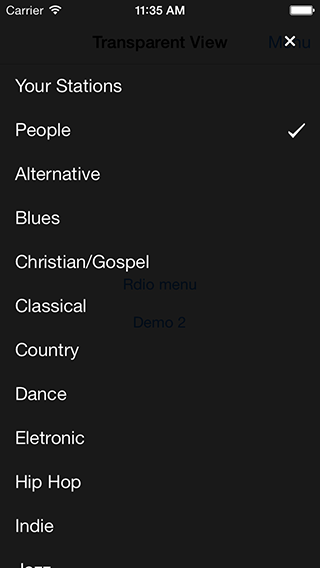
Custom UIView subclass based on Rdio stations menu.

Install
Installation with CocoaPods
CocoaPods is the best way to manage library dependencies in Objective-C projects.
Podfile
pod 'HATransparentView'
Usage
-
Add Key value to info.plist:
View controller-based status bar appearance,NO -
Import the header file wherever you want to use the HATransparentView:
#import "HATransparentView.h"

@interface ViewController () <HATransparentViewDelegate>
- Define:
@property (strong, nonatomic) HATransparentView *transparentView;
- Default open:
_transparentView = [[HATransparentView alloc] init];
_transparentView.delegate = self;
_transparentView.tapBackgroundToClose = YES;
_transparentView.hideCloseButton = YES;
[_transparentView open];
- Close:
[_transparentView close];
- Delegate:
- (void)HATransparentViewDidClosed
{
    NSLog(@"Did close");
}
Custom
- Custom background:
_transparentView = [[HATransparentView alloc] init];
_transparentView.backgroundColor = [UIColor colorWithRed:242/255.0 green:46/255.0 blue:50/255.0 alpha:0.9];
[_transparentView open];
- Custom status bar (iOS 7) and close button with
HAStyleBlack, default isHAStyleLight:
_transparentView = [[HATransparentView alloc] init];
_transparentView.style = HAStyleBlack;
[_transparentView open];
Requirements
- iOS 6.0 or higher
- ARC
License
HATransparentView is released under the MIT license. See LICENSE.
Contact me
Heberti Almeida
-
Contact: hebertialmeida@gmail.com
-
Twitter: http://twitter.com/hebertialmeida

Related Skills
node-connect
332.3kDiagnose OpenClaw node connection and pairing failures for Android, iOS, and macOS companion apps
frontend-design
81.7kCreate distinctive, production-grade frontend interfaces with high design quality. Use this skill when the user asks to build web components, pages, or applications. Generates creative, polished code that avoids generic AI aesthetics.
openai-whisper-api
332.3kTranscribe audio via OpenAI Audio Transcriptions API (Whisper).
commit-push-pr
81.7kCommit, push, and open a PR
