
Hdidx
Approximate Nearest Neighbor (ANN) search for high-dimensional data.
Install / Use
/learn @hdidx/HdidxREADME
HDIdx: Indexing High-Dimensional Data



What is HDIdx?
HDIdx is a python package for approximate nearest neighbor (ANN) search. Nearest neighbor (NN) search is very challenging in high-dimensional space because of the Curse of Dimensionality problem. The basic idea of HDIdx is to compress the original feature vectors into compact binary codes, and perform approximate NN search instead of extract NN search. This can largely reduce the storage requirements and can significantly speed up the search.
Architecture
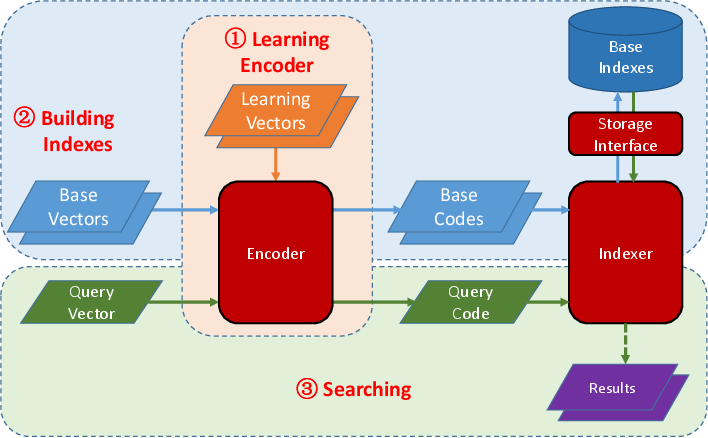
HDIdx has three main modules: 1) Encoder which can compress the original feature vectors into compact binary hash codes, 2) Indexer which can index the database items and search approximate nearest neighbor for a given query item, and 3) Storage module which encapsulates the underlying data storage, which can be memory or NoSQL database like LMDB, for the Indexer.
The current version implements following feature compressing algorithms:
Product Quantization[1].Spectral Hashing[2].
To use HDIdx, first you should learn a Encoder from some learning vectors.
Then you can map the base vectors into hash codes using the learned Encoder and building indexes over these hash codes by an Indexer, which will write the indexes to the specified storage medium.
When a query vector comes, it will be mapped to hash codes by the same Encoder and the Indexer will find the similar items to this query vector.
Installation
HDIdx can be installed by pip:
[sudo] pip install cython
[sudo] pip install hdidx
By default, HDIdx use kmeans algorithm provided by SciPy. To be more efficient, you can install python extensions of OpenCV, which can be installed via apt-get on Ubuntu. For other Linux distributions, e.g. CentOS, you need to compile it from source.
[sudo] apt-get install python-opencv
HDIdx will use OpenCV automatically if it is available.
Windows Guide
General dependencies:
After install the above mentioned software, download stdint.h and put it under the include folder of Visual C++, e.g. C:\Users\xxx\AppData\Local\Programs\Common\Microsoft\Visual C++ for Python\9.0\VC\include. Then hdidx can be installed by pip from the Anaconda Command Prompt.
Example
Here is a simple example. See this notebook for more examples.
# import necessary packages

import hdidx
import numpy as np

# generating sample data
ndim = 16      # dimension of features
ndb = 10000    # number of dababase items
nqry = 10      # number of queries

X_db = np.random.random((ndb, ndim))
X_qry = np.random.random((nqry, ndim))

# create Product Quantization Indexer
idx = hdidx.indexer.IVFPQIndexer()
# build indexer
idx.build({'vals': X_db, 'nsubq': 8})
# add database items to the indexer
idx.add(X_db)
# searching in the database, and return top-10 items for each query
ids, dis = idx.search(X_qry, 10)
print ids
print dis
Citation
Please cite the following paper if you use this library:
@article{wan2015hdidx,
  title={HDIdx: High-Dimensional Indexing for Efficient Approximate Nearest Neighbor Search},
  author={Wan, Ji and Tang, Sheng and Zhang, Yongdong and Li, Jintao and Wu, Pengcheng and Hoi, Steven CH},
  journal={Neurocomputing },
  year={2016}
}
Reference
[1] Jegou, Herve, Matthijs Douze, and Cordelia Schmid.
    "Product quantization for nearest neighbor search."
    Pattern Analysis and Machine Intelligence, IEEE Transactions on 33.1 (2011): 117-128.
[2] Weiss, Yair, Antonio Torralba, and Rob Fergus.
    "Spectral hashing."
    In Advances in neural information processing systems, pp. 1753-1760. 2009.
Related Skills
node-connect
343.3kDiagnose OpenClaw node connection and pairing failures for Android, iOS, and macOS companion apps
frontend-design
92.1kCreate distinctive, production-grade frontend interfaces with high design quality. Use this skill when the user asks to build web components, pages, or applications. Generates creative, polished code that avoids generic AI aesthetics.
openai-whisper-api
343.3kTranscribe audio via OpenAI Audio Transcriptions API (Whisper).
qqbot-media
343.3kQQBot 富媒体收发能力。使用 <qqmedia> 标签,系统根据文件扩展名自动识别类型(图片/语音/视频/文件)。
