
Yaspeller
🔍 Search tool typos in the text, files and websites
Install / Use
/learn @hcodes/YaspellerREADME
yaspeller



This project is closed, use CSpell or another alternative. Example of using CSpell
<img align="right" width="200" src="https://raw.githubusercontent.com/hcodes/yaspeller/master/images/logo.png" />This README is also available in Russian.
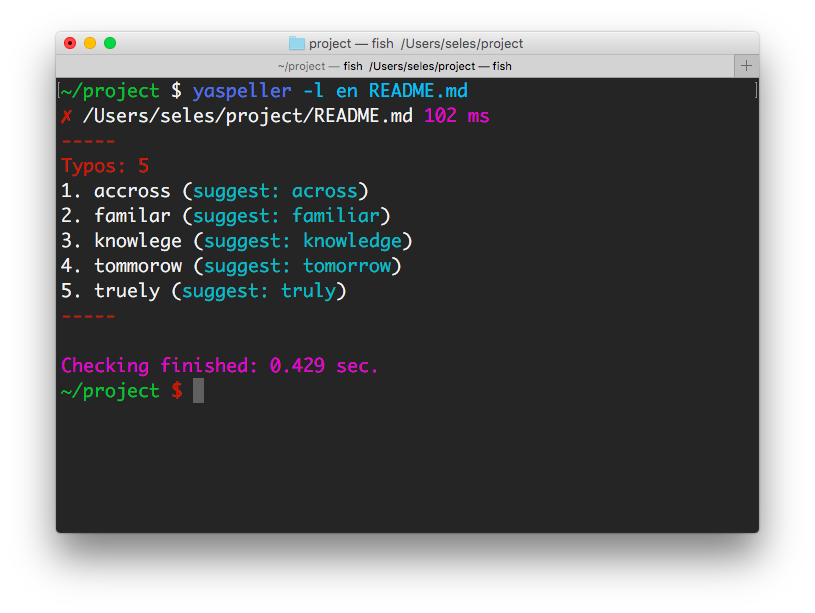
Search tool typos in the text, files and websites.
Used API Yandex.Speller.
Installation
npm install yaspeller -g
Using CLI
yaspeller [options] <file-or-directory-or-link...>
Using with pre-commit
Add this to your .pre-commit-config.yaml:
- repo: https://github.com/hcodes/yaspeller.git
  rev: '' # Use the sha / tag you want to point at
  hooks:
    - id: yaspeller
Examples
yaspeller README.md— search typos in the file.yaspeller "*.md"— node glob syntax for Windows.yaspeller -e ".md,.html,.txt" ./texts/— finding typos in files in the folder.yaspeller https://ru.wikipedia.org/wiki/%D0%9E%D0%BF%D0%B5%D1%87%D0%B0%D1%82%D0%BA%D0%B0— search typos in the page.yaspeller http://bem.info/sitemap.xml— search typos at the addresses specified in the sitemap.xml.echo "Hello, world!" | yaspeller --stdinecho "Hello, world!" | yaspeller --stdin --stdin-filename hello.txt
Options
-f, --format <value>
Formats: plain, html, markdown or auto.<br/>
Default: auto.
-l, --lang <value>
Languages: en, ru or uk.<br/>
Default: en,ru.
-c, --config <path>
Configuration file path.
-e, --file-extensions <value>
Set file extensions to search for files in a folder.<br/>
Example: .md,.htm,.txt.
--dictionary <file>
JSON file for own dictionary.
[
    "someword1", // someword1 = someword1 and Someword1
    "Someword2", // Someword2 = Someword2
    "someword3"
]
Regular expressions are supported:
[
    "unknownword",
    "unknown(W|w)ord[12]?", // unknown(W|w)ord[12]? = unknown(W|w)ord[12]? and Unknown(W|w)ord[12]?
    "Unknown(W|w)ord[34]?" // Unknown(W|w)ord[34]? = Unknown(W|w)ord[34]?
]
Examples:<br/>
yaspeller --dictionary my_dict.json .<br/>
yaspeller --dictionary my_dict.json:my_dict2.json .
If you have tons of markdown and introduce this linter, you're likely to want generation of initial dictionary with yaspeller-dictionary-builder, so one line will cover all word's forms.
--report <type>
Set type of report: console, html, markdown, junit or json.<br/>
Default: console<br/>
Example: console,html,custom_report.js
--check-yo
Check the correctness of using the letter “Ё” (Yo) in Russian texts.
--find-repeat-words
Highlight repetitions of words, consecutive. For example, I flew to to to Cyprus.
--ignore-tags <tags>
Ignore HTML tags.<br/>
Default: code,kbd,object,samp,script,style,var<br/>
Option to formats html and markdown.
--ignore-text <regexp>
Remove the text from the scan using regular expressions.
--ignore-capitalization
Ignore the incorrect use of UPPERCASE / lowercase letters, for example, in the word moscow.
--ignore-digits
Ignore words with numbers, such as avp17h4534.
--ignore-urls
Ignore Internet addresses, email addresses and filenames.
--max-requests <value>
Max count of requests in parallel.<br/>
Default: 2.
--no-color
Clean output without colors.
--only-errors
Output only errors.
--stdin
Process files on <STDIN>. Default: false
--stdin-filename <file>
Specify filename to process <STDIN> as. Used in reports.
--debug
Debug mode.
Configuration
npm install yaspeller --save-dev
Add the text in package.json / scripts:<br/>
"yaspeller": "yaspeller .",
To run the linter:<br/>
npm run yaspeller
yaspeller is configured using JSON file at the root of the project:
.yaspellerrc.yaspellerrc.js.yaspellerrc.json.yaspeller.jsonpackage.json, fieldyaspeller
{
  "excludeFiles": [
    ".git",
    "libs",
    "node_modules",
    "yaspeller"
  ],
  "lang": "ru",
  "fileExtensions": [
    ".md",
    ".css"
  ],
  "dictionary": [
    "someword1"
  ]
}
Advanced example:
{
  "excludeFiles": [
    ".git",
    "yaspeller",
    "node_modules",
    "libs"
  ],
  "format": "html",
  "lang": "en",
  "fileExtensions": [
    ".md",
    ".css"
  ],
  "report": ["console", "html"],
  "dictionary": [
    // JSON comments
    "someword1", // someword1 = someword1 and Someword1
    "Someword2", // Someword2 = Someword2
    "some(w|W)ord[23]", // some(w|W)ord[23] = some(w|W)ord[23] and Some(w|W)ord[23]
    "Some(w|W)ord" // Some(w|W)ord = Some(w|W)ord
  ],
  "ignoreText": [
    "<php\?[^]*?\?>", // Shortly
    ["<php\?[^]*?\?>", "g"] // Longly
  ],
  "ignoreTags": ["code", "script"],
  "ignoreUrls": true,
  "findRepeatWords": true,
  "maxRequests": 5
}
| Property | Type | Details |
|----------|------|---------|
| format | String | --format |
| lang | String | --lang |
| excludeFiles | Array | |
| fileExtensions | Array | --file-extension |
| dictionary | Array | --dictionary |
| report | Array | --report |
| checkYo | Boolean | --check-yo |
| findRepeatWords | Boolean | --find-repeat-words |
| ignoreTags | Array | --ignore-tags |
| ignoreText | Array | --ignore-text |
| ignoreCapitalization | Boolean | --ignore-capitalization |
| ignoreDigits | Boolean | --ignore-digits |
| ignoreUrls | Boolean | --ignore-urls |
| maxRequests | Number | --max-requests |
Ignore text from checking
Ignore a line
var re = /a-z/; // yaspeller ignore
var re = /a-z/; /* yaspeller ignore */
<span>a-z</span> <!-- yaspeller ignore -->
Ignore a block
/* yaspeller ignore:start */
const reUpper = /A-Z/;
const reLower = /a-z/;
/* yaspeller ignore:end */
<!-- yaspeller ignore:start -->
<span>A-Z</span>
<div>a-z</div>
<!-- yaspeller ignore:end -->
Gulp plugin
const gulp = require('gulp');
const run = require('gulp-run'); // npm install gulp-run --save-dev

gulp.task('yaspeller', function (cb) {
    run('./node_modules/.bin/yaspeller .').exec()
        .on('error', function (err) {
            console.error(err.message);
            cb();
        })
        .on('finish', cb);
});
Grunt plugin
module.exports = function(grunt) {
    grunt.loadNpmTasks('grunt-shell'); // npm install grunt-shell --save-dev
    grunt.initConfig({
        shell: {
            yaspeller: {
                options: {stderr: false},
                command: './node_modules/.bin/yaspeller .'
            }
        }
    });
    grunt.registerTask('lint', ['shell:yaspeller']);
};
Restrictions API Yandex.Speller
Links
License
MIT License
Related Skills
node-connect
336.2kDiagnose OpenClaw node connection and pairing failures for Android, iOS, and macOS companion apps
frontend-design
82.8kCreate distinctive, production-grade frontend interfaces with high design quality. Use this skill when the user asks to build web components, pages, or applications. Generates creative, polished code that avoids generic AI aesthetics.
openai-whisper-api
336.2kTranscribe audio via OpenAI Audio Transcriptions API (Whisper).
commit-push-pr
82.8kCommit, push, and open a PR
