
Gosms
:mailbox_closed: Your own local SMS gateway in Go
Install / Use
/learn @haxpax/GosmsREADME
gosms
Your own local SMS gateway
What's the use ?
Can be used to send SMS, where you don't have access to internet or cannot use Web SMS gateways or want to save some money per SMS, or have minimal requirements for personal / internal use and such
- deploy in less than 1 minute
- supports Windows, GNU\Linux, Mac OS
- works with GSM modems
- provides API over HTTP to push messages to gateway, just like the internet based gateways do
- takes care of queuing, throttling and retrying
- supports multiple devices at once
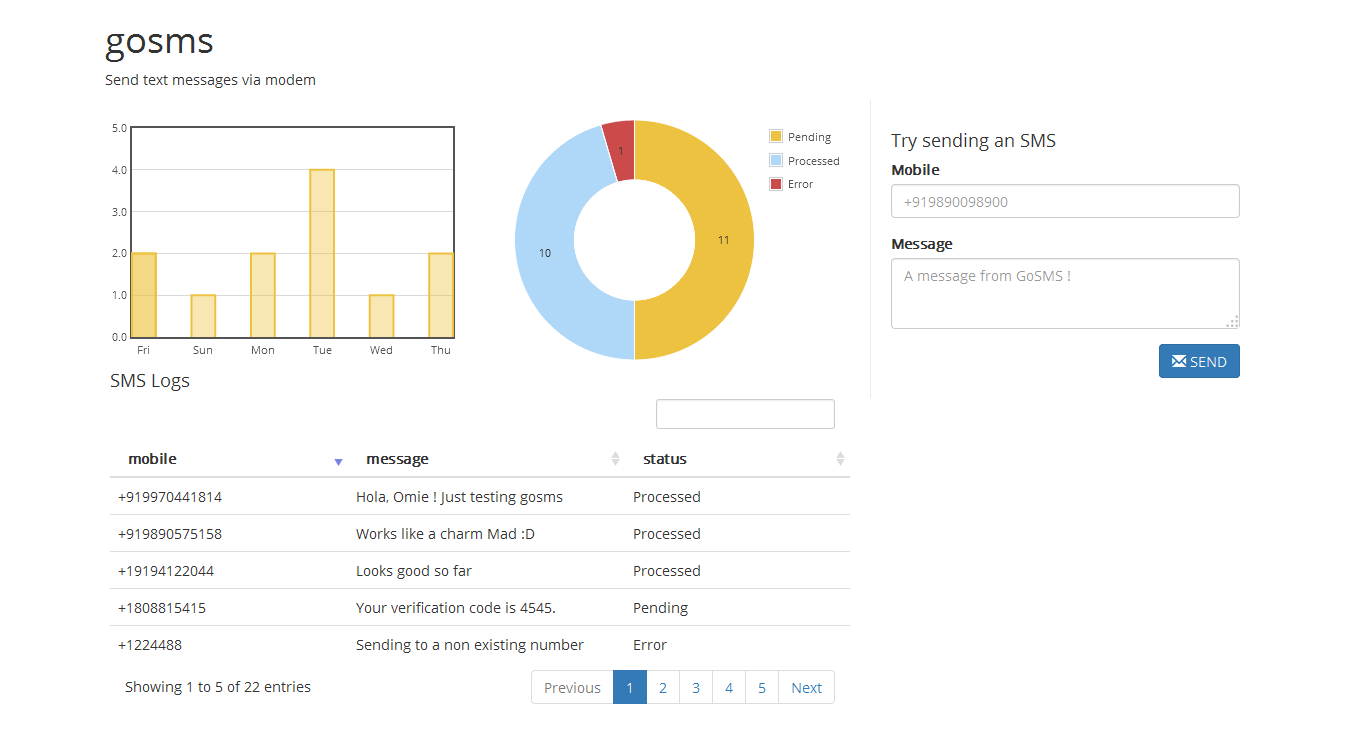
deployment
- Update conf.ini
[DEVICES]section with your modem's COM port. for ex.COM10or/dev/USBtty2 - Run
API specification
- /api/sms/ [POST]
- param mobile
- mobile number to send message to
- number should have contry code prefix
- for ex. +919890098900
- param message
- message text
- max length is limited to 160 characters
- response
- param mobile
{
  "status": 200,
  "message": "ok"
}
- /api/logs/ [GET]
- response
{
  "status": 200,
  "message": "ok",
  "summary": [ 10, 50, 2 ],
  "daycount": { "2015-01-22": 10, "2015-01-23": 25 },
  "messages": [
    {
      "uuid": "d04f17c4-a32c-11e4-827f-00ffcf62442b",
      "mobile": "+1858111222",
      "body": "Hey! Just playing around with gosms.",
      "status": 1
    },
  ]
}
- message status codes
  - 0 : Pending
  - 1 : Processed
  - 2 : Error
planned features
- Allowing multiple mobile numbers with a single message in
/api/sms/ - CRUD support for messages, possibly support cancellation of message
- Authentication support for API
- Adding authentication for Dashboard
- Send an email to admin on high failure rate
building from source
On Ubuntu
- go get github.com/haxpax/gosms
- cd $GOPATH/src/github.com/haxpax/gosms/dashboard
- go get
- go build
On Windows
-
Setup GCC for go-sqlite3 package
- For 32 bit
- Download MinGW from http://sourceforge.net/projects/mingw/
- Add
C:\MinGW\binto PATH - run
mingw-get install gccfrom command line
- For 64 bit
- Download minigw from here : sourcceforge
- Install
- Add its bin dir to path, typically
C:\Program Files\mingw-w64\x86_64-4.9.2-posix-seh-rt_v3-rev1\mingw64\bin
- For 32 bit
-
go get
github.com/haxpax/gosms -
cd $GOPATH/src/github.com/haxpax/gosms/dashboard
-
go get
-
go build
run dashboard executable. Copy assets, templates, conf.ini, dashboard[.exe] if you want to move to another directory db.sqlite is created at first run if not present, copy that too if its there
Related Skills
node-connect
354.2kDiagnose OpenClaw node connection and pairing failures for Android, iOS, and macOS companion apps
frontend-design
112.2kCreate distinctive, production-grade frontend interfaces with high design quality. Use this skill when the user asks to build web components, pages, or applications. Generates creative, polished code that avoids generic AI aesthetics.
openai-whisper-api
354.2kTranscribe audio via OpenAI Audio Transcriptions API (Whisper).
qqbot-media
354.2kQQBot 富媒体收发能力。使用 <qqmedia> 标签,系统根据文件扩展名自动识别类型(图片/语音/视频/文件)。
