
gpt-image-2-6
Guide to OpenAI's GPT Image 2.6 on varg (gpt_image_2_6) and the entry point to the GPT Image 2.6 skill set: Flare vs Sunburst, quality vs reasoning_effort, sizes and aspect presets, what fal rejects (xhigh and max effort, SVG, over 16 GIF frames), measured prices, failure modes, the exact varg MCP a…
Install / Use
npx skills add hashgraph-online/awesome-codex-plugins --skill gpt-image-2-6Installs into whichever agent you are using.
SKILL.md
Installable skill definition
Quality Score
Category
AI & Machine LearningSupported Platforms
Our assessment of gpt-image-2-6
gpt-image-2-6 scores 85/100 on our quality scale, 589th of 955 AI & Machine Learning skills we index.
Its SKILL.md is 16 KB long, well organised into 16 sections with 2 code examples: a thorough specification that gives an agent plenty to work with.
With 1,075 GitHub stars, it is one of the more widely adopted skills in the catalogue.
Maintenance, license and trust
- The repository was last updated about 2 months ago, so gpt-image-2-6 is actively maintained.
- It is released under the Apache-2.0 license, a permissive license that allows use, modification and commercial use with attribution.
- Its trust signals score 100/100, with no cautions. These come from repository metadata, not a code audit — read the skill file before letting an agent act on it.
gpt-image-2-6 compared with similar skills
All 4 of these similar skills score higher than gpt-image-2-6; compare them before choosing.
| Skill | Score | Stars | Updated | Format |
|---|---|---|---|---|
| gpt-image-2-6 (this skill)by hashgraph-online | 85 | 1.1k | 46d ago | SKILL.md |
| claude-memby thedotmack | 100 | 115.0k | today | CLAUDE.md |
| taste-skillby Leonxlnx | 100 | 112.1k | today | CLAUDE.md |
| Agent-Reachby Panniantong | 100 | 110.4k | 1d ago | CLAUDE.md |
| Understand-Anythingby Egonex-AI | 100 | 91.6k | 2d ago | CLAUDE.md |
Frequently asked questions
- How do I install gpt-image-2-6?
- Run
npx skills add hashgraph-online/awesome-codex-plugins --skill gpt-image-2-6. The install tabs above show the steps for each supported agent. - Which AI agents does gpt-image-2-6 work with?
- It is written for Universal, as a SKILL.md file. Other agents that read the same format can often use it too.
- Is gpt-image-2-6 safe to use?
- It is Apache-2.0-licensed and scores 100/100 on trust signals. Skills are instructions an agent will follow, so read the file before installing it and do not approve commands you do not understand.
- Is gpt-image-2-6 still maintained?
- The repository was last updated about 2 months ago, so gpt-image-2-6 is actively maintained.
Skill content
View source on GitHubname: gpt-image-2-6 description: >- Guide to OpenAI's GPT Image 2.6 on varg (gpt_image_2_6) and the entry point to the GPT Image 2.6 skill set: Flare vs Sunburst, quality vs reasoning_effort, sizes and aspect presets, what fal rejects (xhigh and max effort, SVG, over 16 GIF frames), measured prices, failure modes, the exact varg MCP and REST calls, and prompt recipes for the text-heavy layouts people shared on X: infographic, product launch poster, photo to editorial travel print, photo to Baroque gallery poster, landmark postcard, character turnaround sheet, storyboard sheet and low-res to clean upscale, each credited to its author. Use when someone asks for GPT Image 2.6, gpt-image-2.6, Flare or Sunburst, wants an infographic, poster, art print, character sheet or storyboard with readable text, or asks how to prompt, size or price this model. Not for looping GIFs (gpt-image-gif), sticker packs (gpt-image-sticker-pack), game sprite sheets (gpt-image-sprite-sheet), circle-and-arrow edits (gpt-image-markup-edit) or video (varg-ai). license: MIT metadata: author: vargHQ version: "1.0.0" openclaw: requires: anyBins: - curl homepage: https://varg.ai/how-to compatibility: >- Needs a VARG_API_KEY with curl (see the varg-ai skill) or the varg MCP connection (https://mcp.varg.ai/mcp). One image costs 3-6 credits on varg (measured 2026-11-05). allowed-tools: Bash(curl:) Bash(jq:) Read Write Edit
GPT Image 2.6 on varg
OpenAI released GPT Image 2.6 on 2026-11-04: animated GIF output, two API models (Flare and Sunburst)
that "generate images 50% faster than before", image markup, SVG export and a complexity control
(@OpenAIDevs,
@OpenAI). The token price is the same as 2.5: $30 per
million image output tokens, $8 per million image input tokens, $5 per million text input tokens
(@dotey). On varg it is gpt_image_2_6, live since
2026-11-04.
On the LMArena boards on launch night, Sunburst (medium) was #2 in text-to-image (1409) and #3 in image edit (1476); Flare (medium) was #4 (1384) and #5 (1462) (@arena).
This skill is the model guide. The other four skills in the set:
| Skill | For | |---|---| | gpt-image-gif | A still, mascot, logo or prompt → a looping GIF; the sprite-sheet pixel budget; GIF → WebP/MP4 | | gpt-image-sticker-pack | A photo or character → 6-8 animated stickers for Telegram, WhatsApp, LINE, WeChat, Discord, Slack | | gpt-image-sprite-sheet | Game sprite sheets → frames, GIF and a JSON atlas for Phaser or Godot | | gpt-image-markup-edit | Circles, arrows and notes on a transparent layer → an edit that touches only the marked places |
1. Flare or Sunburst
| | Flare (default) | Sunburst |
|---|---|---|
| model | gpt_image_2_6 (text only → fal:openai/gpt-image-2.6/flare/text-to-image; with files → .../flare/edit) | pin fal:openai/gpt-image-2.6/sunburst/text-to-image or fal:openai/gpt-image-2.6/sunburst/edit |
| Time | ~10 s (measured 2026-11-05 on varg) | ~49 s (measured 2026-11-05 on varg) |
| Price | same as Sunburst | same as Flare |
| OpenAI says | "Flare also improves layout quality for posters, product imagery, and other professional visuals" (OpenAI blog, quoted by @TheRealAdamG) | "At medium or high quality, Sunburst keeps details more consistent from one edit to the next" (@OpenAIDevs) |
| Use it for | Drafts, posters, product shots, most stills, GIFs | A chain of edits on one image; the final pass of a dense layout once Flare has the layout right |
Flare is the default. Pin Sunburst only when you will edit the same image again and again. Edits take up to 16 reference images (fal: "A maximum of 16 images are allowed").
2. quality and reasoning_effort are two different dials
quality(low,medium,high,auto; varg defaulthigh) sets render detail and price.reasoning_effort(low,medium,high) is how long the model plans before drawing; OpenAI calls it complexity. OpenAI: "Lower complexity can suit focused edits, such as changing a background or a sign. Higher complexity can help with dense text, complex layouts, and relationships between objects" (OpenAI image guide). fal: "Higher settings increase detail, latency, and token usage."xhighandmaxare in the schema, but fal rejected both (measured 2026-11-05 on varg). We did not measure whether effort changes the varg price.
| Job | quality | reasoning_effort |
|---|---|---|
| Draft, layout test | low (3 credits) | low |
| Poster, product shot, postcard | high | medium |
| Infographic, storyboard, character sheet (many labels) | high | high |
| One focused edit (swap a sign, a background) | high | low (OpenAI's advice for edits, @OpenAIDevs) |
Both go in provider_options.fal.
3. Sizes and aspect ratios
| aspect_ratio | fal preset | Size we got |
|---|---|---|
| 4:3 (default) | landscape_4_3 | 1024×768 |
| 1:1 | square_hd | 1024×1024 |
| 3:4 | portrait_4_3 | 768×1024 |
| 16:9 | landscape_16_9 (1024×576) | 1088×608 |
| 9:16 | portrait_16_9 | not measured |
Sizes from our 2026-11-05 outputs on varg. 16:9 came back as 1088×608, likely because 1024×576
(589,824 px) is under the 655,360 px floor. For any other size, pass
provider_options.fal.image_size: {"width": W, "height": H}: both sides multiples of 16, longest edge
≤ 3840, total 655,360-8,294,400 px (fal schema). Bigger images cost more: fal billed 10.7¢ for one
2048×2048 high image (measured 2026-11-05), so price it with POST /v2/estimate before you go above
1024. In ChatGPT a 16:9 GIF request came back square for
@joseamijares; in the API, always set the
size yourself.
4. What works and what fal rejects
| Option | Status (measured 2026-11-05 on varg unless noted) |
|---|---|
| output_format: png, jpeg, webp | works |
| output_format: "gif" | works on text-to-image and edit; 2-16 frames; see gpt-image-gif |
| output_format: "svg" | in the schema, but fal rejected every SVG prompt at launch. For vector logos use ideogram_vector (varg-ai models list) |
| reasoning_effort: xhigh, max | in the schema, rejected. Use high |
| frame_count above 16 | schema allows 64, rejected |
| GIF with aspect_ratio: "1:1" (1024×1024 frames) | rejected for every frame count we tried (6, 8, 9, 12): the sprite sheet would pass 3840 px or the pixel budget |
| background: "transparent" | works for PNG, WebP and GIF (our GIF stickers came back 54-62% transparent pixels) |
| markup_image_url | works on the edit route; see gpt-image-markup-edit |
| markup_image_url together with mask_url | not allowed (fal docs) |
| num_images 1-10 | for GIFs, "all frames of all outputs share the request's pixel budget" (fal) |
Every PNG and GIF the model returned in our tests carried a C2PA content-credentials block (17 files, checked 2026-11-05). None of the files made by this set's scripts kept it (checked the same day); keep the original if you need the provenance.
5. Prices (measured 2026-11-05 on varg)
| Request | varg credits | fal billed varg |
|---|---|---|
| 1 image, quality: low | 3 | 2.50¢ (1024²) |
| 1 image, quality: medium | 5 | 4.37¢ (1024²) |
| 1 image, quality: high (default) | 6 | 5.30¢ (1024²), 3.64¢ (1024×768) |
| Edit | the above + 1 per reference image | |
| GIF | the same as one image at that quality: 6-7 at high (7 on the edit route with one reference), 3 at low (12 frames of 768²) | 4.78¢ (9 frames, high) |
| 2048×2048, high | estimate first | 10.7¢ |
| Failed job | 0 | |
Check any request before you run it: POST https://api.varg.ai/v2/estimate with the same body, or
estimate_cost on the MCP. Follow the spend rules in the varg-ai skill (a cap, approved models,
estimate before every paid call).
6. The calls
MCP (https://mcp.varg.ai/mcp, OAuth, no key):
call_tool({
  "tool": "image",
  "input": {
    "model": "gpt_image_2_6",
    "prompt": "…",
    "aspect_ratio": "3:4",
    "provider_options": {"fal": {"quality": "high", "reasoning_effort": "medium"}}
  },
  "wait": true
})
It returns url, job_id and cost_credits. An edit adds "files": [{"url": "https://s3.varg.ai/…"}]
to input. To use a local file, upload it first: create_upload({"media_type": "image/png", "size": <bytes>}), then curl -X PUT -H "Content-Type: application/octet-stream" --data-binary @photo.png "https://api.varg.ai$PROXY_URL" with the proxy_url it returned; the answer has the file's
public_url.
REST (needs $VARG_API_KEY, see the varg-ai skill):
# upload a local image -> {"url": "https://s3.varg.ai/...", ...}
curl -s -X POST https://api.varg.ai/v2/files -H "Authorization: Bearer $VARG_API_KEY" \
  -H "Content-Type: image/png" --data-binary @photo.png

# text to image (Flare)
curl -s -X POST https://api.varg.ai/v2/image -H "Authorization: Bearer $VARG_API_KEY" \
  -H "Content-Type: application/json" -d '{
  "model": "gpt_image_2_6",
  "prompt": "…",
  "aspect_ratio": "3:4",
  "provider_options": {"fal": {"quality": "high", "reasoning_effort": "medium"}}
}'

# edit on Sunburst, custom size
curl -s -X POST https://api.varg.ai/v2/image -H "Authorization: Bearer $VARG_API_KEY" \
  -H "Content-Type: application/json" -d '{
  "model": "fal:openai/gpt-image-2.6/sunburst/edit",
  "prompt": "…",
  "files": [{"url": "https://s3.varg.ai/files/…/photo.png"}],
  "provider_options": {"fal": {"quality": "high", "image_size": {"width": 1536, "height": 864}}}
}'

# each image call answers 202 with {"id": "job_…"}; poll until "completed"; the image is output.outputs[0].url
curl -s https://api.varg.ai/v2/jobs/JOB_ID -H "Authorization: Bearer $VARG_API_KEY"
Model spec with every option: https://varg.ai/models/gpt_image_2_6.md. JSON schema (no key): https://api.varg.ai/v2/tools/image?model=gpt_image_2_6.
7. Prompting text-heavy layouts
What the recipes below have in common:
- Put every word that must appear in quotes, and keep each one short ("Bright citrus", not a sentence).
- Name the layout before the content: "3×2 grid", "top 75% / bottom 25%", "sidebar on the left".
- Name the label words you want ("FRONT, 3/4 VIEW, SIDE VIEW…") and say "minimal clean labels".
- End with what to leave out ("no other text", "no logos", "no photorealistic background").
- For dense pages use
reasoning_effort: "high"; for a photo restylemediumis enough. - Read every word in the output before you use it. Fix one wrong word with a markup edit (gpt-image-markup-edit), not a full regeneration.
8. Recipes
Full prompt templates, settings and notes: references/recipes.md. Most community
prompts were written for GPT Image 2.5; our examples show each one on 2.6. Examples were made on varg
on 2026-11-04/05 with gpt_image_2_6.
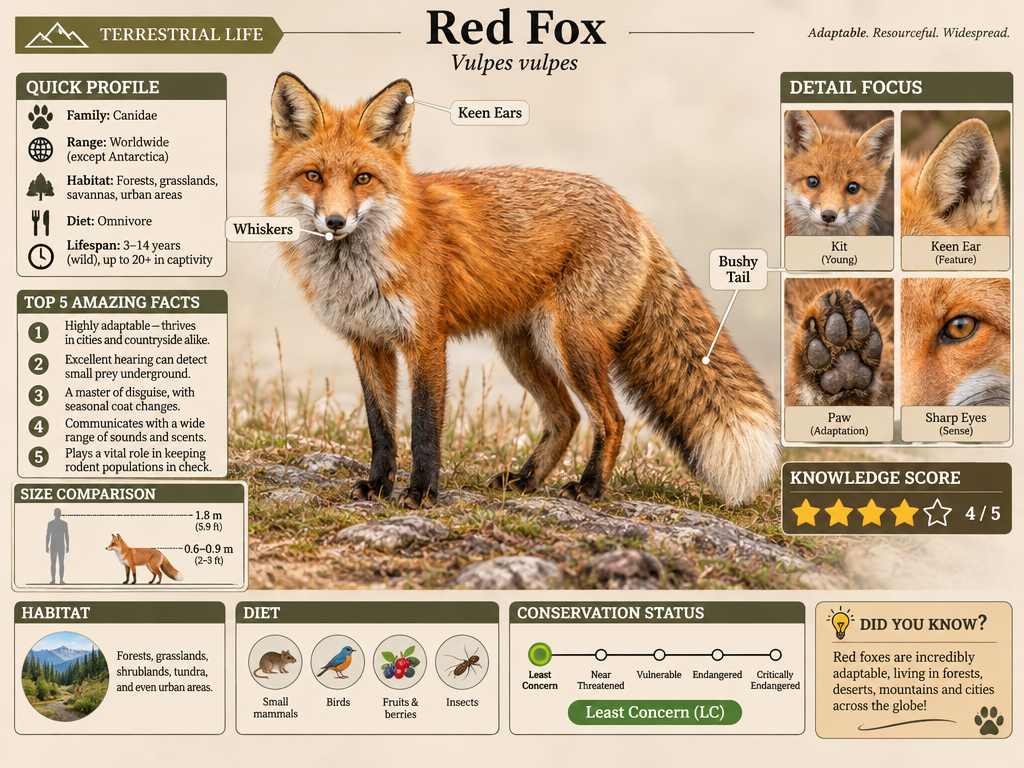
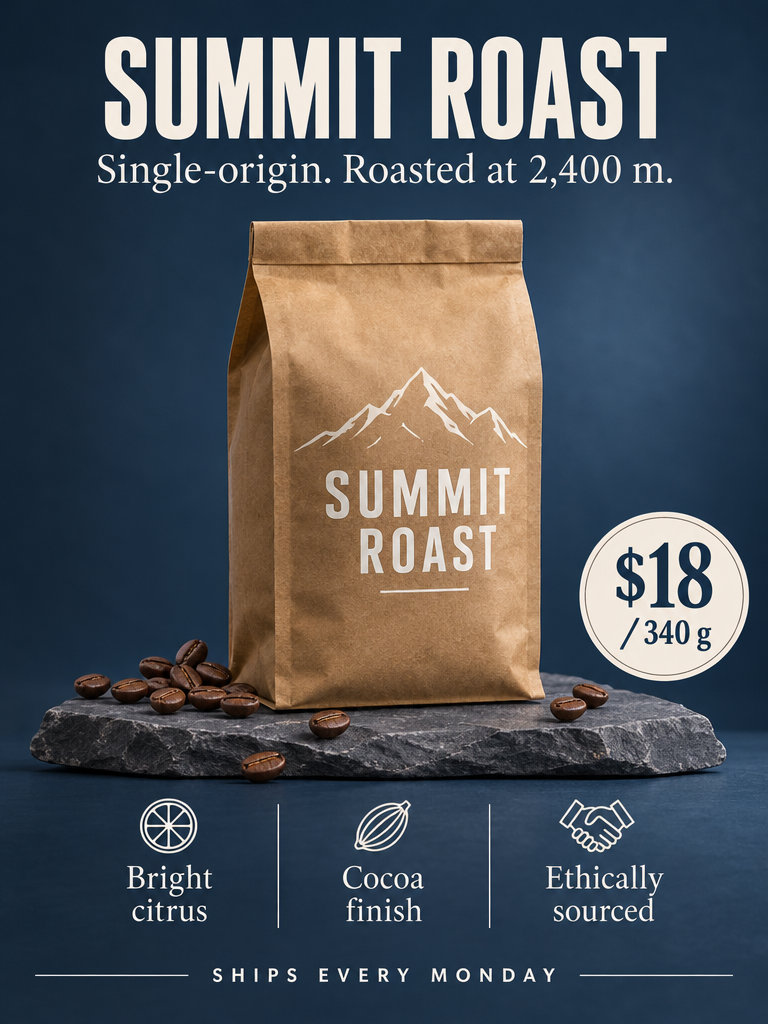
| Recipe | Prompt by | Our example | Settings | |---|---|---|---| | Infographic (field-guide page) | @iamsofiaijaz | Red Fox | 4:3, high, effort high | | Product launch poster | varg (written for this skill) | SUMMIT ROAST (fictional brand) | 3:4, high | | Photo → editorial travel print | [@Naiknel
Truncated for display — read the full file on GitHub.
Related Skills
claude-mem
115.0kPersistent Context Across Sessions for Every Agent – Captures everything your agent does during sessions, compresses it with AI, and injects relevant context back into future sessions. Works with Claude Code, OpenClaw, Codex, Gemini, Hermes, Copilot, OpenCode + More
taste-skill
112.1kAgent skills that give coding agents taste: art direction, reference images and a browser check instead of generic AI pages
Agent-Reach
110.4kGive your AI agent eyes to see the entire internet. Read & search Twitter, Reddit, YouTube, GitHub, Bilibili, XiaoHongShu — one CLI, zero API fees.
Understand-Anything
91.6kGraphs that teach > graphs that impress. Turn any code into an interactive knowledge graph you can explore, search, and ask questions about. Works with Claude Code, Codex, Cursor, Copilot, Gemini CLI, and more.

Languages
Trust signals
From repository metadata: license, adoption, age and documentation. Not a code audit — see the Safety scan above for what the skill file itself contains.