
Harmony
The Harmony Python library: a research tool for psychologists to harmonise data and questionnaire items. Open source.
Install / Use
/learn @harmonydata/HarmonyREADME

<a href="https://harmonydata.ac.uk"><span align="left">🌐 harmonydata.ac.uk</span></a> <a href="https://www.linkedin.com/company/harmonydata"><img align="left" src="https://raw.githubusercontent.com//harmonydata/.github/main/profile/linkedin.svg" alt="Harmony | LinkedIn" width="21px"/></a> <a href="https://twitter.com/harmony_data"><img align="left" src="https://raw.githubusercontent.com//harmonydata/.github/main/profile/x.svg" alt="Harmony | X" width="21px"/></a> <a href="https://www.instagram.com/harmonydata/"><img align="left" src="https://raw.githubusercontent.com//harmonydata/.github/main/profile/instagram.svg" alt="Harmony | Instagram" width="21px"/></a> <a href="https://www.facebook.com/people/Harmony-Project/100086772661697/"><img align="left" src="https://raw.githubusercontent.com//harmonydata/.github/main/profile/fb.svg" alt="Harmony | Facebook" width="21px"/></a> <a href="https://www.youtube.com/channel/UCraLlfBr0jXwap41oQ763OQ"><img align="left" src="https://raw.githubusercontent.com//harmonydata/.github/main/profile/yt.svg" alt="Harmony | YouTube" width="21px"/></a>

Harmony Python library
<!-- badges: start -->








You can also join our Discord server! If you found Harmony helpful, you can leave us a review!
What does Harmony do?
- Psychologists and social scientists often have to match items in different questionnaires, such as "I often feel anxious" and "Feeling nervous, anxious or afraid".
- This is called harmonisation.
- Harmonisation is a time consuming and subjective process.
- Going through long PDFs of questionnaires and putting the questions into Excel is no fun.
- Enter Harmony, a tool that uses natural language processing and generative AI models to help researchers harmonise questionnaire items, even in different languages.
Quick start with the code
Read our guide to contributing to Harmony here or read CONTRIBUTING.md.
You can run the walkthrough Python notebook in Google Colab with a single click: <a href="https://colab.research.google.com/github/harmonydata/harmony/blob/main/Harmony_example_walkthrough.ipynb" target="_parent"><img src="https://colab.research.google.com/assets/colab-badge.svg" alt="Open In Colab"/></a>
You can also download an R markdown notebook to run in R Studio: <a href="https://harmonydata.ac.uk/harmony_r_example.nb.html" target="_parent"><img src="https://img.shields.io/badge/RStudio-4285F4" alt="Open In R Studio"/></a>
You can run the walkthrough R notebook in Google Colab with a single click: <a href="https://colab.research.google.com/github/harmonydata/experiments/blob/main/Harmony_R_example.ipynb" target="_parent"><img src="https://colab.research.google.com/assets/colab-badge.svg" alt="Open In Colab"/></a> View the PDF documentation of the R package on CRAN
Looking for examples?
Check out our examples repository at https://github.com/harmonydata/harmony_examples
<!-- badges: end -->The Harmony Project
Harmony is a tool using AI which allows you to compare items from questionnaires and identify similar content. You can try Harmony at https://harmonydata.ac.uk/app and you can read our blog at https://harmonydata.ac.uk/blog/.
Who to contact?
You can contact Harmony team at https://harmonydata.ac.uk/, or Thomas Wood at https://fastdatascience.com/.
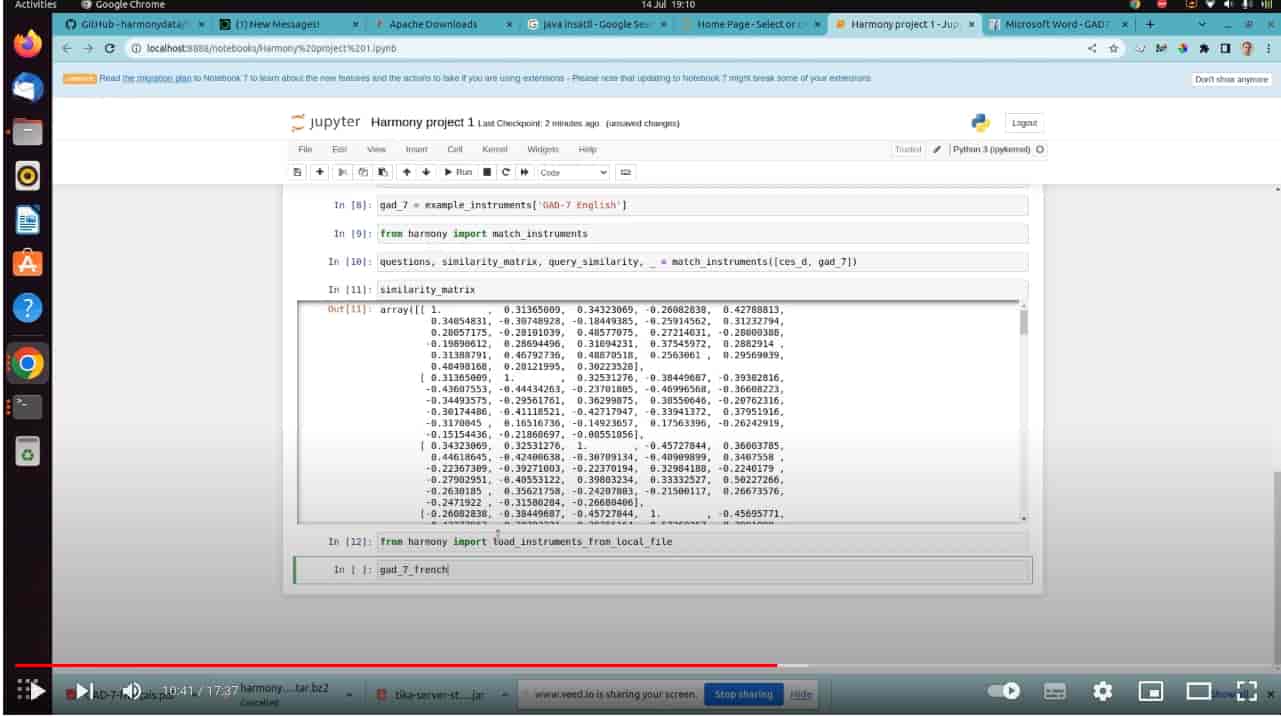
🖥 Installation instructions (video)
🖱 Looking to try Harmony in the browser?
Visit: https://harmonydata.ac.uk/app/
You can also visit our blog at https://harmonydata.ac.uk/
✅ You need Tika if you want to extract instruments from PDFs
Download and install Java if you don't have it already. Download and install Apache Tika and run it on your computer https://tika.apache.org/download.html
java -jar tika-server-standard-2.3.0.jar
Requirements
You need a Windows, Linux or Mac system with
- Python 3.8 or above
- the requirements in requirements.txt
- Java (if you want to extract items from PDFs)
- Apache Tika (if you want to extract items from PDFs)
🖥 Installing Harmony Python package
You can install from PyPI.
pip install harmonydata
Loading all models
Harmony uses spaCy to help with text extraction from PDFs. spaCy models can be downloaded with the following command in Python:
import harmony
harmony.download_models()
Matching example instruments
instruments = harmony.example_instruments["CES_D English"], harmony.example_instruments["GAD-7 Portuguese"]
match_response = harmony.match_instruments(instruments)

questions = match_response.questions
similarity = match_response.similarity_with_polarity
How to load a PDF, Excel or Word into an instrument
harmony.load_instruments_from_local_file("gad-7.pdf")
Optional environment variables
As an alternative to downloading models, you can set environment variables so that Harmony calls spaCy on a remote server. This is only necessary if you are making a server deployment of Harmony.
HARMONY_DATA_PATH- determines where data files are stored. Defaults toHOME DIRECTORY/harmonyHARMONY_NO_PARSING- set to 1 to import a lightweight variant of Harmony which doesn't support PDF parsing.HARMONY_NO_MATCHING- set to 1 to import a lightweight variant of Harmony which doesn't support matching.
Creating instruments from a list of strings
You can also create instruments quickly from a list of strings
from harmony import create_instrument_from_list, match_instruments
instrument1 = create_instrument_from_list(["I feel anxious", "I feel nervous"])
instrument2 = create_instrument_from_list(["I feel afraid", "I feel worried"])

match_response = match_instruments([instrument1, instrument2])
Loading instruments from PDFs
If you have a local file, you can load it into a list of Instrument instances:
from harmony import load_instruments_from_local_file
instruments = load_instruments_from_local_file("gad-7.pdf")
📋 Importing from Google Forms
Harmony can import questionnaires directly from Google Forms URLs, allowing you to harmonise survey instruments that are hosted on Google Forms.
Setup
To use Google Forms integration, you need a Google API key:
- Visit the Google Cloud Console
- Create a new project or select an existing one
- Enable the Google Forms API for your project
- Create credentials (API key) for the Google Forms API
- Set the API key as an environment variable:
export GOOGLE_FORMS_API_KEY="your-api-key-here"
Usage
Import questionnaires from Google Forms using the URL or form ID:
from harmony import convert_files_to_instruments
from harmony.schemas.requests.text import RawFile
from harmony.schemas.enums.file_types import FileType

# Create a RawFile with the Google Forms URL
file = RawFile(
    file_name="Customer Satisfaction Survey",
    file_type=FileType.google_forms,
    content="https://docs.google.com/forms/d/e/1FAIpQLSc.../viewform"
)

# Convert to Harmony instruments
instruments = convert_files_to_instruments([file])

# Access the questions
for instrument in instruments:
    print(f"Form: {instrument.instrument_name}")
    for question in instrument.questions:
        print(f"{question.question_no}. {question.question_text}")
        if question.options:
            print(f"   Options: {', '.join(question.options)}")
You can also use the form ID directly instead of the full URL:
file = RawFile(
    file_name="Survey",
    file_type=FileType.google_forms,
    content="1FAIpQLSc_form_id_here"
)
