
SKTRings
Animated ring charts made with SpriteKit for watchOS 3. Supports bounce easing and color change effects.
Install / Use
/learn @happywatch/SKTRingsREADME
SpriteKit Rings
Animated ring charts made with SpriteKit for watchOS 3. Supports bounce easing and color change effects.
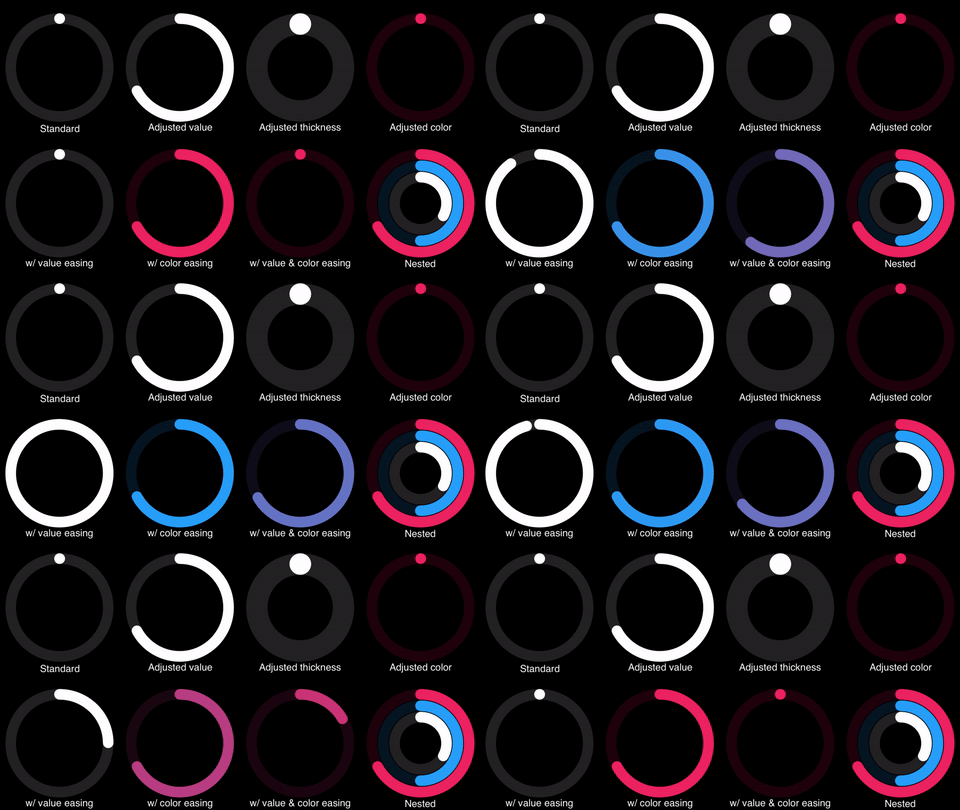
The Activity app is one of the prominent features of the Apple Watch. Imagine if the Activity app’s rings could animate to their current value with a bounce effect or change color depending on how recently you moved. Those animations would be both magical and useful. However, you’d have a hard time implementing them with a sequence of images like you used in watchOS 2. Instead, now you can use SpriteKit to achieve those animations.
<a href="http://bit.ly/w3Tbook"><img src="http://i.imgur.com/o0CCkKa.png" alt="watchOS by Tutorials book cover" width="320" /></a>
This library was originally written for Chapter 18, "Interactive Animations," in the book, watchOS by Tutorials.
API Overview
SKRingNode performs the bulk of the calculations and drawing of a ring chart so that you can focus on the adjustments and animations. You can control the thickness, arcEnd (a.k.a. value), and the color of a ring.
SKNestedRingNode simplifies creating multiple concentric rings. You can control the spacing between rings.
SKTRingValueEffect animates the value of the ring with optional easing. Similarly, SKTRingColorEffect animates the color with optional easing.
Note: This API relies on the open source SKTUtils for animation effects.<sup id="a1">1</sup>
Demo App
The included Demo project shows the different adjustments and animations that you can add to your ring charts for both iOS and watchOS. Build and run the Demo scheme to see the full collection of altered rings on an iOS device. Build and run the Demo WathcKit App scheme to preview one altered ring at a time on an Apple Watch. Swipe between the pages to see different alterations.
Swift 3 Usage
Adding a ring
<img src="http://i.imgur.com/WVf5rCa.png" alt="Ring chart" width="154" />let ring = SKRingNode(diameter: diameter)
ring.position = position
addChild(ring)
The only required parameter to initialize an SKRingNode is diameter. This defines a square frame with edge length of the diameter and draws the ring inside. The default color is white.
Adjusting value
<img src="http://i.imgur.com/JXPjt5b.png" alt="Value ring chart" width="154" />let ring = SKRingNode(diameter: diameter)
ring.position = position
addChild(ring)
ring.arcEnd = 0.67 // decimal percentage of circumference, usually 0...1
You use the arcEnd property to fill the value of the ring. Use a decimal percentage of the circumference from 0.0 to 1.0. Values greater than 1.0 will loop over the top of the ring. The default value is 0.0.
Adjusting thickness
<img src="http://i.imgur.com/Ebk7LF1.png" alt="Thick ring chart" width="154" />let ring = SKRingNode(diameter: diameter, thickness: 0.4) // decimal percentage of radius, 0...1
ring.position = position
addChild(ring)
thickness is the width of each ring. Use a decimal percentage of the radius from 0.0 to 1.0. The default value is 0.2.
Adjusting color
<img src="http://i.imgur.com/VMmthqJ.png" alt="Color ring chart" width="154" />let ring = SKRingNode(diameter: diameter)
ring.position = position
addChild(ring)
ring.color = UIColor.red
You may assign any valid UIColor to color. The background, unfilled portion of the ring uses the same color with 20% opacity.
Animating with value easing
<img src="https://media.giphy.com/media/JwLG5cTUbOKXu/giphy.gif" alt="Ring chart value animation" width="154" />let ring = SKRingNode(diameter: diameter)
ring.position = position
addChild(ring)
let valueUpEffect = SKTRingValueEffect(for: ring, to: 1, duration: duration)
valueUpEffect.timingFunction = SKTTimingFunctionBounceEaseOut
let valueUpAction = SKAction.actionWithEffect(valueUpEffect)
let valueDownEffect = SKTRingValueEffect(for: ring, to: 0, duration: duration)
valueDownEffect.timingFunction = SKTTimingFunctionBounceEaseOut
let valueDownAction = SKAction.actionWithEffect(valueDownEffect)
let sequence = SKAction.sequence([valueUpAction,
SKAction.wait(forDuration: duration / 3),
valueDownAction,
SKAction.wait(forDuration: duration / 3)])
ring.run(SKAction.repeatForever(sequence))
Animating a ring with SKTRings is very similar to any other animation in SpriteKit, especailly one that uses SKTUtils. Here's what's happening in this code:
- Preapre a
SKTRingValueEffectwith a bounce-out ease. - Package up that effect into an
SKActionto run later. - Currently SKTEffects do not support the
reversed()so you prepare anotherSKTRingValueEffectto go the opposite direction. - Place the animations into a sequence.
- Run the animation sequence.
Animating with color easing
<img src="https://media.giphy.com/media/PrIhHVAtyVnmo/giphy.gif" alt="Ring chart color animation" width="154" />let ring = SKRingNode(diameter: diameter)
ring.position = position
addChild(ring)
ring.arcEnd = 0.67 // helpfully show more of the filled part
ring.color = red // starting color
let colorUpEffect = SKTRingColorEffect(for: ring, to: blue, duration: duration)
colorUpEffect.timingFunction = SKTTimingFunctionBounceEaseOut
let colorUpAction = SKAction.actionWithEffect(colorUpEffect)
let colorDownEffect = SKTRingColorEffect(for: ring, to: red, duration: duration)
colorDownEffect.timingFunction = SKTTimingFunctionBounceEaseOut
let colorDownAction = SKAction.actionWithEffect(colorDownEffect)
let sequence = SKAction.sequence([colorUpAction,
SKAction.wait(forDuration: duration / 3),
colorDownAction,
SKAction.wait(forDuration: duration / 3)])
ring.run(SKAction.repeatForever(sequence))
Animating with value easing and color easing
<img src="https://media.giphy.com/media/ExyowJGeLK6xG/giphy.gif" alt="Ring chart value and color animation" width="154" />let ring = SKRingNode(diameter: diameter)
ring.position = position
addChild(ring)
ring.color = red
// calculate color in between start and end
let finalValue: CGFloat = 0.67
let finalColor = lerp(start: red, end: blue, t: finalValue)
let colorUpEffect = SKTRingColorEffect(for: ring, to: finalColor, duration: duration)
colorUpEffect.timingFunction = SKTTimingFunctionBounceEaseOut
let colorUpAction = SKAction.actionWithEffect(colorUpEffect)
let valueUpEffect = SKTRingValueEffect(for: ring, to: finalValue, duration: duration)
valueUpEffect.timingFunction = SKTTimingFunctionBounceEaseOut
let valueUpAction = SKAction.actionWithEffect(valueUpEffect)
let groupUp = SKAction.group([colorUpAction, valueUpAction])
let colorDownEffect = SKTRingColorEffect(for: ring, to: red, duration: duration)
colorDownEffect.timingFunction = SKTTimingFunctionBounceEaseOut
let colorDownAction = SKAction.actionWithEffect(colorDownEffect)
let valueDownEffect = SKTRingValueEffect(for: ring, to: 0, duration: duration)
valueDownEffect.timingFunction = SKTTimingFunctionBounceEaseOut
let valueDownAction = SKAction.actionWithEffect(valueDownEffect)
let groupDown = SKAction.group([colorDownAction, valueDownAction])
let sequence = SKAction.sequence([groupUp,
SKAction.wait(forDuration: duration / 3),
groupDown,
SKAction.wait(forDuration: duration / 3)])
ring.run(SKAction.repeatForever(sequence))
Adding a nested ring
<img src="http://i.imgur.com/VWWjIBo.png" alt="Nested ring chart" width="154" />let nested = SKNestedRingNode(diameter: diameter, count: 3) // usually 2...5
nested.position = position
addChild(nested)
// adjusting color and value
nested.rings[0].arcEnd = 0.33
nested.rings[1].arcEnd = 0.5
nested.rings[1].color = blue
nested.rings[2].arcEnd = 0.67
nested.rings[2].color = red
Use rings to access the individual nested rings. Rings are 0 indexed from innermost to outermost.
Adjusting spacing in a nested ring
<img src="http://i.imgur.com/9nL0e9a.png" alt="Spaced nested ring" width="154" />let nested = SKNestedRingNode(diameter: diameter, count: 3, spacing: 0.5) // decimal percentage of thickness, 0...1
nested.position = position
addChild(nested)
spacing is the separation between rings. Use a decimal percentage of the thickness from 0.0 to 1.0. The default value is 0.05.
Adjusting thickness in a nested ring
<img src="http://i.imgur.com/tXvb1rh.png" alt="Thick nested ring" width="154" />let nested = SKNestedRingNode(diameter: diameter, count: 3, thickness: 0.3) // decimal percentage of radius, 0...1
nested.position = position
addChild(nested)
thickness is the width of each ring. Use a decimal percentage of the radius from 0.0 to 1.0. The default value is 0.2.
Footnotes
<sup id="f1">1</sup> There’s only one file inside SKTUtils that is not shared with the WatchKit Extension: SKTAudio.swift. It refers to
AVFoundationwhich is not available in watchOS. There are alternative ways to play sounds in a Watch app so you won't miss it. ↩
