
Training.computerscience.cloud.aws
Notes, Docs, CLI Commands and, Flashcards for AWS certified solutions architect - Associate Level
Install / Use
/learn @hamidgasmi/Training.computerscience.cloud.awsREADME
AWS:
- This repository is created from Linux Academy course, AWS certified solutions architect - Associate Level and my readings of different websites such as AWS docs
- It includes
- AWS Services description (see the table of contents, below):
- It describes AWS services from the architect role perspective
- There's particularly a section for the following topics: Scalability, Consistency, Resilience, Disaster Recovery, Security which includes Encryption, Pricing, Use cases, Limits and, Best practices
- AWS CLI commands: it's still a work in progress
- Anki flashcards exported file: 318 cards
- AWS Services description (see the table of contents, below):
Table of Contents
- Infrastructure
- Security: Identity and Access Control (IAM)
- Security: Security Token Service (STS)
- AWS Organization
- Compute - Elastic Cloud Computing (EC2)
- Serverless Compute - Lambda
- Serverless Compute - API Gateway
- Containerized Compute - Elastic Container Service (ECS)
- Networking - Virtual Private Cloud (VPC)
- Networking - Route 53
- Storage - Simple Storage Service (S3)
- Networking - CloudFront
- Storage - Elastic File System (EFS)
- Database - SQL - Relational Database Service (RDS)
- Database - SQL - RDS Aurora Provisioned
- Database - SQL - RDS Aurora Serverless
- Database - NoSQL - DynamoDB
- Database - In-Memory Caching
- Hybrid and Scaling - Elastic Load Balancing (ELB)
- Hybrid and Scaling - Auto scaling Groups (ASG)
- Hybrid and Scaling - Virtual Private Networks (VPN)
- Hybrid and Scaling - Direct Connect (DX)
- Hybrid and Scaling - Snow*
- Hybrid and Scaling - Data Migration - Storage Gateway
- Hybrid and Scaling - Data Migration - DB Migration Service (DMS)
- Hybrid and Scaling - Cognito
- Application Integration - Simple Notification Service (SNS)
- Application Integration - Simple Queue Service (SQS)
- Application Integration - Elastic Transcder
- Analytics - Athena
- Analytics - Elastic Map Reduce (EMR)
- Analytics - Kinesis
- Analytics - Redshift
- Logging and Monitoring - CloudWatch
- Logging and Monitoring - CloudTrail
- Logging and Monitoring - VPC Flow Logs
- Operations - CloudWatch Events
- Operations: Key Management Service (KMS)
- Deployment - CloudFormation
- Deployment: Elastic BeansTalk
- Deployment: OpsWorks
- AWS Services - Comparisons
Infrastructure
<details> <summary>Global Infrastructure</summary> </details> <details> <summary>Region</summary>- It's a collection of data centers (AZs)
- It has 2 or more data centers (AZs)
- Regions AZs are independ from each other (to decrease failure likeliness)
- Regions AZs are close enough to each other so that latency is low between them
- High Speed network:
- Some regions are linked by a direct high speed network (see link above)
- It'sn't a public network
- E.g., Paris and Virginia regions are linked by a high speed network
- Data created is a specific region wont leave the region
- Unless we decide otherwise (data replication to another region)
- Regions allow to operate in a specific country where laws are known
- We make sure that data will only operate under the jurisdiction of those laws
- E.g., US East (N. Virginia) region:
- It's the 1st AWS region (launched in 2006)
- It's always up-to-date: all new services are delivered 1st in this region
- It's good for all training purposes
- It's a logical data center within a region
- There could be more physical data centers within an AZ
- Its name could be different from 1 aws account to another
- They're also called "Points of Presence" (Pops)
- They host AWS CDN
- There're many more than regions
- It's a Larger version of Pops
- It has more capacity
- It can serve larger areas
- There're less of them
Security: Identity and Access Control (IAM)
<details> <summary>Description</summary>-
It's a centralised control of an AWS account
-
It's a global service
-
It controls access to AWS Services via policies that can be attached to IAM Identities
-
It's a shared Access to our AWS account.
-
It has granular Permissions:
- It allows to set permission at service level
-
It allows Multifactor Authentication (MFA)
-
It allows to set up our own password rotation policy
-
It supports PCI DSS Compliance (see Foundation, below)
- It's an IAM Identity
- It's given long-term credentials
- It's good for known identities
- It has NO permission when it's created (Default Deny or Non-Explicit Deny)
- It has Permission Boundaries:
- It allows to define boundaries beyond which user permission should never go
- For more details
- It has an access type:
-
Programmatic access by key ID and a secrete access key
- It couble active or inactive
- It's viewable only once (view, download in a csv file)
- It's deleted, when it's lost. A new one is generated
-
Programmatic access by SSH public keys to authenticate access to AWS CodeCommit repositories
-
AWS Management Console access:, it uses email/password
-
- It's possible to add from 1 to 10 users at once
- ARN:
- Format: arn:partition:service:region:account:user/userName
- E.g. 1, arn:aws:iam::091943097519:user/hamid.gasmi (normal aws servers)
- E.g. 2, arn:aws-cn:iam::091943097519:user/hamid.gasmi (Beijin aws servers).
- It's an IAM Identity
- It's NOT a real identity
- because it can't be identified as a Principal in a permission policy
- It's used for administrative functions:
- It's a way to attach policies to multiple users at one time
- ARN:
- Format: arn:partition:service:region:account:group/groupName
- E.g., arn:aws:iam::091943097519:group/ITDevelopers
- It's an IAM Identity
- It's given temporary access credentials when it's assumed (max: 36 hours)
- It allows to delegate access with defined permissions to trusted entities without having to share long-term access keys
- It's not logged in; it's assumed
- It's assumed as follow:
- An identity makes an AssumeRole API call: it requests to assume a role
- Then Security Token Service (STS) uses IAM Trust Policy to check if the identity is allowed to assume the role
- The STS uses then IAM Permission Policy attached to the role to generates a temporary access keys for the identity
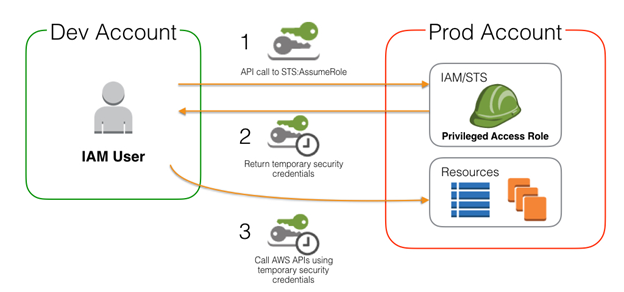
- For more details
- Manage Multiple AWS Accounts with Role Switching
- It's attached to an IAM identity
- It's evaluated as follow:
- All attached policies are merged
- Explicit Deny => Explicit Allow => Implicit Deny
- Identity vs. Resource Policies:
- Identity Policy: it's attached to an IAM identity (role, user, group)
- Resource Policy: it's attached to a resource.
- Inline vs. Managed Policies:
- Inline Policy:
- It's created inside an IAM identity (role, user, group)
- It allows exceptions to be applied to identities
- Managed Policy:
- It's created independently from any IAM identity
- It's available on Policy screen of IAM console
- It allows the same policy to be reused and to impact many identities
- It's low overhead but lack flexibility
- Customer-Managed policy is flexible but requires administration
- Inline Policy:
- Policy Json Document:
- Json version: 2012-10-17;
- Statemen
Related Skills
healthcheck
339.5kHost security hardening and risk-tolerance configuration for OpenClaw deployments
tmux
339.5kRemote-control tmux sessions for interactive CLIs by sending keystrokes and scraping pane output.
prose
339.5kOpenProse VM skill pack. Activate on any `prose` command, .prose files, or OpenProse mentions; orchestrates multi-agent workflows.
claude-opus-4-5-migration
83.9kMigrate prompts and code from Claude Sonnet 4.0, Sonnet 4.5, or Opus 4.1 to Opus 4.5
