
SwiftAccelerate
A playground demoing how to use Accelerate & Swift for Linear Algebra (vector/matrix manipulations)
Install / Use
/learn @haginile/SwiftAccelerateREADME
SwiftAccelerate
This note provides a concise tutorial on how you may use Apple's Accelerate framework with the Swift programming language to perform vector/matrix manipulations, including matrix transposes, dot products, matrix inversions, etc. A playground illustrating all the functions discussed here is included. Also, a better formatted version can be accessed at here.
Linking Your Project Against Accelerate
- Select your project by clicking on the blue icon in the top left corner.
- In the
TARGETSlist (the panel in the middle), select the target you're compiling and then activate theBuild Phasestab. - Click on the little triangle in front of
Link Binary With Libraries. - Click on the
+sign and selectAccelerate.frameworkin the popup.
Importing Accelerate
Now that your project is linked against Accelerate, you can import it in your .swift file by issuing:
import Accelerate
Vector & Scalars
The general syntax for adding a scalar to a vector and for multiplying or dividing a vector by a scalar is as follows
vDSP_vs***D(vector, 1, &scalar, &result, 1, length_of_vector)
The 1s tells the function to operate on each element of the vector. If you replace 1 with 2, it'll operate on every other element instead. Needless to say, for most LA applications, you'll be sticking with 1, as we do for the rest of the tutorial. A few example should make everything crystal clear:
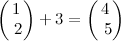
var v = [1.0, 2.0]
var s = 3.0
var vsresult = [Double](count : v.count, repeatedValue : 0.0)
vDSP_vsaddD(v, 1, &s, &vsresult, 1, vDSP_Length(v.count))
vsresult    // returns [4.0, 5.0]
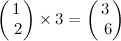
vDSP_vsmulD(v, 1, &s, &vsresult, 1, vDSP_Length(v.count))
vsresult    // returns [3.0, 6.0]
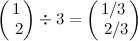
vDSP_vsdivD(v, 1, &s, &vsresult, 1, vDSP_Length(v.count))
vsresult    // returns [0.333333333333333, 0.666666666666667]
Vector & Vector
Vector-vector operations pose no challenge to Accelerate and the associated functions look like
vDSP_v***D(vector_1, 1, vector_2, 1, &result, 1, length_of_vector)
Here are a few worked-out examples:
<!--$$ \begin{pmatrix} 2 \\\ 5 \end{pmatrix} + \begin{pmatrix} 3 \\\ 4 \end{pmatrix} = \begin{pmatrix} 5 \\\ 9 \end{pmatrix} $$-->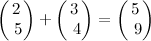
var v1 = [2.0, 5.0]
var v2 = [3.0, 4.0]
var vvresult = [Double](count : 2, repeatedValue : 0.0)
vDSP_vaddD(v1, 1, v2, 1, &vvresult, 1, vDSP_Length(v1.count))
vvresult    // returns [5.0, 9.0]
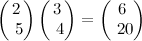
vDSP_vmulD(v1, 1, v2, 1, &vvresult, 1, vDSP_Length(v1.count))
vvresult    // returns [6.0, 20.0]
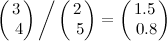
vDSP_vdivD(v1, 1, v2, 1, &vvresult, 1, vDSP_Length(v1.count))
vvresult    // returns [1.5, 0.8]
Dot Product
<!--$$ \begin{pmatrix} 1 \\\ 2 \end{pmatrix} \cdot \begin{pmatrix} 3 \\\ 4 \end{pmatrix} = 11 $$-->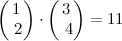
var v3 = [1.0, 2.0]
var v4 = [3.0, 4.0]
var dpresult = 0.0
vDSP_dotprD(v3, 1, v4, 1, &dpresult, vDSP_Length(v3.count))
dpresult    // returns 11.0
Matrix Multiplication
Matrices are passed into Accelerate as 1D arrays. As a result, matrix addition/subtraction is the same as vector addition/subtraction.
Matrix multiplication, on the other hand, is a bit more involved and requires this function:
vDSP_mmulD(matrix_1, 1, matrix_2, 1, &result, 1,
           rows_of_matrix_1, columns_of_matrix_2,
           columns_of_matrix_1_or_rows_of_matrix_2)
For example,
<!--$$ \begin{pmatrix} 3 & 2 \\\ 4 & 5 \\\ 6 & 7 \end{pmatrix} \begin{pmatrix} 10 & 20 & 30 \\\ 30 & 40 & 50 \end{pmatrix} = \begin{pmatrix} 90 & 140 & 190 \\\ 190 & 280 & 370 \\\ 270 & 400 & 530 \end{pmatrix} $$-->
    var m1 = [ 3.0, 2.0, 4.0, 5.0, 6.0, 7.0 ]
    var m2 = [ 10.0, 20.0, 30.0, 30.0, 40.0, 50.0]
    var mresult = [Double](count : 9, repeatedValue : 0.0)

    vDSP_mmulD(m1, 1, m2, 1, &mresult, 1, 3, 3, 2)
    mresult    // returns [90.0, 140.0, 190.0, 280.0, 370.0, 270.0, 400.0, 530.0]
Matrix Transpose
Matrix transpose can be obtained with
vDSP_mtransD(matrix, 1, &result, 1, number_of_rows_of_result, number_of_columns_of_result)
Like this,
<!--$$ \begin{pmatrix} 1 & 2 & 3 \\\ 4 & 5 & 6 \end{pmatrix}^{\sf T} = \begin{pmatrix} 1 & 4 \\\ 2 & 5 \\\ 3 & 6 \end{pmatrix} $$-->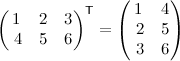
    var t = [1.0, 2.0, 3.0, 4.0, 5.0, 6.0]
    var mtresult = [Double](count : t.count, repeatedValue : 0.0)
    vDSP_mtransD(t, 1, &mtresult, 1, 3, 2)
    mtresult    // returns [1.0, 4.0, 2.0, 5.0, 3.0, 6.0]
Matrix Inversion
Matrix inversion takes a bit more effort, but can be accomplished with the function below (see Stack Overflow):
<!--$$ \begin{pmatrix} 1 & 2 \\\ 3 & 4 \end{pmatrix}^{-1} = \begin{pmatrix} -2 & 1 \\\ 1.5 & -0.5 \end{pmatrix} $$-->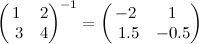
    func invert(matrix : [Double]) -> [Double] {

        var inMatrix = matrix

        var pivot : __CLPK_integer = 0
        var workspace = 0.0
        var error : __CLPK_integer = 0

        var N = __CLPK_integer(sqrt(Double(matrix.count)))
        dgetrf_(&N, &N, &inMatrix, &N, &pivot, &error)

        if error != 0 {
            return inMatrix
        }

        dgetri_(&N, &inMatrix, &N, &pivot, &workspace, &N, &error)
        return inMatrix
    }


    var m = [1.0, 2.0, 3.0, 4.0]
    invert(m)    // returns [-2.0, 1.0, 1.5, -0.5]
