Progressive
A simple Progress tracker for video-series and other tasks
Install / Use
/learn @h8moss/ProgressiveREADME
Progressive

A simple, open-source TODO list and progress tracker for Windows and Linux. Built with ❤️ using Tauri and Svelte.


📋 Table of Contents
- Features
- Getting Started
- Installation
- Usage
- Contributing
- Roadmap
- Frequently Asked Questions
- License
- Acknowledgements
🌟 Features
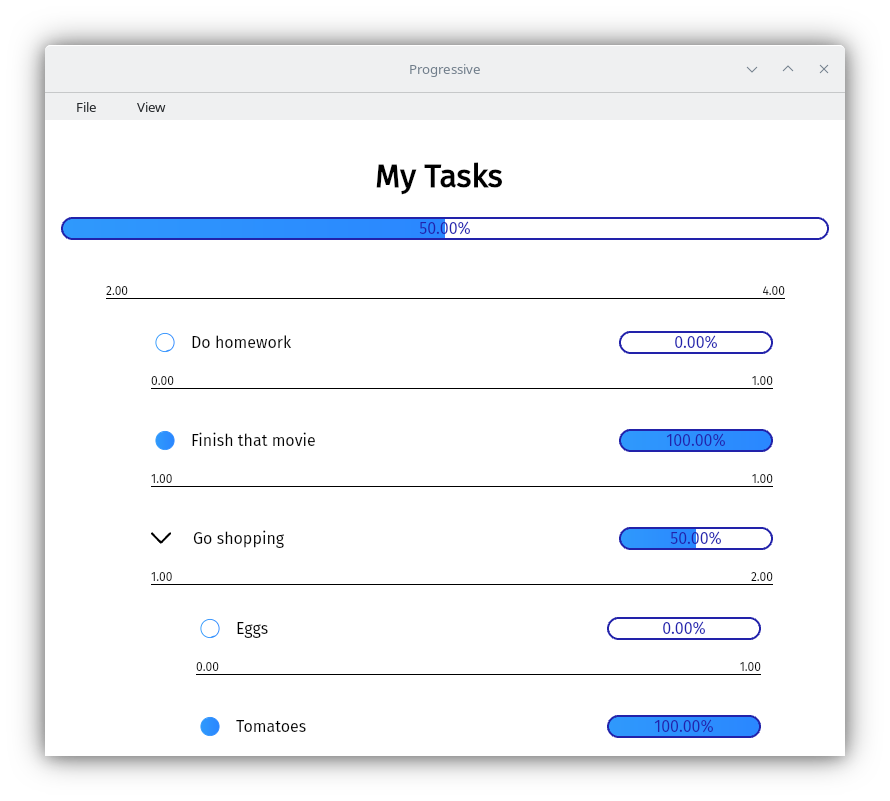
📊 Nested and slider tasks
Organize your work with hierarchical task structures. Break down complex projects into manageable subtasks and keep exact progress on each of them.
⚖️ Task Weights
Assign importance to your tasks. Heavier tasks contribute more to your overall progress.
🔢 Weight Interpretation
Weights can be interpreted and rendered as different units, making it easier to understand task importance in various contexts.
🎨 Custom Themes
Personalize your experience with custom color schemes.
🚀 Getting Started
System Requirements
- 2 GB RAM
- 100 MB free disk space
📥 Installation
Windows
- Visit the Releases page on GitHub.
- Download the latest version of the application.
- Run the installer and follow the prompts.
Linux
Install the app from its flathub page
Building from source (Windows, Linux and MacOS)
[!WARNING] The application has not been tested in MacOS, it may or may not work correctly.
-
Install dependencies Check tauri's prerequisites and follow the instructions. You will need to install NodeJS, Rust, and a few other platform-dependent dependencies.
-
Clone the repository:
git clone https://github.com/h8moss/progressive cd progressive -
Install dependencies:
npm install -
Build the project:
npm run tauri build
If you encounter any issues during installation or have suggestions for improving cross-platform support, please open an issue on our GitHub repository.
🖱️ Usage
- Launch Progressive from your applications menu or desktop shortcut.
- Here you may start a new tracker or open an existing one
- To add new tasks right click anywhere within the main task and click "new child" or press the big plus button at the bottom.
- To create subtasks first right click any existing task and click "make childful", then right click it and click "new child"
🛠️ Customization
Creating Custom Themes
- Navigate to
AppData/Roaming/com.h8m0ss.progressive/themes. - Create a new JSON file for each theme.
- Define the theme properties:
{
  "name": "My Custom Theme",
  "textColor": "#000000",
  "textColorB": "#FFFFFF",
  "backgroundColor": "#F0F0F0",
  "darkenColor": [10, 10, 10],
  "highlightColorA": "#4CAF50",
  "highlightColorB": "#45a049"
}
For more details, check out the default themes.
🤝 Contributing
We welcome contributions! Here's how you can help:
- Fork the repository.
- Create a new branch:
git checkout -b feature/your-feature-name. - Make your changes and commit them:
git commit -m 'Add some feature'. - Push to the branch:
git push origin feature/your-feature-name. - Submit a pull request.
🗺️ Roadmap
- [ ] Custom weight units
- [ ] Setting default theme
- [ ] Duplicating tasks
❓ Frequently Asked Questions
Q: Can I sync my tasks across multiple devices? A: Progressive is, and will always remain, a fully offline application, we will never send your tasks over to a server, that being said, you can use an application like syncthing to keep your files perpetually synced across devices
Q: Is there a mobile version available? A: Absolutely no!!!! This is something that we do not have planned as it would require a full rewrite of the application
Q: How can I report a bug or request a feature? A: Please use our GitHub Issues page to report bugs or suggest new features.
📄 License
This project is licensed under the GNU GPLv3 License - see the LICENSE file for details.
🙏 Acknowledgements
Icons
- Arrow-right icon by ByPeople (Public Domain)
- Settings icon by Vmware (MIT License)
- Edit and Save icon by Konstantin Filatov (CC Attribution License)
Icons sourced from SVG Repo.
Technologies
Made with ☕ by Daniel Armenta © 2023
Related Skills
qqbot-channel
351.8kQQ 频道管理技能。查询频道列表、子频道、成员、发帖、公告、日程等操作。使用 qqbot_channel_api 工具代理 QQ 开放平台 HTTP 接口,自动处理 Token 鉴权。当用户需要查看频道、管理子频道、查询成员、发布帖子/公告/日程时使用。
docs-writer
100.6k`docs-writer` skill instructions As an expert technical writer and editor for the Gemini CLI project, you produce accurate, clear, and consistent documentation. When asked to write, edit, or revie
model-usage
351.8kUse CodexBar CLI local cost usage to summarize per-model usage for Codex or Claude, including the current (most recent) model or a full model breakdown. Trigger when asked for model-level usage/cost data from codexbar, or when you need a scriptable per-model summary from codexbar cost JSON.
project-overview
FlightPHP Skeleton Project Instructions This document provides guidelines and best practices for structuring and developing a project using the FlightPHP framework. Instructions for AI Coding A