
RxWars
Based on the classic "Dope Wars" game.
Install / Use
/learn @gtheilman/RxWarsREADME
##Prescription Wars
Prescription Wars is a multiplayer variation on the old DrugWars DOS game where players buy and sell illicit drugs.
I use this game as a framing device during pharmacy school classes dealing with prescription drug abuse as a public health issue. While students play the game I change the market environment to illustrate various strategies that governments have used to combat the problem. These changes might include increasing surveillance of Schedule II drugs, increasing the risk of arrest when selling on the street, efforts to decrease demand, etc. Students can then try to see how these strategies might affect the illicit prescription drug trade.
Some of the slides I use during the class are here.
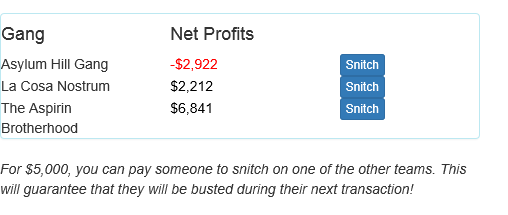
Players take on the role of gangs that buy medicines from pharmacies and then re-sell them for non-therapeutic uses (on the street). The goal is to make more money than other players. Each teams' net profit (or loss) is displayed in real-time on the screen.
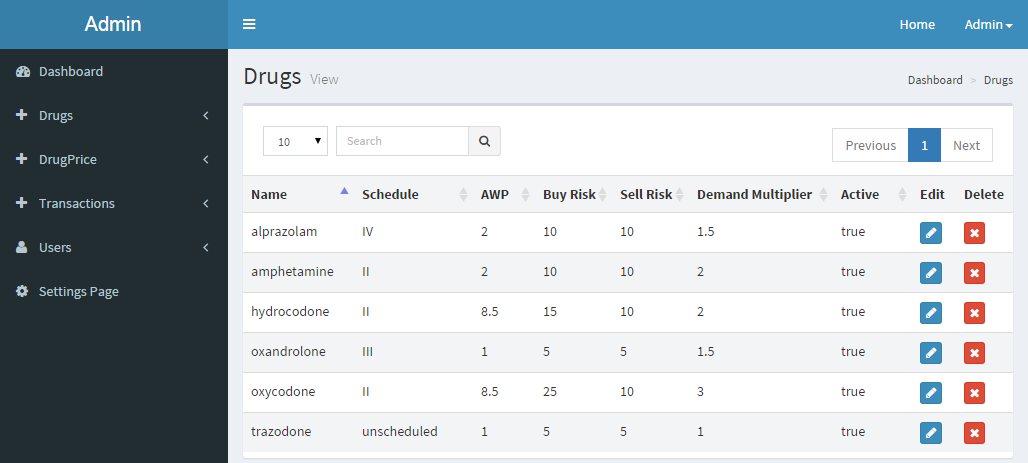
The six baseline medications are alprazolam, hydrocodone, oxycodone, amphetamine, oxandrolone and trazodone. Oxandrolone is an anabolic steroid (Schedule III) that is sometimes used illicitly by athletes. Trazodone, while prescription-only, is not a controlled substance. However, people have been known to crush and insufflate the tablets. The administrator (faculty member) can tailor the drug list however they like.
Players initially borrow money from the loan shark so that they can purchase medicines from pharmacies using fake prescriptions. While the cost of buying drugs from pharmacies stays constant, the risk of getting arrested increases with the number of units bought. Think of it as the pharmacist being much more suspicious when someone comes in with a prescription for 300 oxycodone tablets than they would be if the person was only getting 10 tablets.
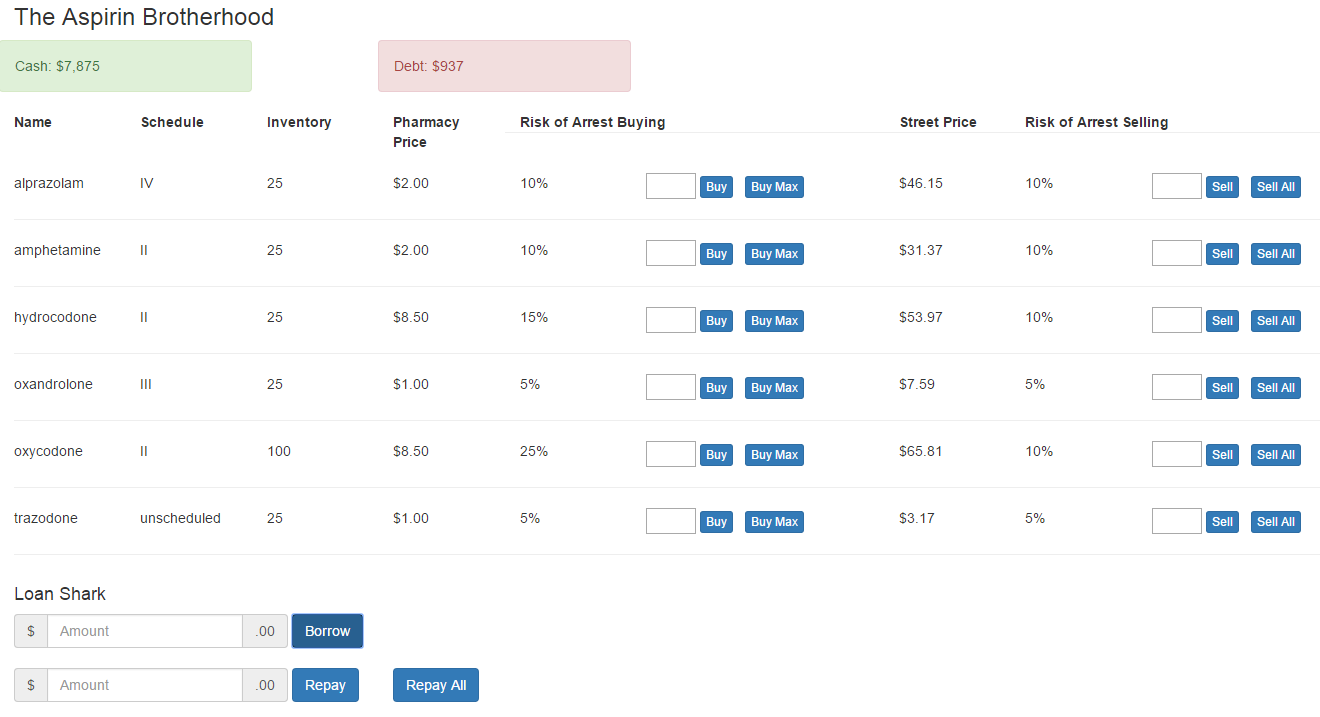
If the player purchases the drugs without getting arrested, they can then sell them on the street. The street price fluctuates based on how many units are available for sale from all the players. If all the players are buying up alprazolam, there is going to be glut on the market and the street price goes down. However, if only one or two players have any alprazolam, the street price will likely be higher. Street prices are always at least a little bit higher than pharmacy prices (no criminal is going to engage in "loss-leaders"!).
Street price can also be influenced by a "demand multiplier" that can be set for each individual drug. For example, when tamper-resistant oxycodone tablets were introduced, the demand for oxycodone tablets went down. However, the demand for other opiates (especially heroin) went up.

I spend the first part of the exercise orienting the students to the interface and gameplay.
- I usually recommend that the work in teams of three persons sitting in front of one laptop. The idea is to get them talking to each other about what's going on rather than just clicking buttons.
- When they borrow from the loan shark, interest accrues roughly every 30 seconds. They need to pay back their loans as quickly as possible. A message pops up every thirty seconds telling them about the interest and urging them to pay back the loan.
- Being arrested buying drugs from pharmacies is random, but the risk is increased the more units they try to buy. Risk of arrest goes up dramatically once they try to purchase more than 100 units. The risk of arrest is displayed next to the number of tablets they are planning to buy.
- If arrested, the player loses whatever money they were trying to spend (and, of course, they don't get the drugs). They also are assessed "legal fees" to pay lawyers to keep their minions out of jail. The legal fees are proportional to the value of the transaction. If they were trying to buy 300 oxycodone tablets, the legal fees will be higher than if they were trying to buy 10 trazodone. If they don't have enough money to pay the legal fees, the amount needed is automatically borrowed from the loan shark.
- The risk of selling on the street is constant (although it can be adjusted by the administrator). The thought is that if someone is selling to an undercover policeman, it doesn't really matter if they were trying to sell 10 pills or 100...they are still going to get arrested. But, as when buying, the legal fees that are assessed after being arrested for selling are proportional to the value of the transaction. Being busted when carrying out a big transaction carries a larger penalty than being busted when selling just a few tablets.
- Because of the relationships between size of transactions, risk of arrest and legal fees, students are strongly encouraged to "go low, go slow" and keep their transactions small. Trying to make "big deals" with hundreds of tablets at a time is a sure way to get in deep with the loan shark.
- There is a 5 second 'lockout' period after each transaction. This is to encourage strategic thinking rather than simply pressing buttons as quickly as possible.
- Players can also "snitch" on other players. For a fee of $5,000, a player can arrange that the other player will be arrested during their next transaction. While the player who was "snitched on" gets a notice that their being arrested was the result of action by another player, they aren't told who did it.

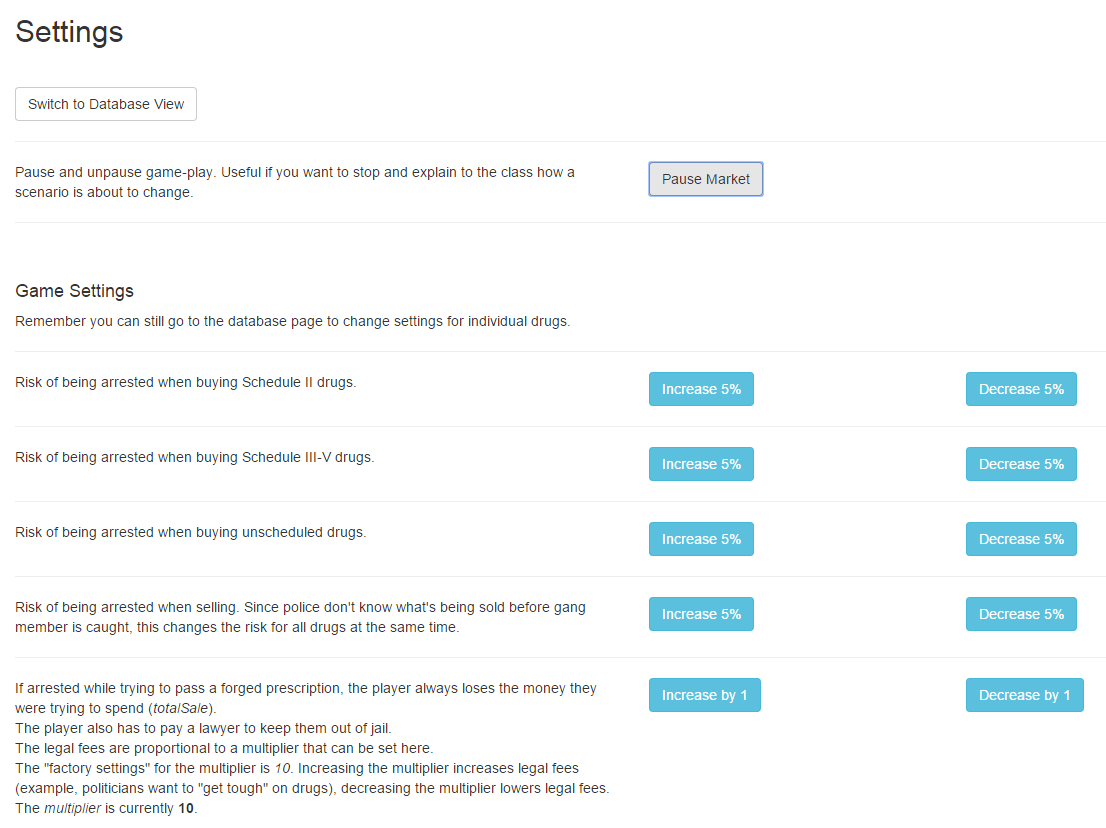
While the administrator can set risk of arrest, prices, demand, etc for individual drugs, there are also several pre-programmed scenarios.
- Gangster's Paradise Practically no law enforcement. Can be thought to be analogous to a time before laws such as the Controlled Substance Act were passed. Would be a good initial scenario to allow students to get used to game play and build up a little bit of money.
- Controlled Substances Act In 1970 the U.S. government set up the 5 controlled substances "schedules" and forbade refills on Schedule II prescriptions. Baseline risk of arrest while buying Schedule II drugs is set at 25%. Baseline risk for Schedules III-V set at 15%. Risk of arrest when buying unscheduled drugs is 5%. Risk of arrest while selling is set at 10% for all.
- Controlled Substances Penalties Amendments Act of 1984 This 1984 legislation increased penalties for repeat-offenders and for selling drugs within 1000 feet of a school. Increases the legal fees assessed when arrested for buying or selling.
- Prescription Drug Monitoring Programs Wide availablity of networked computers in early 21st century increased the ability of prescription drug monitoring programs to detect non-therapeutic prescribing. Increases the risk of being arrested when buying any scheduled drugs.
- Decriminalization The demand multiplier goes to near zero because people won't buy drugs illegally when they can get them legally. Street prices drop to a minimum.
Technical Details
The program is written in JavaScript using Bootstrap and the Meteor framework. Meteor was chosen to allow for simple deployment by faculty members with little programming experience.
Meteor lends itself well to deployment using a Platform as a Service (Paas) provider. These are services where the server itself is managed by the company and the user is simply responsible for uploading and maintaining the application running on it.
Meteor hosting is no longer free. You can still deploy to another, paid hosting service, though
Modulus, Heroku or Digital Ocean
###Installation
If you are a faculty member at an accredited health-care education school and would like assistance setting this up for your institution, please feel free to contact me.
Installation does involve some use of the command line. If you have no idea what "ls", "sudo" or "mkdir" mean, it might be best to get someone to help you. But, if you are feeling adventurous, go ahead and follow the instructions below.
Step 1 Sign up for a Meteor account
It may not be immediately obvious, but to create an account you first click on the "Sign In" button on the Meteor website. Then you will be given the opportunity to create a new account.
Step 2: Install Meteor on your local Windows, Mac or Linux computer.
The official instructions are here, but you also might find these unofficial instructions helpful.
Windows: The Windows installation process is pretty similar to what you see with installing other Windows programs.
Mac: The Mac installer requires that you use Terminal. You can [find the icon to open Terminal](http://w
