
Yardstick
No description available
Install / Use
/learn @gridgain/YardstickREADME

Yardstick - Benchmarking Framework
Yardstick is a framework for writing benchmarks. Specifically it helps with writing benchmarks for clustered or otherwise distributed systems.
The framework comes with a default set of probes that collect various metrics during benchmark execution. Probes can be turned on or off in configuration. You can use a probe for measuring throughput and latency, or a probe that gathers vmstat statistics, etc... At the end of benchmark execution, Yardstick automatically produces files with probe points.
GridGain Benchmarks On Yardstick
See <a href="https://github.com/gridgain/yardstick-gridgain" target="_blank">Yardstick GridGain Benchmarks</a> as an example of Yardstick framework usage.
Screenshots
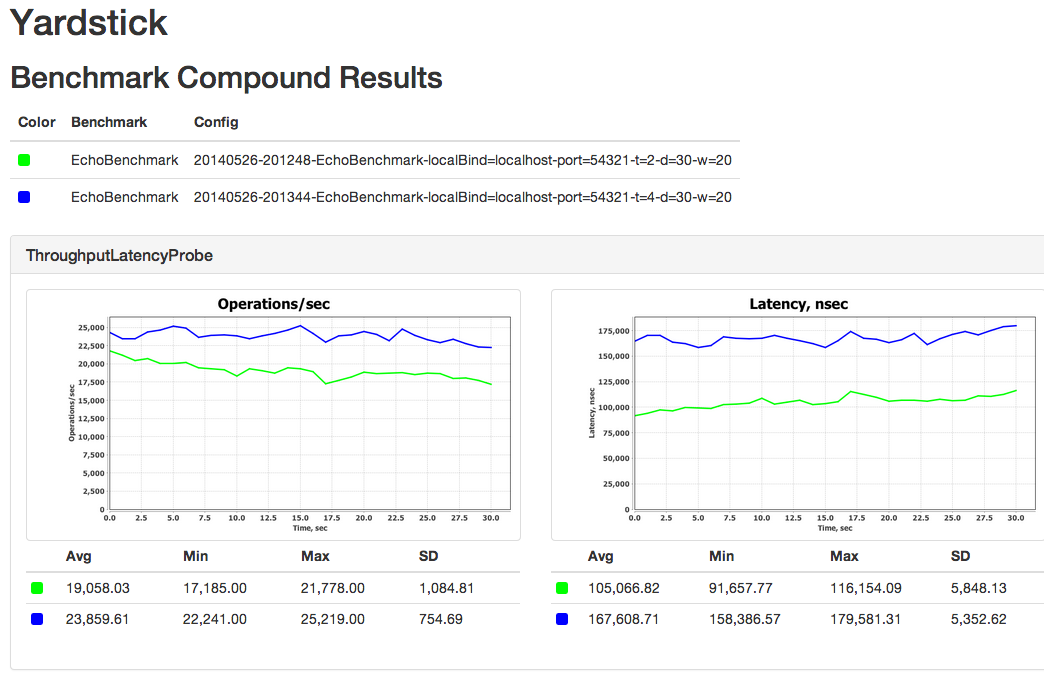
Click on individual graphs to Zoom In
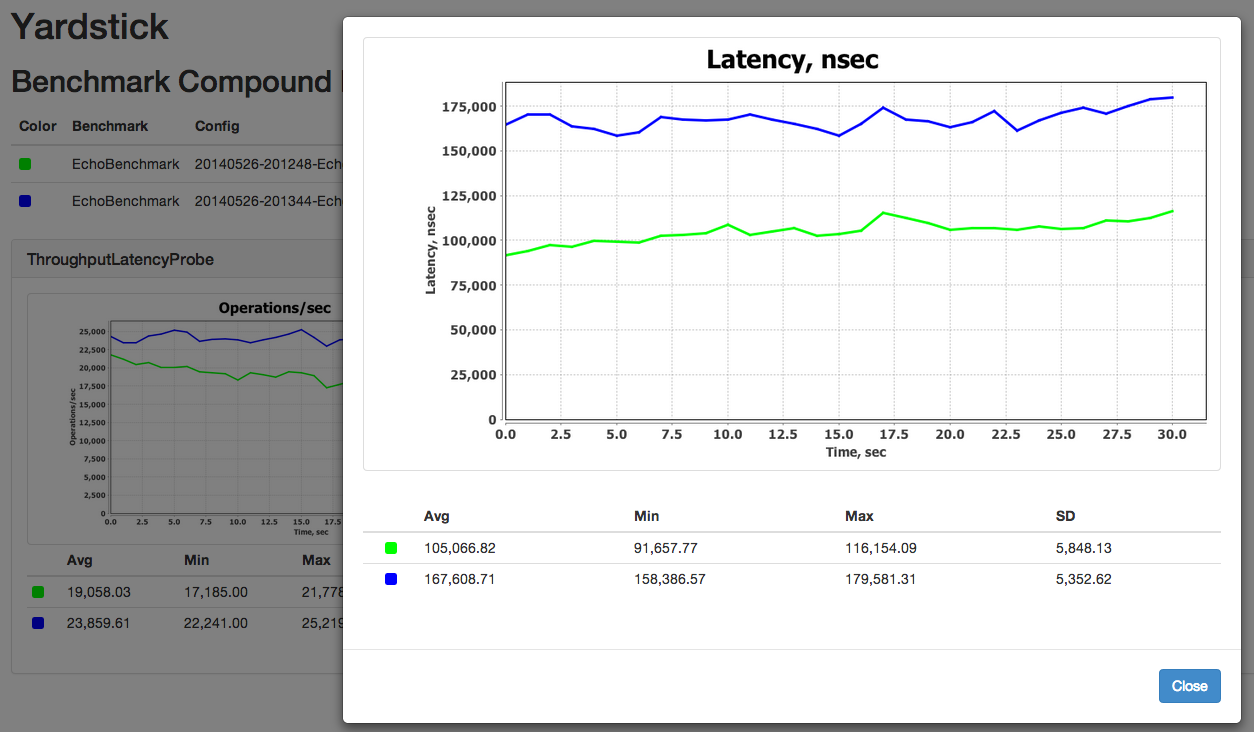
Available Probes
ThroughputLatencyProbe- measures throughput and latencyDStatProbe- collects information provided by Linux/Unix ‘dstat’ command, such as various network, CPU, or memory metricsVmStatProbe- collects information provided by Linux/Unix ‘vmstat’ command (which is a subset of ‘dstat’ command), such as various network, CPU, or memory metricsPercentileProbe- tracks the latency of each individual request and collects the time frame bucket
Creating Yardstick Benchmarks
There are two main interfaces that need to be implemented, BenchmarkServer and BenchmarkDriver:
BenchmarkDriveris an instance of the benchmark that performs some operation that needs to be tested.BenchmarkServeris the remote server that the BenchmarkDriver communicates with.
You can benchmark any distributed operation with Yardstick. For example, if you have to measure message processing time in your application, then you can put message sending logic into BenchmarkDriver, and message processing logic to one or more remote BenchmarkServers.
It is as simple as this. Yardstick will measure throughput, latency, and other metrics for you automatically and produce nice graphs at the end.
Examples
You can find Yardstick benchmark examples in
org.yardstickframework.examplespackage- Yardstick GridGain Benchmark Repository
Running Yardstick Benchmarks
The easiest way to run benchmarks is by executing bin/benchmark-run-all.sh script which will automatically start benchmark driver and remote servers base based on the properties file passed in (config/benchmark.properties used by default):
$ bin/benchmark-run-all.sh config/benchmark.properties
This script will automatically restart benchmark driver and remote servers for every benchmark configuration provided in config/benchmark.properties file.
At the end of the run, you can generate graphs by executing bin/jfreechart-graph-gen.sh script with folders that contain benchmark results.
$ bin/jfreechart-graph-gen.sh -i results_2014-05-16_00-28-01 results_2014-05-15_18-38-14
Starting Remote Servers
If you do not wish to run bin/benchmark-run-all.sh script and prefer to have more control over starting and stopping remote servers, you can use benchmark-servers-start.sh script directly.
$ bin/benchmark-servers-start.sh config/benchmark.properties
Server Log Files are stored in the logs-<current time>/logs_servers folder.
Starting Benchmark Driver
Again, if you do not wish to run bin/benchmark-run-all.sh script, you can start benchmark driver directly by executing benchmark-driver-start.sh script.
$ bin/benchmark-driver-start.sh config/benchmark.properties
Driver Log Files are stored in the logs-<current time>/logs_drivers folder.
Stopping Remote Servers
To stop remote servers after the benchmark is finished, you can execute benchmark-servers-stop.sh script.
$ bin/benchmark-servers-stop.sh config/benchmark.properties
Manual Running
There are scripts that allow to run servers and drivers on local machine only, no SSH commands are used to start remote servers or drivers.
To start servers you can execute benchmark-manual-servers-start.sh script. Optionally the number of servers parameter can be passed to this script.
If it's not specified then the number of servers will be equal to the number of server hosts (SERVER_HOSTS property in properties file).
$ bin/benchmark-manual-servers-start.sh config/benchmark.properties
To start drivers you can execute benchmark-manual-drivers-start.sh script.
$ bin/benchmark-manual-drivers-start.sh config/benchmark.properties
Servers and drivers are stopped manually, for example by kill command.
Windows version of manual scripts is shipped as well: benchmark-manual-servers-start.bat and benchmark-manual-drivers-start.bat batch scripts.
Properties And Command Line Arguments
The following properties can be defined in benchmark properties file:
BENCHMARK_DEFAULT_PROBES- list of default probesBENCHMARK_PACKAGES- packages where the specified benchmark is searched by reflection mechanismBENCHMARK_WRITER- probe point writer class name (by default CSV writer is used)SERVER_HOSTS- comma-separated list of IP addresses where servers should be started, one server per hostDRIVER_HOSTS- comma-separated list of IP addresses where drivers should be started, one driver per host, if the property is not defined then the driver will be run on localhostREMOTE_USER- SSH user for logging in to remote hostsJVM_OPTS- list of general JVM options used to start both server and driver nodeSERVER_JVM_OPTS- list of JVM options used to start server node (appended toJVM_OPTS)DRIVER_JVM_OPTS- list of JVM options used to start driver node (appended toJVM_OPTS)RESTART_SERVERS- there is two modes to use it. 1.RESTART_SERVERS=true- yardstick will start new servers for each benchmark. 2.RESTART_SERVERS=<hostname_1>:<id_1>:<delay_1>:<pause_1>:<period_1>,<hostname_2>:<id_2>:<delay_2>:<pause_2>:<period_2>- comma-separated list of colon-separated tuples of a hostname, a server host id (id - number of hostname atSERVER_HOSTSfrom 0), a delay (for warmup) before first restart (stop, then pause, then start), the pause time (pause between server kill and server start) and a period for next restarts. The delay, the pause and the period in seconds (Note: it can be 0.1 seconds for example). Please pay attention that restarters warmup delay is an absolute time from benchmark start, it does not depends of benchmark's warmup delay. In this case, yardstick will start new servers for each benchmark (the same withRESTART_SERVERS=true), and after starting of driver, yardstick will killing server by the hostname according to the delay, the pause and the period time.CONFIGS- comma-separated list of benchmark run configurations which are passed to the servers and to the benchmarks
Example of benchmark.properties file to run 2 instances of EchoServer
# List of default probes.
BENCHMARK_DEFAULT_PROBES=ThroughputLatencyProbe

# Packages where the specified benchmark is searched by reflection mechanism.
BENCHMARK_PACKAGES=org.yardstick

# Probe point writer class name.
# BENCHMARK_WRITER=

# General JVM options.
JVM_OPTS=${JVM_OPTS}"-Xms512m"

# Server JVM options.
SERVER_JVM_OPTS=${SERVER_JVM_OPTS}"-Xmx512m"

# Driver JVM options.
DRIVER_JVM_OPTS=${DRIVER_JVM_OPTS}"-Xmx1024m"


# Comma-separated list of remote hosts to run BenchmarkServers on.
# If same host is specified multiple times, then benchmark server will be started on that host multiple times.
SERVER_HOSTS=localhost,localhost

# Comma-separated list of remote hosts to run BenchmarkDrivers on.
# If same host is specified multiple times, then benchmark driver will be started on that host multiple times.
DRIVER_HOSTS=localhost,localhost

# Remote username.
# REMOTE_USER=

# Comma-separated list of benchmark driver and server configuration parameters.
CONFIGS="\
--localBind localhost --duration 30 -t 2 -sn EchoServer -dn EchoBenchmark,\
--localBind localhost --duration 30 -t 4 -sn EchoServer -dn EchoBenchmark\
"
The following properties can be defined in the benchmark configuration:
-cfg <path>or--config <path>- framework configuration file path-dn <list>or--driverNames <list>- space-separated list of driver names (required for the driver), the specified drivers will be run in one JVM, optionally a weight can be added to the driver name, for exampleEchoBenchmark:3 NewEchoBenchmark:7, soEchoBenchmarkwill be run 30% of benchmark time, NewEchoBenchmark will be run 70%-sn <name>or--serverName <name>- server name (required for the server)-p <list>or--packages <list>- comma separated list of packages for benchmarks-pr <list>or--probes <list>- comma separated list of probes for benchmarks-wr <name>or--writer <name>- probe point writer class name-t <num>or--threads <num>- thread count (set to 'cpus * 2')-d <time>or--duration <time>- test duration, in seconds-w <time>or--warmup <time>- warmup time, in seconds-shor--shutdown- flag indicating whether to invoke shutdown hook or not-of <path>or--outputFolder <path>- output folder for benchmark results, current folder is used by default-ds <list>or--descriptions <list>- space-separated list of benchmark run descriptions, the description with index 1 corresponds to the driver with index 1 and so on-hn <name>or--hostName <name>- host name where a benchmark driver is run, this property is set automatically by the benchmark script
Related Skills
node-connect
353.1kDiagnose OpenClaw node connection and pairing failures for Android, iOS, and macOS companion apps
frontend-design
111.6kCreate distinctive, production-grade frontend interfaces with high design quality. Use this skill when the user asks to build web components, pages, or applications. Generates creative, polished code that avoids generic AI aesthetics.
openai-whisper-api
353.1kTranscribe audio via OpenAI Audio Transcriptions API (Whisper).
qqbot-media
353.1kQQBot 富媒体收发能力。使用 <qqmedia> 标签,系统根据文件扩展名自动识别类型(图片/语音/视频/文件)。
