
aicb-roslyn-mcp
AIContextBuilder (AICB): Roslyn MCP server and CLI for C#/.NET (dotnet) code intelligence - semantic code analysis and navigation for coding agents: callers, change impact, implementations, dependency injection, tests, side effects, dead code, token-budgeted context.
Install / Use
claude mcp add gregordadera -- npx -y github:gregordadera/aicb-roslyn-mcpIf the server publishes to npm under a different name, use that package instead — check the repo README.
MCP Server
Model Context Protocol server
Quality Score
Category
AI & Machine LearningSupported Platforms
Tags
Our assessment of aicb-roslyn-mcp
aicb-roslyn-mcp scores 75/100 on our quality scale, 843rd of 949 AI & Machine Learning skills we index.
Its MCP Server is 44 KB long, well organised into 25 sections with 12 code examples: long enough that it reads more like full documentation than a focused instruction file, which agents can find harder to follow.
It has 10 GitHub stars, so there is little community track record yet; judge it on its content.
Maintenance, license and trust
- The repository was last updated today, so aicb-roslyn-mcp is actively maintained.
- No license is declared. By default that means all rights are reserved: you can read it, but reusing or redistributing it is not clearly permitted. Ask the author before building on it commercially.
- Its trust signals score 85/100, with 1 caution from licensing, adoption, age or documentation. These come from repository metadata, not a code audit — read the skill file before letting an agent act on it.
Safety scan
No issues foundOur scan of the whole file found no instruction hijacking, hidden characters, credential access, data exfiltration or destructive commands. An AI review of the same text found nothing harmful.
AI review by kimi-k2.7-code on 2026-10-08. Automated pattern scan on 2026-10-08. It catches known dangerous patterns, not every risk — read a skill before letting an agent act on it.
aicb-roslyn-mcp compared with similar skills
All 4 of these similar skills score higher than aicb-roslyn-mcp; compare them before choosing.
| Skill | Score | Stars | Updated | Format |
|---|---|---|---|---|
| aicb-roslyn-mcp (this skill)by gregordadera | 75 | 10 | today | MCP Server |
| claude-memby thedotmack | 100 | 97.7k | 1d ago | CLAUDE.md |
| Agent-Reachby Panniantong | 100 | 93.2k | today | CLAUDE.md |
| Understand-Anythingby Egonex-AI | 100 | 85.5k | 2d ago | CLAUDE.md |
| headroomby headroomlabs-ai | 100 | 74.6k | today | CLAUDE.md |
Frequently asked questions
- How do I install aicb-roslyn-mcp?
- Run
claude mcp add gregordadera -- npx -y github:gregordadera/aicb-roslyn-mcp. The install tabs above show the steps for each supported agent. - Which AI agents does aicb-roslyn-mcp work with?
- It is written for Claude Code, Claude Desktop and OpenAI Codex, as a MCP Server file. Other agents that read the same format can often use it too.
- Is aicb-roslyn-mcp safe to use?
- Our scan of the whole file found no instruction hijacking, hidden characters, credential access, data exfiltration or destructive commands. An AI review of the same text found nothing harmful. It declares no license and scores 85/100 on trust signals. Skills are instructions an agent will follow, so read the file before installing it and do not approve commands you do not understand.
- Is aicb-roslyn-mcp still maintained?
- The repository was last updated today, so aicb-roslyn-mcp is actively maintained.
Skill content
View source on GitHubAIContextBuilder (aicb)
<!-- mcp-name: io.github.gregordadera/aicb-roslyn-mcp -->





Give coding agents a Roslyn-accurate map of your C#/.NET solution. aicb is
a code intelligence server for C# and .NET: it answers questions about callers,
implementations, dependency injection, tests, side effects and change impact,
then packs the relevant code into compact Markdown for an LLM. It runs locally as
an MCP server and CLI; a Windows desktop app adds visual context selection,
analysis and editing.
The software is closed source. This public repository contains its documentation, license and releases. It is free for individuals, education and organizations below the license thresholds.
This page is a short tour, not the reference. It names 35 of the 54 tools an agent sees by default; the three manuals run to 35 chapters, about 40 times the length of this page.
See it answer a code question
Ask your coding agent:
What could be affected if I change
ColorMixerService? Use AICB.
Or call the same tool from a terminal:
aicb call impact_of_change --sln C:/repo/App.sln --arg symbol=ColorMixerService
Abridged output from the bundled ColorMixer.SelectionLab sample:
{
  "symbol": "ColorMixerService",
  "resolvedKind": "type",
  "directCount": 1,
  "transitiveCount": 2,
  "risk": "low",
  "productionImpactCount": 2,
  "directImpact": { "items": ["DemoCompositionRoot"] }
}
The desktop app's MCP Usage page records calls locally and separates guided refusals from suspected defects:
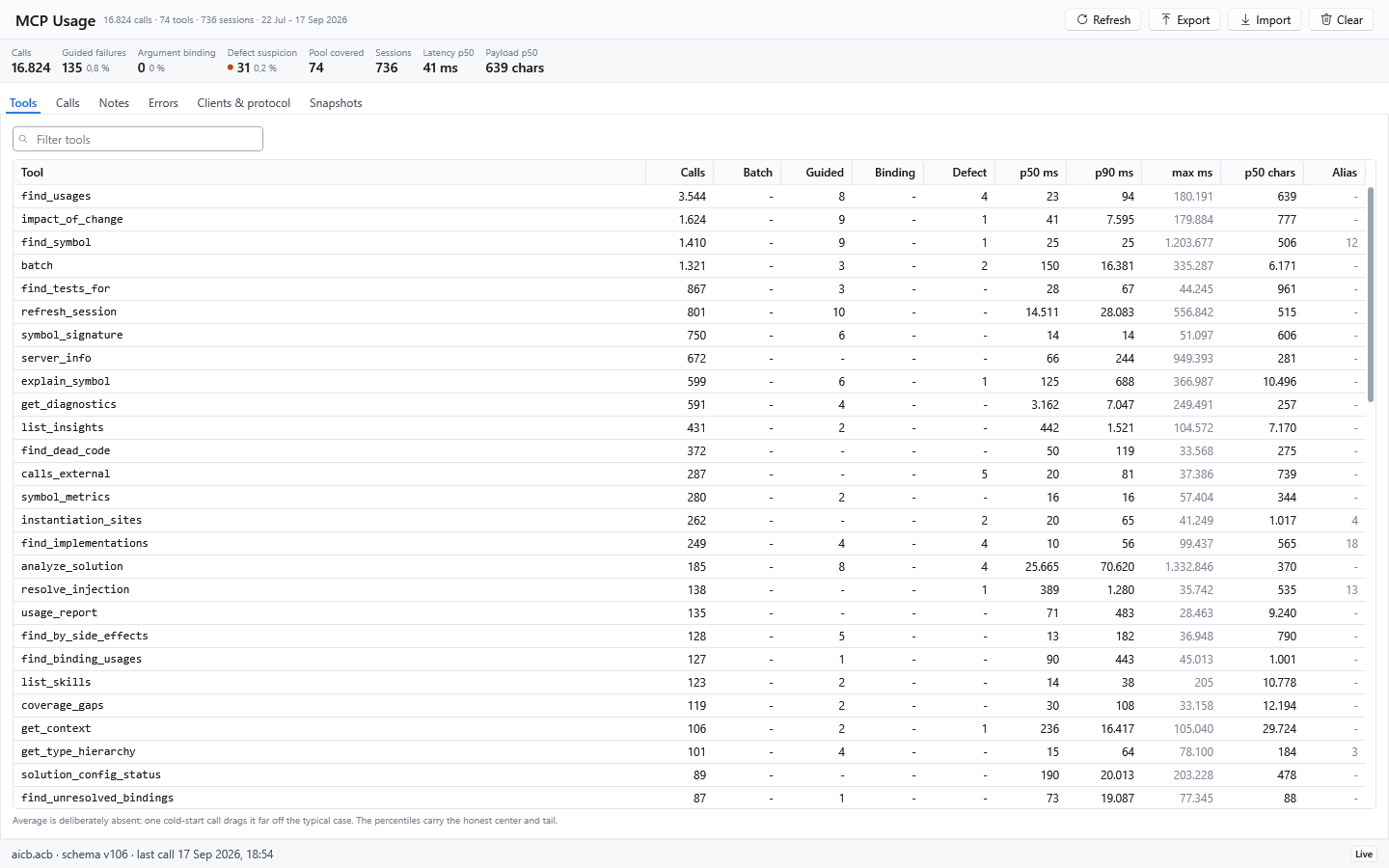
That answer comes from the Roslyn symbol graph, not a substring search. AICB distinguishes overloads, follows interface and override relationships, understands partial types and records DI construction paths.
Build context that fits the task
AICB does more than answer individual symbol questions. It can assemble a focused, task-specific context package for an agent instead of sending an unfiltered source dump:
| Need | Tool | What it returns |
|---|---|---|
| Read one symbol in context | get_context | The symbol plus its direct dependencies and callees |
| Explore a named symbol with selected surroundings | explain_symbol | Callers, callees, implementations, tests or other requested dimensions |
| Pack context for a natural-language goal | pack_for_task | Goal-named symbols and their semantic neighborhood |
| Prepare to edit | prepare_task | The goal-focused context plus covering tests and likely siblings such as a factory or validator |
| Check the response cost first | measure | The exact token count of one or more planned tool answers, without returning their large payloads |
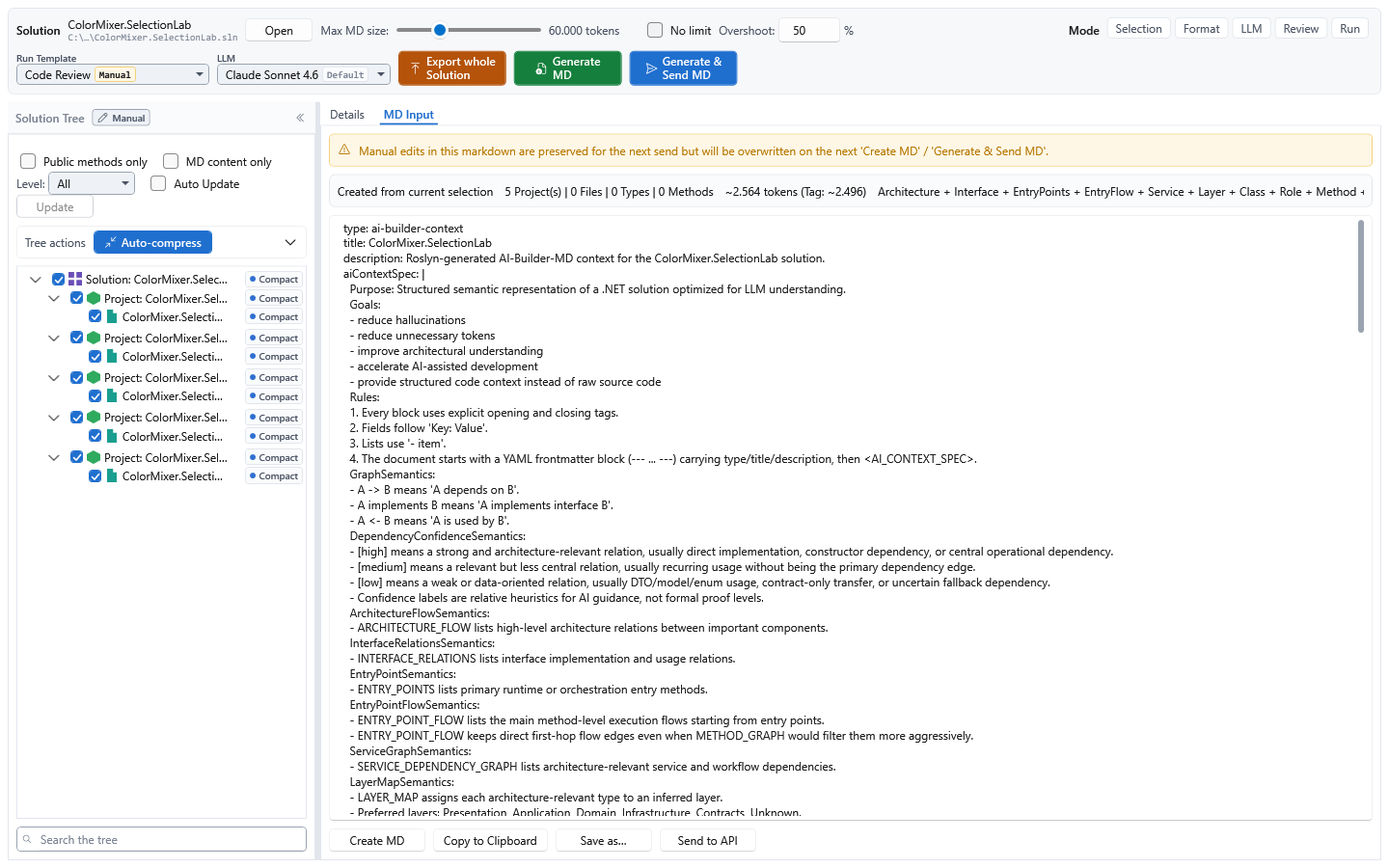
The focused context tools accept a token budget. Explicitly named seed symbols stay in the package; AICB first reduces method detail and then removes less-relevant surrounding content when the budget is tight. It does not cut text in the middle of a block, and a leading note discloses types, tests or siblings that were omitted. AICB can therefore tell you that a bundle was structurally reduced or capped; it cannot certify that the remaining budget is sufficient to solve the task correctly. Whole-document rendering can use the same budget pipeline through a pipeline profile, including a configurable overshoot allowance and an optional trimming report.
The result is AI-Builder-MD: structured Markdown for an LLM, containing the selected code together with symbol relationships, architecture graphs, semantic metadata and provenance. It can use the established tag notation or YAML. See the context-document guide and the task-packing tools.
Add explicit meaning with AI Tags and semantic annotations
AICB works without annotations. Where source structure and conventions are not
enough, optional <ai> tags in XML documentation let a developer state the intended
role of a type or method explicitly:
/// <ai
///   role="service"
///   layer="Application"
///   responsibility="Coordinates order validation and submission."
///   stability="Stable"
/// />
public sealed class OrderService
Annotations can describe semantics such as role, domain, architectural layer,
priority, stability, responsibility and side effects. Explicit values take
precedence over heuristic inference; sentinel values such as none can deliberately
suppress inference for one field. AICB preserves provenance so an agent can
distinguish source-derived facts, author-provided meaning and inferred hints. The
AI annotation reference
documents the supported forms and fields.
How analysis and memory work
.sln / .slnx / .slnf + C# + XAML/AXAML
                 ↓
        MSBuild + Roslyn semantic models
                 ↓
  AICB facts and consolidated semantic indexes
                 ↓
 individual answers or budgeted AI-Builder-MD
AICB is more than a response cache around Roslyn. During analysis it walks the solution's C# documents, records declarations, calls, type references and other facts, then consolidates caller and type fan-in, implementations, resolved markup references and transitive side-effect classifications. Tools traverse or project that warm model for a particular question; context tools select and render a task-specific slice. This does not mean that every possible answer or runtime relationship is precomputed.
An MCP session belongs to one aicb mcp process and pins both the analyzed graph
and its Roslyn workspace. A second server process builds its own session. The
desktop app, CLI and MCP server use the same analysis and rendering engine and can
share configuration and persisted snapshots through the local database, but they
do not share one live in-memory graph. Within one session, only one refresh runs at
a time; concurrent callers join it. A source-only edit can take the incremental
path, replaying changed document text without reloading the workspace. When that
path is unavailable, or when force: true is requested, AICB fully reloads it.
Live sessions, snapshots and persistent codebase memory
These states serve different purposes and should not be treated as interchangeable:
| State | Lifetime and purpose | Important boundary |
|---|---|---|
| Live MCP session | In-memory graph and Roslyn workspace reused by one server process | Sees saved files, not unsaved editor buffers; another server process has a separate session |
| Remembered codebase | remember_codebase persists an analyzed model; recall_codebase can rehydrate it later or in another process without running Roslyn | A recalled session has no live workspace, no reliable line numbers and a reduced insight contract; use refresh_remembered when live precision is required |
| Saved snapshot | Named baseline used by compare_with_previous and public-contract comparison | A comparison baseline, not a live workspace |
| <Solution>.aicb.json | Git-trackable solution configuration | Contains rules and choices, never analysis results, sessions or credentials |
remember_codebase, recall_codebase and refresh_remembered are opt-in tools: no
MCP profile exposes them, so start the server with AICB_MCP_TOOLS naming them (or
AICB_MCP_TOOLS=all). recall_codebase reports whether the persisted model still matches the source,
payload schema and analyzer identity. It deliberately returns the recalled model
even when it is stale, with metadata that tells the agent when a live re-analysis
is necessary. See sessions, recall and staleness.
What the model can and cannot prove
- AICB analyzes statically visible C# and selected XAML/AXAML relationships. Code reached only through reflection, runtime assembly scanning, dynamic configuration or an external consumer can remain invisible.
- DI analysis recognizes statically readable Microsoft-DI-shaped registrations; runtime-produced registrations are disclosed as dynamic or unknown rather than invented.
- XAML binding analysis resolves paths only where the source and data type are safe to establish. Unknown scopes are skipped conservatively.
- A reported side effect is a conservative static contact classification propagated through known call edges. It is not general data-flow, taint or runtime state analysis.
- Responses disclose stale sessions, unresolved projects and capped result sets.
Read
staleness,incompleteProjects,totalFoundandtruncatedbefore treating an empty or short answer as proof.
How an agent should judge an answer
An AICB response is evidence together with its limits. Before acting on an empty, short or apparently definitive result, inspect the accompanying signals:
| Signal | Meaning | Typical response |
|---|---|---|
| staleness | Saved source changed after the analysis, or an automatic refresh ran or failed | Save the files and refresh if the response is not current |
| incompleteProjects or verdict: "inconclusive" | Project references could not be resolved well enough for a complete semantic graph | Restore or build, then call refresh_session(force: true) |
| totalFound and truncated | More matches exist than were returned | Narrow the scope, paginate or raise the documented cap |
| Bundle manifest or leading omission note | A token budget removed surrounding types, tests or sibling implementations | Increase the budget or request the missing axis explicitly |
| mergedNamesakes, ambiguity or multiple candidates | A name did not resolve to one unique symbol | Repeat the query with a qualified symbol name |
| confidence, provenance, dynamic or unknown markers | A value is measured, author-supplied, inferred or not statically knowable | Preserve the uncertainty and verify the relevant runtime configuration when needed |
| origin: "Recalled" or lineNumbersAvailable: false | The answer came from persisted memory rather than a live Roslyn workspace | Use refresh_remembered before relying on live-only details |
The MCP profile controls automatic refresh. Off only discloses drift,
Reactive refreshes before a reading tool answers and is the normal shipped
setting, while Proactive starts analysis after saved edits settle. Automatic
refresh never sees unsaved editor buffers. Staleness is also different from
reference incompleteness: the first needs a refresh; the second normally needs a
restore or build followed by a forc
Truncated for display — read the full file on GitHub.
Related Skills
claude-mem
97.7kPersistent Context Across Sessions for Every Agent – Captures everything your agent does during sessions, compresses it with AI, and injects relevant context back into future sessions. Works with Claude Code, OpenClaw, Codex, Gemini, Hermes, Copilot, OpenCode + More
Agent-Reach
93.2kGive your AI agent eyes to see the entire internet. Read & search Twitter, Reddit, YouTube, GitHub, Bilibili, XiaoHongShu — one CLI, zero API fees.
Understand-Anything
85.5kGraphs that teach > graphs that impress. Turn any code into an interactive knowledge graph you can explore, search, and ask questions about. Works with Claude Code, Codex, Cursor, Copilot, Gemini CLI, and more.
headroom
74.6kCompress tool outputs, logs, files, and RAG chunks before they reach the LLM. 20% fewer tokens for coding agents, 60-95% fewer tokens for JSON, same answers. Library, proxy, MCP server.

Trust signals
From repository metadata: license, adoption, age and documentation. Not a code audit — see the Safety scan above for what the skill file itself contains.