
AnfisTensorflow2.0
This is an implementation of Adaptive-Network-Based Fuzzy Inference System (ANFIS) based on Keras on top of Tensorflow 2.0.
Install / Use
/learn @gregorLen/AnfisTensorflow2.0README
[WORK IN PROGRESS] ANFIS Tensoflow 2.0
A simple implementation of Adaptive-Network-Based Fuzzy Inference System (ANFIS) based on Tensorflow 2.0 and Keras.
If you are looking for a PyTorch implementation, check out my python package S-ANFIS-PyTorch.
1. Features
Model
Currently the implementation will support two types of membership functions (memb_func):
- gaussian
- generalized bell
In contrast to the original paper, you can choose
- optimizers (
optimzer) - and loss functions (
loss_func) from the keras toolbox documentation.
No. of membership functions n_memb, input size of the network n_input and number of learning epochs n_epochs can be set abitrarily.
Sandbox
The sandbox run.py includes six default data sets data_set (1-6) to fit:
- Chaotic time series generated by the Mackey-Glass differential delay equation
- Two-Input Nonlinear Function (sinc equation)
- Three-Input Nonlinear Functnion
- Threshold autoregressive time series (TAR)
- Smooth Transition autoregressive time series (STAR)
- Markov regime switching autoregressive time series (MSAR)
You can choose from various parameters to set inputs, membershipfunctions, losses and optimizers as well as evaluation metrics.
Experimental Setup
For hyperparameter tuning you can run run_experiment.py which tunes n_input, n_memb, memb_func, loss and optimizer depending an arbitrary metric and data set. The experiment also includes a callback for Tensorboard (see 4. Using Tensorboard).
2. Dependencies
- Python 3.6-3.9
- tensorflow 2.6.0
- numpy
- pandas
- sklearn
- matplotlib
- seaborn
How to setup the environment via conda:
cdinto the repository- run
conda env create -f environment.ymlto install all requirements. - activate environment via
conda activate tensoflowanfis-env
For future updates cd into repo and run conda env update --file environment.yml --prune.
The --prune option causes conda to remove any dependencies that are no longer required from the environment.
3. Quickstart
A quick start to a default ANFIS model is shown below. myanfis.ANFIS() is a customized tensorflow model. As a consequence you can use all model functions that are part of tensorflow, i.e. model.compile() to compile the model.
import myanfis
import data_gen as gen
import tensorflow as tf

param_obj = myanfis.fis_parameters(n_input=4, n_memb=3)

X, X_train, X_test, y, y_train, y_test = sim.gen_data(data_set=0,       # mackey
                                                        n_obs=2080,
                                                        param.n_input ) # lagged inputs

fis = myanfis.ANFIS(n_input = param.n_input,
                    n_memb = param.n_memb,
                    batch_size = param.batch_size,
                    memb_func = param.memb_func,
                    name = 'myanfis' )

fis.model.compile(optimizer=param.optimizer,
                  loss=param.loss
                  ,metrics=['mae', 'mse'] )

history = fis.fit(X_train, y_train,
                  epochs=param.n_epochs,
                  batch_size=param.batch_size,
                  validation_data = (X_test, y_test) )
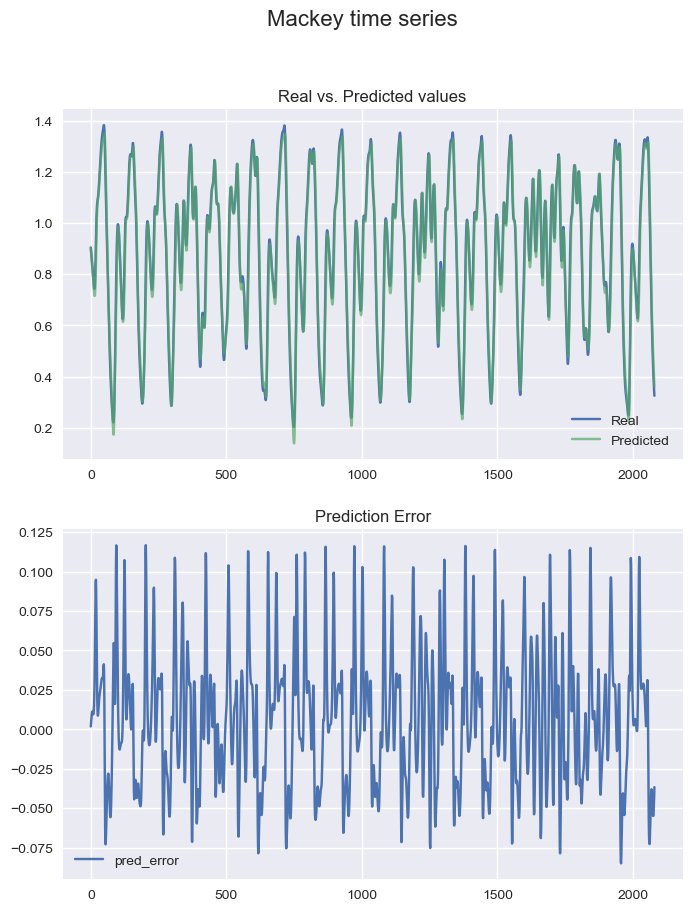
You can use various plots to visualize results i.e. show fitted outcome vs. the true values:
if plot_prediction:
    y_pred = fis.model.predict(X)
    f, axs = plt.subplots(2,1,figsize=(8,10))
    f.suptitle('Mackey time series', size=16)
    axs[0].plot(y)
    axs[0].plot(y_pred, alpha=.7)
    axs[0].legend(['Real', 'Predicted'])
    axs[0].grid(True)
    axs[0].set_title('Real vs. Predicted values')
    axs[1].plot(np.arange(y.shape[0]), y - y_pred)
    axs[1].legend(['pred_error'])
    axs[1].grid(True)
    axs[1].set_title('Prediction Error')
    plt.show()
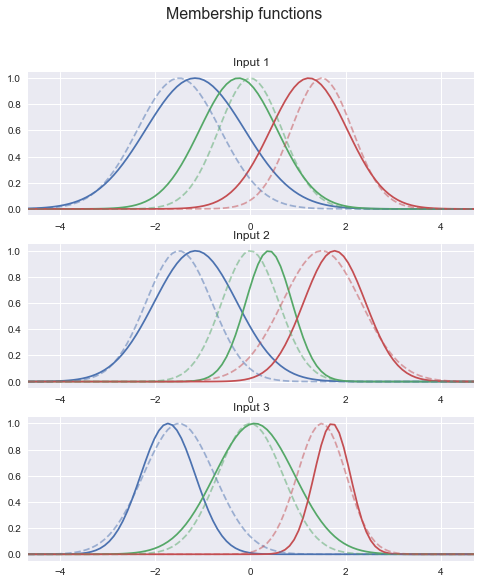
Plotting the membershipfunctions is part of the ANFIS class:
if plot_mfs:
    fis.plotmfs()
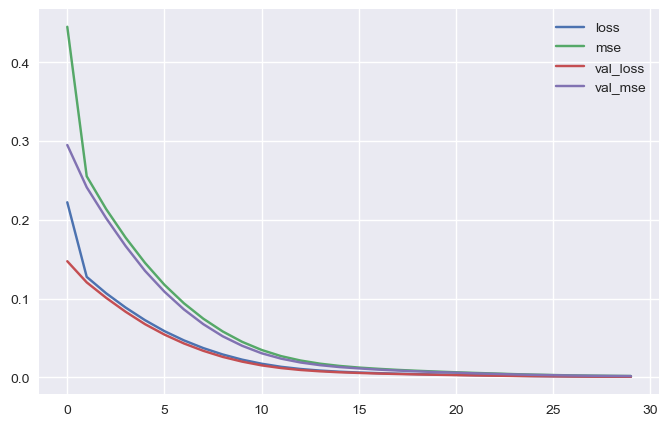
 Or learning curves:
if plot_learningcurves:
    loss_curves = pd.DataFrame(history.history)
    loss_curves.plot(figsize=(8, 5))
    plt.grid(True)
    plt.show()
4. Using Tensorboard
Tensorboard provides visualization and tooling needed for machine learning experimentation. Further information can be found here
Step 0: Define a callback in code
log_name = f'-data_{data_set}_N{param.n_input}_M{param.n_memb}_batch{param.batch_size}_{param.memb_func}_{param.optimizer}_{param.loss}'

log_path = os.path.join("logs",
                    datetime.datetime.now().strftime("%Y%m%d-%H%M%S") + log_name )

tensorboard_callback = tf.keras.callbacks.TensorBoard(log_dir=log_path, histogram_freq=1)

history = fis.fit(...
                  callbacks = [tensorboard_callback] )
Step 1: Set working directory :
- i.e. for windows
cd ...\...\MyAnfis
Step 2: Activate virtual environment
conda activate tensorflow
Step 3: Start Tensorboard
- for single runs
tensorboard --logdir=logs/run_anfis - for an experimental session
tensorboard --logdir=logs/exp_anfis
Step 4: Open Browser
localhost:6006
5. TO DO
- other fuzzy reasoning mechanism
6. Related Work
- S-ANFIS-PyTorch by me
- bare-bones implementation of ANFIS (manual derivatives) by twmeggs
- PyTorch implementation by James Power
- simple ANFIS based on Tensorflow 1.15.2 by Santiago Cuervo
7. Contact
I am very thankful for any kind of feedback. Also, if you have questions, please contact gregor.lenhard@unibas.ch
8. References
Lenhard, G. (2020). Adaptive-Network-Based Fuzzy Inference System (ANFIS) based on Keras on top of Tensorflow 2.0.
