
Clasp
🔗 Command Line Apps Script Projects
Install / Use
/learn @google/ClaspREADME
Clasp
Note: This is not an officially supported Google product.
 <a href="https://coveralls.io/github/google/clasp?branch=master"><img src="https://coveralls.io/repos/github/google/clasp/badge.svg?branch=master" alt="Coverage Status"></a>
<a href="https://www.npmjs.com/package/@google/clasp"><img src="https://img.shields.io/npm/v/@google/clasp.svg" alt="npm Version"></a>
<a href="https://npmcharts.com/compare/@google/clasp?minimal=true"><img src="https://img.shields.io/npm/dw/@google/clasp.svg" alt="npm Downloads"></a>
<a href="https://github.com/google/gts" title="Code Style: Google"><img src="https://img.shields.io/badge/code%20style-google-blueviolet.svg"/></a>
<a href="https://coveralls.io/github/google/clasp?branch=master"><img src="https://coveralls.io/repos/github/google/clasp/badge.svg?branch=master" alt="Coverage Status"></a>
<a href="https://www.npmjs.com/package/@google/clasp"><img src="https://img.shields.io/npm/v/@google/clasp.svg" alt="npm Version"></a>
<a href="https://npmcharts.com/compare/@google/clasp?minimal=true"><img src="https://img.shields.io/npm/dw/@google/clasp.svg" alt="npm Downloads"></a>
<a href="https://github.com/google/gts" title="Code Style: Google"><img src="https://img.shields.io/badge/code%20style-google-blueviolet.svg"/></a>
<!-- GIF bash prompt: PS1='\[\033[38;5;9m\]❤ \[$(tput sgr0)\]' --> <!-- Width: 888px --> <!-- Commands: clasp create "Hello" ls echo 'function hello() { Logger.log("Hello, Apps Script!"); }' >> hello.js clasp push clasp deploy rm .clasp.json appsscript.json hello.js clear -->Develop Apps Script projects locally using clasp (Command Line Apps Script Projects).
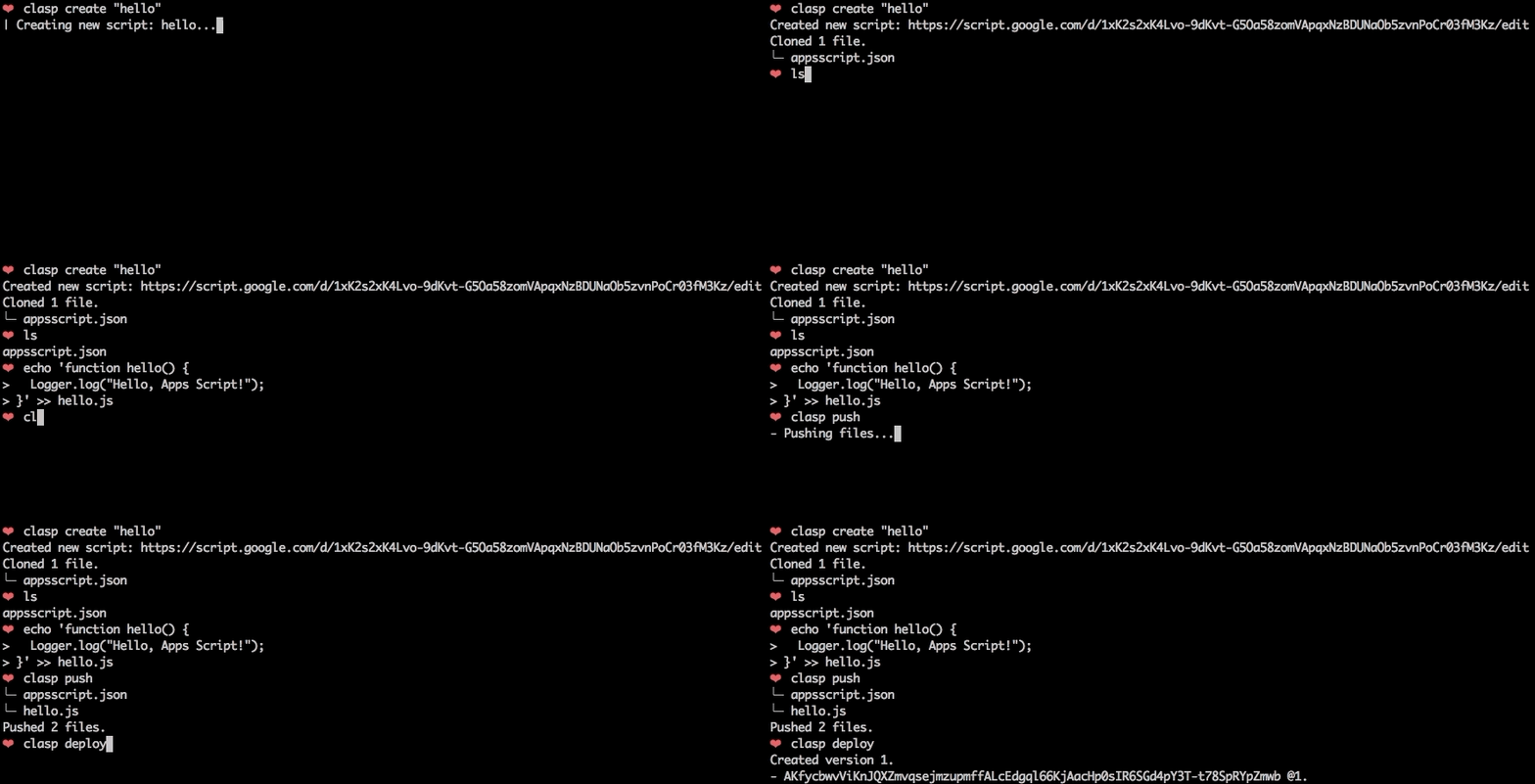
To get started, try out the codelab!
You can also try clasp in Gitpod, a one-click online IDE for GitHub:

Features
🗺️ Develop Locally: clasp allows you to develop your Apps Script projects locally. That means you can check-in your code into source control, collaborate with other developers, and use your favorite tools to develop Apps Script.
🔢 Manage Deployment Versions: Create, update, and view your multiple deployments of your project.
📁 Structure Code: clasp automatically converts your flat project on script.google.com into folders. For example:
- On script.google.com:
tests/slides.gstests/sheets.gs
- locally:
tests/slides.jssheets.js
➡️ Run Apps Script: Execute your Apps Script from the command line. Features:
- Instant deployment.
- Suggested functions Autocomplete (Fuzzy)
- Easily add custom Google OAuth scopes
- And more…
Install
First download clasp:
npm install -g @google/clasp
Then enable the Google Apps Script API: https://script.google.com/home/usersettings

Installing as a Gemini CLI Extension
You can install clasp as an Gemini CLI extensions using the following command:
gemini extensions install https://github.com/google/clasp
This makes clasp available as an MCP server in Gemini CLI.
Make sure to enable the Google Apps Script API (as explained above) and perform a clasp login (with your specific login parameters) before you use the extension.
Installing as a Claude Code CLI Extension
You can use clasp with Claude Code CLI in one of two ways:
1. Install as a Plugin (Recommended)
Run the following command in Claude Code to install clasp as a plugin directly from the repository:
/plugin install @google/clasp
2. Manual Installation
You can manually add clasp as an MCP server using the provided configuration file or by running:
claude mcp add clasp -- npx -y @google/clasp mcp
Or by referencing the configuration file included in the repository:
claude mcp add-json clasp "$(cat claude-mcp.json)"
Commands
The following command provide basic Apps Script project management.
Note: Most of them require you to
clasp loginandclasp create/clonebefore using the rest of the commands.
clasp
clasp login [--no-localhost] [--creds <file>] [--use-project-scopes] [--include-clasp-scopes] [--extra-scopes <scopes>] [--redirect-port]clasp logoutclasp show-authorized-user [--json]clasp create-script [--title <title>] [--type <type>] [--rootDir <dir>] [--parentId <id>]clasp clone-script <scriptId | scriptURL> [versionNumber] [--rootDir <dir>]clasp delete-script [--force]clasp pull [--versionNumber]clasp push [--watch] [--force]clasp show-file-status [--json]clasp open-scriptclasp list-deploymentsclasp create-deployment [--versionNumber <version>] [--description <description>] [--deploymentId <id>]clasp delete-deployment [deploymentId] [--all]clasp create-version [description]clasp list-versionsclasp list-scripts
Advanced Commands
NOTE: These commands require you to add your Project ID.
clasp tail-logs [--json] [--watch] [--simplified]clasp setup-logs [--json]clasp list-apisclasp enable-api<api>clasp disable-api <api>clasp run-function [function]
Guides
Migrating from 2.x to 3.x
Drop typescript support
Clasp no longer transpiles typescript code. For typescript projects, use typescript with a bundler like Rollup to transform code prior to pushing with clasp. This has the advantage of offering more robust support for Typescript features along with ESM module and NPM package support.
There are several template projects on GitHub that show how to transform Typescript code into Apps Script that are all excellent choices.
- https://github.com/WildH0g/apps-script-engine-template
- https://github.com/tomoyanakano/clasp-typescript-template
- https://github.com/google/aside
- https://github.com/sqrrrl/apps-script-typescript-rollup-starter
Command renames
Clasp 3.x introduces some breaking changes from 2.x. For common use cases these changes should not impact usage, but some lesser used commands have been restructured and renamed to improve consistency.
| 2.x | 3.x |
|----------------------------|----------------------------------------|
|open | open-script |
|open --web | open-web-app |
|open --addon | open-container |
|open --creds | open-credentials-setup |
|login --creds <file> | login -u <name> --creds <file> |
|logs --open | open-logs |
|logs --setup | N/A |
|apis --open | open-api-console |
|apis enable <api> | enable-api <api> |
|apis disable <api> | disable-api <api> |
|deploy -i <id> | update-deployment <id> |
|settings | N/A |
Other commands have also been renamed but retain aliases for compatibility.
Authorization
Most command require user authorization. Run clasp login to authorize access to manage your scripts.
Multiple user support
Use the global --user option to switch between accounts. This supports both running clasp as different users as well as when invoking the clasp run-function command.
Examples:
clasp login # Saves as default credentials
clasp clone # User not specified, runs using default credentials
clasp login --user testaccount # Authorized new named credentials
clasp run-function --user testaccount myFunction # Runs function as test account
Bring your own project/credentials
While clasp includes a default OAuth client, using your own project is recommend and can improve security and compliance in environments that limit which third party applications users may authorize. To set up your own project:
- Create a new project in the Google Cloud Developer Console.
- Create an OAuth client. The client type must be
Desktop Application. Download and save the generated client secrets file. This is required when authorizing using theclasp login --creds <filename>command. - Enable services. For full functionality, clasp requires the following:
- Apps Script API -
script.googleapis.com(required) - Service Usage API -
serviceusage.googleapis.com(required to list/enable/disable APIs) - Google Drive API -
drive.googleapis.com(required to list scripts, create container-bound scripts)
- Cloud Logging API -
logging.googleapis.com(required to read logs)
Note: If configuring the project for external use where OAuth scopes must be registered, include the following:
https://www.googleapis.com/auth/script.deployments
https://www.googleapis.com/auth/script.projects
https://www.googleapis.com/auth/script.webapp.deploy
https://www.googleapis.com/auth/drive.metadata.readonly
https://www.googleapis.com/auth/drive.file
https://www.googleapis.com/auth/service.management
https://www.googleapis.com/auth/logging.read
https://www.googleapis.com/auth/userinfo.email
https://www.googleapis.com/auth/userinfo.profile
https://www.googleapis.com/auth/cloud-platform
Allow-list clasp
If your organization restricts authorization for third-party apps, you may either:
- Request your admin allow-list clasp's client id `1072944905499-vm2v2i5dvn
