
Bouncer
Bouncer is a network TCP port redirector/forward proxy (like rinetd) with extra features like Reverse tunneling (like ssh -R), SSL tunneling (like stunnel), connection Failover, LoadBalancing and Clustering. In pure Java (BIO)
Install / Use
/learn @ggrandes/BouncerREADME
Bouncer (TCP)
Bouncer is an open source (Apache License, Version 2.0) Java network proxy. Do not require any external lib.
Current Stable Version is 2.2.11
DOC
Schema about Forward / Port Redirector (you need ONE bouncer):

- Machine-A (Client) init connection to Machine-B (Bouncer)
- Machine-B init connection to Machine-C (Server)
- Done: Machine-A is able to speak with Machine-C
Notes about security:
- Machine-A (Client) may be in Internal network.
- Machine-B (Bouncer) may be in DMZ.
- Machine-C (Server) may be in External network.
Schema about Reverse Tunneling (you need TWO bouncers):
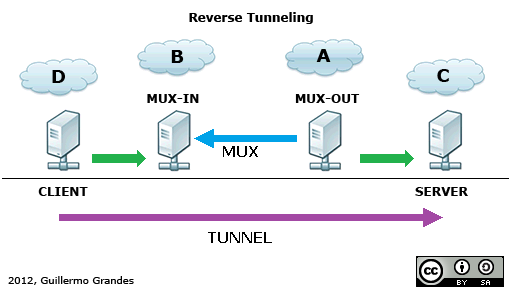
Machine-A and Machine-B are Bouncers in Client-Server configuration.
- Machine-A (MUX-OUT) init connection to Machine-B (MUX-IN)
- Machine-D (Client) init connection to Machine-B
- Machine-B request to Machine-A new SubChannel over MUX (Tunnel).
- Machine-A open connection to Machine-C (Server).
- Done: Machine-D is able to speak with Machine-C
Notes about security:
- Machine-B (MUX-IN) should be in DMZ.
- Machine-A (MUX-OUT) and Machine-C (Server) may be in internal network.
System Properties (optional)
# To redir stdout/stderr to (auto-daily-rotated) files you can use:
-Dlog.stdOutFile=/var/log/bouncer.out -Dlog.stdErrFile=/var/log/bouncer.err
# To log to stdout too:
-Dlog.stdToo=true
Filenames are a base-pattern, output files they will be: bouncer.xxx.YEAR-MONTH-DAY (bouncer.xxx.2014-12-01)
Config (bouncer.conf)
Config file must be in class-path ${BOUNCER_HOME}/conf/, general format is:
# Forward / Port Redirector
# <listen-addr> <listen-port> <remote-addr> <remote-port> [opts]

# Reverse Tunneling (Bouncer 2.x syntax)
# <mux-in|tun-listen> <mux-name> <listen-addr> <listen-port> [opts]
# <mux-out|tun-connect> <mux-name> <remote-addr> <remote-port> [opts]

# Note: <remote-addr> can be a coma separated list of addresses, like "srv1,srv2,192.168.1.1"

# Clustering Config
# <cluster-listen> <cluster-id> <listen-addr> <listen-port> [opts]
# <cluster-peer> <cluster-id> <remote-addr> <remote-port> [opts]
Options are comma separated:
- Options for outgoing connections
- Loadbalancing/Failover (only one option can be used)
- LB=ORDER: active failover-only in order (DNS resolved IP address are sorted, lower first)
- LB=RR: active LoadBalancing in DNS order (round-robin)
- LB=RAND: activate LoadBalancing in DNS random order
- Sticky Session
- STICKY=MEM:bitmask:elements:ttl[:cluster-id:replication-id]: activate Sticky session based on IP Source Address. Sessions are stored in MEMory, bitmask is a CIDR to apply in source-ip-address (16=Class B, 24=Class C, 32=Unique host), elements for LRU cache, ttl is time to live of elements in cache (seconds), cluster-id and replication-id in cluster environment is cluster identifier and replication identifier respectively.
- Loadbalancing/Failover (only one option can be used)
- Options for inbound connections
- PROXY=SEND: use PROXY protocol (v1), generate header for remote server
- Options for Forward / Port Redirector (rinetd)
- TUN=SSL: activate SSL/TLS tunneling outbound (destination is SSL/TLS, like stunnel)
- SSL=client.crt:client.key[:server.crt]: specify files for SSL/TLS config (client mode) (optional)
- TUN=ENDSSL: activate SSL/TLS tunneling inbound (origin is SSL/TLS, like stunnel)
- ENDSSL=server.crt:server.key[:client.crt]: specify files for SSL/TLS config (server mode)
- TUN=SSL: activate SSL/TLS tunneling outbound (destination is SSL/TLS, like stunnel)
- Options for Reverse Tunneling (MUX)
- TUN_ID=number: When use Bouncer 2.x syntax you can create multiple Tunnels over same mux, use this ID for associate both ends.
- Select operation of MUX (only one option can be used) in Bouncer 1.x config
- MUX=IN: activate input-terminator multiplexor (Bouncer 2.x syntax:
mux-in, tun-listen) - MUX=OUT: activate output-initiator multiplexor (Bouncer 2.x syntax:
mux-out, tun-connect)
- MUX=IN: activate input-terminator multiplexor (Bouncer 2.x syntax:
- Options for encryption (optional -AES or SSL or NONE-):
- MUX=AES: activate AES encryption in multiplexor (see AES=sharedsecret)
- AES=sharedsecret: specify the password for AES (no white spaces, no comma sign, no equals sign)
- AESBITS=bits (optional): specify the keysize for AES (default:
128) - AESALG=algorithm (optional): specify the transformation for AES (default:
AES/CTR/NoPadding)
- MUX=SSL: activate SSL/TLS encryption in multiplexor (see SSL=xxx)
- SSL=server.crt:server.key:client.crt: specify files for SSL/TLS config (server/mux-in)
- SSL=client.crt:client.key:server.crt: specify files for SSL/TLS config (client/mux-out)
- MUX=AES: activate AES encryption in multiplexor (see AES=sharedsecret)
- Options for Clustering (TCP only)
- Options for encryption (optional -AES or SSL or NONE-):
- CLUSTER=AES: activate AES encryption in cluster (see AES=sharedsecret)
- AES=sharedsecret: specify the password for AES (no white spaces, no comma sign, no equals sign)
- AESBITS=bits (optional): specify the keysize for AES (default:
128) - AESALG=algorithm (optional): specify the transformation for AES (default:
AES/CTR/NoPadding)
- CLUSTER=SSL: activate SSL/TLS encryption in cluster (see SSL=xxx)
- SSL=server.crt:server.key:client.crt: specify files for SSL/TLS config (server/cluster-in)
- SSL=client.crt:client.key:server.crt: specify files for SSL/TLS config (client/cluster-out)
- CLUSTER=AES: activate AES encryption in cluster (see AES=sharedsecret)
- Options for encryption (optional -AES or SSL or NONE-):
Notes about LB policies:
- LB=ORDER: ordering of <remote-addr> is preserved, but DNS resolved records are sorted numerically before create address list, Example config: srv3,srv2,10.1.1.1 (DNS query return {10.1.3.7,10.1.3.8} for srv3 and {10.1.2.9,10.1.2.3} for srv2), the resulting Address list will be: {10.1.3.7,10.1.3.8,10.1.2.3,10.1.2.9,10.1.1.1}. All connections will be always for 10.1.3.7, if down, 10.1.3.8, and so on. If Sticky is enabled this have preference over address order (no failback).
- LB=RR: ordering of <remote-addr> is preserved, and DNS resolved records are not sorted numerically before create address list, Example config: srv3,srv2,10.1.1.1 (DNS query return {10.1.3.7,10.1.3.8} for srv3 and {10.1.2.9,10.1.2.3} for srv2), the resulting Address list will be: {10.1.3.7,10.1.3.8,10.1.2.9,10.1.2.3,10.1.1.1}. The connections are rotative over all addresses for all clients, 10.1.3.7,10.1.3.8,...,10.1.1.1,and again 10.1.3.7,... if an address is down, picks next, and so on.... until a full turn.
- LB=RAND: ordering of <remote-addr> is not preserved, and DNS resolved records are not sorted numerically before create address list, instead, all addreses are agregated and shuffled on every connection, Example config: srv3,srv2,10.1.1.1 (DNS query return {10.1.3.7,10.1.3.8} for srv3 and {10.1.2.9,10.1.2.3} for srv2), the resulting Address list can be: {10.1.3.8,10.1.1.1,10.1.3.7,10.1.2.9,10.1.2.3}. The connection first try 10.1.3.8, if down, 10.1.1.1, and so on.... until 10.1.2.3.
Notes about security:
- If use MUX=SSL or CLUSTER=SSL
- Keys/Certificates are pairs, must be configured in the two ends (MUX-IN & MUX-OUT)
- files.crt are X.509 public certificates
- files.key are RSA Keys in PKCS#8 format (no encrypted)
- files.crt/.key must be in class-path
${BOUNCER_HOME}/keys/ - be careful about permissions of "files.key" (unix permission 600 may be good)
- If use MUX=AES or CLUSTER=AES, you need to protect the "bouncer.conf" from indiscrete eyes (unix permission 600 may be good)
Example config of Forward / Port Redirector (rinetd style):
# <listen-addr> <listen-port> <remote-addr> <remote-port> [opts]
0.0.0.0 1234 127.1.2.3 9876
127.0.0.1 5678 encrypted.google.com 443 LB=RR,STICKY=MEM:24:128:300,TUN=SSL
127.0.0.1 8443 encrypted.google.com 443 TUN=ENDSSL,ENDSSL=server.crt:server.key,TUN=SSL
Example config of Reverse Tunnels (equivalent ssh -p 5555 192.168.2.1 -R 127.0.0.1:8080:192.168.1.1:80)
Machine-A (MUX-OUT):
### Bouncer 1.x legacy syntax ###
# <remote-addr> <remote-port> <remote-tun-addr> <remote-tun-port> MUX-OUT
192.168.1.1 80 192.168.2.1 5555 MUX=OUT

### Bouncer 2.x syntax, with support for multi-port ###
# <mux-out|tun-connect> <mux-name> <remote-addr> <remote-port> [opts]
mux-out mux1 127.0.0.1 5555
tun-connect mux1 192.168.2.1 80 TUN_ID=1
tun-connect mux1 192.168.2.1 22 TUN_ID=2
Machine-B (MUX-IN):
### Bouncer 1.x legacy syntax ###
# <listen-tun-addr> <listen-tun-port> <listen-addr> <listen-port> MUX-IN
192.168.2.1 5555 127.0.0.1 8080 MUX=IN

### Bouncer 2.x syntax, with support for multi-port ###
# <mux-in|tun-listen> <mux-name> <listen-addr> <listen-port> [opts]
mux-in mux1 192.168.2.1 5555
tun-listen mux1 127.0.0.1 8080 TUN_ID=1
tun-listen mux1 127.0.0.1 2222 TUN_ID=2
Same example config of Reverse tunnels but SSL/TLS
Machine-A (MUX-OUT):
### Bouncer 1.x legacy syntax ###
# <remote-addr> <remote-port> <remote-tun-addr> <remote-tun-port> MUX-OUT
192.168.1.1 80 192.168.2.1 5555 MUX=OUT,MUX=SSL,SSL=peerA.crt:peerA.key:peerB.crt

### Bouncer 2.x syntax, with support for multi-port ###
# <mux-out|tun-connect> <mux-name> <remote-addr> <remote-port> [opts]
mux-out mux1 127.0.0.1 5555 MUX=SSL,SSL=peerA.crt:peerA.key:peerB.crt
tun-connect mux1 192.168.2.1 80 TUN_ID=1
tun-connect mux1 19
