
ColorVideoVDP
Colour video VDP
Install / Use
/learn @gfxdisp/ColorVideoVDPREADME
ColorVideoVDP: A visible difference predictor for color images and videos

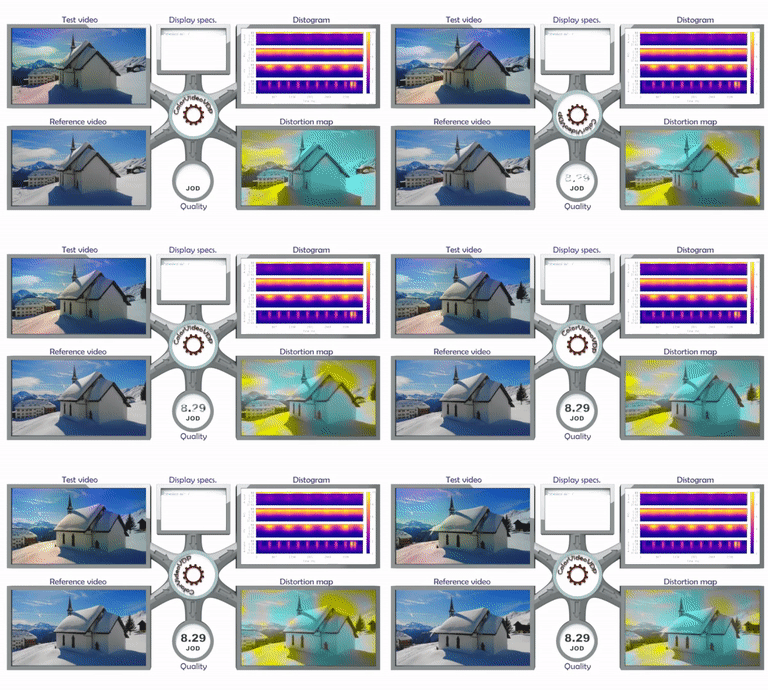

ColorVideoVDP is a full-reference visual quality metric that predicts the perceptual difference between pairs of images or videos. Similar to popular metrics like PSNR, SSIM, and DeltaE 2000 it is aimed at comparing a ground truth reference against a distorted (e.g. blurry, noisy, color-shifted) version.
This metric is unique because it is the first color-aware metric that accounts for spatial and temporal aspects of vision.
The main features:
- models chromatic and achromatic contrast sensitivity using a novel contrast sensitivity model (castleCSF), allowing us to predict distortions in color and luminance;
- models spatio-temporal sensitivity so that it can predict visibility of artifacts like waveguide nonuniformity and other temporally varying artifacts;
- works with colorimetrically calibrated content, both SDR and HDR (any color space);
- can predict a single number quality correlate, a distortion map or a visualization of an error over time and visual channels (distogram).
ColorVideoVDP is implemented in PyTorch and can be run efficiently on a CUDA-enabled GPU. It can also run on a CPU, but the processing times will be much longer, especially for video. Its usage is described below.
The metric is explained in detail in:
ColorVideoVDP: A visual difference predictor for image, video and display distortions.
Rafal K. Mantiuk, Param Hanji, Maliha Ashraf, Yuta Asano, Alexandre Chapiro.
In SIGGRAPH 2024 Technical Papers, Article 129
https://doi.org/10.1145/3658144
If you use the metric in your research, please cite the paper above.
Other metrics: ColorVideoVDP-ML, PU-PSNR
The repository also contains code for other metrics, such as PU-PSNR, or ColorVideoVDP-ML. See metrics.md for more information.
PyTorch quickstart
- Start by installing anaconda or miniconda. Then, create a new environment for ColorVideoVDP and activate it:
conda create -n cvvdp python=3.13
conda activate cvvdp
conda install ffmpeg conda-forge::freeimage
- Install PyTorch by following these instructions (OS-specific). If you have an Nvidia GPU with appropriate drivers, it is recommended to install with conda for proper CUDA support. To use MPS on a Mac, please install torch>=2.1.0. You may also want to install CUDA toolkit via conda:
conda install nvidia/label/cuda-12.9.1::cuda-toolkit
4a. Install from sources
Obtain the ColorVideoVDP codebase, by cloning the repository:
git clone git@github.com:gfxdisp/ColorVideoVDP.git # skip if a .zip is provided or you use Github GUI
Install ColorVideoVDP with PyPI:
cd ColorVideoVDP
pip install -e .
Note: The "-e/--editable" option to pip is optional and should be used only if you intend to change the ColorVideoVDP code.
4b. Alternatively, you can install ColorVideoVDP from a PIP package:
pip install cvvdp
Note: If you skip the steps 1-4 and directly install from the pip package, ColorVideoVDP may still work, but will not use CUDA acceleration, and may be missing ffpmeg or FreeImage libraries.
After installation, run cvvdp directly from the command line:
cvvdp --test test_file --ref ref_file --display standard_fhd
The test and reference files can be images or videos. The option --display specifies a display on which the content is viewed. See vvdp_data/display_models.json for the available displays.
See Command line interface for further details. ColorVideoVDP can be also run directly from Python - see Low-level Python interface.
Examples
Compare all feris-test-*.mp4 files with the same reference feris-ref.mp4 using a custom display model, store results in a CSV file res.csv:
cvvdp --test example_media/structure/ferris-test-*.mp4 --ref example_media/structure/ferris-ref.mp4 --config-paths=display_models_custom.json --display my_display --result res.csv
where the custom display is described in a JSON file display_models_custom.json:
{
  "my_display": {
    "name": "30-inch 4K monitor, peak luminance 200 cd/m^2, viewed under office light levels (250 lux), seen from 2 x display height",
    "resolution": [1920, 1080],
    "viewing_distance_meters":  1.0,
    "diagonal_size_inches": 22,
    "max_luminance": 500,
    "contrast": 3000,
    "E_ambient": 100,
    "k_refl": 0.01,
    "source": "none" }
}
Note that the file name must be display_models_*.json. The format of this file is explained here.
Compare two 30 fps video files stored as PNG frames:
cvvdp --test test_frame_%05d.png --ref reference_frame_%05d.png --display standard_4k --fps 30
The same as above, but use only frames 10, 12, 14, ... Use Matlab's range notation to select frames.
cvvdp --test test_frame_%05d.png --ref reference_frame_%05d.png --display standard_4k --fps 30 --frames 10:2:
Compare two HDR video files. Note that a display model with the right EOTF must be used.
cvvdp --test test_hdr_video.mp4 --ref reference_hdr_video.mp4 --display standard_hdr_pq
Check examples folder showing how to call ColorVideoVDP from Python or matlab folder showing how to run a Matlab wrapper.
Table of contents
- Display specification
- HDR content
- Yuv files
- Reporting metric results
- Predicting quality scores
- Usage
- How to report issues?
- Release notes
Display specification
Unlike most image quality metrics, ColorVideoVDP needs physical specification of the display (e.g., its size, resolution, peak brightness) and viewing conditions (viewing distance, ambient light) to compute accurate predictions. The specifications of the displays are stored in vvdp_data/display_models.json. You can add the exact specification of your display to this file, or create a new JSON file and pass the directory it is located in as --config-paths parameter (see Configuration files). If the display specification is unknown to you, you are encouraged to use one of the standard display specifications listed on the top of that file, for example standard_4k, or standard_fhd. If you use one of the standard displays, there is a better chance that your results will be comparable with other studies.
You specify the display by passing --display argument to cvvdp. Run with --display ? to get a list of available display models.
Note the the specification in display_models.json is for the display and not the image. If you select to use standard_4k with the resolution of 3840x2160 for your display and pass a 1920x1080 image, the metric will assume that the image occupies one quarter of that display (the central portion). If the image resolution happens to be larger than the display resolution, it will not be cropped and instead ColorVideoVDP will assume a larger display. If you want to enlarge (or shrink) the image to the full resolution of the display, pass --full-screen-resize {fast_bilinear,bilinear,bicubic,lanczos} option (for now it works with video only).
The display model also determines the colour space and transfer function (EOTF) used for the input content. For example, when the input is an HDR video encoded using PQ EOTF, you need to pass -d standard_hdr_pq. See HDR content for more information.
You can use this online calculator to check or compute display geometric parameters.
Custom display specification
If you run the metric from the command line, we recommend that you create a directory with a copy of display_models.json, add a new display specification in that file and then add to the command line --config-paths <path-to-dir-with-json-file> --display <name-of-display-spec>. The format of display_models.json is explained here.
If you run the metric from Python code, the display photometry and geometry can be specified by passing display_name parameter to the metric. Alternatively, if you need more flexibility in specifying display geometry (size, viewing distance) and its colorimetry, you can instead pass objects of the classes vvdp_display_geometry, vvdp_display_photo_gog for most SDR displays, and vvdp_display_photo_absolute for HDR disp
Related Skills
qqbot-channel
347.0kQQ 频道管理技能。查询频道列表、子频道、成员、发帖、公告、日程等操作。使用 qqbot_channel_api 工具代理 QQ 开放平台 HTTP 接口,自动处理 Token 鉴权。当用户需要查看频道、管理子频道、查询成员、发布帖子/公告/日程时使用。
docs-writer
100.1k`docs-writer` skill instructions As an expert technical writer and editor for the Gemini CLI project, you produce accurate, clear, and consistent documentation. When asked to write, edit, or revie
model-usage
347.0kUse CodexBar CLI local cost usage to summarize per-model usage for Codex or Claude, including the current (most recent) model or a full model breakdown. Trigger when asked for model-level usage/cost data from codexbar, or when you need a scriptable per-model summary from codexbar cost JSON.
Design
Campus Second-Hand Trading Platform \- General Design Document (v5.0 \- React Architecture \- Complete Final Version)1\. System Overall Design 1.1. Project Overview This project aims t
