
Scraper
Nodejs web scraper. Contains a command line, docker container, terraform module and ansible roles for distributed cloud scraping. Supported databases: SQLite, MySQL, PostgreSQL. Supported headless clients: Puppeteer, Playwright, Cheerio, JSdom.
Install / Use
/learn @get-set-fetch/ScraperREADME





Node.js web scraper
get-set, Fetch! is a plugin based, nodejs web scraper. It scrapes, stores and exports data.
At its core, an ordered list of plugins is executed against each to be scraped URL.
Supported databases: SQLite, MySQL, PostgreSQL.
Supported browser clients: Puppeteer, Playwright.
Supported DOM-like clients: Cheerio, JSdom.
Use it in your own javascript/typescript code
import { Scraper, Project, CsvExporter } from '@get-set-fetch/scraper';

const scraper = new Scraper(ScrapeConfig.storage, ScrapeConfig.client);
scraper.on(ScrapeEvent.ProjectScraped, async (project: Project) => {
  const exporter = new CsvExporter({ filepath: 'languages.csv' });
  await exporter.export(project);
});

scraper.scrape(ScrapeConfig.project, ScrapeConfig.concurrency);
Note: package is exported both as CommonJS and ES Module.
Use it from the command line
gsfscrape \
--config scrape-config.json \
--loglevel info --logdestination scrape.log \
--save \
--overwrite \
--export project.csv
Run it with Docker
docker run \
-v <host_dir>/scraper/docker/data:/home/gsfuser/scraper/data getsetfetch:latest \
--version \
--config data/scrape-config.json \
--save \
--overwrite \
--scrape \
--loglevel info \
--logdestination data/scrape.log \
--export data/export.csv
Note: you have to build the image manually from './docker' directory.
Run it in cloud with Terraform and Ansible
module "benchmark_1000k_1project_multiple_scrapers_csv_urls" {
  source = "../../node_modules/@get-set-fetch/scraper/cloud/terraform"

  region                 = "fra1"
  public_key_name        = "get-set-fetch"
  public_key_file        = var.public_key_file
  private_key_file       = var.private_key_file
  ansible_inventory_file = "../ansible/inventory/hosts.cfg"

  pg = {
    name                  = "pg"
    image                 = "ubuntu-20-04-x64"
    size                  = "s-4vcpu-8gb"
    ansible_playbook_file = "../ansible/pg-setup.yml"
  }

  scraper = {
    count                 = 4
    name                  = "scraper"
    image                 = "ubuntu-20-04-x64"
    size                  = "s-1vcpu-1gb"
    ansible_playbook_file = "../ansible/scraper-setup.yml"
  }
}
Note: only DigitalOcean terraform provider is supported atm. See datasets for some examples.
Benchmarks
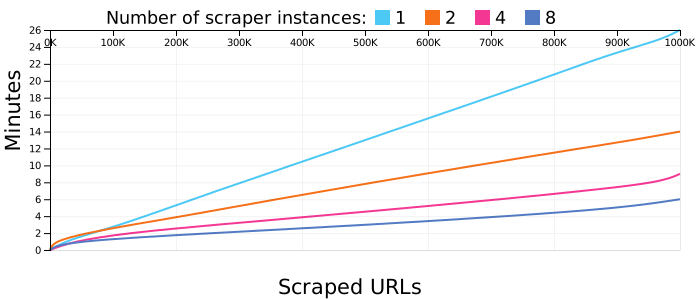
For quick, small projects under 10K URLs storing the queue and scraped content under SQLite is fine. For anything larger use PostgreSQL. You will be able to start/stop/resume the scraping process across multiple scraper instances each with its own IP and/or dedicated proxies.
Using a PostgreSQL database and 4 scraper instances it takes 9 minutes to scrape 1 million URLs. That's 0.5ms per scraped URL. Scrapers are using synthetic data, there is no external traffic, results are not influenced by web server response times and upload/download speeds. See benchmarks for more info.
Getting Started
What follows is a brief "Getting Started" guide using SQLite as storage and Puppeteer as browser client. For an in-depth documentation visit getsetfetch.org. See changelog for past release notes and development for technical tidbits.
Install the scraper
$ npm install @get-set-fetch/scraper
Install peer dependencies
$ npm install knex @vscode/sqlite3 puppeteer
Supported storage options and browser clients are defined as peer dependencies. Manually install your selected choices.
Init storage
const { KnexConnection } = require('@get-set-fetch/scraper');
const connConfig = {
  client: 'sqlite3',
  useNullAsDefault: true,
  connection: {
    filename: ':memory:'
  }
}
const conn = new KnexConnection(connConfig);
See Storage on full configurations for supported SQLite, MySQL, PostgreSQL.
Init browser client
const { PuppeteerClient } = require('@get-set-fetch/scraper');
const launchOpts = {
  headless: true,
}
const client = new PuppeteerClient(launchOpts);
Init scraper
const { Scraper } = require('@get-set-fetch/scraper');
const scraper = new Scraper(conn, client);
Define project options
const projectOpts = {
  name: "myScrapeProject",
  pipeline: 'browser-static-content',
  pluginOpts: [
    {
      name: 'ExtractUrlsPlugin',
      maxDepth: 3,
      selectorPairs: [
        {
          urlSelector: '#searchResults ~ .pagination > a.ChoosePage:nth-child(2)',
        },
        {
          urlSelector: 'h3.booktitle a.results',
        },
        {
          urlSelector: 'a.coverLook > img.cover',
        },
      ],
    },
    {
      name: 'ExtractHtmlContentPlugin',
      selectorPairs: [
        {
          contentSelector: 'h1.work-title',
          label: 'title',
        },
        {
          contentSelector: 'h2.edition-byline a',
          label: 'author',
        },
        {
          contentSelector: 'ul.readers-stats > li.avg-ratings > span[itemProp="ratingValue"]',
          label: 'rating value',
        },
        {
          contentSelector: 'ul.readers-stats > li > span[itemProp="reviewCount"]',
          label: 'review count',
        },
      ],
    },
  ],
  resources: [
    {
      url: 'https://openlibrary.org/authors/OL34221A/Isaac_Asimov?page=1'
    }
  ]
};
You can define a project in multiple ways. The above example is the most direct one.
You define one or more starting urls, a predefined pipeline containing a series of scrape plugins with default options, and any plugin options you want to override. See pipelines and plugins for all available options.
ExtractUrlsPlugin.maxDepth defines a maximum depth of resources to be scraped. The starting resource has depth 0. Resources discovered from it have depth 1 and so on. A value of -1 disables this check.
ExtractUrlsPlugin.selectorPairs defines CSS selectors for discovering new resources. urlSelector property selects the links while the optional titleSelector can be used for renaming binary resources like images or pdfs. In order, the define selectorPairs extract pagination URLs, book detail URLs, image cover URLs.
ExtractHtmlContentPlugin.selectorPairs scrapes content via CSS selectors. Optional labels can be used for specifying columns when exporting results as csv.
Define concurrency options
const concurrencyOpts = {
  project: {
    delay: 1000
  }
  domain: {
    delay: 5000
  }
}
A minimum delay of 5000 ms will be enforced between scraping consecutive resources from the same domain. At project level, across all domains, any two resources will be scraped with a minimum 1000 ms delay between requests. See concurrency options for all available options.
Start scraping
scraper.scrape(projectOpts, concurrencyOpts);
The entire process is asynchronous. Listen to the emitted scrape events to monitor progress.
Export results
const { ScrapeEvent, CsvExporter, ZipExporter } = require('@get-set-fetch/scraper');

scraper.on(ScrapeEvent.ProjectScraped, async (project) => {
  const csvExporter = new CsvExporter({ filepath: 'books.csv' });
  await csvExporter.export(project);

  const zipExporter = new ZipExporter({ filepath: 'book-covers.zip' });
  await zipExporter.export(project);
})
Wait for scraping to complete by listening to ProjectScraped event.
Export scraped html content as csv. Export scraped images under a zip archive. See Export for all supported parameters.
Browser Extension
This project is based on lessons learned developing get-set-fetch-extension, a scraping browser extension for Chrome, Firefox and Edge.
Both projects share the same storage, pipelines, plugins concepts but unfortunately no code. I'm planning to fix this in the future so code from scraper can be used in the extension.
Related Skills
feishu-drive
336.5k|
things-mac
336.5kManage Things 3 via the `things` CLI on macOS (add/update projects+todos via URL scheme; read/search/list from the local Things database)
clawhub
336.5kUse the ClawHub CLI to search, install, update, and publish agent skills from clawhub.com
yu-ai-agent
1.9k编程导航 2025 年 AI 开发实战新项目,基于 Spring Boot 3 + Java 21 + Spring AI 构建 AI 恋爱大师应用和 ReAct 模式自主规划智能体YuManus,覆盖 AI 大模型接入、Spring AI 核心特性、Prompt 工程和优化、RAG 检索增强、向量数据库、Tool Calling 工具调用、MCP 模型上下文协议、AI Agent 开发(Manas Java 实现)、Cursor AI 工具等核心知识。用一套教程将程序员必知必会的 AI 技术一网打尽,帮你成为 AI 时代企业的香饽饽,给你的简历和求职大幅增加竞争力。
