
Hypermax
Better, faster hyper-parameter optimization
Install / Use
/learn @genixpro/HypermaxREADME
Introduction
Hypermax is a power tool for optimizing algorithms. It builds on the powerful TPE algorithm with additional features meant to help you get to your optimal hyper parameters faster and easier. We call our algorithm Adaptive-TPE, and it is fast and accurate optimizer that trades off between explore-style and exploit-style strategies in an intelligent manner based on your results. It depends upon pretrained machine learning models that have been taught how to optimize your machine learning model as fast as possible. Read the research behind ATPE in Optimizing Optimization and Learning to Optimize, and use it for yourself by downloading Hypermax.
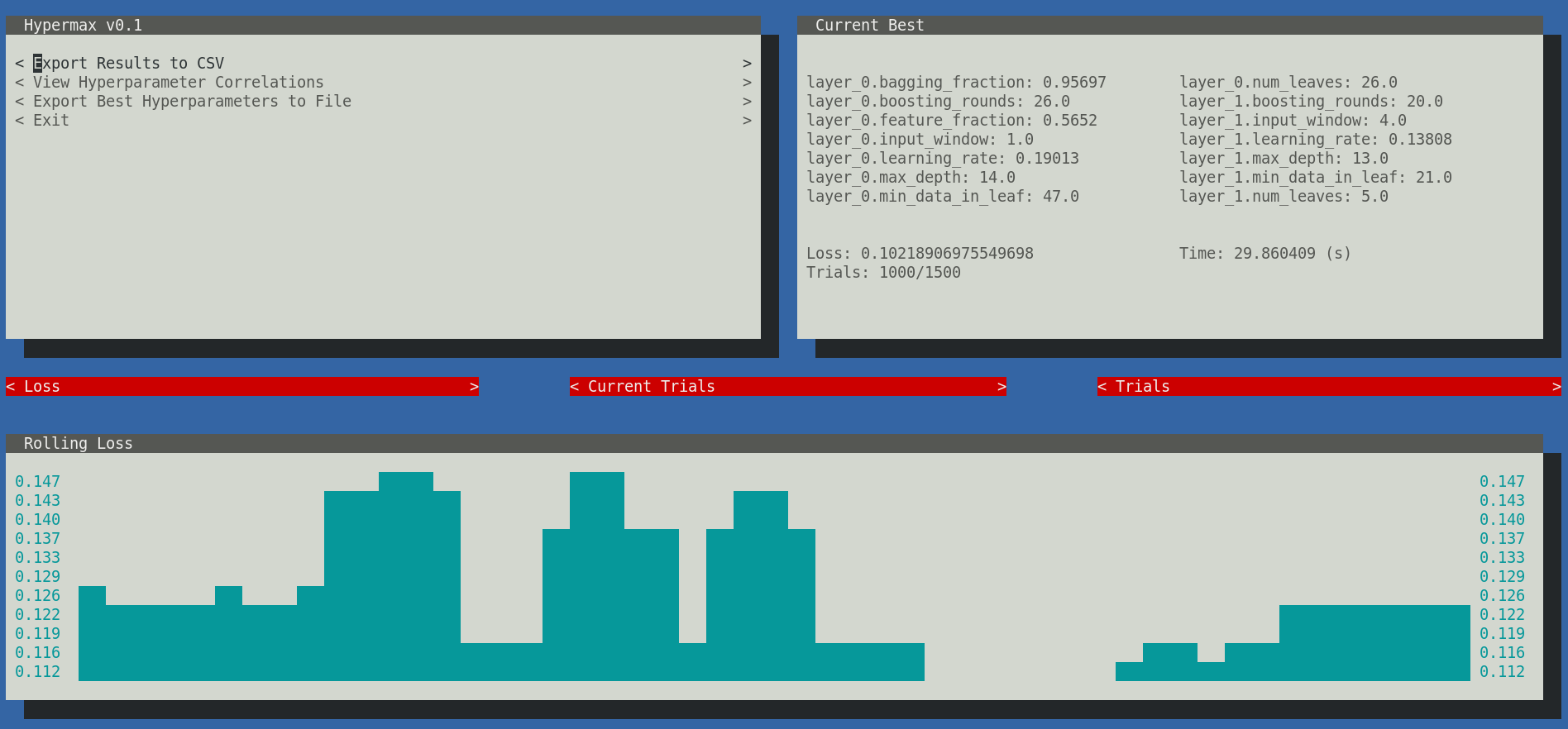
In addition, Hypermax automatically gives you a variety of charts and graphs based on your hyperparameter results. Hypermax can be restarted easily in-case of a crash. Hypermax can monitor the CPU and RAM usage of your algorithms - automatically killing your process if it takes too long to execute or uses too much RAM. Hypermax even has a UI. Hypermax makes it easier and faster to get to those high performing hyper-parameters that you crave so much.
Start optimizing today!
Installation
Install using pip:
pip3 install hypermax -g
Python3 is required.
Getting Started (Using Python Library)
In Hypermax, you define your hyper-parameter search, including the variables, method of searching, and loss functions, using a JSON object as you configuration file.
Getting Started (Using CLI)
Here is an example. Lets say you have the following file, model.py:
import sklearn.datasets
import sklearn.ensemble
import sklearn.metrics
import datetime

def trainModel(params):
    inputs, outputs = sklearn.datasets.make_hastie_10_2()

    startTime = datetime.now()

    model = sklearn.ensemble.RandomForestClassifier(n_estimators=int(params['n_estimators']))
    model.fit(inputs, outputs)
    predicted = model.predict(inputs)

    finishTime = datetime.now()

    auc = sklearn.metrics.auc(outputs, predicted)

    return {"loss": auc, "time": (finishTime - startTime).total_seconds()}
You configure your hyper parameter search space by defining a JSON-schema object with the needed values:
{
    "hyperparameters": {
        "type": "object",
        "properties": {
            "n_estimators": {
                "type": "number",
                "min": 1,
                "max": 1000,
                "scaling": "logarithmic"
            }
        }
    }
}
Next, define how you want to execute your optimization function:
{
    "function": {
        "type": "python_function",
        "module": "model.py",
        "name": "trainModel",
        "parallel": 1
    }
}
Next, you need to define your hyper parameter search:
{
    "search": {
        "method": "atpe",
        "iterations": 1000
    }
}
Next, setup where you wants results stored and if you want graphs generated:
{
    "results": {
        "directory": "results",
        "graphs": true
    }
}
Lastly, you need to provide indication if you want to use the UI:
{
    "ui": {
        "enabled": true
    }
}
NOTE: At the moment the console UI is not supported in Windows environments, so you will need to specify false in
the enabled property. We use the urwid.raw_display module which relies on fcntl. For more information, see here.
Pulling it all together, you create a file like this search.json, defining your hyper-parameter search:
{
    "hyperparameters": {
        "type": "object",
        "properties": {
            "n_estimators": {
                "type": "number",
                "min": 1,
                "max": 1000,
                "scaling": "logarithmic"
            }
        }
    },
    "function": {
        "type": "python_function",
        "module": "model",
        "name": "trainModel",
        "parallel": 1
    },
    "search": {
        "method": "atpe",
        "iterations": 1000
    },
    "results": {
        "directory": "results",
        "graphs": true
    },
    "ui": {
        "enabled": true
    }
}
And now you can run your hyper-parameter search
$ hypermax search.json
Hypermax will automatically begin searching your hyperparameter space. If your computer dies and you need to restart your hyperparameter search, its as easy as providing it the existing results directory as a second parameter. Hypermax will automatically pick up where it left off.
$ hypermax search.json results_0/
Optimization Algorithms
Hypermax supports 4 different optimization algorithms:
- "random" - Does a fully random search
- "tpe" - The classic TPE algorithm, with its default configuration
- "atpe" - Our Adaptive-TPE algorithm, a good general purpose optimizer
- "abh" - Adaptive Bayesian Hyperband - this is an optimizer that its able to learn from partially trained algorithms in order to optimizer your fully trained algorithm
The first three optimizers - random, tpe, and atpe, can all be used with no configuration.
Adaptive Bayesian Hyperband
The only optimizer in our toolkit that requires additional configuration is the Adaptive Bayesian Hyperband algorithm.
ABH works by training your network with different amounts of resources. Your "Resource" can be any parameter that significantly effects the execution time of your model. Typically, training-time, size of dataset, or # of epochs are used as the resource. The amount of resource is referred to as the "budget" of a particular execution.
By using partially trained networks, ABH is able to explore more widely over more combinations of hyperparameters, and then triage the knowledge it gains up to the fully trained model. It does this by using a tournament of sorts, promoting the best performing parameters on smaller budget runs to be trained at larger budgets. See the following chart as an example:
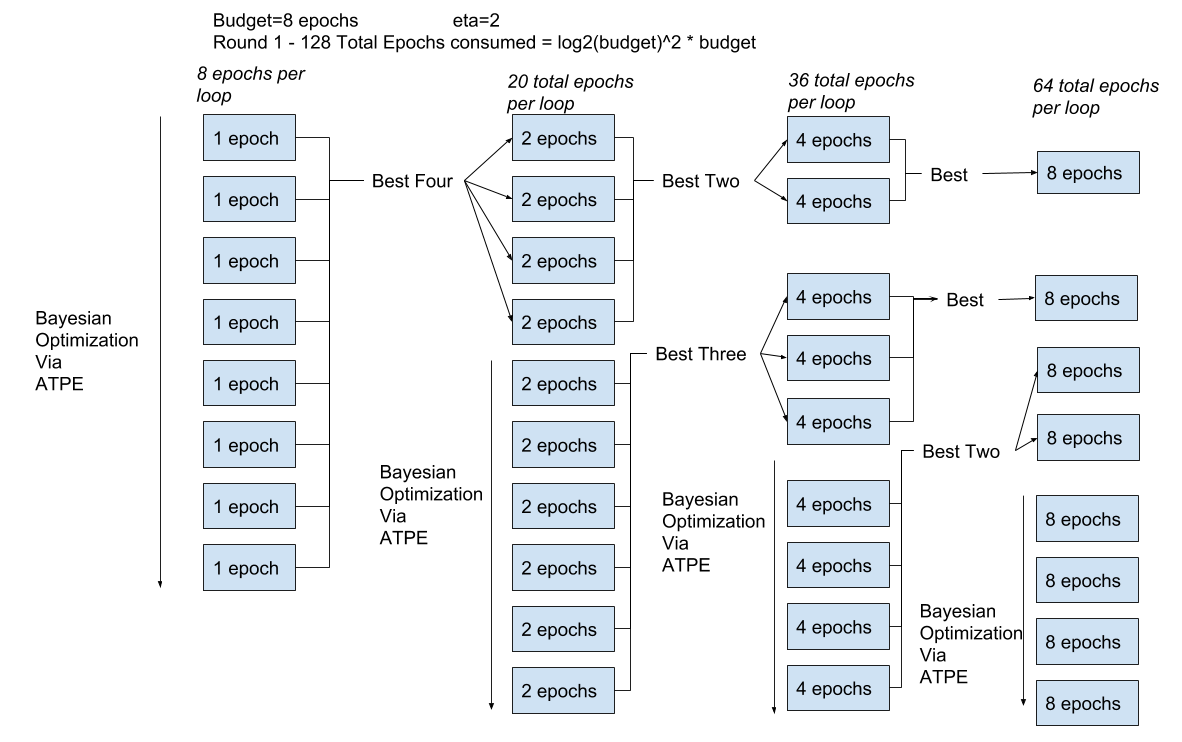
There are many ways you could configure such a system. Hyperband is just a mathematically and theoretically sound way of choosing how many brackets to run and with what budgets. ABH is a method that combines Hyperband with ATPE, in the same way that BOHB combines Hyperband with conventional TPE.
ABH requires you to select three additional parameters:
- min_budget - Sets the minimum amount of resource that must be allocated to a single run
- max_budget - Sets the maximum amount of resource that can be allocated to a single run
- eta - Defines how much the budget is reduced for each bracket. The theoretically optimum value is technically E or 2.71, but values of 3 or 4 are more typical and work fine in practice.
You define these parameters like so:
{
  "search": {
      "method": "abh",
      "iterations": 1000,
      "min_budget": 1,
      "max_budget": 30,
      "eta": 3
  }
}
This configuration will result in Hyperband testing 4 different brackets: 30 epochs, 10 epochs, 3.333 epochs (rounded down), and 1.1111 epochs (rounded down)
The budget for each run is provided as a hyperparameter to your function, along side your other hyperparameters. The budget will be given as the "$budget" key in the Python dictionary that is passed to your model function.
Tips:
- ABH only works well when the parameters for a run with a small budget correlates strongly with the parameters for a run with a high budget.
- Try to eliminate any parameters whose behaviour and effectiveness might change depending on the budget. E.g. a parameter for % of budget in mode 1, % of budget in mode 2 will not work well with ABH.
- Don't test too wide of a range of budgets. As a general rule of thumb, never set min_budget lower then max_budget/eta^4
- Never test a min_budget thats so low that your model doesn't train at all. The minimum is there for a reason
- If you find that ABH is getting stuck in a local minima, choosing parameters that work well on few epochs but work poorly on many epochs, your better off using vanilla ATPE and just training networks fully on each run.
Results
Hypermax automatically generates a wide variety of different types of results for you to analyze.
Hyperparameter Correlations
The hyperparameter correlations can be viewed from within the user-interface or in "correlations.csv" within your results directory. The correlations can help you tell which hyper-parameter combinations are moving the needle the most. Remember that a large value either in the negative or positive indicates a strong correlation between those two hyper-parameters. Values close to 0 indicate that there is little correlation between those hyper-parameters. The diagonal access will give you the single-parameter correlations.
It should also be noted that these numbers get rescaled to fall roughly between -10 and +10 (preserving the original sign), and thus are not the mathematically defined covariances. This is done to make it easier to see the important relationships.
Single Parameter Loss Charts
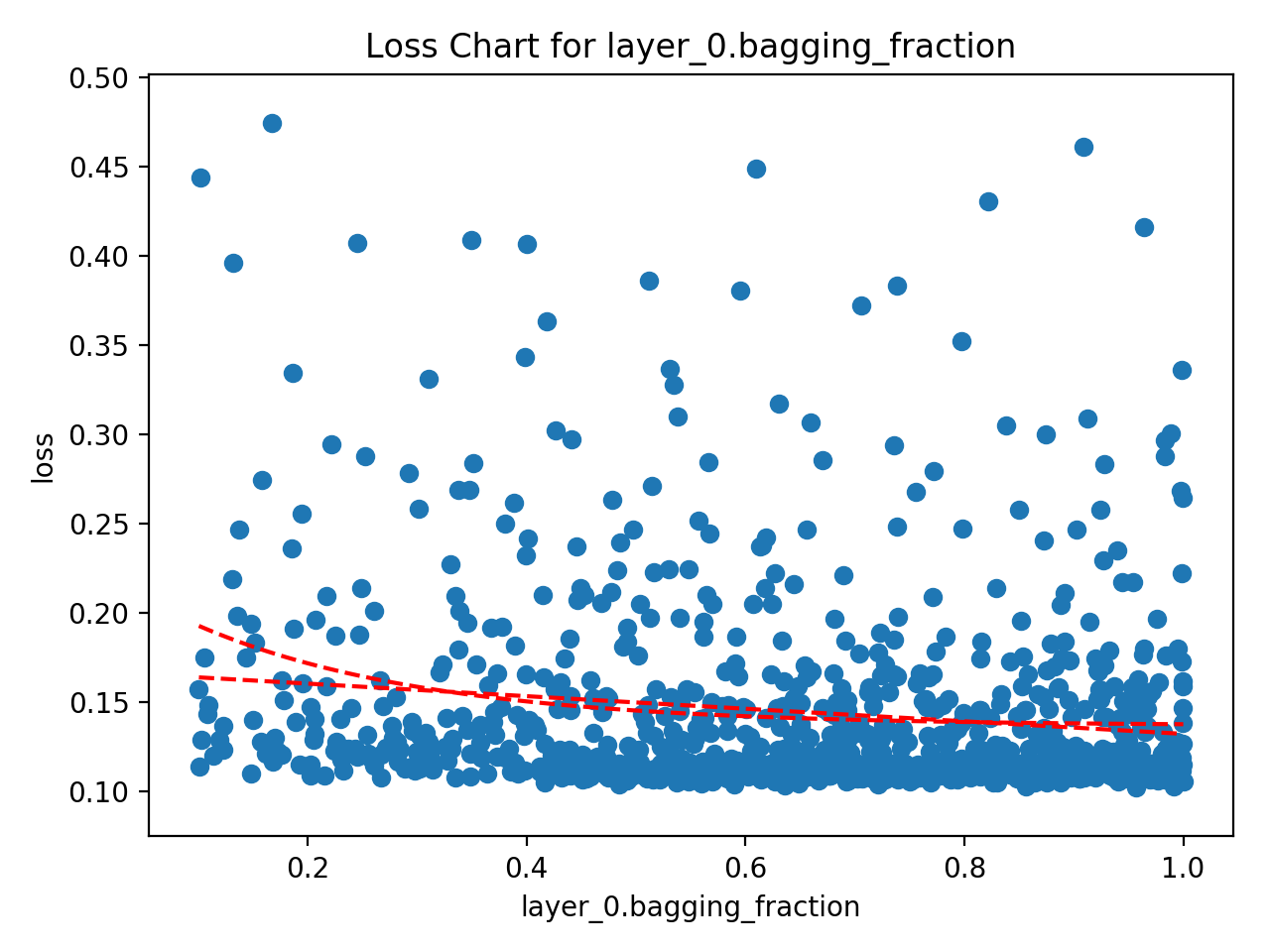
The single parameter loss charts create a Scatter diagram between the parameter and the loss. These are the most useful charts and are usually the go-to for attempting to interpret the results. Hypermax is going to generate several different versions of this chart. The original version will have every tested value. The "bucketed" version will attempt to combine hype
