
VacancyReactTest
Test for Frontend developer vacancy
Install / Use
/learn @geeksteam/VacancyReactTestREADME
ReactJS Junior developer Vacancy test
 <img src="https://upload.wikimedia.org/wikipedia/commons/4/42/Love_Heart_SVG.svg" width="80">
<img src="https://react-mdl.github.io/react-mdl/react.svg" width="250">
<img src="https://upload.wikimedia.org/wikipedia/commons/4/42/Love_Heart_SVG.svg" width="80">
<img src="https://react-mdl.github.io/react-mdl/react.svg" width="250">
We are looking for a junior React and Mobx reactive :rocket: developer.
If you have any questions, welcome to our Gitter Chat

Please send your CV and link to your github repo with resolved test challenge to gitter or vacancy @ geeks.team.
Small and simple challenge to test your HTML, CSS, React basic skills:
Asume we have up and running backend server wich listen for POST requests in JSON format (default React post format), at /login URL and reply to our frontend in JSON format too.
We suggest to use mockserver-grunt or ther mock server for testing your app: https://www.npmjs.com/package/mockserver-grunt. But you can test as you wish.
Create Login form
Create Login form view using Bootstrap:

Our backend server have several reponses to your React frontend:
- /login
 |- 1. "Login Denied"
 |- 2. "Success"
1. Login Denied.
We POST request to /login with incorrect (foo,bar in our case) Username and Password from our Login form.
Our backend server respond:
{"Auth":"Denied"}
So we are denied to enter the app. Make red Login field of the form:
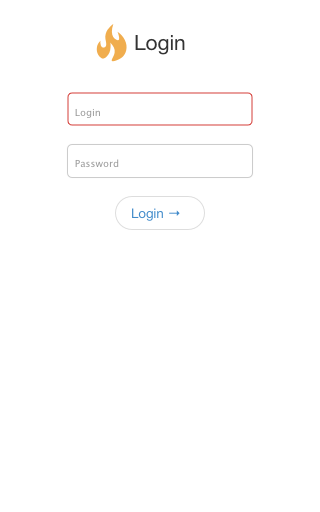
If you use mock server to emulate backend, there is mock for testing and developing:
mockServerClient("localhost", 8080).mockAnyResponse({
    "httpRequest": {
        "method": "POST",
        "path": "/login",
        "body": {
            "type": "JSON",
            "value": JSON.stringify({ Username: "foo", Password: "bar" }),
            "matchType": "STRICT"
        }
    },
    "httpResponse": {
        "statusCode": 200,
        "headers": [
            {
                "name": "Content-Type",
                "values": ["application/json; charset=utf-8"]
            },
            {
                "name": "Cache-Control",
                "values": ["public, max-age=86400"]
            }
        ],
        "body": JSON.stringify({ Auth: "Denied" }),
        "delay": {
            "timeUnit": "SECONDS",
            "value": 1
        }
    }
});
2. Auth succcess
We POST request to /login with correct (User:Password in our case) Username and Password from our Login form.
Out backend server respond:
{
	"Auth":"Logged",
	"Language":"EN"
}
We are succesfull logged to your Application, and you must show this to the user:

If you use mock server to emulate backend, there is mock for testing and developing:
mockServerClient("localhost", 8080).mockAnyResponse({
    "httpRequest": {
        "method": "POST",
        "path": "/login",
        "body": {
            "type": "JSON",
            "value": JSON.stringify({ Username: "User", Password: "Password" }),
            "matchType": "STRICT"
        }
    },
    "httpResponse": {
        "statusCode": 200,
        "headers": [
            {
                "name": "Content-Type",
                "values": ["application/json; charset=utf-8"]
            },
            {
                "name": "Cache-Control",
                "values": ["public, max-age=86400"]
            }
        ],
        "body": JSON.stringify({ Auth: "Logged", Language: "EN" }),
        "delay": {
            "timeUnit": "SECONDS",
            "value": 1
        }
    }
});
Project manifest (optional but can make your life easy):
-
[x] Read our best practices and code rules for React and Mobx: https://github.com/geeksteam/CodeRules#react,
-
[x] Bootstrap React from react-create-app: https://github.com/facebookincubator/create-react-app,
-
[x] Using MobX would be + in your karma,
-
[x] Activate decorators for MobX and react-create-app: https://github.com/geeksteam/CodeRules/blob/master/React/Readme.md#mobx
-
[x] Use
CamelCasenames, -
[x] Use feauture-based directory structure.
If any questions about task, join the chat at our Gitter or mailto vacancy @ geeks.team.
Related Skills
node-connect
341.8kDiagnose OpenClaw node connection and pairing failures for Android, iOS, and macOS companion apps
frontend-design
84.6kCreate distinctive, production-grade frontend interfaces with high design quality. Use this skill when the user asks to build web components, pages, or applications. Generates creative, polished code that avoids generic AI aesthetics.
openai-whisper-api
341.8kTranscribe audio via OpenAI Audio Transcriptions API (Whisper).
commit-push-pr
84.6kCommit, push, and open a PR

Security Score
Audited on May 17, 2024