
AlgoBook
A beginner-friendly project to help you in open-source contributions. Data Structures & Algorithms in various programming languages Please leave a star ⭐ to support this project! ✨
Install / Use
/learn @geekquad/AlgoBookREADME












Please see the <a href="https://github.com/geekquad/AlgoBook/blob/master/CONTRIBUTING.md"> Contributing Guidelines </a>.
Overview
The goal of this project is to help the beginners with their contributions in Open Source and bring all the possible algorithms of Machine Learning and Python together. We aim to achieve this collaboratively, so feel free to contribute in any way you want, just make sure to follow the contribution guidelines.
What is Open - Source? 
The open source community provides a great opportunity for aspiring programmers to distinguish themselves; and by contributing to various projects, developers can improve their skills and get inspiration and support from like-minded people. When you contribute to something you already know and love, it can have so much more meaning, because you know how the tool is used and the good it does for you. Being part of an open source community opens you up to a broader range of people to interact with.
Read more about it <a href="https://www.digitalocean.com/community/tutorial_series/an-introduction-to-open-source"> here. </a>
<u> Let's Get Started: </u>
Step 1. Create a Copy of this Repository
In order to work on an open-source project, you will first need to make your own copy of the repository. To do this, you should fork the repository and then clone it so that you have a local working copy.
Fork :fork_and_knife: this repo. Click on the Fork button at the top right corner.
With the repository forked, you’re ready to clone it so that you have a local working copy of the code base.
Clone the Repository
To make your own local copy of the repository you would like to contribute to, let’s first open up a terminal window.
We’ll use the git clone command along with the URL that points to your fork of the repository.
- Open the Command Prompt
- Type this command:
git clone https://github.com/your_username/AlgoBook
Step 2: Creating a New Branch
It is important to branch the repository so that you are able to manage the workflow, isolate your code, and control what features make it back to the main branch of the project repository.
When creating a branch, it is very important that you create your new branch off of the master branch. To create a new branch, from your terminal window, follow:
git branch new-branch
git checkout new-branch
Once you enter the git checkout command, you will receive the following output:
Switched to branch 'new-branch'
Step 3: Contribute
Make relevant changes. Add new algorithms. Add Readme files. Contribute in any way you feel like :)
Step 4: Commiting and Pushing:
Once you have modified an existing file or added a new file to the project, you can add it to your local repository, which we can do with the git add command.
git add filename or git add .
You can type the command git add -A or alternatively git add -all for all new files to be staged.
With our file staged, we’ll want to record the changes that we made to the repository with the git commit command.
git commit -m "commit message"
At this point you can use the git push command to push the changes to the current branch of your forked repository:
git push --set-upstream origin new-branch
Step 6: Create Pull Request
At this point, you are ready to make a pull request to the original repository.
You should navigate to your forked repository, and press the “Compare & pull request” button on the page. <img src="https://github.com/geekquad/AlgoBook/blob/master/project/Readme_Images/pr.JPG">
GitHub will alert you that you are able to merge the two branches because there is no competing code. You should add in a title, a comment, and then press the “Create pull request” button.
<img src="https://github.com/geekquad/AlgoBook/blob/master/project/Readme_Images/create%20pr.JPG">Step 7: CONGRATULATIONS :boom: :clap: :relaxed:
You have made it till the end. Kudos to you!!
<hr> </hr>Contents
Our content is basically divided into 5 segments for now. Please create an issue if you wish to add code in a language that we don't currently have here.
- <a href="https://github.com/geekquad/AlgoBook/tree/master/python"> Python</a>
- <a href="https://github.com/geekquad/AlgoBook/tree/master/ml"> ML</a>
- <a href="https://github.com/geekquad/AlgoBook/tree/master/dl"> DL</a>
- <a href="https://github.com/geekquad/AlgoBook/tree/master/cpp"> cpp </a>
- go
Where to upload the files
- Your files should be uploaded directly into the corresponding folder (For instance, if you wrote code for an Algorithm Implementation in Python, it goes inside the Python folder and same goes for the ML Algorithm)
- Under no circumstances create new folders within the language folders to upload your code unless specifically told to do so.
For any more issues and queries, please join our <a href="https://discord.gg/Bvw8NR9VnM"> Discord server. </a>
Feel free to reach out to us. Remember, collaboration is the key to open-source.
Please see the <a href="https://github.com/geekquad/AlgoBook/blob/master/CONTRIBUTING.md"> Contributing Guidelines </a>.
<hr> </hr>Please STAR :star2: this repository if you liked it and had fun :)
Maintainers! :blush:
<table> <tbody><tr> <td align="center"><a href="https://github.com/geekquad"><img alt="" src="https://avatars.githubusercontent.com/geekquad" width="100px;"><br><sub><b>Aditya Kumar Gupta</b></sub></a><br><a href="https://github.com/geekquad/AlgoBook/commits?author=geekquad" title="Code">💻 🖋</a></td> </a></td> <td align="center"><a href="https://github.com/major-beast"><img alt="" src="https://avatars.githubusercontent.com/major-beast" width="100px;"><br><sub><b>Paurush Tiwari</b></sub></a><br><a href="https://github.com/geekquad/AlgoBook/commits?author=major-beast" title="Code">💻 🖋</a></td></a></td> </tr> </tbody></table>Community
Join our Discord Server to get help in contributing, as well as stay up-to-date on issues and best practices.
As always, thanks to our amazing contributors!
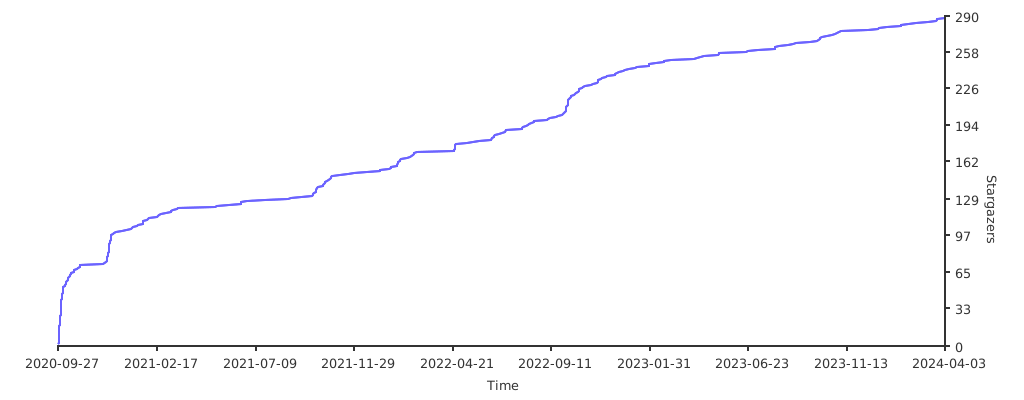
<a href="https://github.com/geekquad/AlgoBook/graphs/contributors"> <img src="https://contrib.rocks/image?repo=geekquad/AlgoBook" /> </a>Stargazers over time
Related Skills
xurl
343.1kA CLI tool for making authenticated requests to the X (Twitter) API. Use this skill when you need to post tweets, reply, quote, search, read posts, manage followers, send DMs, upload media, or interact with any X API v2 endpoint.
claude-opus-4-5-migration
90.0kMigrate prompts and code from Claude Sonnet 4.0, Sonnet 4.5, or Opus 4.1 to Opus 4.5
model-usage
343.1kUse CodexBar CLI local cost usage to summarize per-model usage for Codex or Claude, including the current (most recent) model or a full model breakdown. Trigger when asked for model-level usage/cost data from codexbar, or when you need a scriptable per-model summary from codexbar cost JSON.
openhue
343.1kControl Philips Hue lights and scenes via the OpenHue CLI.
