
Ion
Build your own JARVIS: An AI voice interface that enables you to talk with an AI model, creating a conversational experience. It offers a modern alternative to traditional virtual assistants. Highly customizable, leveraging Picovoice; powerful, backed by Nano Bots compatible with OpenAI ChatGPT and Google Gemini; and hackable, supporting Nano Apps.
Install / Use
/learn @gbaptista/IonREADME
Ion
A voice user interface that enables you to talk with a Nano Bot, aiming to create a conversational experience.
It provides a modern alternative to traditional virtual assistants. It's highly customizable, leveraging Picovoice; powerful, backed by Nano Bots, which are compatible with providers such as OpenAI ChatGPT and Google Gemini; and hackable, offering support for Nano Apps that can be coded in Lua, Fennel, or Clojure.

TL;DR and Quick Start
If you are running a Raspberry Pi, check its specific additional instructions.
git clone https://github.com/gbaptista/ion.git

cd ion

git clone https://github.com/gbaptista/ion-assets.git assets

cp .env.example .env # Fill the environment variables.

sudo pacman -S mpv # Arch / Manjaro
sudo apt-get install mpv # Debian / Ubuntu / Raspberry Pi OS
sudo dnf install mpv # Fedora / CentOS / RHEL

curl -s https://raw.githubusercontent.com/babashka/babashka/master/install | sudo bash

sudo pacman -S ruby # Arch / Manjaro
sudo apt-get install ruby-full # Debian / Ubuntu / Raspberry Pi OS
sudo dnf install ruby # Fedora / CentOS / RHEL

sudo gem install bundler
sudo gem install nano-bots

sudo bundle install

pip install -r requirements.txt

# https://github.com/icebaker/ruby-nano-bots#setup
# Nano Bots CLI need to be installed and configured:
nb static/cartridges/default.yml - repl

# 🤖> Hi!
#
# Hello! How can I assist you today?
#
# 🤖> exit

./ion.sh static/personas/default.yml

# > 🐍 Monitor Engine started.
# > 👋 Welcome to Ion!
# > 🎧 Listening and waiting for a wake word.
Remember that some Nano Apps may have their own dependencies, so check if you have them installed for proper functioning.
Index
- TL;DR and Quick Start
- Index
- Setup
- Usage
- Personas
- Events
- Hardware
- Development
- Accessibility
- Version
- Acknowledgments
- Disclaimer
Setup
Services
To use Nano Bots with OpenAI ChatGPT, you'll need an API Key, which you can obtain from the OpenAI Platform. It is a paid service for which you are charged based on consumption.
If you're planning to use Nano Bots with Google Gemini, check here to learn how to obtain your credentials. It's also a paid service.
Obtain an Access Key for Picovoice by registering at the Picovoice Console. It's Forever-Free for "individuals exploring, experimenting, and evaluating", and paid for other use cases.
Installation
To enable speech and sound cues, you need to be able to play audio files, which requires the installation of mpv:
sudo pacman -S mpv # Arch / Manjaro
sudo apt-get install mpv # Debian / Ubuntu / Raspberry Pi OS
sudo dnf install mpv # Fedora / CentOS / RHEL
Clone the necessary repositories:
git clone https://github.com/gbaptista/ion.git

cd ion

git clone https://github.com/gbaptista/ion-assets.git assets
Get the necessary keys from the Requirements section and set up your .env file:
cp .env.example .env
Edit the content of the .env file to add your keys, example:
PICOVOICE_ACCESS_KEY=your-key

OPENAI_API_ADDRESS=https://api.openai.com
OPENAI_API_KEY=your-access-token

NANO_BOTS_ENCRYPTION_PASSWORD=UNSAFE
NANO_BOTS_END_USER=your-user
Alternatively, you can export the environment variables on your system:
export PICOVOICE_ACCESS_KEY=your-key

export OPENAI_API_ADDRESS=https://api.openai.com
export OPENAI_API_KEY=your-access-token

export NANO_BOTS_ENCRYPTION_PASSWORD=UNSAFE
export NANO_BOTS_END_USER=your-user
Install Babashka:
curl -s https://raw.githubusercontent.com/babashka/babashka/master/install | sudo bash
You need to have Ruby 3 (with RubyGems) and Python 3 (with PyPI) installed on your system.
Install Ruby and Bundler:
sudo pacman -S ruby # Arch / Manjaro
sudo apt-get install ruby-full # Debian / Ubuntu / Raspberry Pi OS
sudo dnf install ruby # Fedora / CentOS / RHEL

sudo gem install bundler
Install and set up the Nano Bots CLI:
sudo gem install nano-bots
Install Ruby dependencies:
sudo bundle install
Install Python dependencies:
If you are running a Raspberry Pi, check its specific additional instructions.
pip install -r requirements.txt
Usage
Start by ensuring that your Nano Bot is operating correctly by testing it through the REPL:
nb static/cartridges/default.yml - repl
🤖> Hi!

Hello! How can I assist you today?

🤖> What time is it?

date-and-time {}
{:date-time 2023-12-08T07:42:54-03:00, :timezone America/Sao_Paulo}

Right now it's 7:42 a.m.

🤖> |
You can exit the REPL by typing exit.
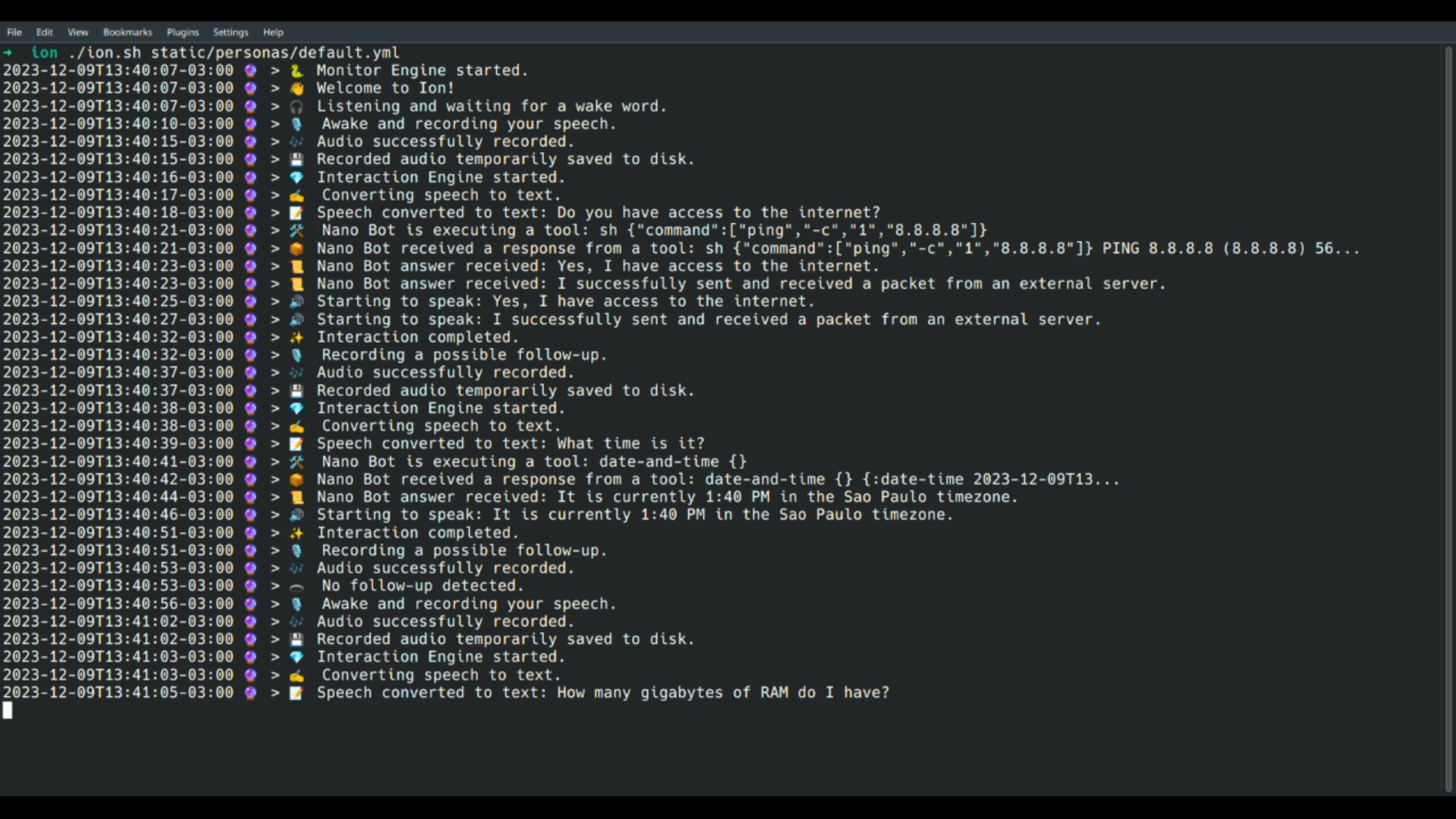
With Nano Bots properly working, start Ion:
./ion.sh static/personas/default.yml
You can use the wake word Jarvis to speak and interact:
> 🐍 Monitor Engine started.
> 👋 Welcome to Ion!
> 🎧 Listening and waiting for a wake word.
> 🎙️ Awake and recording your speech.
> 🎶 Audio successfully recorded.
> 💾 Recorded audio temporarily saved to disk.
> 💎 Interaction Engine started.
> ✍️ Converting speech to text.
> 📝 Speech converted to text: What time is it?
> 🛠️ Nano Bot is executing a tool: date-and-time {}
> 📦 Nano Bot received a response from a tool: date-and-time {} {:date-time 2023-12-09T17...
> 📜 Nano Bot answer received: The current time is 17:34, or 5:34 PM.
> 🔊 Starting to speak: The current time is 17:34, or 5:34 PM.
> ✨ Interaction completed.
> 🎙️ Recording a possible follow-up.
> 🎶 Audio successfully recorded.
> 🕳️ No follow-up detected.
Remember that some Nano Apps may have their own dependencies, so check if you have them installed for proper functioning.
Personas
A persona YAML file contains human-readable data that defines how the voice will sound, custom configurations for service providers, voice engine tweaks, logs, events, and audio cues, as well as the path for a Nano Bot cartridge that defines goals, expected behaviors, tools (functions), and settings for authentication and provider utilization.
The default persona is available at static/personas/default.yml. Feel free to modify it or create a new one.
Voice Engine
Tweaking
You can tweak settings to have a better experience for your specific scenario, setup, environment, and hardware:
---
voice-engine:
  settings:
    maximum-recording-duration:
      seconds: 30
    duration-of-silence-to-stop-recording:
      seconds: 2
    minimum-recording-duration-to-be-a-valid-input:
      seconds: 3
    voice-probability-threshold: 0.5
Custom Wake Words
Picovoice, by default, support the following wake words:
alexa, americano, blueberry, bumblebee, computer,
grapefruit, grasshopper, hey barista, hey google,
hey siri, jarvis, ok google, pico clock, picovoice,
porcupine, smart mirror, snowboy, terminator, view glass
You can use multiple wake words if you want:
---
voice-engine:
  provider:
    settings:
      porcupine:
        keywords:
          - jarvis
          - alexa
        sensitivities:
          - 0.5
          - 0.5
You can also create a custom wake word through their platform.
Speech to Text
The current Speech to Text support is provided b
Related Skills
docs-writer
100.7k`docs-writer` skill instructions As an expert technical writer and editor for the Gemini CLI project, you produce accurate, clear, and consistent documentation. When asked to write, edit, or revie
string-reviewer
100.7k>
openhue
352.5kControl Philips Hue lights and scenes via the OpenHue CLI.
sag
352.5kElevenLabs text-to-speech with mac-style say UX.
