
MMD4Maya
Import pmx/pmd model to maya.
Install / Use
/learn @gameboy12615/MMD4MayaREADME
master: dev</br> maya2016 branch: maya2015~maya2016<br> maya2017 branch: maya2017<br> maya2022 branch: maya2022<br>
MMD4Maya
This is maya plug-in which use for importing pmx/pmd model to maya.<br> It is based on pmx2fbx.exe which is wrote by http://stereoarts.jp/
Install:
- Copy
MMD4Maya.pyandMMD4Mayafolder to your maya plug-ins folder. like:Maya2016\bin\plug-ins. - Enable MMD4Maya in maya Plug-in Manager.
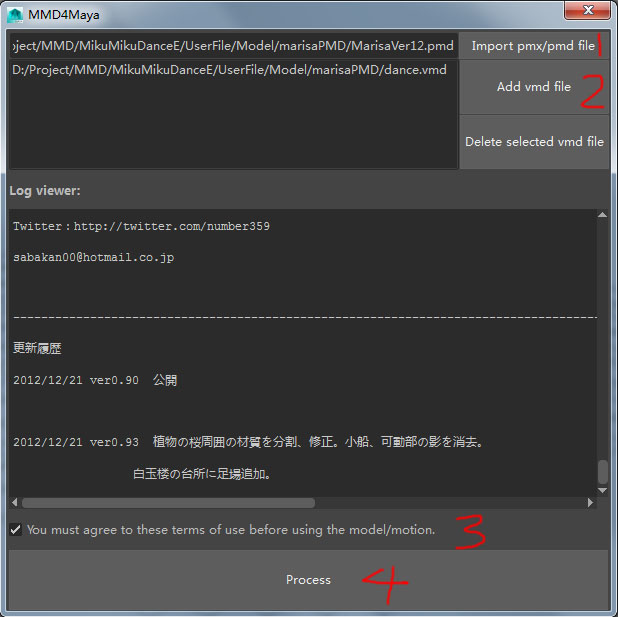
Steps to import:
- Select a pmx/pmd file.
- Select one or multiple vmd files.
- Check the terms of use then click Process.
Attention:
- The file name of fbx file and texture files should not be japanese or chinese.
- You can only import one model at a time, please save your model as the standard fbx file, then create a new scene to import another one.
