ExecutionGraph
Fast Generic Execution Graph/Network
Install / Use
/learn @gabyx/ExecutionGraphREADME
This library is in alpha and still under development. First usable version will be v1.1. Note: This library is under heavy development on the dev branch! Forking should mainly be considered for looking around, or contributing of course. At the moment there are some major design flaws which make the Library not less usable but unpractical in the future, these flaws need to be fixed first.
ExecutionGraph




Fast Execution Graph consisting of Execution Nodes
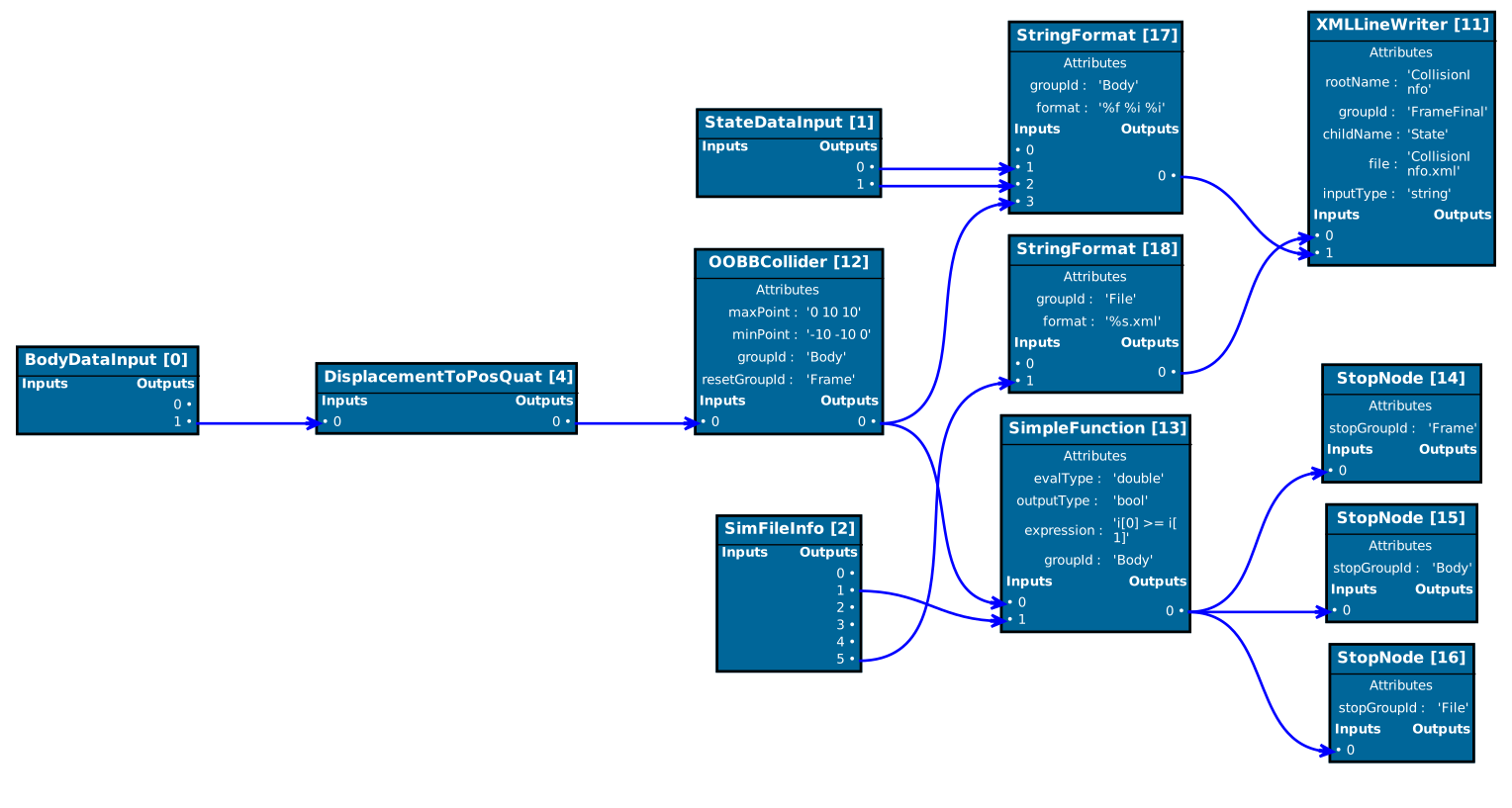
Be able to design and run such input/output dataflow graphs, such as the ones used for the work here (using this graph). A generic, independent GUI is provided in from of a single-page Angular application with a backend HTTP server which allows interactive design/manipulation and execution of graphs:

Installing and Dependencies
To build the library, the tests and the example you need the build tool cmake. This library has these dependencies:
Library
- meta (meta programming)
- crossguid (guid implementation)
- rttr (runtime type information, serialization only)
- fmt (asserts, exception formatting)
GUI Backend
GUI Client
- node (client build)
Testing
- googletest (for tests)
- benchmark (for benchmarks)
For easy building, all dependencies are searched, downloaded and built if not found, during the first super build run.
OS X
Install the latest clang with homebrew by updateing your xcode installation,
installing a code-sign certificate
for lldb and then running:
brew install --HEAD llvm --with-toolchain --with-lldb
or manually install
git clone https://github.com/llvm/llvm-project llvm-project
mkdir llvm-build && cd llvm-build
cmake ../llvm-project/llvm -DCMAKE_BUILD_TYPE=Release -DLLVM_ENABLE_PROJECTS="clang;libcxx;libcxxabi;lldb;compiler-rt;lld;polly" -DCMAKE_INSTALL_PREFIX="/usr/local/opt/llvm-latest"
make -j install
Now you should be ready to configure with cmake:
Building
Source the tools/.enable-compiler.sh and use enableCompiler "clang" which uses the tools/.clang-flags-llvm-latest.cfg to setup the compiler before you configure with:
cd <pathToRepo>
mkdir build
cd build
# configuring the superbuild (-DUSE_SUPERBUILD=ON is default)
cmake .. -DUSE_SUPERBUILD=ON \
        -DExecutionGraph_BUILD_TESTS=true \
        -DExecutionGraph_BUILD_LIBRARY=true \
        -DExecutionGraph_BUILD_GUI=true \
        -DExecutionGraph_EXTERNAL_BUILD_DIR="$(pwd)/external" \
        -DExecutionGraph_USE_ADDRESS_SANITIZER=true \
        -DCMAKE_EXPORT_COMPILE_COMMANDS=true
# building the superbuild configuration
make -j all
# configuring the actual build
cmake ..
# building the library/gui
make -j <targetName>
We use a super build setup. The first cmake configure and build by using -DUSE_SUPERBUILD=ON (automatically set at first run) will download every dependency and build the ones which need installing.
See the cmake variable ExecutionGraph_EXTERNAL_BUILD_DIR which is used for building all external dependencies to be able to quickly delete certain dependencies without deleting the normal build folder build).
After the super build, the cmake cache file CMakeCache.txt is setup with all necessary variables, that later cmake configure invocations will find all dependencies
and configure the actual project. This works also with VS Code and the cmake extension.
Contributing
This project supports Visual Studio Code which is warmly recommended.
Note: Dont use the multi-root workspaces feature in VS Code since the C++ Extension does not yet support this and code completion won't work properly.
General Development Setup
If you start developing, install the pre-commit/post-commit hooks with:
sudo npm install -g json-fmt xmllint prettier
sudo apt-get install plantuml # or sudo brew install plantuml
cd .git && mv hooks hooks.old && ln -s ../tools/git-hooks hooks
Codeformatting
You can run the same pre-commit hook by doing
tools/formatAll.sh
which will format all files for which formatting styles have been defined in the repository.
GUI
The UI is made up of an Angular application that uses the Angular CLI to create the web assets that are ultimately displayed in an electron app browser.
The client backend consists of a http server which provides the executiong graph.
Please visit the Angular CLI website for its prerequisites (node.js and npm respectively, also a globally installed Angular CLI aka ng).
Once you installed the prerequisites build with
cd gui/executionGraphGui/client
npm install
npm run serve
For more information about the development of the client application please refer to the dedicated client documentation
Introduction
The execution graph implemented in ExecutionTree is a directed acyclic graph consisting of several connected nodes derived from LogicNode which define a simple input/output control flow.
Each node in the execution graph contains several input/output sockets (LogicSocket) with a certain type out of the predefined types defined in LogicSocketTypes.
An execution graph works in the way that each node contains a specific compute routine which provides values for the output sockets by using the values from the input sockets.
Each output of a node can be linked to an input of the same type of another node. This means an output socket of the arithmetic type double cannot be linked to an input socket of integral type int for example.
Each node can be assigned to one or more execution groups which are collections of nodes and form directed acyclic subgraphs.
For each execution group, an execution order is computed such that the data flow defined by the input/output links in the group is respected.
An execution order of an execution group is called a topological ordering in computer science, and such an ordering always exists for a directed acyclic graph, despite being non-unique. A topological ordering of an execution group is an ordering of all nodes such that for all connections from a node A to B, A precedes B in the ordering. Each execution graph network consists of several input nodes whose output sockets are initialized before executing the network.
The implementation in LogicSocket allows two types of directed links between an input and output socket, namely a get and a write connection.
A write link is a link from an output socket i of a node A to an input socket j of some node B, denoted as {A,i} -> {j,B}.
A write link basically duplicates a write request to the output socket i of A also to an additional write request to the input socket j of B.
A get link is the exact opposite and is a link from an input socket j of a node B to an output socket i of a node A, denoted as
{A,i} <- {j,B}.
A get link basically forwards any read access on the input socket j of B to a read access on the input socket i of A.
Most of the time only get links are necessary but as soon as the execution graph becomes more complex and certain switching behavior should be reproduced, the additional write links are a convenient tool to realize this.
Cyclic paths between nodes are detected and result in an error when building the execution network.
The write and read access to input and output sockets is implemented using a fast static type dispatch system in LogicSocket.
Static type dispatching avoids the use of virtual calls when using polymorphic objects in object-oriented programming languages.
Example 1:
Source: examples/libraryUsage
Let us build the simple directed graph below:

This execution tree consists of 4 i
Related Skills
feishu-drive
352.2k|
things-mac
352.2kManage Things 3 via the `things` CLI on macOS (add/update projects+todos via URL scheme; read/search/list from the local Things database)
clawhub
352.2kUse the ClawHub CLI to search, install, update, and publish agent skills from clawhub.com
codebase-memory-mcp
1.3kHigh-performance code intelligence MCP server. Indexes codebases into a persistent knowledge graph — average repo in milliseconds. 66 languages, sub-ms queries, 99% fewer tokens. Single static binary, zero dependencies.